
Gain the Advantage!
7 Delightful Tips to Improve Your Stories and Save Time
I guarantee a couple of these will make your eyes light up!

Gotta love tips that save time and help you pull it all together on Medium!
Time is money. — Benjamin Franklin.
My favourites are the ones that make your eyes light up and exclaim —
“Oh, I didn’t know that one!”
So I dug around on my desk this morning, looking through my notes, printouts, and folders to find the ones that did it for me.
Here’s hoping at least one of them will do the same for you! 💛

1. Adding emojis to your stories
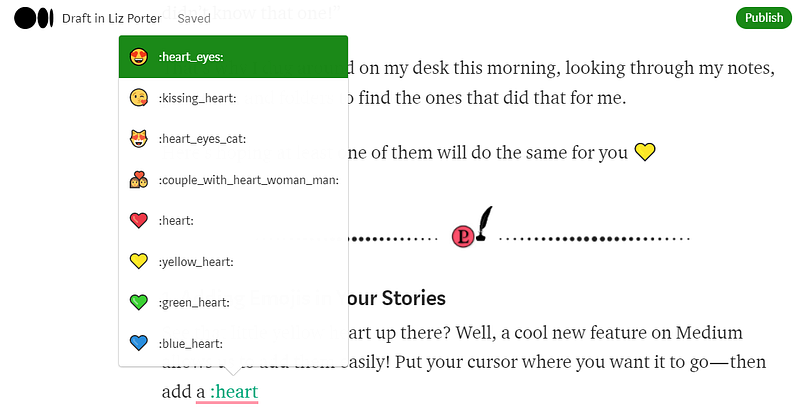
See the little yellow heart up there? A cool new feature on Medium allows us to easily add any emoji to our stories! Put your cursor where you want your emoji to go — add a colon and type the emoji you want. I typed ‘heart’ and then chose the colour I wanted from the list.
In the example below, you can see more options come up by using an underscore between the words in your description.
I did notice a minor glitch; if you have punctuation at the end of a sentence, you’ll need to delete it, type the colon, and then punctuate your sentence once you have your emoji in place.
Pretty cool! I wouldn’t go too crazy with them, but good to know when you want one!
2. Use this editing tool — keyboard shortcut “Ctrl F”
Part of your editing strategy should be using Ctrl F to find issues Grammarly, and similar Apps won’t catch. I use it to find my writing ticks, words we overuse, and weak words that water down our stories.
Trust me…we all have ticks! Some of the most common overused words are; really — just — that — only — so — very — somehow.
I had no idea I was doing any of this until I saw it for myself.
To discover your ticky patterns, highlight your text in drafts and hit CTRL F (or Command Key F for Mac). You’ll see a white box come up in the top right corner of your screen. Type one of the overused words above (or one you know you use too much) and each one will be highlighted in orange for you. It also gives you a running total.
Wait ’til you see how many you find; it’s crazy!
Super cool way to improve your writing! 🆒
3. Add focal points to your images
Our images are an essential part of our stories and it takes time to find just the right one. So you want to ensure your readers are seeing them correctly. Medium optimizes images to ensure they display properly on phones and tablets. They also crop images to thumbnail size in readers' feeds and publications.
This can mean your reader only sees a portion of your image. That’s why it’s important to pick each image’s focal point before publishing your piece.
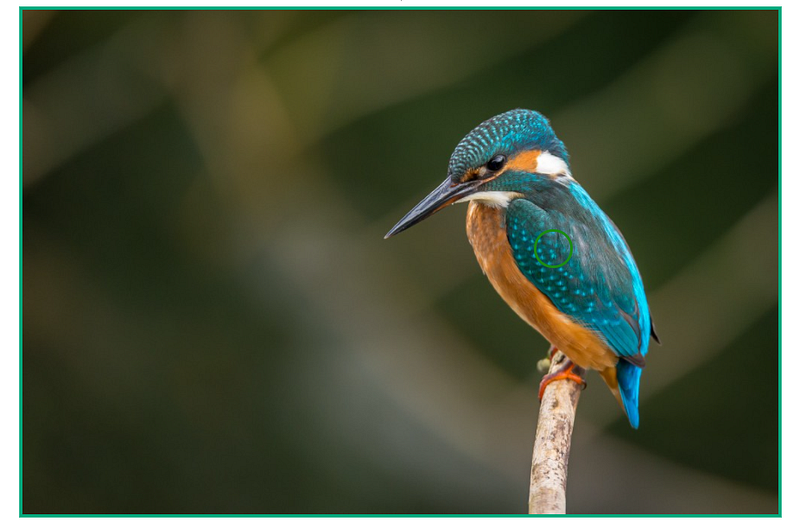
In my example below, if you didn’t choose a focal point, you’d run the risk of your image showing up as a plain green background and missing the bird completely.
So put your focal point right in the middle of your main subject.
You’ll see that green circle (on the bird's wing) when you’ve done it correctly, and a message will flash at the top of your screen telling you the focal point has been chosen.
4. Use canonical links where necessary
If your articles are published elsewhere, like your website or blog, and you’re repurposing them on Medium, it’s best to add a canonical link to give them a single source authority. This will avoid plagiarism flags and improve your SEO.
Warning — the date of the original post follows the article. For example, I added a story I’d written in 2019 from my website, and when I published it with the canonical link on Medium, it got buried amongst the archived articles from that date; never to be seen!
Just an FYI if you’re adding older stories, you may need to copy and paste into drafts to get a fresh date.
5. The location of your links and shout-outs matter
Remember, reading time is how you get paid on this platform, so you want those eyeballs reading all the way to the bottom of your stories to increase your earnings.
While sourcing your work is important, too many links can lead your readers away, especially if they appear early in your article. Sometimes they get distracted (I know I do!), find another rabbit hole and never come back to your story.
So, keep your links to a minimum and never put them in your first few sentences. You want your readers engaged in your story before you send them away through a link to be sure they come back and finish reading.
This goes for shout-outs to other writers and publications as well, so place them strategically!
6. A faster way to manage your notifications
If you’re one of those lucky writers that get 100’s of notifications, you’re going to save oodles of time with this one. You might even want to hug me!
It’s a good problem to have, but it can take a lot of time away from your writing. Don’t rely on your email notifications from Medium to know when you get comments either — once your numbers get higher they don’t notify you on all of them.
So, instead of reviewing your notifications in drafts or on your stats page, go to your main feed page by clicking the Medium icon.
Now when you click the notification icon, you’ll have an option to review ‘all’ or ‘responses’ — click over to responses, and it filters them out for you! Medium rewards engagement on the platform , so it’s important to respond to comments, but now you don’t have to wade through all the highlights and claps to find them.
Yeeha! Huge ⏰ saver!
7. Tag your responses
When you respond to comments from other writers on your stories, you can gain more exposure on the platform by adding relevant tags. Yup! As I mentioned above, interacting with other members on Medium pleases the algorithm gods, and when they’re happy, you’re happy!
You can add up to five, just like our stories, so add the same ones again or choose new ones to get more eyes on your work!
Lots more where that came from right here…
Before you run…If you like my work, you can follow me or get an email notification when I publish something new! Here’s my bio, and you can also have a peek at my publication “the Advantage” here.
If you find value and entertainment in my work, consider a Medium membership for $5 a month. Read all you want while your subscription fee helps support me directly along with thousands of talented writers on our creative journey.