
GitHub’s Magic Tools — GitHub CLI, API, and JavaScript
Exploring programmable GitHub operations and visualization

GitHub is an Internet hosting service for software development and version control using Git. It provides the distributed version control of Git plus access control, bug tracking, software feature requests, task management, continuous integration, and wikis for every project.
The company was founded in April 2008 in San Francisco, CA. On June 4, 2018, Microsoft announced its intent to acquire GitHub for $7.5 billion. The deal closed on October 26, 2018.
GitHub provides tools in three formats — CLI, API, and JavaScript — to perform operations, query account information, and retrieve repository statistics. In this article, we are going to explore these tools in detail.
Generate and Configure a GitHub Token
To use GitHub tools, we need to generate a token for authentication.
Here are the steps:
- Log in to your GitHub account,
https://github.com/login. - Go to
https://github.com/settings/personal-access-tokens/new, and input the required information.
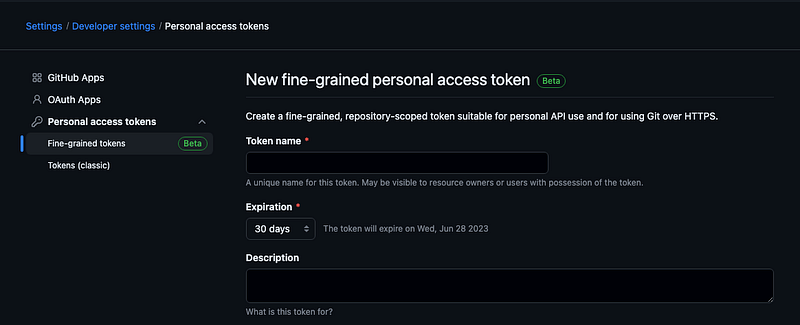
- Click the button,
Generate token, to generate a new token. - An email from GitHub will inform you that “A personal access token (classic) has been added to your account.”
Here’s what that email may look like:
Hey XXX!

A personal access token (classic) "XXXXXX-token" with admin:enterprise,
admin:gpg_key, admin:org, admin:org_hook, admin:public_key, admin:repo_hook,
admin:ssh_signing_key, audit_log, codespace, delete:packages, delete_repo,
gist, notifications, project, repo, user, workflow, write:discussion, and
write:packages scopes was recently added to your account. Visit
https://github.com/settings/tokens for more information.

To see this and other security events for your account, visit
https://github.com/settings/security-log

If you run into problems, please contact support by visiting
https://github.com/contact

Thanks,
The GitHub Team- Click the link in the email,
https://github.com/settings/tokens, toConfigure SSO.
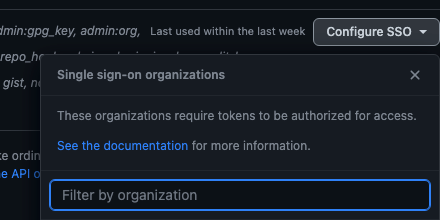
The best way to keep the token is to set it as an environment variable, GH_TOKEN, in a profile, such as .zshrc.
export GH_TOKEN="the-token-text"How To Use GitHub CLI, API, and JavaScript
GitHub provides tools in three formats — CLI, API, and JavaScript — to perform operations, query account information, and retrieve repository statistics. With a GitHub token, we are ready to use these tools.
GitHub CLI
GitHub CLI brings GitHub to a terminal. The command line tool is gh, which can be installed by brew.
% brew install ghgh api makes an authenticated GitHub API request. Let’s call the endpoint, /octocat, to retrieve GitHub’s mascot, Octocat.
% gh api /octocat --method GET

               MMM.           .MMM
               MMMMMMMMMMMMMMMMMMM
               MMMMMMMMMMMMMMMMMMM      ____________________________
              MMMMMMMMMMMMMMMMMMMMM    |                            |
             MMMMMMMMMMMMMMMMMMMMMMM   | Practicality beats purity. |
            MMMMMMMMMMMMMMMMMMMMMMMM   |_   ________________________|
            MMMM::- -:::::::- -::MMMM    |/
             MM~:~ 00~:::::~ 00~:~MM
        .. MMMMM::.00:::+:::.00::MMMMM ..
              .MM::::: ._. :::::MM.
                 MMMM;:::::;MMMM
          -MM        MMMMMMM
          ^  M+     MMMMMMMMM
              MMMMMMM MM MM MM
                   MM MM MM MM
                   MM MM MM MM
                .~~MM~MM~MM~MM~~.
             ~~~~MM:~MM~~~MM~:MM~~~~
            ~~~~~~==~==~~~==~==~~~~~~
             ~~~~~~==~==~==~==~~~~~~
                 :~==~==~==~==~~
Since the GET method is the default method, gh api /octocat works as well.
gh search searches for repositories, issues, and pull requests. The following is an example of searching public repositories in the Facebook organization:
% gh search repos --owner=facebook --visibility=public

Showing 30 of 115 repositories

NAME                           DESCRIPTION                                                                                       VISIBILITY        UPDATED
facebook/react                 The library for web and native user interfaces                                                    public            about 1 minute ago
facebook/react-native          A framework for building native applications using React                                          public            about 21 minutes ago
facebook/create-react-app      Set up a modern web app by running one command.                                                   public            about 1 hour ago
facebook/docusaurus            Easy to maintain open source documentation websites.                                              public            about 9 minutes ago
facebook/rocksdb               A library that provides an embeddable, persistent key-value store for fast storage.               public            about 2 hours ago
facebook/folly                 An open-source C++ library developed and used at Facebook.                                        public            about 29 minutes ago
facebook/flow                  Adds static typing to JavaScript to improve developer productivity and code quality.              public            about 1 day ago
facebook/zstd                  Zstandard - Fast real-time compression algorithm                                                  public            about 43 minutes ago
facebook/relay                 Relay is a JavaScript framework for building data-driven React applications.                      public            about 20 hours ago
facebook/hhvm                  A virtual machine for executing programs written in Hack.                                         public            about 7 hours ago
facebook/fresco                An Android library for managing images and the memory they use.                                   public            about 16 hours ago
facebook/yoga                  Yoga is a cross-platform layout engine which implements Flexbox. Follow https://twitter.com/y...  public            about 43 minutes ago
facebook/prophet               Tool for producing high quality forecasts for time series data that has multiple seasonality ...  public            about 2 hours ago
facebook/lexical               Lexical is an extensible text editor framework that provides excellent reliability, accessibi...  public            about 2 hours ago
facebook/infer                 A static analyzer for Java, C, C++, and Objective-C                                               public            about 3 hours ago
facebook/flipper               A desktop debugging platform for mobile developers.                                               public            about 1 hour ago
facebook/watchman              Watches files and records, or triggers actions, when they change.                                 public            about 7 hours ago
facebook/react-devtools        An extension that allows inspection of React component hierarchy in the Chrome and Firefox De...  public, archived  about 2 days ago
facebook/chisel                Chisel is a collection of LLDB commands to assist debugging iOS apps.                             public            about 17 hours ago
facebook/buck                  A fast build system that encourages the creation of small, reusable modules over a variety of...  public            about 13 hours ago
facebook/jscodeshift           A JavaScript codemod toolkit.                                                                     public            about 13 hours ago
facebook/hermes                A JavaScript engine optimized for running React Native.                                           public            about 18 hours ago
facebook/proxygen              A collection of C++ HTTP libraries including an easy to use HTTP server.                          public            about 3 hours ago
facebook/litho                 A declarative framework for building efficient UIs on Android.                                    public            about 12 hours ago
facebook/facebook-ios-sdk      Used to integrate the Facebook Platform with your iOS & tvOS apps.                                public            about 13 hours ago
facebook/pyre-check            Performant type-checking for python.                                                              public            about 15 hours ago
facebook/facebook-android-sdk  Used to integrate Android apps with Facebook Platform.                                            public            about 11 hours ago
facebook/redex                 A bytecode optimizer for Android apps                                                             public            about 1 day ago
facebook/componentkit          A React-inspired view framework for iOS.                                                          public            about 3 days ago
facebook/shimmer-android       An easy, flexible way to add a shimmering effect to any view in an Android app.
gh gist manages gists. It can clone a gist to the local directory.
% gh gist clone https://gist.github.com/JenniferFuBook/0573e92e4c5e9dca1f33fafb3a02c601
Cloning into '0573e92e4c5e9dca1f33fafb3a02c601'…
remote: Enumerating objects: 3, done.
remote: Total 3 (delta 0), reused 0 (delta 0), pack-reused 3
Receiving objects: 100% (3/3), done.
gh works seamlessly with GitHub. gh --help shows the full usage:
% gh --help
Work seamlessly with GitHub from the command line.
USAGE
  gh <command> <subcommand> [flags]
CORE COMMANDS
  auth:        Authenticate gh and git with GitHub
  browse:      Open the repository in the browser
  codespace:   Connect to and manage codespaces
  gist:        Manage gists
  issue:       Manage issues
  org:         Manage organizations
  pr:          Manage pull requests
  release:     Manage releases
  repo:        Manage repositories
GITHUB ACTIONS COMMANDS
  run:         View details about workflow runs
  workflow:    View details about GitHub Actions workflows
ADDITIONAL COMMANDS
  alias:       Create command shortcuts
  api:         Make an authenticated GitHub API request
  completion:  Generate shell completion scripts
  config:      Manage configuration for gh
  extension:   Manage gh extensions
  gpg-key:     Manage GPG keys
  label:       Manage labels
  search:      Search for repositories, issues, and pull requests
  secret:      Manage GitHub secrets
  ssh-key:     Manage SSH keys
  status:      Print information about relevant issues, pull requests, and notifications across repositories
  variable:    Manage GitHub Actions variables
HELP TOPICS
  actions:     Learn about working with GitHub Actions
  environment: Environment variables that can be used with gh
  exit-codes:  Exit codes used by gh
  formatting:  Formatting options for JSON data exported from gh
  mintty:      Information about using gh with MinTTY
  reference:   A comprehensive reference of all gh commands
FLAGS
  --help      Show help for command
  --version   Show gh version
EXAMPLES
  $ gh issue create
  $ gh repo clone cli/cli
  $ gh pr checkout 321
LEARN MORE
  Use 'gh <command> <subcommand> --help' for more information about a command.
  Read the manual at https://cli.github.com/manual
GitHub API
GitHub API defines REST APIs that can interact with GitHub. It is recommended to pass the following headers to the call, although they are optional:
- The
Acceptheader: Mostly with a value ofapplication/vnd.github+json - The
X-GitHub-Api-Versionheader: The latest version is2022–11–28.
cURL (client URL) is a command-line tool to perform a REST call. It can be installed by brew.
% brew install curlFor cURL, the -L option enables redirects and the -H flag specifies the header options.
The following cURL calls the endpoint, https://api.github.com/octocat, to retrieve GitHub’s mascot, Octocat.
% curl -L \
  -H "Accept: application/vnd.github+json" \
  -H "X-GitHub-Api-Version: 2022-11-28" \
  https://api.github.com/octocat

               MMM.           .MMM
               MMMMMMMMMMMMMMMMMMM
               MMMMMMMMMMMMMMMMMMM      _____________________
              MMMMMMMMMMMMMMMMMMMMM    |                     |
             MMMMMMMMMMMMMMMMMMMMMMM   | Design for failure. |
            MMMMMMMMMMMMMMMMMMMMMMMM   |_   _________________|
            MMMM::- -:::::::- -::MMMM    |/
             MM~:~ 00~:::::~ 00~:~MM
        .. MMMMM::.00:::+:::.00::MMMMM ..
              .MM::::: ._. :::::MM.
                 MMMM;:::::;MMMM
          -MM        MMMMMMM
          ^  M+     MMMMMMMMM
              MMMMMMM MM MM MM
                   MM MM MM MM
                   MM MM MM MM
                .~~MM~MM~MM~MM~~.
             ~~~~MM:~MM~~~MM~:MM~~~~
            ~~~~~~==~==~~~==~==~~~~~~
             ~~~~~~==~==~==~==~~~~~~
                 :~==~==~==~==~~
GitHub API’s base URL is https://api.github.com/, and the following command lists all special URLs:
% curl https://api.GitHub.com
{
  "current_user_url": "https://api.github.com/user",
  "current_user_authorizations_html_url": "https://github.com/settings/connections/applications{/client_id}",
  "authorizations_url": "https://api.github.com/authorizations",
  "code_search_url": "https://api.github.com/search/code?q={query}{&page,per_page,sort,order}",
  "commit_search_url": "https://api.github.com/search/commits?q={query}{&page,per_page,sort,order}",
  "emails_url": "https://api.github.com/user/emails",
  "emojis_url": "https://api.github.com/emojis",
  "events_url": "https://api.github.com/events",
  "feeds_url": "https://api.github.com/feeds",
  "followers_url": "https://api.github.com/user/followers",
  "following_url": "https://api.github.com/user/following{/target}",
  "gists_url": "https://api.github.com/gists{/gist_id}",
  "hub_url": "https://api.github.com/hub",
  "issue_search_url": "https://api.github.com/search/issues?q={query}{&page,per_page,sort,order}",
  "issues_url": "https://api.github.com/issues",
  "keys_url": "https://api.github.com/user/keys",
  "label_search_url": "https://api.github.com/search/labels?q={query}&repository_id={repository_id}{&page,per_page}",
  "notifications_url": "https://api.github.com/notifications",
  "organization_url": "https://api.github.com/orgs/{org}",
  "organization_repositories_url": "https://api.github.com/orgs/{org}/repos{?type,page,per_page,sort}",
  "organization_teams_url": "https://api.github.com/orgs/{org}/teams",
  "public_gists_url": "https://api.github.com/gists/public",
  "rate_limit_url": "https://api.github.com/rate_limit",
  "repository_url": "https://api.github.com/repos/{owner}/{repo}",
  "repository_search_url": "https://api.github.com/search/repositories?q={query}{&page,per_page,sort,order}",
  "current_user_repositories_url": "https://api.github.com/user/repos{?type,page,per_page,sort}",
  "starred_url": "https://api.github.com/user/starred{/owner}{/repo}",
  "starred_gists_url": "https://api.github.com/gists/starred",
  "topic_search_url": "https://api.github.com/search/topics?q={query}{&page,per_page}",
  "user_url": "https://api.github.com/users/{user}",
  "user_organizations_url": "https://api.github.com/user/orgs",
  "user_repositories_url": "https://api.github.com/users/{user}/repos{?type,page,per_page,sort}",
  "user_search_url": "https://api.github.com/search/users?q={query}{&page,per_page,sort,order}"
}https://api.github.com/user can be used to query the current user:
% curl -H "Authorization: token ${GH_TOKEN}" https://api.github.com/user
{
  "login": "jennifer",
  "id": 11111111,
  "node_id": "XXXXXXXXXXXXXXXXXXXX",
  "avatar_url": "https://avatars.githubusercontent.com/u/11111111?v=4",
  "gravatar_id": "",
  "url": "https://api.github.com/users/jennifer",
  "html_url": "https://github.com/jennifer",
  "followers_url": "https://api.github.com/users/jennifer/followers",
  "following_url": "https://api.github.com/users/jennifer/following{/other_user}",
  "gists_url": "https://api.github.com/users/jennifer/gists{/gist_id}",
  "starred_url": "https://api.github.com/users/jennifer/starred{/owner}{/repo}",
  "subscriptions_url": "https://api.github.com/users/jennifer/subscriptions",
  "organizations_url": "https://api.github.com/users/jennifer/orgs",
  "repos_url": "https://api.github.com/users/jennifer/repos",
  "events_url": "https://api.github.com/users/jennifer/events{/privacy}",
  "received_events_url": "https://api.github.com/users/jennifer/received_events",
  "type": "User",
  "site_admin": false,
  "name": null,
  "company": null,
  "blog": "",
  "location": null,
  "email": null,
  "hireable": null,
  "bio": null,
  "twitter_username": null,
  "public_repos": 0,
  "public_gists": 27,
  "followers": 0,
  "following": 0,
  "created_at": "2000-01-01T23:35:02Z",
  "updated_at": "2023-06-01T16:52:00Z",
  "private_gists": 0,
  "total_private_repos": 0,
  "owned_private_repos": 0,
  "disk_usage": 0,
  "collaborators": 0,
  "two_factor_authentication": true,
  "plan": {
    "name": "free",
    "space": 976562499,
    "collaborators": 0,
    "private_repos": 10000
  }
}
The following command lists all commits of the repository, https://github.com/JenniferFuBook/empty-repo.
% curl https://api.github.com/repos/JenniferFuBook/empty-repo/commits
[
  {
    "sha": "1fda90a2ecf5e1549358a468fb0604942bce1e20",
    "node_id": "C_kwDOJswFh9oAKDFmZGE5MGEyZWNmNWUxNTQ5MzU4YTQ2OGZiMDYwNDk0MmJjZTFlMjA",
    "commit": {
      "author": {
        "name": "Jennifer Fu",
        "email": "[email protected]",
        "date": "2023-06-08T04:21:58Z"
      },
      "committer": {
        "name": "GitHub",
        "email": "[email protected]",
        "date": "2023-06-08T04:21:58Z"
      },
      "message": "Create empty-file",
      "tree": {
        "sha": "ffbbf7d674439d9b0d35c4242d40b2212e49e8a6",
        "url": "https://api.github.com/repos/JenniferFuBook/empty-repo/git/trees/ffbbf7d674439d9b0d35c4242d40b2212e49e8a6"
      },
      "url": "https://api.github.com/repos/JenniferFuBook/empty-repo/git/commits/1fda90a2ecf5e1549358a468fb0604942bce1e20",
      "comment_count": 0,
      "verification": {
        "verified": true,
        "reason": "valid",
        "signature": "-----BEGIN PGP SIGNATURE-----\n\nwsBcBAABCAAQBQJkgVdmCRBK7hj4Ov3rIwAAN0IIACu7ItQtTzflJu81rS78SGLm\nRcFws1x/xqpsbpRJHUfsloexwicRJAIYsQ7LwrAjA3WKci2XjbW2ZiN0xB9BnUae\nQG7ujs8lviKgEAf52gSBlhmlYSf0MBcMUS5fYwYHLpoLhd6Nx5+ityGcRha6fkrg\n1+h4xqqafE3vWqflnKM5gtEZP4L7I/rAmSIKnOm22xdnOctYgr4uko+3eYAUDKF4\na0Q3qPM6ecTa06n0ScpfSvi46UkWZwfgCNO78hK1k1bTv9Gwz/ZcRdkdzPntpR6G\nl0joq4kPHU7wAReB7Zyyzrtq5yTPPbinBHSLxKp3XEpZNcQQmcFkKzt4pPumZ38=\n=lBTx\n-----END PGP SIGNATURE-----\n",
        "payload": "tree ffbbf7d674439d9b0d35c4242d40b2212e49e8a6\nauthor Jennifer Fu <[email protected]> 1686198118 -0700\ncommitter GitHub <[email protected]> 1686198118 -0700\n\nCreate empty-file"
      }
    },
    "url": "https://api.github.com/repos/JenniferFuBook/empty-repo/commits/1fda90a2ecf5e1549358a468fb0604942bce1e20",
    "html_url": "https://github.com/JenniferFuBook/empty-repo/commit/1fda90a2ecf5e1549358a468fb0604942bce1e20",
    "comments_url": "https://api.github.com/repos/JenniferFuBook/empty-repo/commits/1fda90a2ecf5e1549358a468fb0604942bce1e20/comments",
    "author": {
      "login": "JenniferFuBook",
      "id": 54613999,
      "node_id": "MDQ6VXNlcjU0NjEzOTk5",
      "avatar_url": "https://avatars.githubusercontent.com/u/54613999?v=4",
      "gravatar_id": "",
      "url": "https://api.github.com/users/JenniferFuBook",
      "html_url": "https://github.com/JenniferFuBook",
      "followers_url": "https://api.github.com/users/JenniferFuBook/followers",
      "following_url": "https://api.github.com/users/JenniferFuBook/following{/other_user}",
      "gists_url": "https://api.github.com/users/JenniferFuBook/gists{/gist_id}",
      "starred_url": "https://api.github.com/users/JenniferFuBook/starred{/owner}{/repo}",
      "subscriptions_url": "https://api.github.com/users/JenniferFuBook/subscriptions",
      "organizations_url": "https://api.github.com/users/JenniferFuBook/orgs",
      "repos_url": "https://api.github.com/users/JenniferFuBook/repos",
      "events_url": "https://api.github.com/users/JenniferFuBook/events{/privacy}",
      "received_events_url": "https://api.github.com/users/JenniferFuBook/received_events",
      "type": "User",
      "site_admin": false
    },
    "committer": {
      "login": "web-flow",
      "id": 19864447,
      "node_id": "MDQ6VXNlcjE5ODY0NDQ3",
      "avatar_url": "https://avatars.githubusercontent.com/u/19864447?v=4",
      "gravatar_id": "",
      "url": "https://api.github.com/users/web-flow",
      "html_url": "https://github.com/web-flow",
      "followers_url": "https://api.github.com/users/web-flow/followers",
      "following_url": "https://api.github.com/users/web-flow/following{/other_user}",
      "gists_url": "https://api.github.com/users/web-flow/gists{/gist_id}",
      "starred_url": "https://api.github.com/users/web-flow/starred{/owner}{/repo}",
      "subscriptions_url": "https://api.github.com/users/web-flow/subscriptions",
      "organizations_url": "https://api.github.com/users/web-flow/orgs",
      "repos_url": "https://api.github.com/users/web-flow/repos",
      "events_url": "https://api.github.com/users/web-flow/events{/privacy}",
      "received_events_url": "https://api.github.com/users/web-flow/received_events",
      "type": "User",
      "site_admin": false
    },
    "parents": [

    ]
  }
]
Here is a list of commit endpoints:
GET /repos/{owner}/{repo}/comments
GET /repos/{owner}/{repo}/comments/{comment_id}
PATCH /repos/{owner}/{repo}/comments/{comment_id}
DELETE /repos/{owner}/{repo}/comments/{comment_id}
GET /repos/{owner}/{repo}/commits
GET /repos/{owner}/{repo}/commits/{commit_sha}/branches-where-head
GET /repos/{owner}/{repo}/commits/{commit_sha}/comments
POST /repos/{owner}/{repo}/commits/{commit_sha}/comments
GET /repos/{owner}/{repo}/commits/{commit_sha}/pulls
GET /repos/{owner}/{repo}/commits/{ref}
GET /repos/{owner}/{repo}/commits/{ref}/status
GET /repos/{owner}/{repo}/commits/{ref}/statuses
GET /repos/{owner}/{repo}/compare/{basehead}
POST /repos/{owner}/{repo}/statuses/{sha}
Besides commits, there are endpoints for actions, including the following:
- activities, apps
- branches
- checks, code-scanning, codes-of-conduct, codespaces
- dependabot, dependency-graph, deploy-keys, deployments
- emojis
- git, gitignore
- interactions, issues
- licenses
- markdown, meta, metrics, migrations
- orgs
- pages, projects, pulls
- rate-limit, reactions, releases, repos
- search, secret-scanning, security-advisories
- teams, users, and webhooks
GitHub JavaScript
We can also write JavaScript to interact with GitHub’s REST APIs. The recommended package is the Octokit.js SDK, which is maintained by GitHub. It works with all modern browsers, Node.js, and Deno.
We can set up Create React App working environment to explore Octokit.js.
The following command creates a React project:
% yarn create react-app react-octokit
% cd react-octokit
Install octokit.
% yarn add octokitAfter the installation, octokit becomes part of dependencies in package.json:
"dependencies": {
  "octokit": "^2.0.19"
}
Because GH_TOKEN has been set as an environment variable, we can create the .env file at root, react-octokit, to read from $GH_TOKEN:
REACT_APP_GH_TOKEN=$GH_TOKENThe following is src/App.js. It uses octokit to call GET /octocat. The <pre> tag defines the preformatted text displayed in a fixed-width font, with preserved spaces and line breaks.
import { useEffect, useState } from 'react';
import { Octokit } from 'octokit';

function App() {
  const [content, setContent] = useState('');

  useEffect(() => {
    const getOctocat = async () => {
      try {
        // create Octokit instance with authentication token
        const octokit = new Octokit({ auth: process.env.REACT_APP_GH_TOKEN });

        // call GitHub API's GET method from /octocat
        const response = await octokit.request('GET /octocat', {
          // it is optional
          headers: {
            'X-GitHub-Api-Version': '2022-11-28'
          }
        });
        setContent(response.data);
      } catch (e) {
        console.error(e);
      }
    };
    getOctocat();
  }, []);

  // pre-formatted text that is displayed in a fixed-width font, with preserved spaces and line breaks
  return <pre>{content}</pre>;
}

export default App;
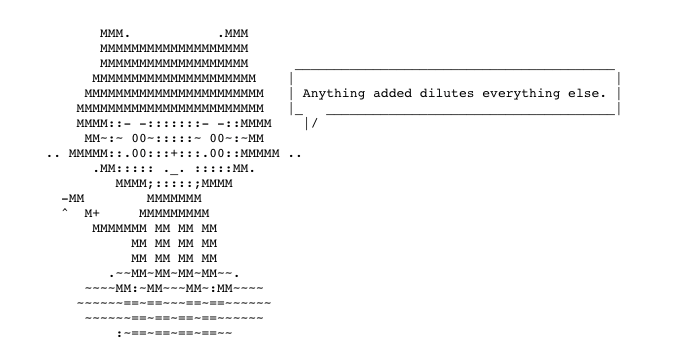
Execute yarn start, and we see GitHub’s mascot, Octocat.
GitHub JavaScript supports all API endpoints, including rendering a markdown document as an HTML page or raw text.
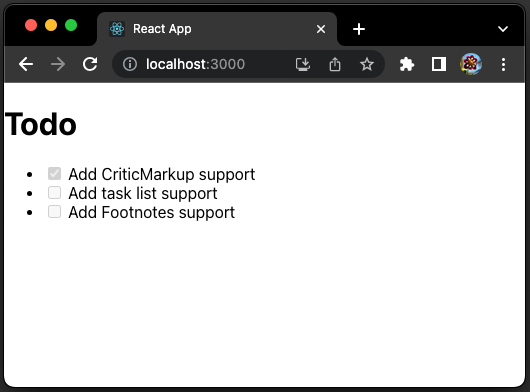
Here is the modified src/App.js:
import { useEffect, useState } from 'react';
import { Octokit } from 'octokit';

function App() {
  const [content, setContent] = useState('');

  useEffect(() => {
    const getOctocat = async () => {
      try {
        // create Octokit instance with authentication token
        const octokit = new Octokit({ auth: process.env.REACT_APP_GH_TOKEN });

        // call GitHub API's GET method from /octocat
        const response = await octokit.request('POST /markdown', {
          text: `
# Todo
- [X] Add CriticMarkup support
- [ ] Add task list support
- [ ] Add Footnotes support`,
          mode: 'gfm', // it supports 'markdown', 'gfm', and 'markdown' is default
        });
        setContent(response.data);
      } catch (e) {
        console.error(e);
      }
    };
    getOctocat();
  }, []);

  return <div dangerouslySetInnerHTML={{ __html: content }} />;
}

export default App;
Execute yarn start, and we see that the GitHub-flavored markdown is converted to HTML.
Besides visualizing as an HTML file, charting is another way for visualization. We install Highcharts to view GitHub activities.
% yarn add highcharts highcharts-react-officialAfter the installation, highcharts and highcharts-react-official become part of dependencies in package.json:
"dependencies": {
  "highcharts": "^11.1.0",
  "highcharts-react-official": "^3.2.0"
}
/repos/{owner}/{repo}/traffic/clones is an endpoint to get the total number of clones and breakdown per day or week for the last 14 days.
/repos/{owner}/{repo}/traffic/views is an endpoint to get the total number of views and breakdown per day or week for the last 14 days.
The following src/App.js has been modified to show clones and views for the last 14 days:
import { useEffect, useState } from 'react';
import { Octokit } from 'octokit';
import Highcharts from 'highcharts';
import HighchartsReact from 'highcharts-react-official';
import HighchartsExporting from 'highcharts/modules/exporting';
import HighchartsAccessibility from 'highcharts/modules/accessibility';
HighchartsExporting(Highcharts);
HighchartsAccessibility(Highcharts);

const getOctocat = async (type) => {
  try {
    // create Octokit instance with authentication token
    const octokit = new Octokit({ auth: process.env.REACT_APP_GH_TOKEN });

    // call GitHub traffic API for a specific type
    const response = await octokit.request(
      `GET /repos/{owner}/{repo}/traffic/${type}`,
      {
        owner: 'XXXXXX', // repository owner
        repo: 'XXXXXX', // repository name
      }
    );

    // process response data for Highcharts time series
    const data = response.data[type];
    return data.reduce(
      (sum, item) => [...sum, [new Date(item.timestamp).getTime(), item.count]],
      []
    );
  } catch (e) {
    console.error(e);
    return [];
  }
};

function App() {
  const [options, setOptions] = useState({});

  useEffect(() => {
    const getData = async () => {
      // get clone stats
      const clones = await getOctocat('clones');

      // get view stats
      const views = await getOctocat('views');

      // configure Highcharts options
      const options = {
        chart: {
          type: 'line',
          width: 500,
          height: 300,
        },
        title: {
          text: 'Weekly Statistics',
        },
        xAxis: {
          type: 'datetime',
        },
        yAxis: {
          title: {
            text: 'Counts',
          },
        },
        series: [
          {
            id: 'clones',
            name: 'Clones',
            data: clones,
          },
          {
            id: 'views',
            name: 'Views',
            data: views,
          },
        ],
        credits: {
          enabled: false,
        },
      };
      setOptions(options);
    };
    getData();
  }, []);

  // render Highcharts
  return <HighchartsReact highcharts={Highcharts} options={options} />;
}

export default App;
Execute yarn start, and we see the statistics charting of clones and views.
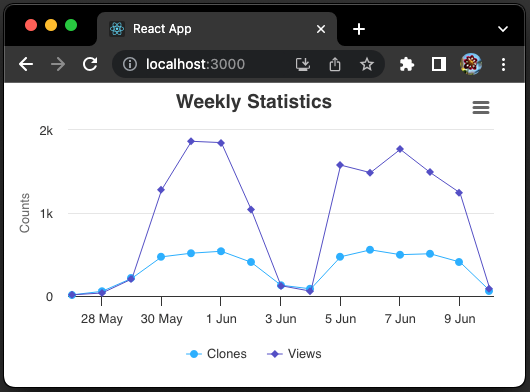
GitHub JavaScript presents many possibilities for operations and visualization.
Conclusion
GitHub provides tools in three formats — CLI, API, and JavaScript — to perform operations, query account information, and retrieve repository statistics. While GitHub CLI and API can be executed instantly, JavaScript presents many possibilities for operations and visualization.
Thanks for reading.
Want to Connect?

If you are interested, check out my directory of web development articles.


