
6-Step Content Creation Process with AI Tools
Use Free AI Tools to Turn Five Minutes Into Massively Valuable Content
Hey there, friends! Doug here, your go-to AI tool evangelist. Today, I’ve got something super exciting to share with you.

Imagine being able to create killer content without breaking a sweat. Sounds like a dream, right? Well, it’s not just a dream anymore; it’s a reality you can touch, feel, and most importantly, implement.
Below I will detail the six step process I use for creating content. And at the end, I’ll outline the powerful butterfly effect of using artificial intelligence tools to speed up the process.
First the brief, then the detail:
- I use open broadcast software to create an unlisted livestream that I have prepared to record, on my YouTube channel.
- Once the unlisted livestream video has been processed by YouTube, I take the transcript from the narration, and I have ChatGPT clean up the narration and turn the transcript into a blog post format.
- I format the blog post on my beehive website; I embed the YouTube video, the formatted transcript and I use the new AI image generation within Beehiive to fill out the post.
- I import the article on to my Medium profile, and I submit the article into a large publication.
- Once the article has been accepted and released by the publication, then I share that on the business page on LinkedIn.
- I share the LinkedIn update into a related to crypto community in LinkedIn.
I’m going to walk you through the six-step process I use to create content, and I’ll show you how I use artificial intelligence tools to make the whole thing a breeze. By the end of this post, you’ll be itching to try it out for yourself.
➦ The entire process starts with a five minute recording and takes just 1 hour!
We can use powerful AI tools and transform that simple 5 minute screen recording into an amazing sales value for your online marketing!
Step 1: Setting Up an Unlisted Livestream with Open Broadcast Software
⫸ First things first, let’s talk about livestreaming. You might be thinking, “Doug, why on Earth would I start with a livestream?” Because it’s a fast way to make great, original video content every single day!
Once you have created a YouTube video script with a tool like Cohesive AI then you can create a screen recording video with the free open source OBS and read out the script.
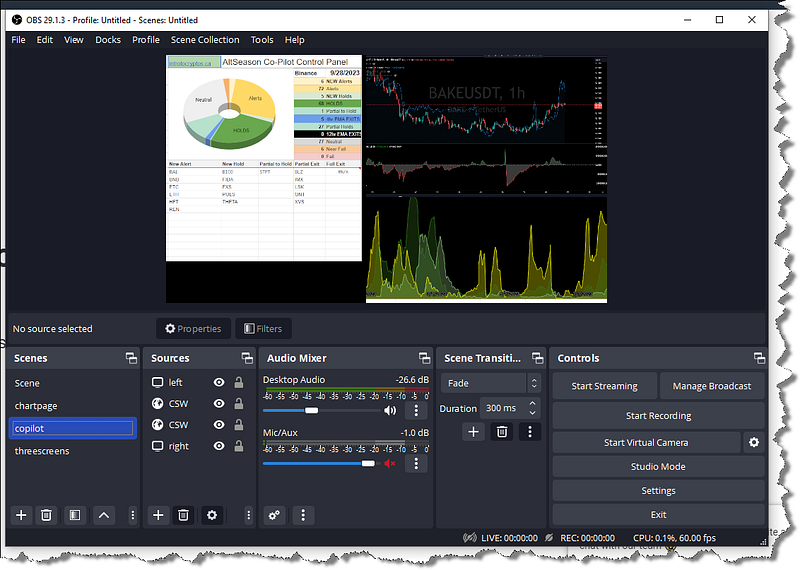
With a bit of practice, you can get skilled at creating very fast on-the-fly explainer videos, especially if you are really familiar with your topic… you can speak out your commentary naturally, and then use other AI tools to transform your conversation into some lasting content for your audience.
I use Open Broadcast Software (OBS) to set up an unlisted livestream on my YouTube channel. It’s as easy as pie. Just download OBS, link it to your YouTube channel, and you’re good to go. Make sure it’s unlisted because we want to process the transcript and release the blog post and video at the same time. It might take an extra hour, but don’t rush the process. The draft livestream is not ready for the world to see it yet.
Step 2: Grabbing the Transcript from YouTube
⫸ Once YouTube has processed your unlisted livestream, it’s time to grab the transcript. Think of this as your raw material, like a block of marble you’re about to sculpt into a masterpiece.
It used to be laborious to process and clean up the transcripts from YouTube. Here’s where ChatGPT comes in. I use it to clean up the narration and turn the transcript into a blog post format. It’s like having a personal editor who works at the speed of light.
➥ Here’s a simple ChatGPT Prompt that I use every day.
I have a video transcript that I'll need you to process. I'll ask you to clean up the punctuation, capitals and paragraphs with minimal changes to the wording. Please use the exact original wording. Create new clickbait style subheadings where major content breaks occur. remove the timestamps from the transcript text, and create a separate table with timestamp field first and subheadings as the next field:
Save even more time with Bloggify. Get more ideas and more tools for processing YouTube transcripts into powerful, SEO friendly blog posts!
Step 3: Formatting the Blog Post on Beehiive
⫸ Next, I head over to my free Beehiiv Newsletter website to format the blog post. Beehiiv is like the Swiss Army knife of content creation-super versatile and incredibly useful because of how the email newsletter is integrated.
I embed the YouTube video and the formatted transcript into the blog post. But wait, there’s more! I also use Beehiiv’s new AI image generation tool to add some eye-catching visuals. It’s like putting the cherry on top of your content sundae.
Small things that you do within your post will have long term and profound impact on your success and earning potential.
◯ Consider the revenue streams to be included. ◯
◯ Double check how you have used calls to action. ◯
◯ Review how you encourage readers to subscribe. ◯
Step 4: Importing the Article to Medium
⫸ Once everything looks good on Beehiiv, I import the published article onto my Medium profile. Medium provides an income stream layer and another place where we can actively grow our audience.
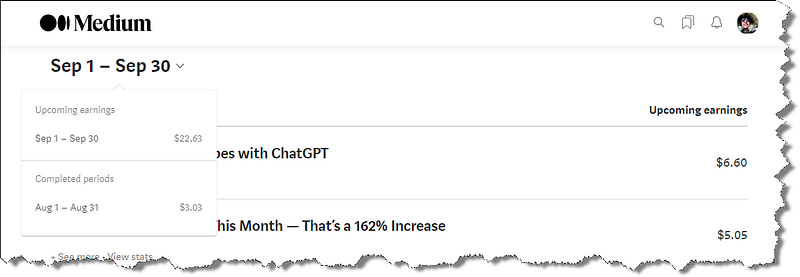
But don’t get tripped up on the small revenues from readership activity on Medium — the main revenue generated from publishing on Medium actually comes from someplace completely different, as we see below.
I’m excited to share several more butterfly effect strategies as our newsletter series unfolds!
Joining a Large Publication on Medium
Once I am satisfied with the formatting of the imported post, I then submit the article to a large publication. Many publications on Medium have several thousand followers. This is like getting your indie film into a major film festival. It’s a big deal and can get you tons of lasting visibility. It’s worth the time to research and find the biggest and most active Publications on Medium in your niche.
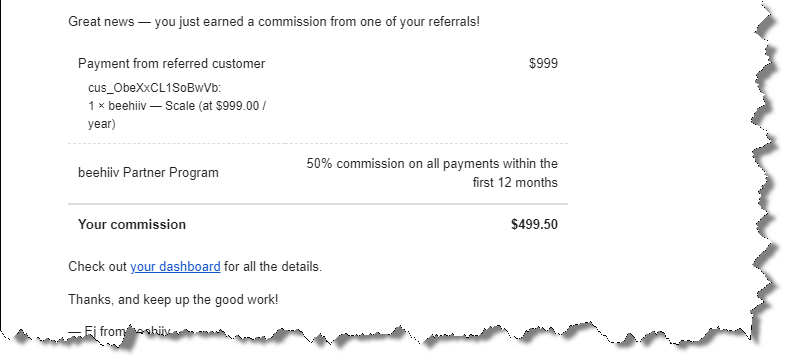
Publishing on Medium may seem like an unnecessary extra step — it’s one of the overlooked butterfly effects that can open the doors to larger revenues.
Step 5: Sharing on LinkedIn Business Page
⫸ After the article gets accepted and published on one of the large and respected publications on Medium, I share that article on my other social accounts like my business LinkedIn page.
LinkedIn is like the business networking event of the internet-professional, impactful, and a great place to build on the connection between your content and your readers.
More than that, it’s a great place to network with the editors of the large publications on Medium — a like, share or comment from an influential leader can also have a tremendous impact on the exposure and engagement that our content receives.
Step 6: Engaging the Crypto Community on LinkedIn
⫸ Finally, I share the LinkedIn update in a community related to crypto. It’s like finding your tribe at a music festival-people who get you and are interested in what you have to say.
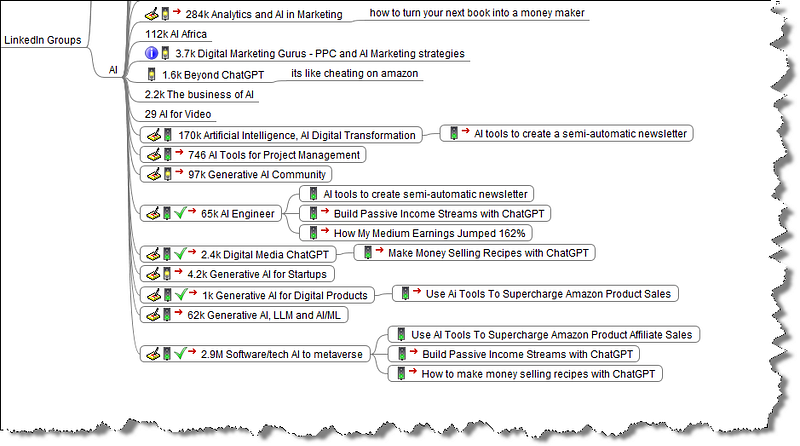
Track which groups you have shared content and watch your stats to find the groups with the best engagement rates.

So there you have it, folks!
A six-step process that takes you from zero to hero in the content creation game.
➜ The entire process takes less than an hour from livestream recording, to post and social sharing.
Amazingly powerful content creation process that is only possible with a team of professionals, or with a free YouTube, a free livestream software, using a few free AI Tools and a free Beehiive newsletter website — republished to a free account on Medium, shared to your free social profiles.
You really CAN get started. And you don’t need money.
Don’t let your own doubts stop you.
Ready to Take the Leap?
If you’re as excited as I am about leveraging AI in your content creation process, then what are you waiting for? Dive in, give it a try, and watch your business soar to new heights.
And hey, if you want to keep learning and growing, make sure to check out our series of newsletters and comprehensive books at ai-businessplans.com.
We’re here to be the bridge that connects you to the future of AI in business.
Originally published at https://ai-businessplans.com.
⫷
I Love To Read Comments
Check the comments below, and leave your thoughts, questions, or success stories too! I love to read them! Many times the comments below some of my posts are way more valuable and insightful than what I’ve shared here!
🛆 Investment Disclaimer 🛆 You should not invest money into a paid tool until you have maximized the benefits of the free features. Be certain the tool is improving your bottom line before you commit to buy. Never spend money you cannot afford to lose. Seek advice from a certified independent business planner if you have any doubts. Nothing in our training products are a promise or guarantee of earnings.👈
Connect on Twitter and Linkedin
Be safe and make small steps forward every day.
Doug
Read Next -
☄ Disclaimer: This article contains referral links for some of my absolute favorite AI business tools for content creators and crypto enthusiasts.
If you purchase one of my favorite software and AI tools, I will receive a small commission at no additional charge to you.