
Exploring the Play Web Framework With Twirl Templates
A first look at the non-JavaScript web framework

Scala is a strong statically typed general-purpose programming language supporting object-oriented and functional programming. Play is a web framework that builds web applications with Scala and Java. Play comes with Twirl, a Scala-based template engine, which has the following advantages:
- Compact, expressive, and fluid: It minimizes the number of characters and keystrokes required in a file and enables a fast, fluid coding workflow.
- Easy to learn: It has a minimum of concepts to learn beyond Scala constructs and HTML knowledge.
- Not a new language: It is simply Scala + HTML.
- Editable in any text editor: A simple editor should be sufficient to be productive for coding.
Play is a non-JavaScript web framework, and it is server-side rendered. We are going to explore how a Play web application works.
Set Up Play Environment
Lightbend Tech Hub offers downloadable Play examples for Java and Scala. Learning by example is an efficient way to have the environment ready instantly.
This is the link to download the example, Play Scala Hello World. Unzip the downloaded file, play-samples-play-scala-hello-world-tutorial.zip, to a local directory.
Play requires Java and sbt, with some version requirements:
- Java Software Developer’s Kit (SE) 1.8 or higher, which can be downloaded here.
sbt1.3.4 or higher, which is included in the zip file. Alternatively, it can be downloaded here.
sbt is an interactive build tool for Scala, Java, etc. It runs on JVM.
Check the versions to ensure qualified Java and sbt.
% pwd
/Users/jenniferfu/play-samples-play-scala-hello-world-tutorial
% java --version
openjdk 11.0.11 2021-04-20
OpenJDK Runtime Environment AdoptOpenJDK-11.0.11+9 (build 11.0.11+9)
OpenJDK 64-Bit Server VM AdoptOpenJDK-11.0.11+9 (build 11.0.11+9, mixed mode)% sbt --version
sbt version in this project: 1.7.2
sbt script version: 1.6.2Execute sbt run:
% sbt run
[info] welcome to sbt 1.7.2 (AdoptOpenJDK Java 11.0.11)
[info] loading project definition from /Users/jenniferfu/play-samples-play-scala-hello-world-tutorial/project/project
[info] loading settings for project play-samples-play-scala-hello-world-tutorial-build from plugins.sbt,scaffold.sbt ...
[info] loading project definition from /Users/jenniferfu/play-samples-play-scala-hello-world-tutorial/project
[info] loading settings for project root from build.sbt ...
[info]   __              __
[info]   \ \     ____   / /____ _ __  __
[info]    \ \   / __ \ / // __ `// / / /
[info]    / /  / /_/ // // /_/ // /_/ /
[info]   /_/  / .___//_/ \__,_/ \__, /
[info]       /_/               /____/
[info]
[info] Version 2.8.18 running Java 11.0.11
[info]
[info] Play is run entirely by the community. Please consider contributing and/or donating:
[info] https://www.playframework.com/sponsors
[info]
--- (Running the application, auto-reloading is enabled) ---[info] p.c.s.AkkaHttpServer - Listening for HTTP on /0:0:0:0:0:0:0:0:9000(Server started, use Enter to stop and go back to the console...)The example is accessible from a browser at http://localhost:9000.

Here is the workflow:
- The browser requests the root
/URI from the HTTP server using theGETmethod. - The Play internal HTTP Server receives the request.
- Play resolves the request using the
routesfile, which maps URIs to controller action methods. - The action method renders the
indexpage, which is a Twirl template. - The HTTP server returns the response as an HTML page.
Model-View-Controller Architecture
A Play application adopts Model-View-Controller (MVC), a commonly used software architectural pattern for developing User Interfaces (UIs).
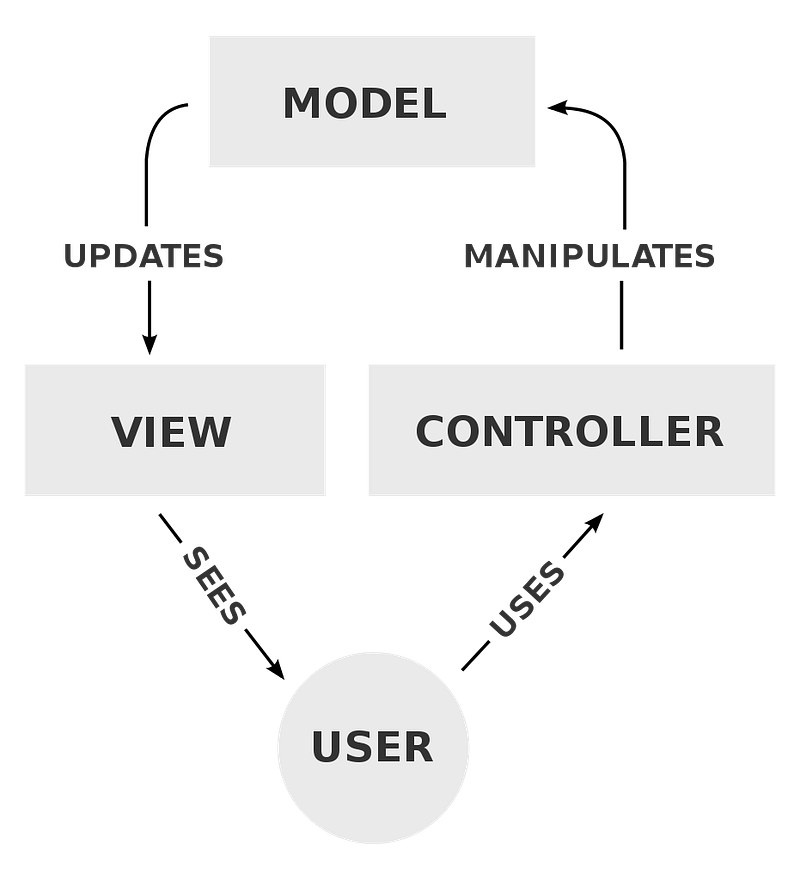
- Model is the central component of the pattern. It is the application’s dynamic data repository, independent of the UI.
- View is any representation of information composed of a header, footer, sidebar, content view, and/or other components.
- Controller accepts input and converts it to commands for the model or view.
Play Application Source Tree
The unzipped play-samples-play-scala-hello-world-tutorial looks like this:
play-samples-play-scala-hello-world-tutorial
├── README.md
├── .g8
├── app
│   ├── controllers
│   └── views
├── conf
├── logs
│   └── application.log
├── project
├── public
│   ├── images
│   ├── javascripts
│   └── stylesheets
├── sbt-dist
├── scripts
│   └── test-sbt
├── target
├── build.sbt
├── sbt
└── sbt.batplay-samples-play-scala-hello-world-tutorial: It is the project directory for the Play application.README.md: It is the README file that describes project requirements and execution steps..g8: It is the directory generated byplay-scala-seed.g8, a template for generating a Play project seed in Scala. This template has been used to craft this project.app: It is the directory that contains MVC code, where all executable artifacts reside, including Java and Scala source code, templates, and compiled assets’ sources. For this example, it contains two packages,controllersandviews. If there is an external data repository, themodelspackage can be added. In addition, theservicepackage andutilscan also be added.conf: It is the directory that contains application configuration, includingroutes.logs: It is the directory that contains logs, whereapplication.logis the default log file.project: It is the directory that containssbtconfiguration files.public: It is the directory for static assets served directly by the web server. There are three sub-directories:images,javascripts, andstylesheets.sbt-dist: It is the directory that contains the distributedsbt.scripts: It is the directory that containssbtscripts, where the script,test-sbt, executes tests usingsbt.target: It is the directory that contains the generated code and API docs.build.sbt: It is the build script that executes the project in the current directory (line 1 below), with the specified plugin (line 2) and settings (lines 3–17). It is a common practice to declare lazy loading of the project (line 1).
sbt: It is the executable that invokes the distributedsbtscript with 600+ lines of code.
#!/usr/bin/env bash./sbt-dist/bin/sbt "$@"The following is the sbt usage:
Usage: `basename "$0"` [options] -h | --help print this message
-v | --verbose this runner is chattier
-V | --version print sbt version information
--numeric-version print the numeric sbt version (sbt sbtVersion)
--script-version print the version of sbt script
-d | --debug set sbt log level to debug
-debug-inc | --debug-inc
enable extra debugging for the incremental debugger
--no-colors disable ANSI color codes
--color=auto|always|true|false|never
enable or disable ANSI color codes (sbt 1.3 and above)
--supershell=auto|always|true|false|never
enable or disable supershell (sbt 1.3 and above)
--traces generate Trace Event report on shutdown (sbt 1.3 and above)
--timings display task timings report on shutdown
--sbt-create start sbt even if current directory contains no sbt project
--sbt-dir <path> path to global settings/plugins directory (default: ~/.sbt)
--sbt-boot <path> path to shared boot directory (default: ~/.sbt/boot in 0.11 series)
--ivy <path> path to local Ivy repository (default: ~/.ivy2)
--mem <integer> set memory options (default: $sbt_default_mem)
--no-share use all local caches; no sharing
--no-global uses global caches, but does not use global ~/.sbt directory.
--jvm-debug <port> Turn on JVM debugging, open at the given port.
--batch disable interactive mode # sbt version (default: from project/build.properties if present, else latest release)
--sbt-version <version> use the specified version of sbt
--sbt-jar <path> use the specified jar as the sbt launcher # java version (default: java from PATH, currently $(java -version 2>&1 | grep version))
--java-home <path> alternate JAVA_HOME # jvm options and output control
JAVA_OPTS environment variable, if unset uses "$default_java_opts"
.jvmopts if this file exists in the current directory, its contents
are appended to JAVA_OPTS
SBT_OPTS environment variable, if unset uses "$default_sbt_opts"
.sbtopts if this file exists in the current directory, its contents
are prepended to the runner args
/etc/sbt/sbtopts if this file exists, it is prepended to the runner args
-Dkey=val pass -Dkey=val directly to the java runtime
-J-X pass option -X directly to the java runtime
(-J is stripped)
-S-X add -X to sbt's scalacOptions (-S is stripped)In the case of duplicated or conflicting options, the order above
shows precedence: JAVA_OPTS lowest, command line options highest.
@JenniferFuBook
Add heading textAdd bold text, <Cmd+b>Add italic text, <Cmd+i>
Add a quote, <Cmd+Shift+.>Add code, <Cmd+e>Add a link, <Cmd+k>
Add a bulleted list, <Cmd+Shift+8>Add a numbered list, <Cmd+Shift+7>Add a task list, <Cmd+Shift+l>
Directly mention a user or team
Reference an issue or pull request
Leave a commentsbt.bat: It is an executable that invokes the distributedsbt’s launcher script with 900+ lines of code.
@REM SBT launcher script
.\sbt-dist\bin\sbt.bat %*Play Application Controllers
A controller governs the MVC application based on the workflow. It accepts input and converts it to commands for the model or view. A controller in Play is nothing more than an object that generates Action values. Play controllers are typically defined as classes to take advantage of Dependency Injection.
app/controllers is the recommended directory for controllers. Out of the box, there is one controller, HomeController.scala.
controllers
└── HomeController.scala
Here is app/controllers/HomeController.scala:
- At line 1, the package,
controllers, is created by declaring it at the top of the Scala file. It would be convenient to name the package the same as the directory containing the Scala file. However, Scala is agnostic to file layout. - At line 3, it imports everything in the package,
javax.inject.javaxis the naming convention for JRE extension. The code above is in Scala 2 syntax:import javax.inject._. In Scala 3, it would be written asimport javax.inject.*. - At line 4, it imports everything in the package,
play.api. - At line 5, it imports everything in the package,
play.api.mvc. - At lines 11–33, it creates a class with a singleton notation (line 11). It invokes the idiomatic Play API for
Actionby extendingAbstractController(line 12). This controller defines three actions for three routes,index(/),explore(/explore), andtutorial(/tutorial). - At lines 21–23, it defines the
indexmethod that is anActionreturningOk(views.html.index()). It generates an HTML page defined byindex.scala.html, a Twirl template inviews. - At lines 25–27, it defines the
exploremethod that is anActionreturningOk(views.html.explore()). It generates an HTML page defined by theexplore.scala.html, a Twirl template inviews. - At lines 29–31, it defines the
tutorialmethod that is anActionreturningOk(views.html.tutorial()). It generates an HTML page defined by thetutorial.scala.html, a Twirl template inviews.
Play Application Views
A view produces a response for the browser. It receives data from the model and presents it to the browser for display. It can be a whole view for the route or a subview that composes the whole view.
app/views is the recommended directory for views. Out of the box, there are several view files written as Twirl templates with the .scala.html extensions.
views
├── main.scala.html
├── commonSidebar.scala.html
├── index.scala.html
├── explore.scala.html
└── tutorial.scala.html
main.scala.html renders the head and body. It takes two arguments, a String for the title of the page and an Html object to insert into the body of the page. Other Twirl templates use it to compose the HTML page.
Here is app/views/main.scala.html:
- At line 7, it defines a constructor with two arguments:
titleandcontent. - At lines 9–32, it is an HTML template, where it defines
head(lines 12–20) andbody(lines 22–30). - At line 13,
@titleis a dynamic value, which is evaluated from the argument,title. - At lines 23–28, the page header is defined.
- At line 29,
@contentis a dynamic value, which is evaluated from the argument,content.
Including this template, a page will show the following header:

commonSidebar.scala.html defines a main.scala.html, which takes no arguments.
Here is app/views/commonSidebar.scala.html:
- At line 1, it defines a constructor with no arguments.
- At line 2, it sets
versionto the value ofplay.core.PlayVersion.current. - At lines 3–8, it defines a list of the table of contents, where
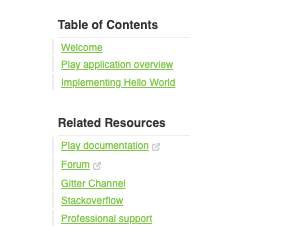
@routes.HomeController.index()(line 5),@routes.HomeController.explore()(line 6), and@routes.HomeController.tutorial()(line 7) are route functions. - At lines 9–16, it defines a list of related resources, where
@version(line 11) is a dynamic value.
Here is the UI display:
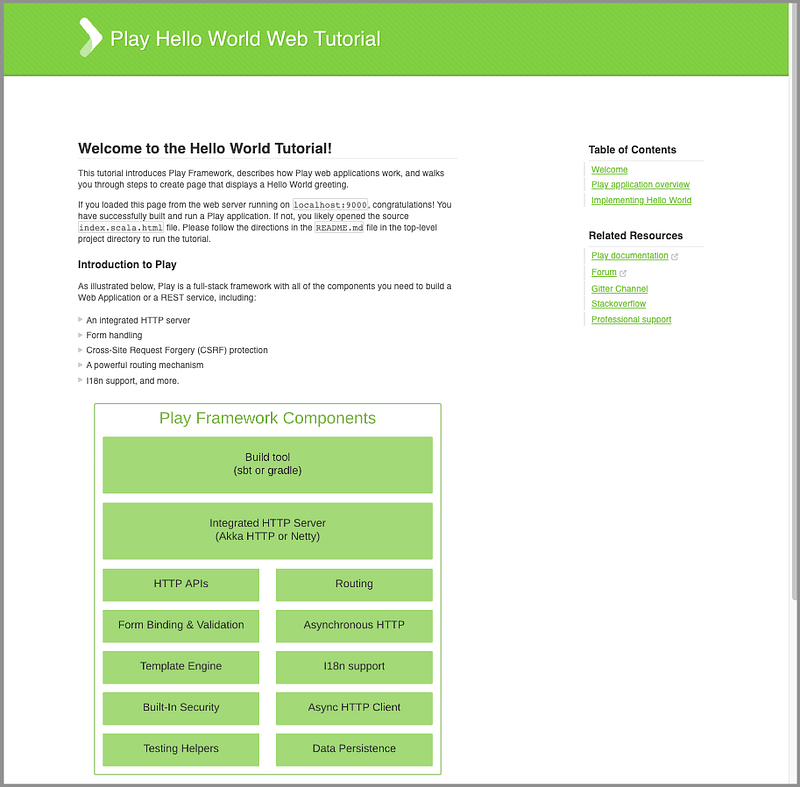
index.scala.html is a Twirl template that is invoked by the index (/) route.
Here is app/views/index.scala.html:
- At line 1, it defines a constructor with no arguments.
- At lines 3–71, the
maindirective (line 3) calls themaintemplate,main.scala.html, with two parameters. - title:"Welcome"- content: lines 4–71, where@commonSidebar()(line 66) is the common sidebar defined incommonSidebar.scala.html.
Here is the UI display:
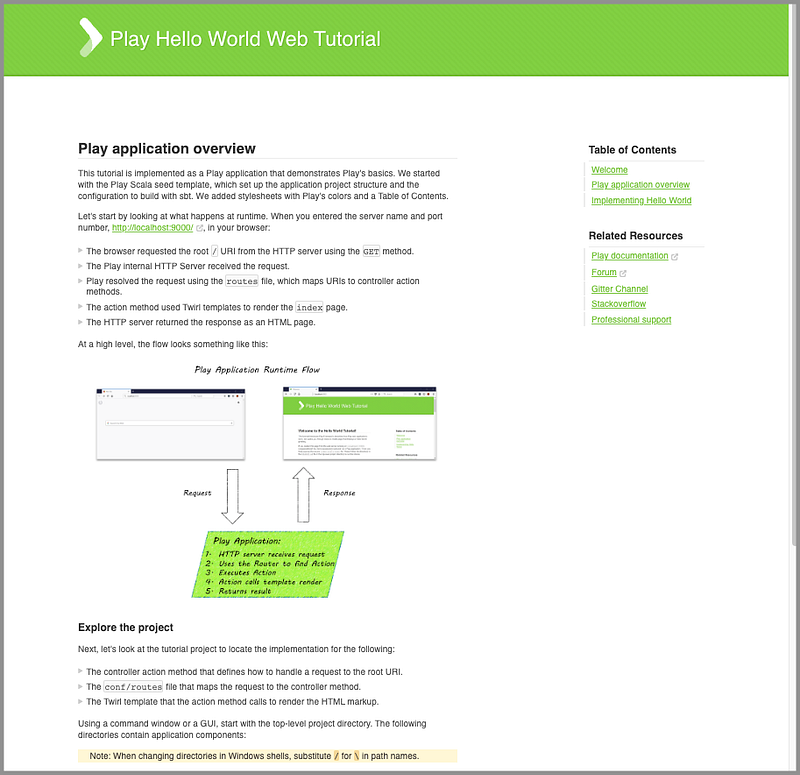
explore.scala.html is a Twirl template that is invoked by the explore (/explore) route.
Here is app/views/explore.scala.html:
- At line 1, it defines a constructor with no arguments.
- At lines 3–90, the
maindirective (line 3) calls themaintemplate,main.scala.html, with two parameters to generate the page. - title:"Hello World"- content: lines 4–90, where@commonSidebar()(line 84) is the common sidebar defined incommonSidebar.scala.html.
Here is the UI display:
tutorial.scala.html is a Twirl template that is invoked by the tutorial (/tutorial) route.
Here is app/views/tutorial.scala.html:
- At line 1, it defines a constructor with no arguments.
- At lines 3–162, the
maindirective (line 3) calls themaintemplate,main.scala.html, with two parameters to generate the page. - title:"Hello World"- content: lines 4–162, where@commonSidebar()(line 157) is the common sidebar defined incommonSidebar.scala.html.
Here is the UI display:
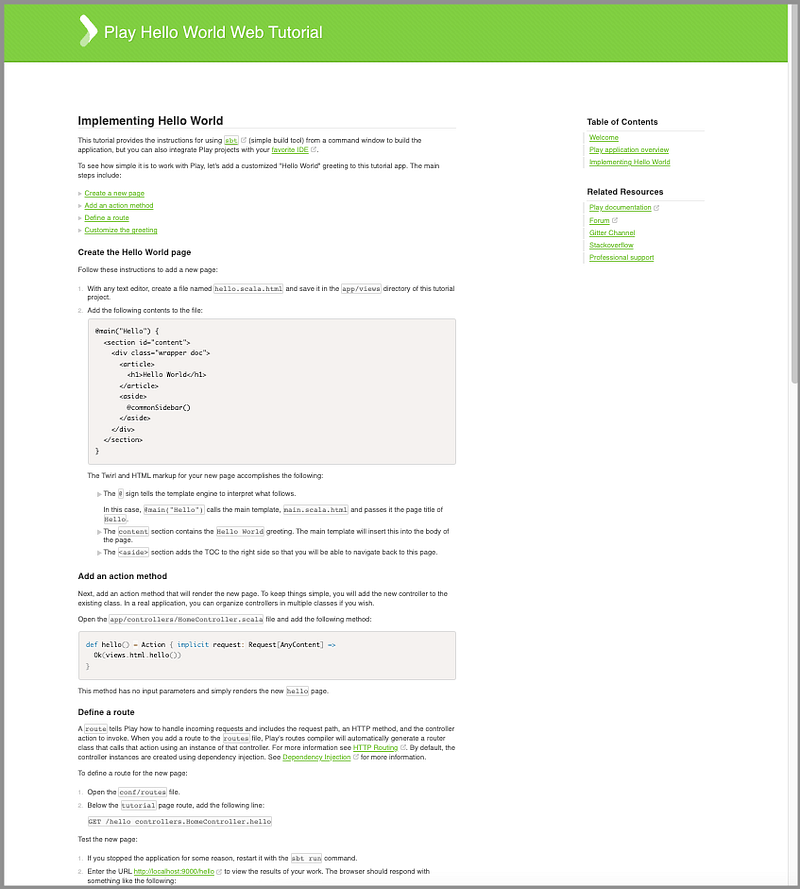
Since the templates are rendered on the server, there is no need to use REST APIs for endpoints. Twirl templates can access models via Scala code.
Play Application Configuration
conf is the directory that contains application configuration (compiled) and other non-compiled resources on classpath. Out of the box, there are these files.
conf
├── routes
├── application.conf
├── logback.xml
└── messages
The router is the component in charge of translating each incoming HTTP request to a controller Action. An HTTP request is seen as an event by the MVC framework. This event contains two major pieces of information:
- The request path, including the query string
- The HTTP method (GET, POST, PUT, DELETE, etc.)
routes is the configuration file used by the router. It resolves the incoming HTTP request by finding a proper URI and then mapping to a controller action method. Many routes can match the same request.
Here is app/conf/routes:
- At line 7, for a GET method of the
indexroute,/,HomeController’sindexmethod is invoked. - At line 8, for a GET method of the
exploreroute,/explore,HomeController’sexploremethod is invoked. - At line 9, for a GET method of the
tutorialroute,/tutorial,HomeController’stutorialmethod is invoked. - At line 13, for a GET method of the asset route,
/assets/*file, the built-in controllerAssets’sversionedmethod is invoked, with the path (/public) and thefilename.*fileis the dynamic part that matches the.*regular expression.
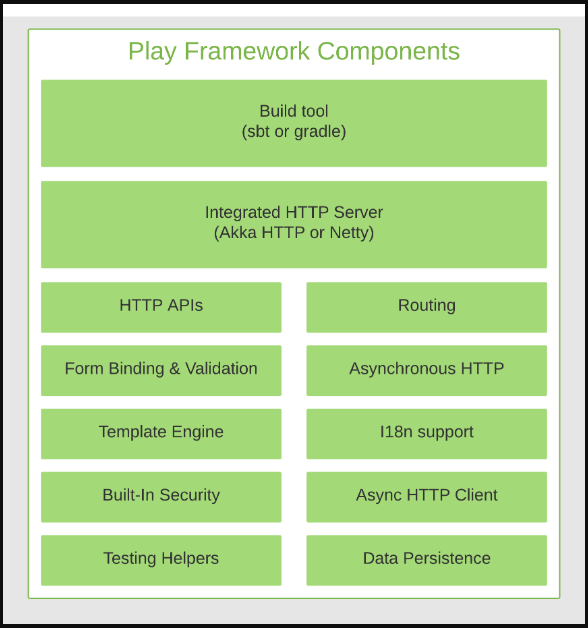
Go to the URL, http://localhost:9000/assets/images/play-stack.png, and the following image is displayed:
What if there is a conflict in routes?
The first route in the declaration order will be used.
What if there is an error in routes?
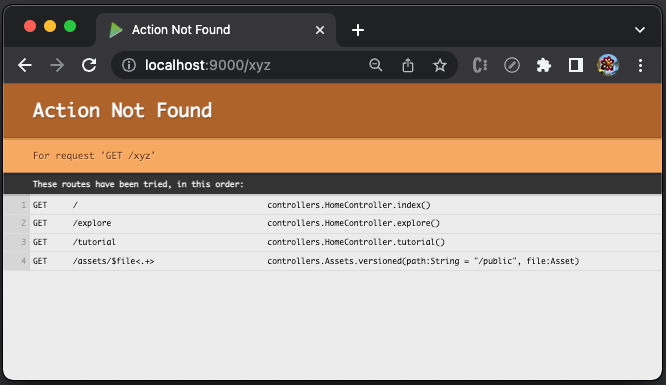
The route error will be directly displayed in a browser because this file has been compiled.
Here is an example of an unmatched route, /xyz:
If needed, REST APIs can be configured in routes. This article explains how to implement REST APIs in routes.
Besides routes, there are other configuration files, application.conf, logback.xml, and messages.
application.conf: It is the main configuration file that defines features, tokens, cookies, connect pool, thread pools, logging, cache, etc.logback.xml: It is the logback configuration file. Play usesSLF4Jfor logging, backed byLogback, as its default logging engine.messages: It is the message catalog for I18N.
Conclusion
Play is a web framework that builds web applications with Scala and Java. The web pages are server-side rendered and written with Twirl templates.
For a change, we have explored a non-JavaScript web framework. They all manipulate HTML, but syntaxes and terminologies vary.
All roads lead to web applications.
Thanks for reading.
Thanks, S Sreeram, Noah Jackson, and Siddhartha Chinthapally, for working with me on Play web applications.
Want to Connect?

If you are interested, check out my directory of web development articles.


