
5 Portfolio-Worthy SQL Project Ideas for Beginners
Ideas to help you create projects that will wow future employers.
This story is intended to be a resource to help you brainstorm, conceptualize and execute SQL-oriented professional samples. Download a PDF here if you’d like to revisit the list or attempt any of these projects later.

After plowing through a full Udemy course load, updating your LinkedIn certifications and finally understanding what C-T-E stands for, you will inevitably start searching for ways to display your work.
It’s time to create a SQL project but, like many a high school project, you’re not sure where to begin.
If you’re learning SQL for data science, you’ve likely picked up on the fact that data science projects, like the algorithms that power them, follow a certain formula.
And when it comes to data science or language-specific projects like Python, you’d strain your eyes reading the thousands of articles offering suggestions.
If you want to see what I mean, you can read a recent story I wrote about coming up with data science project ideas.
But, frustratingly, less has been written about SQL project ideation.
My goal in this story about SQL portfolio project ideas is to present five project types that use SQL in ways that match professional use cases.
In addition to each area, I’ll also provide next steps as well as my suggestions for where to find the data that will make it all possible.
Project 1
Ingest a CSV, Create a Table, Prepare for End User
Level: Easy
When to attempt: After completing initial SQL course work or when you’re comfortable with basic aggregation functions like SUM(), AVG(), COUNT(), MAX()/MIN().
When you reach a point in your learning SQL journey that you believe you’ve exhausted beginner-level course material, it may be more beneficial to pause your course learning and work on your first project.
I‘m suggesting this ingestion/transformation project first because it mirrors a routine task you would conduct as a data analyst or data engineer: A batch load job.
If you have experience with a scripting language like Python, R or JavaScript, you can create an automatic file transfer to ingest your chosen CSV.
If not, no worries. Nearly every SQL environment has this feature built into its user interface (UI).
In order to ingest the contents of the CSV, you’ll need to create a table. This is a great opportunity to review both CRUD statements and explore basic schema design in a practical scenario.
Once you’ve ingested a CSV and inserted its values into a table, then the final step is to clean and aggregate the data so that it serves your hypothetical business use case.
Output: Cleaned table that you can store in a GitHub repository, along with the queries used to create and manipulate it.
Project 2
Use SQL JOINS to Combine Multiple Tables into a New Table
Level: Easy-Intermediate
When to attempt: After understanding SQL JOIN clauses and after completing project 1.
Like project 1, your goal is to create a product valuable to an employer looking for a SQL developer: A clean, user-ready table.
However, unlike project 1, this time you’re going to show off your understanding of JOINs.
As a data engineer, a significant portion of my job is to understand the relationship between tables and how to use existing data to create new tables based on stakeholder requests.
Being able to show an employer that you can effectively JOIN tables in a way that addresses a business use case will be an asset for you.
When choosing your data for this project it is essential that you ensure that there is, indeed, a relationship between tables you attempt to join.
To be completely safe, I’d recommend searching Kaggle for datasets that come with a schema pre-defined and primary keys assigned.
As you work on this project, remember that the goal is not to see what kind of crazy join combinations you can use. Your goal is to efficiently leverage the relationships between tables to extract the requested data.
Output: A final, aggregated table containing values from 2–3 supplemental tables.
Below, I join several tables within the ncaa_basketball BigQuery public dataset.
Pardon the interruption: To receive my latest writing, consider following me.
Project 3
Create One or More Views — With Output
Level: Easy-Intermediate
When to Attempt: After you’ve created several SQL tables and understand the difference between a view and a table.
Depending on the courses and resources you access as a SQL beginner, you may not fully understand or work with views.
Now’s your chance.
I create views at work on nearly a weekly basis to help stakeholders access tables without having to manually add WHERE clauses or other filters every time they want specific data.
In short: Views are a great way to optimize your SQL performance and long-term storage.
Demonstrating to an employer that you can define and query views will put you on top of the candidate pile.
For this project, pick a large dataset.
If you’re partial to BigQuery, like me, there are public datasets with millions of rows of data, available for experimentation.
First, disregard SQL best practices and run a SELECT * query to see how long it takes for a large dataset to process.
Then, work to create a view that produces a very specific subset of the data you’re working with, to optimize performance.
For instance, maybe your hypothetical stakeholder only wants the most recent date’s data.
After you create your view, use your SQL environments performance metrics to determine how much (or less) efficient your view is than the initial SELECT * query.
To present this to future employers, create a README. Better yet, attach either screen shots of your query performance metrics or create your own visualizations.
Output: View definition, table, write-up
Project 4
Write a SQL Script
Level: Intermediate
When to Attempt: When you’ve grown comfortable writing fairly complex queries, generally those involving multiple sub queries/joins and those that are longer than 50 lines.
Projects 1–3 focused on the output a SQL query would generate.
In this project, you want to focus on creating an optimized, readable and wow-worthy SQL script.
Your end goal should be to show an employer that you can apply programming best practices to SQL script writing.
Your script doesn’t need to be long. Less than 100 lines is fine.
However, it should include some of these elements so that employers know you understand how to write SQL code that can be read and reproduced by others:
- Variable declarations for values used repeatedly
- Dynamic filtering, i.e. using CURRENT_DATE() instead of a STRING DATE
- In-line comments to explain the flow of execution
- Semi colons to separate operations, i.e. after DELETE or INSERT statements
- Proper documentation
Output: A .sql file with the contents of your precise, formatted script.
-- Example SQL scriptDECLARE start DATE DEFAULT DATE_SUB(CURRENT_DATE(), INTERVAL 1 DAY);
DECLARE end DATE DEFAULT CURRENT_DATE();DELETE FROM my_project.dataset.table
WHERE 1=1;INSERT INTO my_project.dataset.new_table
(
col_1,
col_2,
col_3
)WITH a_CTE AS (SELECT col_1, col_2, col_3
FROM my_project.dataset.table)
SELECT * FROM a_CTE
WHERE date BETWEEN start AND end
As someone who writes and reviews SQL code on a daily basis, adhering to the basics of best practices can really elevate a SQL script.
Project 5
Create a Dashboard
Level: Intermediate
When to Attempt: After you’ve developed proficiency with SQL in an environment and understand how to utilize SQL in conjunction with a BI tool like Tableau.
Be honest.
When I said ‘SQL project’ your mind immediately went to dashboarding.
That’s ok!
When I was job searching I built several dashboards using data generated by SQL queries.
Using SQL to create a dashboard is one of the best, most accessible ways to display your SQL work.
Dashboards are the perfect SQL calling cards because:
- They impress both technical and non-technical interviewers
- They’re representative of products data analyst build
- They demonstrate your ability to go beyond querying to tell a data story
Building a dashboard also exposes you to different BI platforms like Tableau and Looker, many of which have their own SQL-derived syntax.
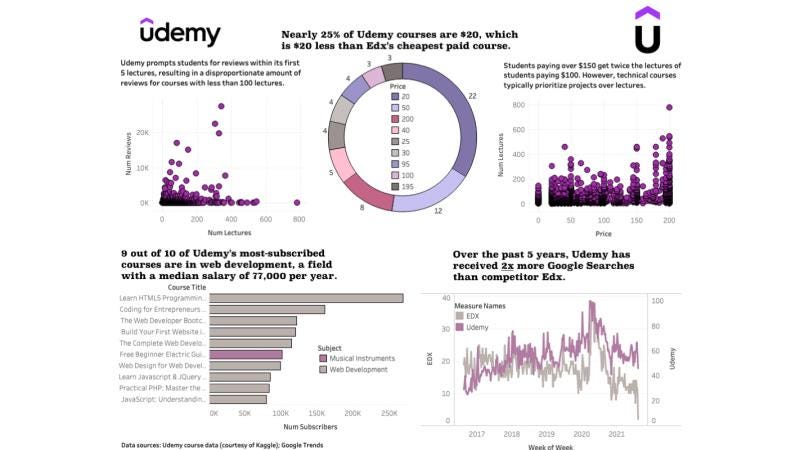
For this project your challenge is to use 1 primary dataset and 2–3 supplemental datasets (remember those JOINS) to create a dashboard with 3–5 visualizations.
For a free, web-based tool, I suggest using Tableau desktop (not an endorsement). Tableau also has amazing resources to learn about and practice data visualization, a skill that is becoming as important as SQL.
Output: Static or dynamic dashboard, like the example I created below.
Recap
Since I haven’t encountered many articles dedicated solely to advising SQL beginners on projects to pursue, I did my best to create a list of project types that can help you learn practical skills and wow employers.
As a reminder, I suggest you focus your time creating projects in the following five categories:
- Ingest a CSV, Create a Table
- Use JOINS to Build a New Table
- Create View(s)
- Write a SQL Script
- Create a Dashboard
Like many other aspects of your SQL journey, these projects will demand hours of your time. The work is worth it.
The final product will reflect the time and skill you’ve invested.
Create a job-worthy data portfolio. Learn how with my free project guide.


