
5 Miraculous Apps to Read, Remember, and Reproduce Your Content
The magical framework you ought to try today.
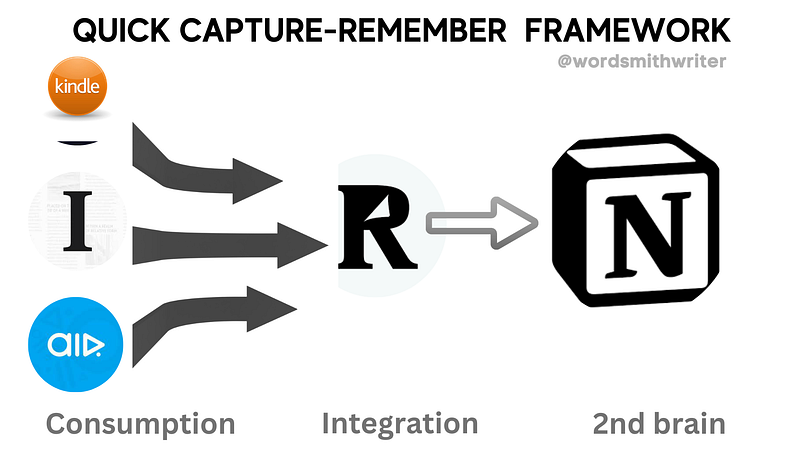
I recently used these five miraculous apps to address the following issue.
Like you, I used to listen to many podcasts, read many books, explore many articles online, and constantly scroll through Twitter when using the toilet.
Throughout these countless hours of daily content consumption, I occasionally come across highlights, interesting passages that resonate with me, surprises, or insights I want to remember later.
But I didn’t have a way to record these thoughts until just recently.
So, throughout the last ten years or so of my life, I would spend a lot of time listening, reading, surfing, and seeing different things, but I would only indeed retain a small portion of it, remember even less of it, and use even less of it in my daily life.
This raises the question,
“Why was I wasting all this time eating all of these things if I wasn’t going to use them later on?”
TheQuick Capture Framework, as I call it, is a system for automatically capturing and logging all of the insights we gain from books, articles, podcasts, and even tweets.It consists of these five apps that all work together without any issues.
Table of Contents
· The Consumption Layer. ∘ 1. Kindle ∘ 2. Instapaper ∘ 3. Air IO · The Integration Layer. ∘ 4. Readwise. IO · My Second Brain. ∘ 5. Notion · More Related Stories
The Consumption Layer.
Let’s begin with the first three applications that make up the consumption layer, the initial component of the Magical Insight Logging Framework.
1. Kindle
Kindle is the first and least intriguing on my list.
I’ve been using a Kindle to read books since it came out in 2008, and one of the best features is the ability to highlight essential passages as you read them.
Also, this is an excellent experience on a laptop or desktop computer. Simply choose the passage to highlight.
The Kindle software, available on iOS, the iPad, and Android, virtually every device you own, allows you to highlight text in various colors.
2. Instapaper
Apps like Instapaper and Pocket, which allow you to save web pages to read later, make up the second component of a five-app stack. I use Instapaper as my favorite.
The plan is to use Instapaper to save any online articles or blog posts that I want to read but don’t want to read directly on the site.
There are numerous methods to share it. The iOS Share extension is available. It can be sent via email to Instapaper. Use the extension with Chrome or Safari. There are countless ways to add content to Instapaper.
When I next need to read something. As soon as I open it, I see a massive list of articles I’ve saved, all of which I may begin reading one at a time for as long as I like.
The exciting feature of Instapaper is the ability to highlight articles as you read them on any device of your choice.
3. Air IO
I now listen to all of my podcasts in this manner. A genuinely great app that highlights and shares the most significant parts of podcasts is called Air IO.
Air is now my preferred iOS podcasting app. Additionally, I can access Air and listen to all the podcasts I want.
So far, it’s a reasonably typical podcast player. But the remarkable feature of Air is that you can take an Air quote while listening to it by hitting the giant quotation button in the middle.
You must press the Air quote button if you’re listening to a podcast and come across a line that strikes a chord with you.
Depending on your chosen settings, it will automatically make an Air quote using the last 30 to 60 seconds of the content you’ve listened to.
Therefore, if the transcription is accessible when you generate an Air quotation, it will essentially merely create a highlight for you.
And this is a huge deal because it was never possible to take notes from podcasts before this software.
These three applications together comprise the consumption layer of the enchanted Insight logging system.
The Integration Layer.
4. Readwise. IO
For the past two years, ever since I initially downloaded Readwise, it has been one of my most treasured apps.
And what it does is it compiles the best features of the three consumption applications I’ve made.
Consequently, if I sign into my replies, it combines books, articles, tweets, and podcasts from the consumption layer’s apps.
In other words, it uses the access I’ve granted to my Amazon account to fetch book recommendations. For this reason, my Kindle is full of books I’ve marked up over the past few years.
Of course, it’s not limited to books alone; users may enjoy seamless integration with Instapaper. Therefore, it collects all the highlighted text from the articles I’ve marked up and displays it in one location.
So, Now we have an app that compiles the best bits from various sources. However, what’s the use in that? There are two primary advantages to this.
- Initially, the standard readwise service entails the option to receive an email with five of your highlights that have been randomly surfaced every day.
- However, they have just lately included a new feature that makes this a fundamentally transformative component of the miraculous Insight logging architecture. This function allows Readwise to sync its highlights with the app I use for my second brain, Notion.
Here’s how you can integrate Readwise with Notion:
My Second Brain.
5. Notion
I use Notion as my second brain. I use the primary external note-taking method to keep track of everything.
I do everything in Notion. For me, it’s a life-organizing tool. It records my workouts. It’s a helpful tool for me as I prepare for exams.
In addition to using Notion to run my businesses and YouTube channel, I rely on it for all my scriptwriting, editing, and team collaboration needs.
So, the fact that Readwise now seamlessly transfers into Notion as an export option, and this is the most pleasing thing ever.
Connecting your Notion account with Readwise makes a unique Readwise page that compiles the essential points and insightful observations from the books, articles, podcasts, and tweets you’ve saved from consumption layer apps.
And this is freaking cool.
How did you find my productivity system, and how your productivity system looks like? Tell me in the comments below.


