avatarShelby Leigh

Free AI web copilot to create summaries, insights and extended knowledge, download it at here

2603

Abstract

ittle personality.</p><p id="13db">I change mine up every few months, but here’s my current bio.</p><p id="cb51">It may not be the greatest bio of all time, but it’s clear that I write, it has a call-to-action, and I include a couple of my other hobbies and likes.</p><figure id="95c6"><img src="https://cdn-images-1.readmedium.com/v2/resize:fit:800/1*VZUSbjemLlf23ycWOla30g.jpeg"><figcaption>Screenshot provided by the author.</figcaption></figure><h1 id="e106">Create a landing page for all of your links</h1><p id="6cda">There’s only space for one link on most social platforms.</p><p id="635b">You need to use that space wisely, and luckily there’s a simple solution.</p><p id="e919">Create a landing page for all of your links on your website. This will give you one unique URL that you can use in your social media bios, but it will lead your readers to a list of links.</p><p id="0b3b">I use this <a href="https://www.shelbyleigh.co/learnmore">link</a> on my Instagram and Twitter, so people can click on it and find links to the places that I want them to go.</p><p id="37b2">If you’re confused, here is what mine looks like.</p><figure id="b7bc"><img src="https://cdn-images-1.readmedium.com/v2/resize:fit:800/1*fWHMHMTJpzt14TlwE3hhnA.jpeg"><figcaption>Screenshot provided by the author.</figcaption></figure><p id="eebe">If you don’t have a website (you definitely should), there are other options. <a href="https://linktr.ee/shelbyleighpoetry">Linktree</a> is a free website that lets you create a URL to house all of your links.</p><p id="c661">However, there are a few downsides:</p><ul><li>You can’t customize the branding/colors unless you pay for the pro version</li><li>You’re sending traffic to Linktree, rather than directly to your website</li><li>Instagram has been known to flag Linktree links as spam in the past (it happened to me in 2018!)</li></ul><p id="b765">This is a good option while you’re working on building your website, but if you already have a website, go create your custom landing page!</p><h1 id="7ecc">Use highlights strategically</h1><p id="4465">Highlights are a feature on Instagram that let you make your stories visible on your profile for as long as you want them there (rather than the standard 24 hour time frame).</p><p id="5051">Use the Highlights feature to humanize yourself, thank your readers, and more.</p><p id="c66e">Create a new highlight by going to your profile and clicking “New”. Then, add a cover image, give it a name, and add as many of your past Instagram stories as you want.</p><figure id="beb0"><img src="https://cdn-images-1.readme

Options

dium.com/v2/resize:fit:800/1*gHkeg0B9N9ea6F-yxU-a_w.jpeg"><figcaption>Screenshot provided by the author.</figcaption></figure><p id="c270">A few examples of Highlights I use are:</p><ul><li>“Thank you”: Anytime someone posts a picture of my books on their story, I add it to this collection. Not only does this make my readers feel appreciated, it’s also a way to show my work to people who visit my profile.</li><li>“Happy”: I added this Highlight as a way to personalize my page and share what makes me happy. I post concert photos, a lot of dessert photos, and other miscellaneous things I do beside write.</li><li>I also have highlights to showcase my articles and links to purchase my books.</li></ul><p id="fa96">There you have it! Four simple things you can start today that will help you market yourself as a writer on social media.</p><p id="bff1">Which strategy are you going to implement first?</p><p id="624b">Shelby Leigh is a top writer in Social Media and Creativity, and is the author of two poetry books. She loves sharing her knowledge of social media marketing for writers. Keep up with her daily writing on Instagram @<a href="https://www.instagram.com/shelbyleighpoetry/">shelbyleighpoetry</a> and join her newsletter <a href="https://www.shelbyleigh.co/">here</a>.</p><p id="1439">Read more by Shelby:</p><div id="355f" class="link-block"> <a href="https://readmedium.com/why-you-should-be-using-pinterest-if-youre-a-writer-3dbc4b4570e6"> <div> <div> <h2>Why You Should be Using Pinterest if You’re a Writer</h2> <div><h3>Get thousands of monthly viewers in just a few steps</h3></div> <div><p>medium.com</p></div> </div> <div> <div style="background-image: url(https://miro.readmedium.com/v2/resize:fit:320/1*NEiGIhnrl8Dft0HQSdBUHQ.jpeg)"></div> </div> </div> </a> </div><div id="b7e2" class="link-block"> <a href="https://writingcooperative.com/how-to-grow-on-instagram-as-a-writer-c13e663d40a1"> <div> <div> <h2>How to Grow on Instagram as a Writer</h2> <div><h3>5 tips for finding organic, engaged followers</h3></div> <div><p>writingcooperative.com</p></div> </div> <div> <div style="background-image: url(https://miro.readmedium.com/v2/resize:fit:320/1*p2BFTG8INQ6FGKjA7pRhGg.jpeg)"></div> </div> </div> </a> </div></article></body>

4 Things You Can Do Today to Market Yourself on Social Media

Simple ways for writers to succeed on social media

Photo by NordWood Themes on Unsplash

There are so many ways to market yourself on social media that it can start to get very overwhelming, very fast.

The most important thing I’ve learned is to start small. Success on social media doesn’t come in a day.

If you use social media to market yourself as a writer (of course you do!), here are 4 simple things you can do today to help your strategy.

Share your story

I have a hard time talking about myself. But I’m a writer, and I know it’s what I have to do so my readers can get to know me.

If you’re active on social media and you’re a writer, don’t just talk about your books, or post links to your latest article.

Share your story.

How you got started with writing. When you knew you wanted to be a writer. The struggles you’ve faced in your journey to being a writer. The rejections. The acceptances.

Pick one of these and post about it today on at least one social platform.

If you need some inspiration, here’s a recent Instagram post I shared telling my story.

After that post, I received way more direct messages and emails than I do from my usual posts. People got to know me, learned about my writing journey, and it led to more readers asking questions about my work.

Humanize your bio

I’ve said it before and I’ll say it again: you’re not a company. You’re a writer.

Yes, you have books to sell, articles to share, and money to make, but that can’t be your entire bio on social media.

What else do you do besides write? Where are you from? What makes you unique?

Of course, it should be clear from reading your bio that you’re a writer, and you should always include a call-to-action for your readers. But don’t be afraid to give your bio a little personality.

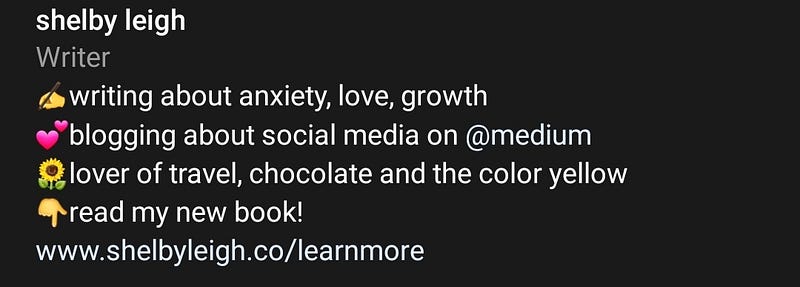
I change mine up every few months, but here’s my current bio.

It may not be the greatest bio of all time, but it’s clear that I write, it has a call-to-action, and I include a couple of my other hobbies and likes.
Screenshot provided by the author.

Create a landing page for all of your links

There’s only space for one link on most social platforms.

You need to use that space wisely, and luckily there’s a simple solution.

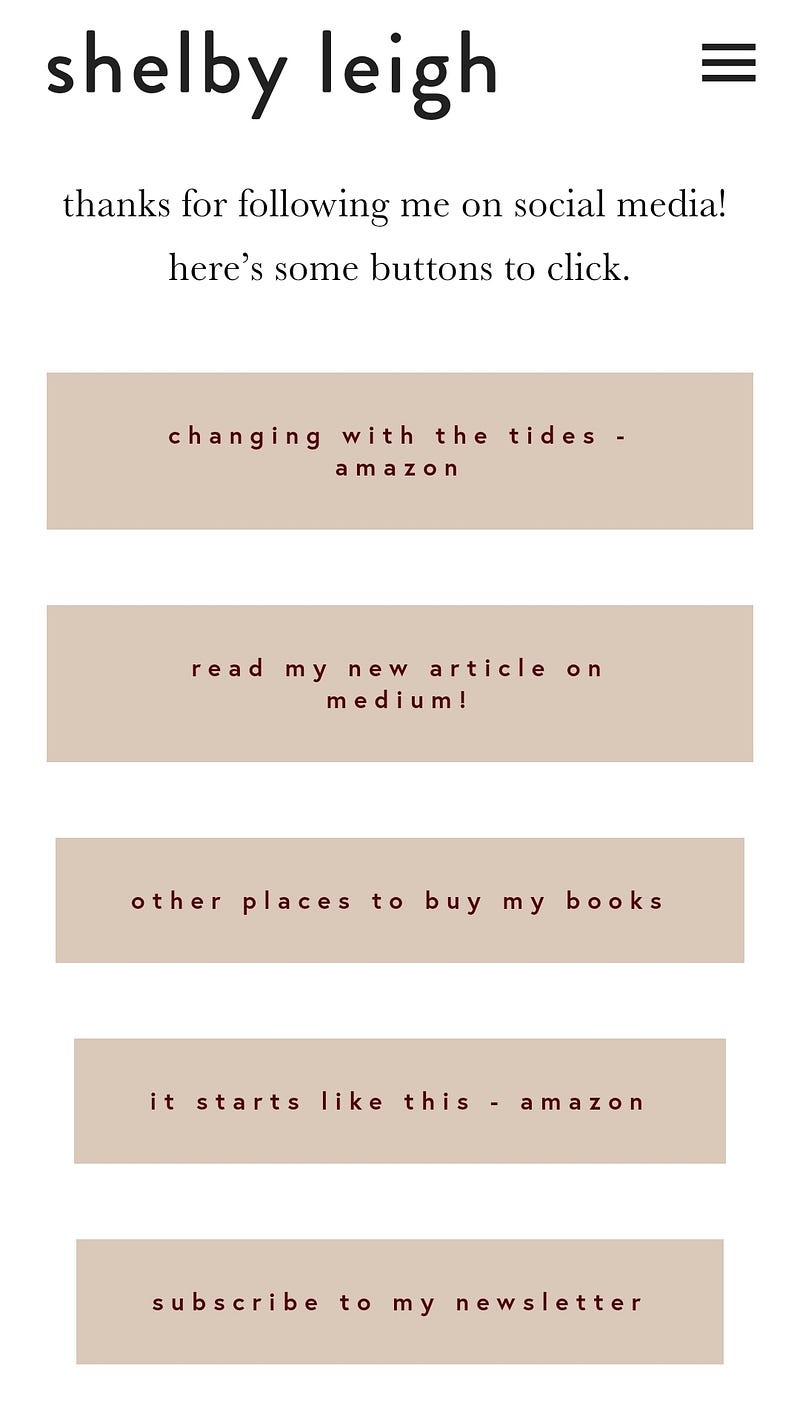
Create a landing page for all of your links on your website. This will give you one unique URL that you can use in your social media bios, but it will lead your readers to a list of links.

I use this link on my Instagram and Twitter, so people can click on it and find links to the places that I want them to go.

If you’re confused, here is what mine looks like.
Screenshot provided by the author.

If you don’t have a website (you definitely should), there are other options. Linktree is a free website that lets you create a URL to house all of your links.

However, there are a few downsides:

  • You can’t customize the branding/colors unless you pay for the pro version
  • You’re sending traffic to Linktree, rather than directly to your website
  • Instagram has been known to flag Linktree links as spam in the past (it happened to me in 2018!)

This is a good option while you’re working on building your website, but if you already have a website, go create your custom landing page!

Use highlights strategically

Highlights are a feature on Instagram that let you make your stories visible on your profile for as long as you want them there (rather than the standard 24 hour time frame).

Use the Highlights feature to humanize yourself, thank your readers, and more.

Create a new highlight by going to your profile and clicking “New”. Then, add a cover image, give it a name, and add as many of your past Instagram stories as you want.

Screenshot provided by the author.

A few examples of Highlights I use are:

  • “Thank you”: Anytime someone posts a picture of my books on their story, I add it to this collection. Not only does this make my readers feel appreciated, it’s also a way to show my work to people who visit my profile.
  • “Happy”: I added this Highlight as a way to personalize my page and share what makes me happy. I post concert photos, a lot of dessert photos, and other miscellaneous things I do beside write.
  • I also have highlights to showcase my articles and links to purchase my books.

There you have it! Four simple things you can start today that will help you market yourself as a writer on social media.

Which strategy are you going to implement first?

Shelby Leigh is a top writer in Social Media and Creativity, and is the author of two poetry books. She loves sharing her knowledge of social media marketing for writers. Keep up with her daily writing on Instagram @shelbyleighpoetry and join her newsletter here.

Read more by Shelby:

Social Media
Writing
Freelancing
Creativity
Marketing
Recommended from ReadMedium