
4 killer SQL commands to take your SQL skills to the next level
And how to master these time-saving commands

SQL is a normally self-learned language. Its simplicity and fast learning curve make it the perfect language to crash into Data Science.
I am pretty sure you have self-learned SQL, and you are already really good at it.
However, with the rising volume of data, the need for skilled — and qualified — data professionals is at its highest ever. Specifically, there’s been a growing need for professionals who are fluent in SQL — and not just at a beginner level.
This is why knowing SQL concepts is not enough, you should be able to implement them at your work efficiently.
Therefore, I listed here 4 powerful SQL concepts with explanations and query examples that you should know to master SQL👇🏻
#1. COALESCE
The COALESCEfunction returns the first non-null expression in a list. This command is especially life-changing when working with our data to be displayed in a dashboard. Let’s break down this idea.
Let’s imagine, I have a column storing how much money I have spent for a month.
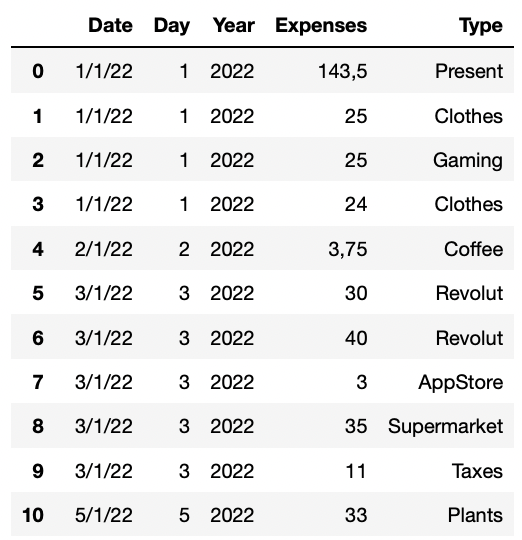
Using this input table, I can easily compute how much money I have spent daily aggregating all expenses by date and day.
As the resulting output, we obtain the following table:
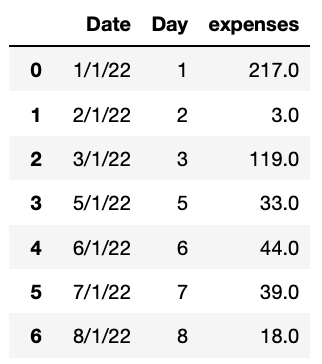
So what’s the problem? For those days without any transaction, there won’t be any record. We can easily observe this in the previous table as there is a gap between the 3rd and the 5th day. 4th January had no transaction — so there is no record of it.
I can easily assess this by first creating a table with all January days and then joining to each day the corresponding amount of money spent. However, this will produce a side effect. The corresponding output table will contain many null-valued cells corresponding to all those days that have no transactions.
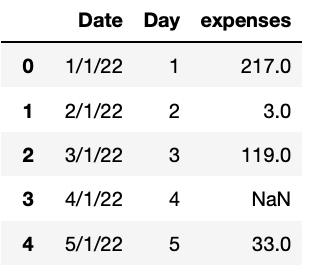
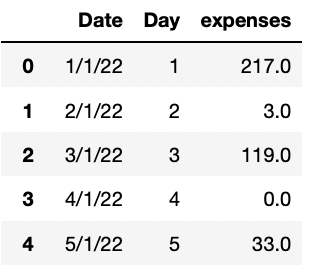
There’s where the COALESCEelement plays its role. We can easily substitute any null-valued cell of the expenses column by a zero using this command.
Now we just made sure that all all cells contain a non-null value.
#2. Computing deltas using the LAG function
Calculating delta values is probably one of data analysts’ most common tasks. This is usually required when calculating day-to-day, month-to-month, or year-to-year changes.
Be it revenue, costs, price changes, volume changes — or anything else imaginable — you’ll need to calculate the time difference between numbers. To do so, an advanced SQL query with the LAG() function is what you need.
This function is used to retrieve the data from a previous row. Let me show you how it works using once again the sample table used before.
Our main goal will be to compute the day-to-day amount of spent money difference.
To do so, we need to compute the previous value of each indicator. Hence, the LAG function needs to be calculated sequentially, not by random days — and this is why there’s ORDER BY Day.
You can find the corresponding query as follows:
The corresponding output table will contain in every row the amount of money spent during that specific day — and the amount of money spent during the previous day contained in the lag_expenses column.
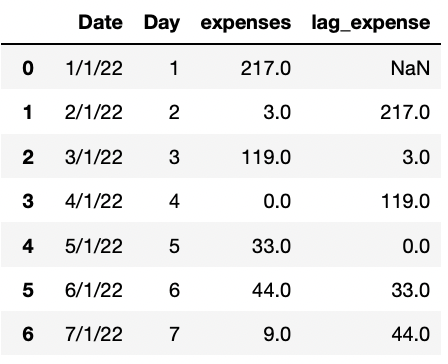
To compute the delta indicator, we just need to deduct the previous day from the current day. The code below does exactly this.
And the corresponding output looks as follows:
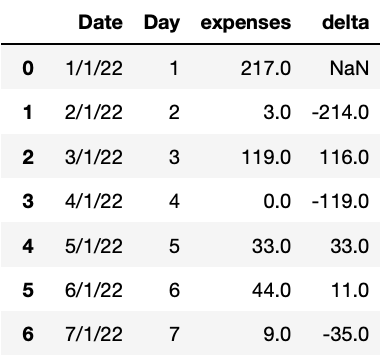
Some of you might have noticed something while observing the table above. The first day — or first temporal record — contains a null-value in its delta columns. Actually, if you check the previous table containing the lag_expenses column, you will observe the first temporal record was null as well.
To asses this, we can use the COALESCEelement.
Now, our final output contains all deltas.
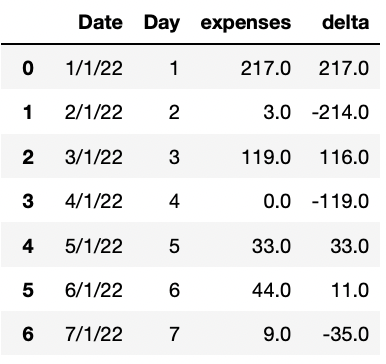
⚠️ There is another important input for the LAG() function. The function accepts a second input to define how many rows the function goes back to perform the operation.
This means if we define LAG(variable, 1), we get the previous time-unit value of the variable column. However, if we set another number — let’s imagine a 3 — the LAG(variable, 3) would get the value from 3 time units before.
#3. Rank vs Dense Rank vs Row Number
After computing temporal changes, ordering stuff is the second most frequent task of any data analyst.
From ranking highest valued customers by number of purchases, or the top products by number of units sold it is very common application to rank rows and values.
In SQL, there’s several ways that you can assign a rank to a row, which we’ll dive into with an example. Consider once again the same example as before, but now we want to know what is the highest type of expense.
To do so, sum all expenses and group them by the type of expense with the resulting output table.
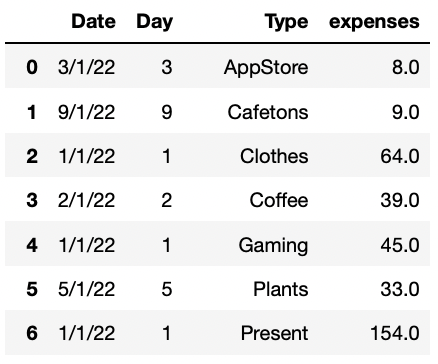
We want to know where do I spend the most money. There are different ways to do it. We can use all ROW_NUMBER() , RANK() and DENSE_RANK() . We will order the previous table using all three functions and see what are the main differences between them using the following query:
Obtaining the following output.
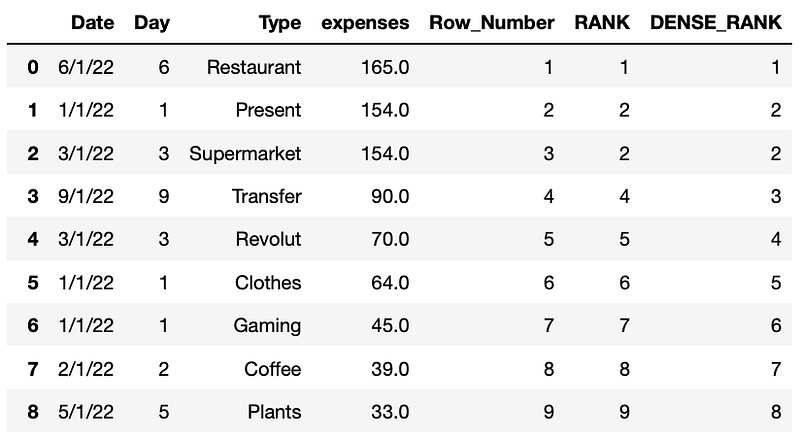
Can you see the difference between all three functions? The main difference between them is the way they deal with ties. We will further deep-dive their differences:
ROW_NUMBER()returns a unique number for each row starting at 1. When there are ties, it arbitrarily assigns a number if a second criteria is not defined.RANK()returns a unique number for each row starting at 1, except for when there are ties, then it will assign the same number. As well, a gap will follow a duplicate rank.DENSE_RANK()leaves no gaps after a duplicate rank.
#4. Calculating Running Totals
The running total is probably one of the most useful window functions especially when you want to visualize growth. Using a window function with SUM(), we can calculate a cumulative aggregation.
To do so, we just need to sum a variable using the aggregator SUM() but order this function using a second column. In our time, we will use our time unit Day. You can observe the corresponding query as follows:
The corresponding output looks like follows.
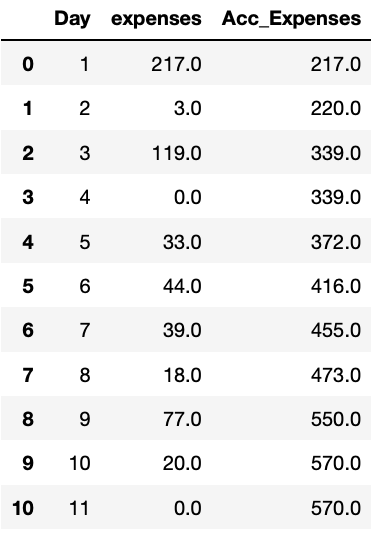
As you can observe in the table above, now we have the accumulated aggregation of the amount of money spent as the month passes by.
Conclusion
SQL is great. It’s one of the bases of data analysis, data science, and any other data-related field — and it is here to stay.
This is why you should care to keep improving your SQL skills. In this article, I summarized 4 advanced commands in SQL — some of them by experience. But there are way more!
Hope you find it useful to level up your SQL skills! :)
Data always has a better idea — trust it.
You can suscribe to my Medium Newsletter to stay tuned and receive my content. I promise it will be unique!
If you are not a full Medium member yet, just check it out here to support me and many other writers. It really helps :D
Some other nice medium related articles you should go check out! :D


