avatarThe PyCoach

Free AI web copilot to create summaries, insights and extended knowledge, download it at here

2286

Abstract

ay Store</a></p><h2 id="e512">Skype</h2><p id="3207">Probably most of you have switched from Skype to Zoom or Google Meet a long time ago, but the integration of Bing into Skype might make you at least give Skype a try.</p><p id="c807">When you log in to Skype, you’ll see a new Bing chat that can help you get answers, come up with new ideas, or summarize your text right from Skype.</p><p id="f802">In the example below I ask Bing to create a 30-minute workout routine.</p><figure id="eabc"><img src="https://cdn-images-1.readmedium.com/v2/resize:fit:800/1*OvtU-m5MR9CZ0HvWcfTiDg.png"><figcaption>Image by author</figcaption></figure><p id="0833">Another cool thing you can do on Skype is add Bing to a group chat.</p><p id="03f4">First, you have to create a group chat and then you have to add Bing to the group. Once Bing is added to the group, you can include it in the conversation by clicking on the Bing button in the lower-right corner or simply typing @ Bing followed by your question.</p><p id="acb5"><a href="https://apps.apple.com/us/app/skype/id304878510">Skype on the App Store</a>, <a href="https://play.google.com/store/apps/details?id=com.skype.raider">Skype on the Play Store</a></p><h2 id="c21f">SwiftKey</h2><p id="3a7f">SwiftKey is an intelligent keyboard from Microsoft that helps you type faster and even learns your writing style.</p><p id="ecd5">In the latest version, Microsoft introduced the new Bing in SwiftKey. Bing in SwiftKey provides three main features:</p><ul><li>Search: You can search anything on the internet right from your keyboard</li><li>Tone: You can change the tone of your sentence with one click. There are 4 tones available — professional, casual, polite, and social post.</li><li>Chat: Start a new conversation with Bing</li></ul><figure id="edf5"><img src="https://cdn-images-1.readmedium.com/v2/resize:fit:800/1*N7kjtDdXTsS06cej8ntHrQ.png"><figcaption>Image by author</figcaption></figure><p id="ed5c">SwiftKey makes it easy to use some of the most advanced AI-powered tools available</p><p id="c88d"><a href="https://apps.apple.com/us/app/microsoft-swiftkey-keyboard/id911813648">Microsoft SwiftKey Keyboard on the App Store</a>, <a href="https://play.google.com/store/apps/details?id=com.touchtype.swiftkey">Microsoft SwiftKey Keyboa

Options

rd on the Play Store</a></p><h2 id="df5c">S-GPT (iPhone Shortcut)</h2><p id="09d5">S-GPT isn’t an app, but a shortcut that is available to only Apple devices. Unlike other shortcuts, S-GPT connects ChatGPT with native iOS functions like the reminder, calendar, music app, clipboard, and more!</p><p id="fd5c">Here’s an example of how S-GPT summarizes text from an article by only copying the link to the clipboard.</p><figure id="282b"><img src="https://cdn-images-1.readmedium.com/v2/resize:fit:800/1*fCSbo89F7skbUHEbqW9PRg.png"><figcaption>Image by <a href="undefined">Diana Dovgopol</a></figcaption></figure><p id="c546">Setting up S-GPT on your iPhone isn’t straightforward, so check this <a href="https://readmedium.com/a82be1676492">step-by-step guide</a> on how to install S-GPT for iPhone and learn everything you can do with this shortcut.</p><p id="5ab9"><i>Note: This shortcut isn’t free, but on average its monthly use is very inexpensive.</i></p><h2 id="d28e">Artificial Corner’s Free ChatGPT Cheat Sheet</h2><p id="4c9c">We’re offering a free cheat sheet to our readers. <a href="https://frankandrade.ck.page/08c94cf1c1"><b>Join our newsletter with 20K+ people and get our free ChatGPT cheat sheet.</b></a></p><p id="94db">If you enjoy reading stories like these and want to support me as a writer, consider signing up to become a Medium member. It’s $5 a month, giving you unlimited access to thousands of Python guides and Data science articles. If you sign up using <a href="https://frank-andrade.medium.com/membership">my link</a>, I’ll earn a small commission with no extra cost to you.</p><div id="d769" class="link-block"> <a href="https://frank-andrade.medium.com/membership"> <div> <div> <h2>Join Medium with my referral link — Frank Andrade</h2> <div><h3>As a Medium member, a portion of your membership fee goes to writers you read, and you get full access to every story…</h3></div> <div><p>frank-andrade.medium.com</p></div> </div> <div> <div style="background-image: url(https://miro.readmedium.com/v2/resize:fit:320/0*xJErm7xRo6Ru3zNo)"></div> </div> </div> </a> </div></article></body>

4 Free Apps to Unleash the Power of ChatGPT (GPT-4) On Your Phone

Apps to get GPT-4 on iOS and Android devices.
Image by Shantanu Kumar on Pexels

Wouldn’t it be cool if you could have free access to GPT-4, the model that powers ChatGPT, right on your phone?

Well, now you can have access to it on your phone through different apps. Whether you’re an Android or iPhone user, you’ll be able to unleash the power of GPT-4 on your phone using the apps below.

Bing: Chat with AI & GPT-4

Bing is Microsoft’s AI search engine that is powered by GPT-4.

Besides helping you with regular web searches, with Bing, you can unleash the power of ChatGPT in your searches to get your answer right away instead of scrolling through endless links.

But that’s not all! Like ChatGPT, Bing can become your writing assistant and help you with different tasks. To name a few:

  • Write emails
  • Plan your vacations
  • Prepare for a job interview
  • Proofread content in multiple languages
  • Create lyrics for a song

Here are some ideas for a weekend getaway that Bing generated.
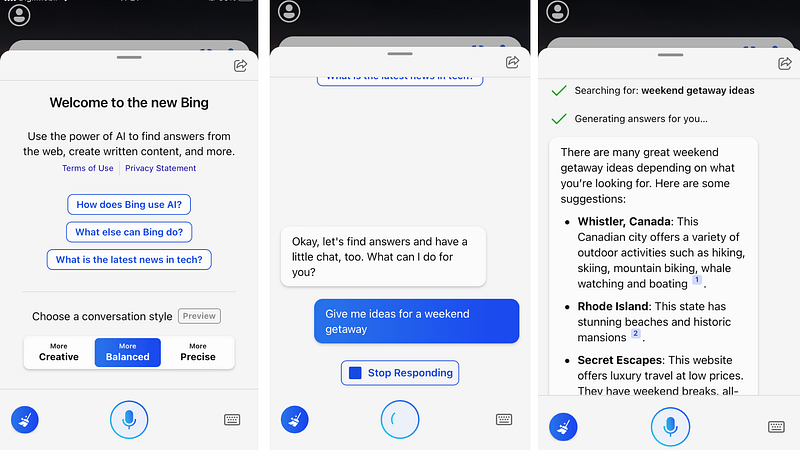
Image by author

Also, Bing can help you generate images. The AI art generated by Bing isn’t as good as Midjourney but, hey, it's free!

To know more about what you can do with the new Bing, read this article I wrote.

Bing on the App Store, Bing on the Play Store

Skype

Probably most of you have switched from Skype to Zoom or Google Meet a long time ago, but the integration of Bing into Skype might make you at least give Skype a try.

When you log in to Skype, you’ll see a new Bing chat that can help you get answers, come up with new ideas, or summarize your text right from Skype.

In the example below I ask Bing to create a 30-minute workout routine.
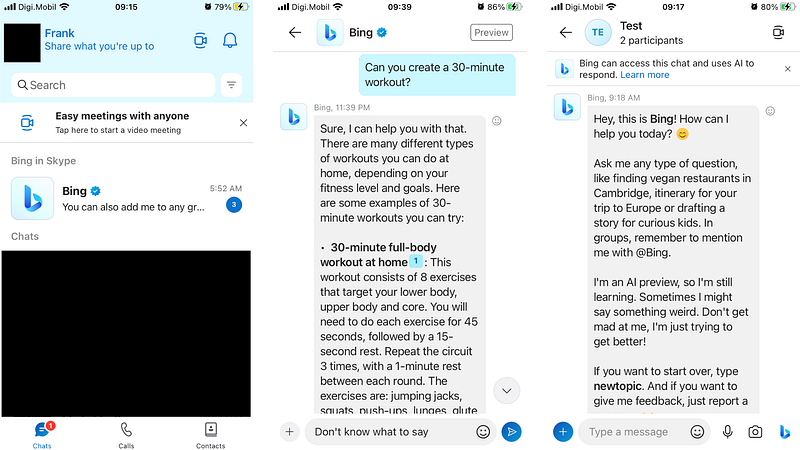
Image by author

Another cool thing you can do on Skype is add Bing to a group chat.

First, you have to create a group chat and then you have to add Bing to the group. Once Bing is added to the group, you can include it in the conversation by clicking on the Bing button in the lower-right corner or simply typing @ Bing followed by your question.

Skype on the App Store, Skype on the Play Store

SwiftKey

SwiftKey is an intelligent keyboard from Microsoft that helps you type faster and even learns your writing style.

In the latest version, Microsoft introduced the new Bing in SwiftKey. Bing in SwiftKey provides three main features:

  • Search: You can search anything on the internet right from your keyboard
  • Tone: You can change the tone of your sentence with one click. There are 4 tones available — professional, casual, polite, and social post.
  • Chat: Start a new conversation with Bing
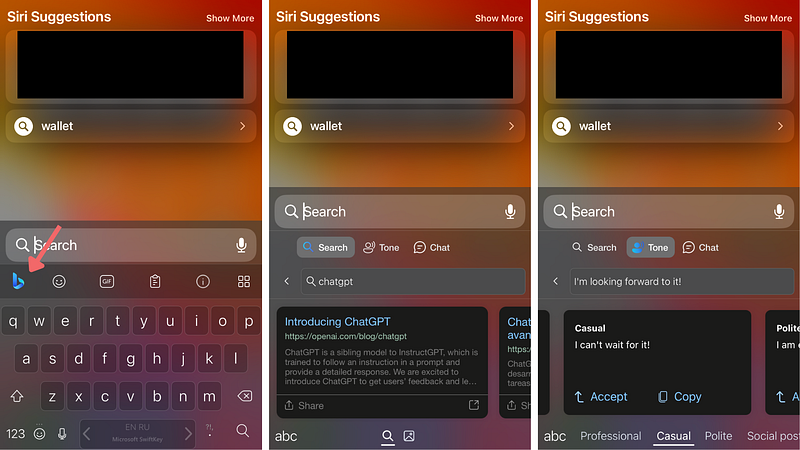
Image by author

SwiftKey makes it easy to use some of the most advanced AI-powered tools available

Microsoft SwiftKey Keyboard on the App Store, Microsoft SwiftKey Keyboard on the Play Store

S-GPT (iPhone Shortcut)

S-GPT isn’t an app, but a shortcut that is available to only Apple devices. Unlike other shortcuts, S-GPT connects ChatGPT with native iOS functions like the reminder, calendar, music app, clipboard, and more!

Here’s an example of how S-GPT summarizes text from an article by only copying the link to the clipboard.
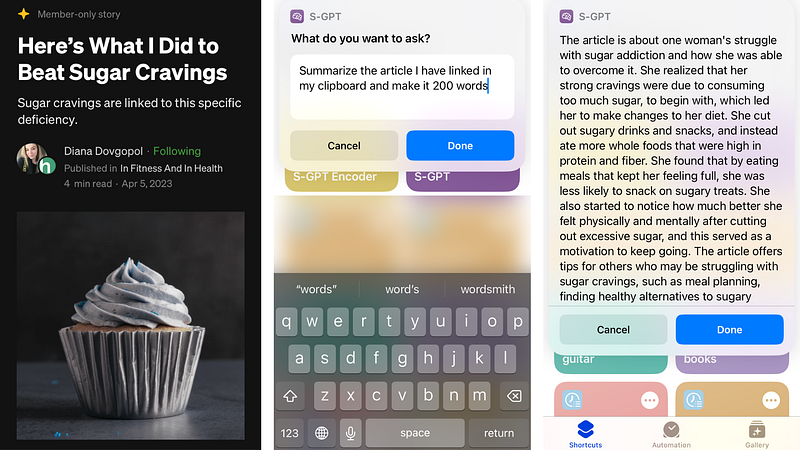
Image by Diana Dovgopol

Setting up S-GPT on your iPhone isn’t straightforward, so check this step-by-step guide on how to install S-GPT for iPhone and learn everything you can do with this shortcut.

Note: This shortcut isn’t free, but on average its monthly use is very inexpensive.

Artificial Corner’s Free ChatGPT Cheat Sheet

We’re offering a free cheat sheet to our readers. Join our newsletter with 20K+ people and get our free ChatGPT cheat sheet.

If you enjoy reading stories like these and want to support me as a writer, consider signing up to become a Medium member. It’s $5 a month, giving you unlimited access to thousands of Python guides and Data science articles. If you sign up using my link, I’ll earn a small commission with no extra cost to you.

ChatGPT
Artificial Intelligence
Technology
Apple
Science
Recommended from ReadMedium