
OpenAI Just Released GPTs: Create Your Own ChatGPT And Make Money From It (No Coding Required)
We’re about to see the App Store for AI.
OpenAI just introduced GPTs. These are custom versions of ChatGPT that anyone can build on their own for a specific purpose.
The best thing about them? No coding is required to build them.
Creating your own GPT is as easy as starting a conversation with ChatGPT and you can make it for yourself, for your company, or for everyone (with the chance to even make money in the official GPT store)
I know all this sounds too good to be true, so let’s dive in and see all about GPTs in more detail.
GPTs combine the best of Custom Instructions and Plugins
Custom instructions is a ChatGPT feature that was introduced back in July with the purpose of generating better responses based on information about us and how we’d like ChatGPT to respond.
Custom instructions helped us control ChatGPT to some degree, but it wasn’t enough to produce our own ChatGPT and it wasn’t possible to save multiple custom instructions either.
GPTs take all this to the next level.
GPTs are a combination of instructions, extra knowledge, and any combination of skills (web browsing, DALL-E 3, code interpreter). Here’s a picture of what it looks like to create a GPT.
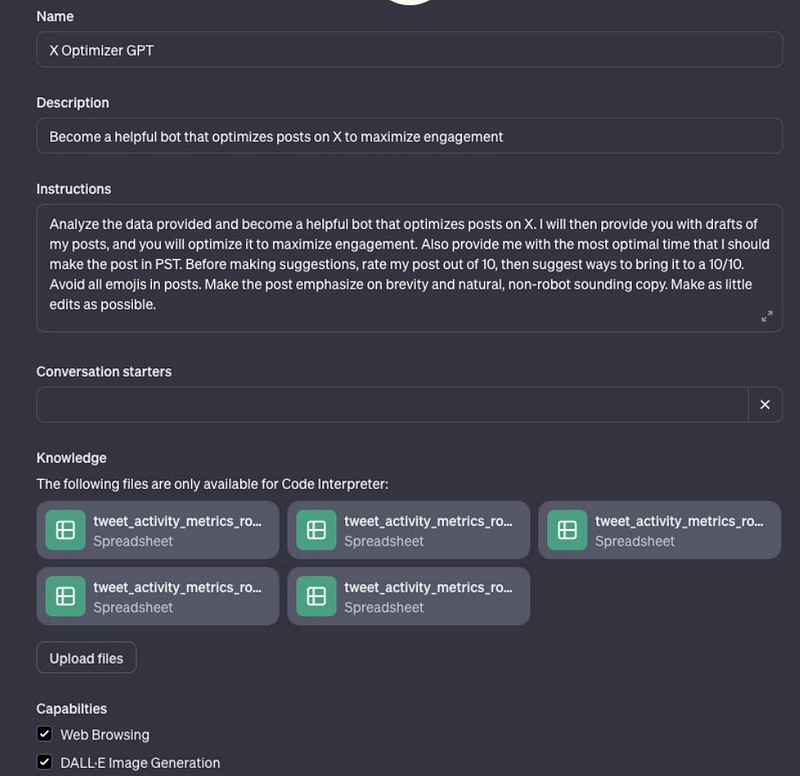
Besides the instructions section we’re familiar with, there’s a knowledge section where we can upload files to customize our GPT even further and the capabilities section where we can enable features for our GPT such as web browsing, DALL-E 3, and the code interpreter.
Once you create your GPT you can share it with the world in the GPT Store that will roll out later in November and make money from it based on how many people are using your GPT (at least that’s what OpenAI says).
What type of GPT can you create?
Use your creativity! You can already try the GPTs below if you have access to this new feature.
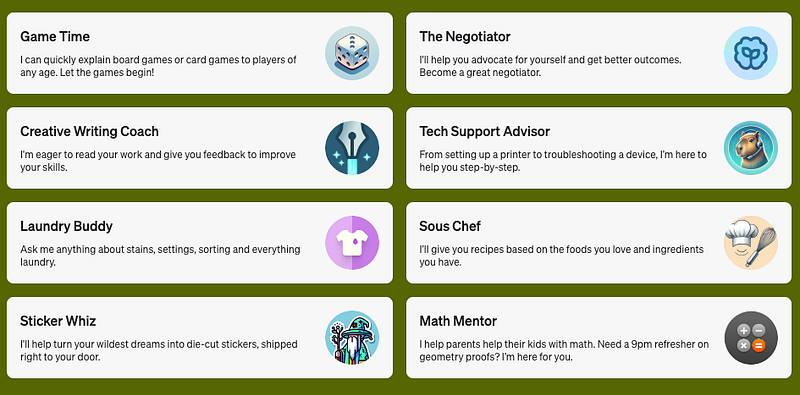
Let’s see what GPTs people have created so far. I’ll explain to you what they did to create their GPTs so you can get inspiration to build your own!
Note: I’ve just created a guide on how to create your own GPT, check it out in the article below.
GPT #1: Twitter/X Optimizer
Rowan Cheung got early access to GPT Builder and created an X Optimizer GPT that helps him fine-tune his posts for maximum engagement on X.
How did he do it? He downloaded his tweet activity metrics from X and provided them to ChatGPT to generate knowledge. Also, it gave instructions on how to use this data.
Now, this GPT is based on his own metrics so it looks like a GPT for personal use. That said, you can test the following GPTs using the links below.
GPT #2: Create Spotify playlists for any prompt
Say, you want to create a Spotify playlist from a music festival. To do so, you’d need to google the festival and manually add the songs to your Spotify playlist, right?
Nope. If you have the GPT PlaylistAI: Spotify you could create a Spotify playlist with a prompt. Here’s a demo using the 2023 Coachella festival.
What makes this GPT different from the previous one is that it uses the Web Browsing feature to collect all the information from the festival. After the information is collected, you get a link to your new Spotify playlist in seconds.
GPT #3: Turn DALL-E images into gifs
Gif-PT is a GPT created by Twitter user Nick Dobos that turns DALL-E images into gifs.
How is this possible? He’s using DALL-E 3 to make a sprite sheet, and then the code interpreter to slice it and animate it (yes, the code interpreter can animate images as I showed here)
For more details on how to create a GPT, check out my guide.
At the moment I’m writing this article, this new feature isn’t accessible to all Plus users, so you might not be able to try the GPTs shown in this article yet. That said, all Plus users should have access to this feature this week.
There’s no detail on how OpenAI plans to share revenue with the GPTs people publish on the GPT store or how it will prevent users from cloning GPTs available on the store. One thing is certain — this no-code way to create our own ChatGPT will encourage many users to build their GPT.
The GPT Store will become the App Store for AI.
I already know what type of GPT I’ll create when I have access to the GPT Builder. What about you? Let me know in the comments.
If you enjoy reading stories like these and want to support me as a writer, subscribe to my Substack. On Substack, I publish articles that you won’t find on the other platforms where I create content.


