mages-1.readmedium.com/v2/resize:fit:800/1*beMOxEudbrFdR6UqPuvVFQ.png"><figcaption>Screenshot</figcaption></figure><p id="085e">You only need to provide the link and the type of analysis you want to do with it.</p><p id="ba7e">Let’s start by summarizing an <a href="https://artificialcorner.com/write-for-artificial-corner-85c3cbcfda0">800-word article</a> that describes the rules writers have to follow to submit an article to my website.</p><figure id="1982"><img src="https://cdn-images-1.readmedium.com/v2/resize:fit:800/1*LQNICUC0QgWbx0FZiJfWEA.png"><figcaption>Screenshot</figcaption></figure><p id="addf">The way it summarized the 3 sections of the article was very impressive. It even included the email to which writers should send their drafts.</p><p id="5fbb">I also tried summarizing a <a href="https://www.ncbi.nlm.nih.gov/pmc/articles/PMC1964229/pdf/15333167.pdf">PDF</a> about AI in medicine by providing its link and it did a good job.</p><figure id="902b"><img src="https://cdn-images-1.readmedium.com/v2/resize:fit:800/1*7WhahUUAoewBoRhy3jO3pA.png"><figcaption>Screenshot</figcaption></figure><p id="2574">Just like that, you can analyze images, PPT, Word, and other docs, but it might sometimes fail.</p><p id="4442">That’s why whenever I have issues with a specific file format, I use other plugins. Below is one that always works with PDFs.</p><h2 id="79d8">ChatGPT Plugin #3: Ask Your PDF</h2><p id="61c2">Reading papers and articles is sometimes difficult because some are complex and technical, but now we can easily summarize PDFs in a few seconds with the ChatGPT plugin Ask Your PDF.</p><figure id="dde8"><img src="https://cdn-images-1.readmedium.com/v2/resize:fit:800/1*0-ueOrXyqle8GWHbm2O-sA.png"><figcaption>Screenshot</figcaption></figure><p id="fe24">You don’t need an extra AI tool to do this, but you can summarize any PDF right from ChatGPT.</p><p id="df96">To work with this plugin you need to provide it with a link that ends with <code>.pdf</code> or with a PDF file that you have on your computer.</p><p id="8a48">I tried to summarize this <a href="https://www.ncbi.nlm.nih.gov/pmc/articles/PMC1964229/pdf/15333167.pdf">PDF</a> about AI in medicine using its link, but it wasn’t possible, so I upload the document and pasted the Doc ID.</p><figure id="36c2"><img src="https://cdn-images-1.readmedium.com/v2/resize:fit:800/1*hODxqamGjSB_zOF5E5JkQg.png"><figcaption>Screenshot</figcaption></figure><h2 id="151d">ChatGPT Plugin #4: Speak</h2><p id="5ffd">If you’re into learning foreign languages, you’ll love this ChatGPT plugin.</p><p id="03be">In the past, you had to use some prompt engineering techniques to <a href="https://readmedium.com/f7e7e38b1cee">turn ChatGPT into your AI language tutor</a>, but with the plugin Speak, you just need to ask a simple question to obtain a detailed explanation.</p><figure id="d650"><img src="https://cdn-images-1.readmedium.com/v2/resize:fit:800/1*G_wg1xelzi0VCcIkHZym2Q.png"><figcaption>Screenshot</figcaption></figure><p id="1d79">Here’s how ChatGPT would teach me how to say “I like AI” in Spanish.</p><figure id="9136"><img src="https://cdn-images-1.readmedium.com/v2/resize:fit:800/1*rNKil_LyKQcHcbZayZs_ZA.png"><figcaption>Screenshot</figcaption></figure><p id="2d9e">It gives the answer but it’s very basic (like Google Translator). However, Speak gives alternatives and example conversations.</p><figure id="b55f"><img src="https://cdn-images-1.readmedium.com/v2/resize:fit:800/1*e62e4E70JhThW3M6ENrziQ.png"><figcaption>Screenshot</figcaption></figure><p id="7087">As a Spanish speaker, I have to say that the vocabulary suggested is good, but the example conversation doesn’t make much sense (it’s still grammatically correct though).</p><p id="9225">In previous tests the answer given was perfect. Hopefully, in the future, the plugin will be more consistent with the quality of the responses.</p><h2 id="6a53">ChatGPT Plugin #5: There’s an AI for That</h2><p id="edfa">Tired of wasting hours looking for an AI tool that makes your life easier? Look no more! With the ChatGPT plugin, “There’s an AI for That” you’ll find a list of AI tools for you in seconds.</p><figure id="7ef1"><img src="https://cdn
Options
-images-1.readmedium.com/v2/resize:fit:800/1*WB8an9EvSTJ47JBxPT50uw.png"><figcaption>Screenshot</figcaption></figure><p id="6c53">The other day, a friend of mine asked me about AI tools for web design. I felt embarrassed that I didn’t know even one, but thanks to this plugin now I can recommend him 10 good AI tools.</p><figure id="e5b1"><img src="https://cdn-images-1.readmedium.com/v2/resize:fit:800/1*hLdM0VPCoG9bMPDYHyg_eA.png"><figcaption>Screenshot</figcaption></figure><p id="f8eb">When you click on any of the links listed you’ll be redirected to the website of the plugin. There you can find a quick description of the tool, price, and the link to visit its website.</p><h2 id="6564">ChatGPT Plugin #6: Wolfram</h2><p id="f017">Wolfram is a ChatGPT plugin that allows us to compute expert-level answers using Wolfram’s algorithms and AI technology.</p><figure id="5333"><img src="https://cdn-images-1.readmedium.com/v2/resize:fit:800/1*_9-NWMKwKbhFJHxZMHoCZg.png"><figcaption>Screenshot</figcaption></figure><p id="0aac">Wolfram’s is commonly used for maths. It can provide step-by-step solutions for algebra, geometry, statistics calculus problems, and more.</p><p id="b204">The best part is that you can use Wolfram’s capabilities to help you in your everyday life like calculating a weight-loss regimen.</p><figure id="b271"><img src="https://cdn-images-1.readmedium.com/v2/resize:fit:800/1*-kjggYewK9ZGW1a4ZH0nMw.png"><figcaption>Screenshot</figcaption></figure><p id="5c6e">Wolfram can also plot charts, which ChatGPT can’t do natively.</p><p id="eab3">Say we want to compare the population growth trends between the USA and Brazil from 1920 to 2020. Here’s how Wolfram would do it.</p><figure id="188e"><img src="https://cdn-images-1.readmedium.com/v2/resize:fit:800/1*0sRlwY_mb7bPB9CYuGzA9w.png"><figcaption>Screenshot</figcaption></figure><h2 id="01e3">ChatGPT Plugin #7: Prompt Perfect</h2><p id="9d0f">Prompt Perfect is a ChatGPT plugin that can optimize prompts for ChatGPT, Midjourney, DALL-E, and other tools.</p><figure id="84ef"><img src="https://cdn-images-1.readmedium.com/v2/resize:fit:800/1*b1VgGzv58JDl-FAHx0uhNw.png"><figcaption>Screenshot</figcaption></figure><p id="6bc5">Prompt Perfect works fine on its website but for some reason the ChatGPT plugin isn’t as good. Here’s an example of a Midjourney prompt I tried to optimize.</p><figure id="ee30"><img src="https://cdn-images-1.readmedium.com/v2/resize:fit:800/1*c45naQQgjkRfDZKo13xIzg.png"><figcaption>Screenshot</figcaption></figure><p id="8354">That wasn’t the prompt I was expecting … actually, I was expecting an optimization like the one below.</p><figure id="61fd"><img src="https://cdn-images-1.readmedium.com/v2/resize:fit:800/1*mLw8TwIjAnefhvIq8Euhgw.png"><figcaption>Screenshot</figcaption></figure><p id="f26a">Hopefully, in new updates, this plugin will be as good as on the website.</p><h2 id="d28e">Artificial Corner’s Free ChatGPT Cheat Sheet</h2><p id="4c9c">We’re offering a free cheat sheet to our readers. <a href="https://frankandrade.ck.page/08c94cf1c1"><b>Join our newsletter with 20K+ people and get our free ChatGPT cheat sheet.</b></a></p><p id="01b7">If you enjoy reading stories like these and want to support me as a writer, consider signing up to become a Medium member. It’s $5 a month, giving you unlimited access to thousands of Python guides and Data science articles. If you sign up using <a href="https://frank-andrade.medium.com/membership">my link</a>, I’ll earn a small commission with no extra cost to you.</p><div id="7dd1" class="link-block">
<a href="https://thepycoach.com/membership">
<div>
<div>
<h2>Join Medium with my referral link — The PyCoach</h2>
<div><h3>Read every story from The PyCoach (and thousands of other writers on Medium). Your membership fee directly supports The…</h3></div>
<div><p>thepycoach.com</p></div>
</div>
<div>
<div style="background-image: url(https://miro.readmedium.com/v2/resize:fit:320/0*HbYeE8xngcqiLhOo)"></div>
</div>
</div>
</a>
</div></article></body>
I Tried 84 ChatGPT Plugins. These are the Best
Plugins are the best thing that happened to ChatGPT. Here are the best plugins available in the Plugin Store.

Plugins is a new functionality available to ChatGPT Plus users that will change ChatGPT forever because it adds many features to what ChatGPT can do natively.
As of today, there are around 84 plugins in the Plugin Store. I tried them all and, in this article, I’ll share with you what I think are the best plugins available.
Below are the ChatGPT plugins that are making my life easier.
If you don’t feel like reading, you can watch my YouTube video below.
First Things First — Enable Plugins on Your Account
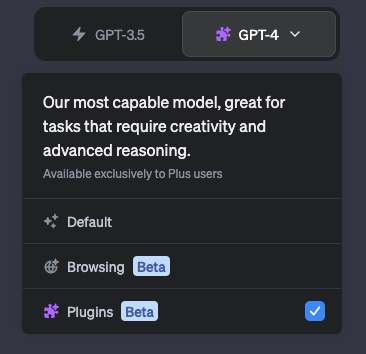
To turn on plugins, go to ChatGPT, click on the three dots in the lower-left corner, click on settings, select “Beta features” and turn on Plugins. Then close the window and select Plugins from GPT-4.
Screenshot
You can install any plugin from the plugin store. Plugins are only available to ChatGPT Plus users.
ChatGPT Plugin #1: Video Insights
If you’re like me and watch a lot of YouTube videos, this plugin is for you. Video Insights is a ChatGPT plugin that allows us to interact with online video platforms like YouTube or Daily Motion. This means that we can analyze entire YouTube videos and get insights from them in a few seconds!

Screenshot
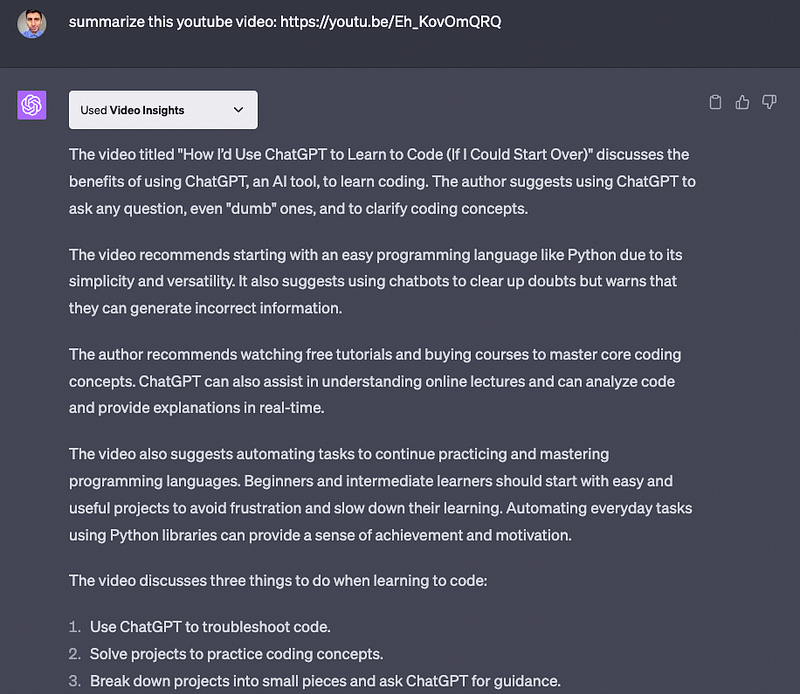
I did a test with one of my YouTube videos titled How I’d Use ChatGPT to Learn to Code published in December 2022 and this plugin did a great job summarizing my entire video!
Screenshot
All the key points I mentioned in the video were in the summary. Amazing!
Some issues this plugin has is that it can’t summarize videos longer than 10 minutes and it sometimes throws timeout errors.
That said, Video Insights can analyze videos that were published even a few hours ago. I asked it to summarize this YouTube video, which was released hours before writing this post and it did it!

Screenshot
ChatGPT Plugin #2: Link Reader
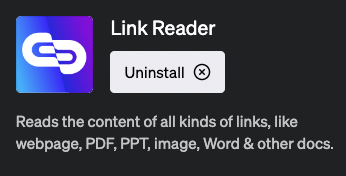
Now we can analyze the content in web pages, PDFs, PPTs, and all kinds of links inside ChatGPT with the plugin Link Reader.
Screenshot
You only need to provide the link and the type of analysis you want to do with it.
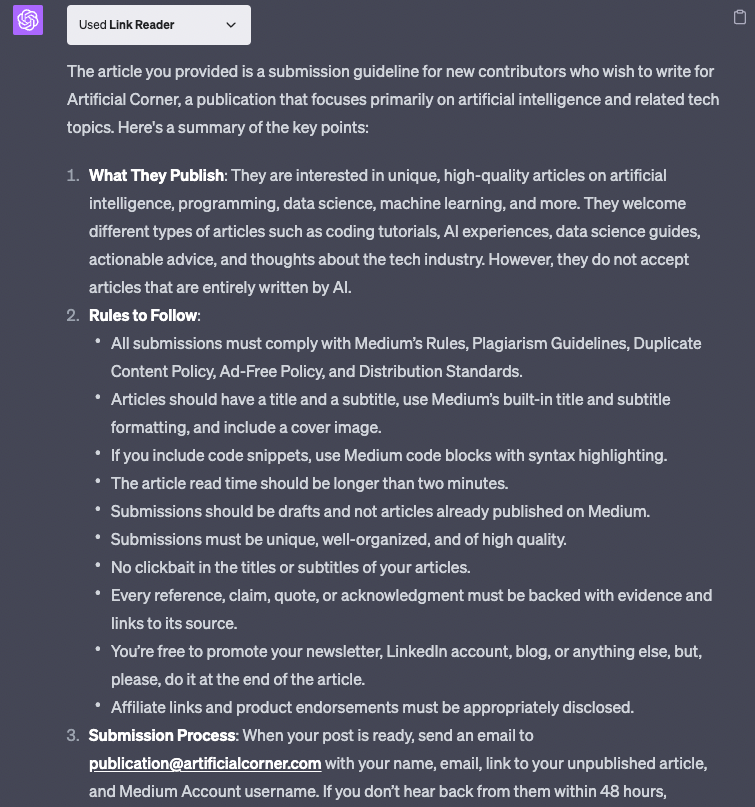
Let’s start by summarizing an 800-word article that describes the rules writers have to follow to submit an article to my website.
Screenshot
The way it summarized the 3 sections of the article was very impressive. It even included the email to which writers should send their drafts.
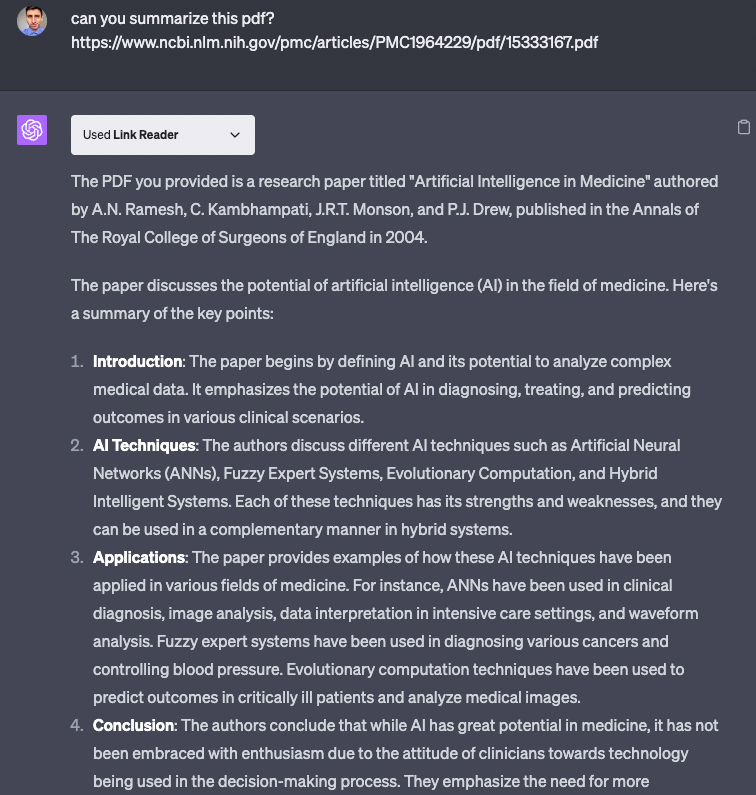
I also tried summarizing a PDF about AI in medicine by providing its link and it did a good job.
Screenshot
Just like that, you can analyze images, PPT, Word, and other docs, but it might sometimes fail.
That’s why whenever I have issues with a specific file format, I use other plugins. Below is one that always works with PDFs.
ChatGPT Plugin #3: Ask Your PDF
Reading papers and articles is sometimes difficult because some are complex and technical, but now we can easily summarize PDFs in a few seconds with the ChatGPT plugin Ask Your PDF.
Screenshot
You don’t need an extra AI tool to do this, but you can summarize any PDF right from ChatGPT.
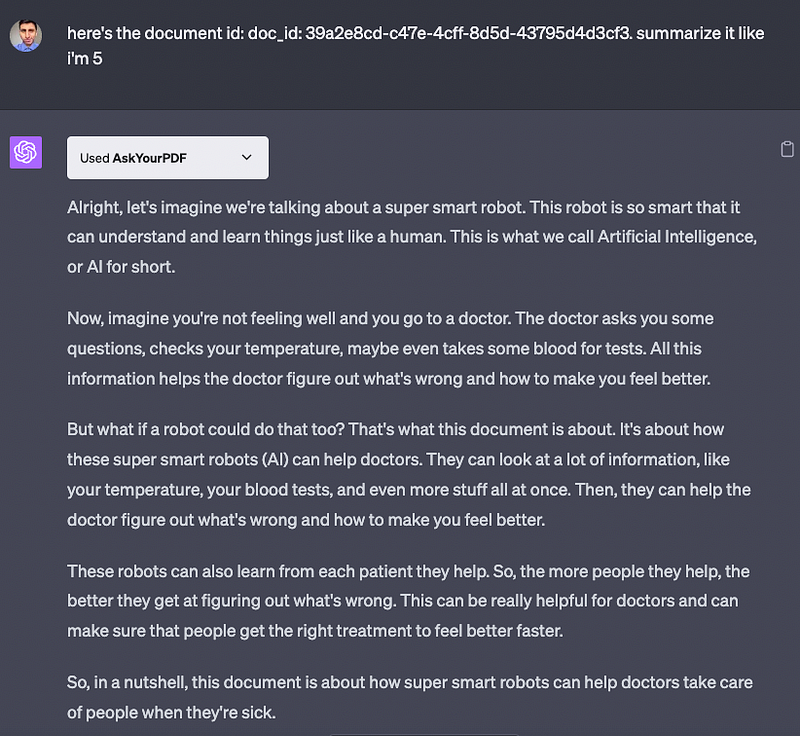
To work with this plugin you need to provide it with a link that ends with .pdf or with a PDF file that you have on your computer.
I tried to summarize this PDF about AI in medicine using its link, but it wasn’t possible, so I upload the document and pasted the Doc ID.
Screenshot
ChatGPT Plugin #4: Speak
If you’re into learning foreign languages, you’ll love this ChatGPT plugin.
In the past, you had to use some prompt engineering techniques to turn ChatGPT into your AI language tutor, but with the plugin Speak, you just need to ask a simple question to obtain a detailed explanation.
Screenshot
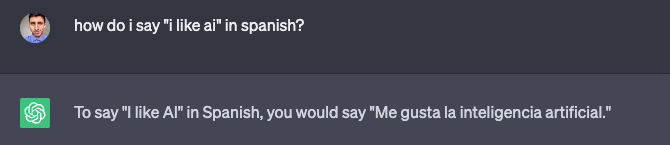
Here’s how ChatGPT would teach me how to say “I like AI” in Spanish.
Screenshot
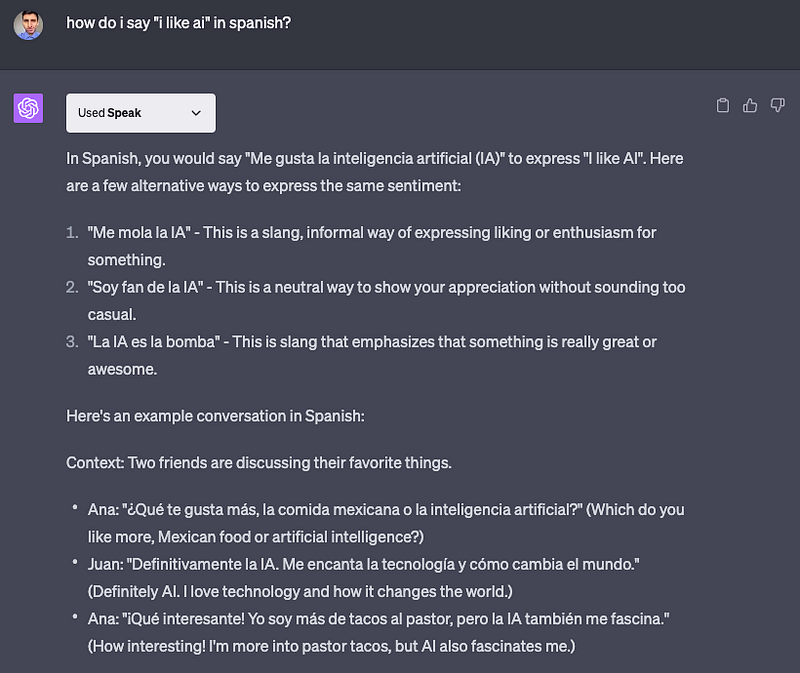
It gives the answer but it’s very basic (like Google Translator). However, Speak gives alternatives and example conversations.
Screenshot
As a Spanish speaker, I have to say that the vocabulary suggested is good, but the example conversation doesn’t make much sense (it’s still grammatically correct though).
In previous tests the answer given was perfect. Hopefully, in the future, the plugin will be more consistent with the quality of the responses.
ChatGPT Plugin #5: There’s an AI for That
Tired of wasting hours looking for an AI tool that makes your life easier? Look no more! With the ChatGPT plugin, “There’s an AI for That” you’ll find a list of AI tools for you in seconds.

Screenshot
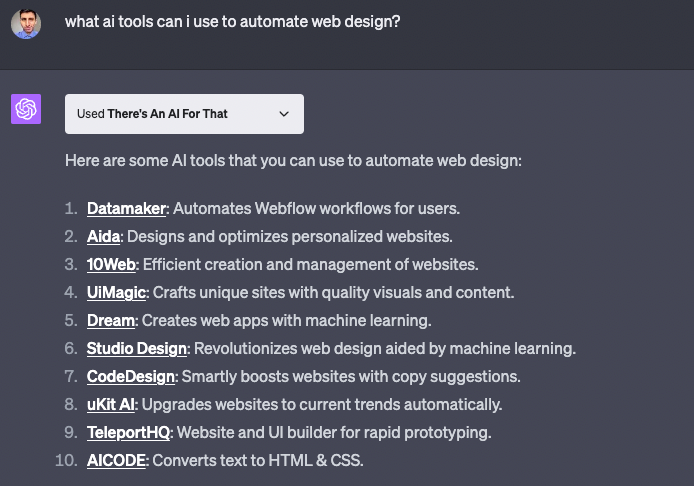
The other day, a friend of mine asked me about AI tools for web design. I felt embarrassed that I didn’t know even one, but thanks to this plugin now I can recommend him 10 good AI tools.
Screenshot
When you click on any of the links listed you’ll be redirected to the website of the plugin. There you can find a quick description of the tool, price, and the link to visit its website.
ChatGPT Plugin #6: Wolfram
Wolfram is a ChatGPT plugin that allows us to compute expert-level answers using Wolfram’s algorithms and AI technology.
Screenshot
Wolfram’s is commonly used for maths. It can provide step-by-step solutions for algebra, geometry, statistics calculus problems, and more.
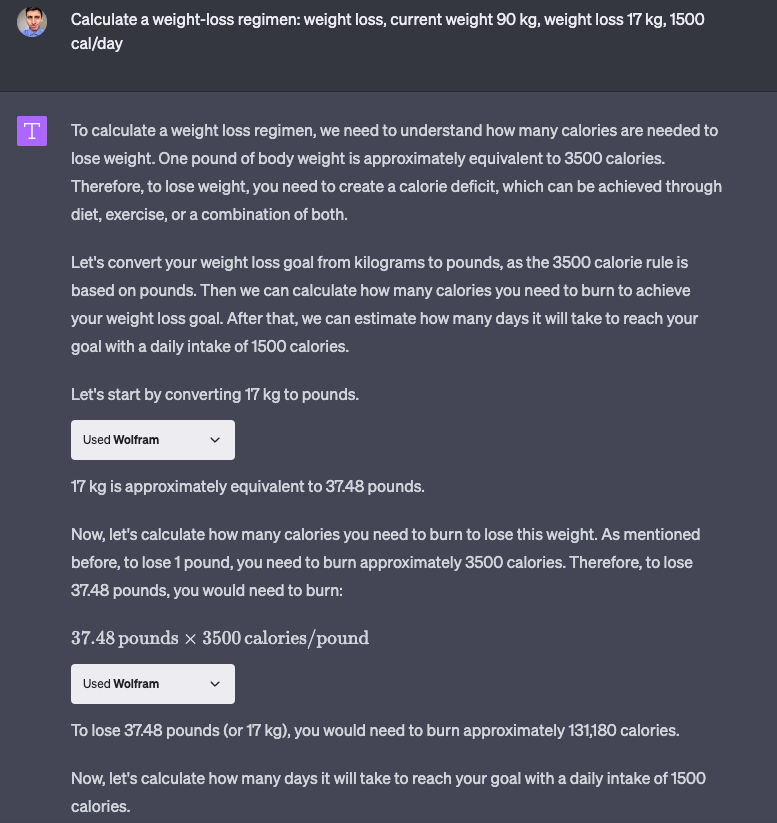
The best part is that you can use Wolfram’s capabilities to help you in your everyday life like calculating a weight-loss regimen.
Screenshot
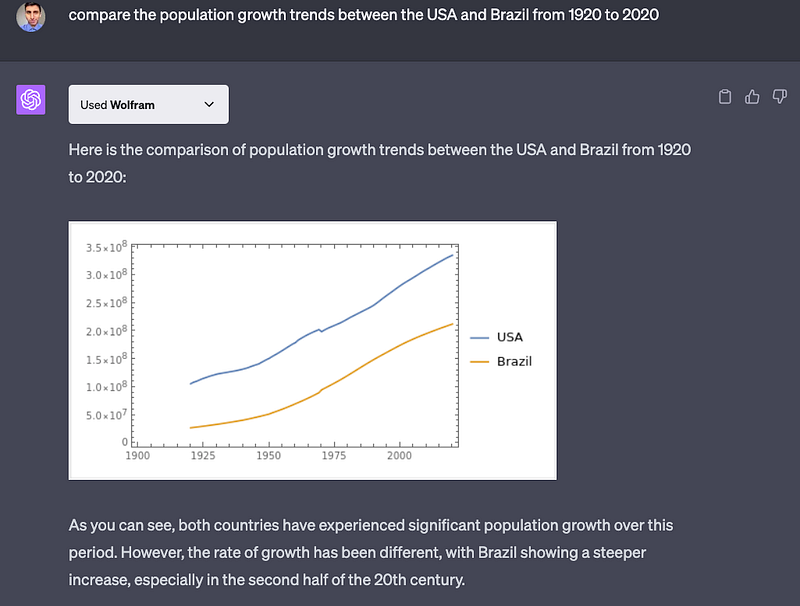
Wolfram can also plot charts, which ChatGPT can’t do natively.
Say we want to compare the population growth trends between the USA and Brazil from 1920 to 2020. Here’s how Wolfram would do it.
Screenshot
ChatGPT Plugin #7: Prompt Perfect
Prompt Perfect is a ChatGPT plugin that can optimize prompts for ChatGPT, Midjourney, DALL-E, and other tools.
Screenshot
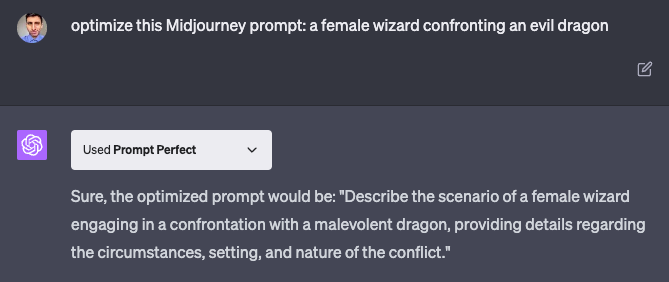
Prompt Perfect works fine on its website but for some reason the ChatGPT plugin isn’t as good. Here’s an example of a Midjourney prompt I tried to optimize.
Screenshot
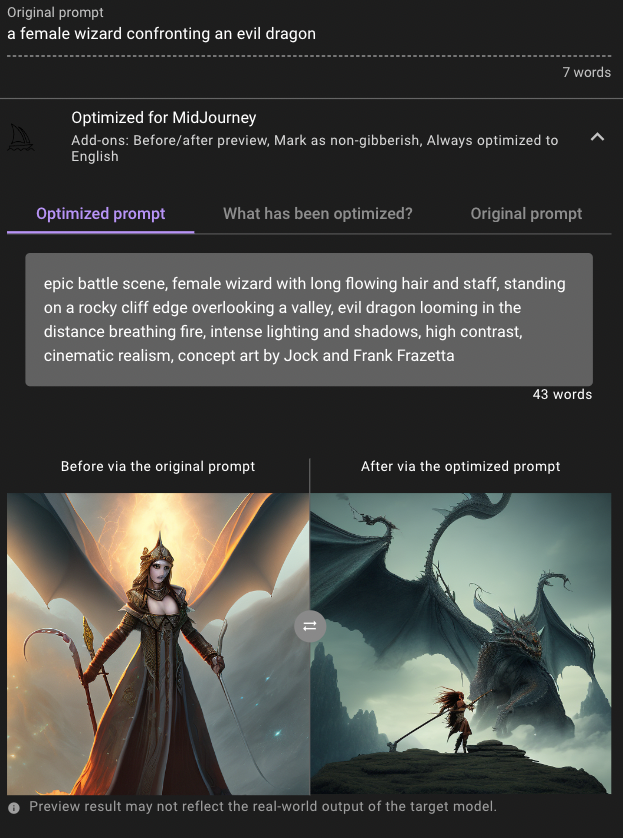
That wasn’t the prompt I was expecting … actually, I was expecting an optimization like the one below.
Screenshot
Hopefully, in new updates, this plugin will be as good as on the website.
If you enjoy reading stories like these and want to support me as a writer, consider signing up to become a Medium member. It’s $5 a month, giving you unlimited access to thousands of Python guides and Data science articles. If you sign up using my link, I’ll earn a small commission with no extra cost to you.