
🦜🔗 LangSmith Is for Production- Grade AI Applications
A detailed guidance on how to use LangSmith to debug, test, evaluate, and monitor LLM-powered applications

Introduction
We have built an AI chatbot using LangChain, which is a framework for developing applications powered by large language models (LLMs). It provides the capability to build AI powered systems using configurable chains, and takes a few lines of code to develop LLM-powered applications.
However, building reliable LLM applications is challenging. LangChain applications need to be tuned for performance and reliability for production.
LangSmith is built on top of LangChain. It can log all the runs, and hence has the capability to debug, test, evaluate, and monitor AI chains and intelligent agents. It is a platform for building production-grade LLM applications
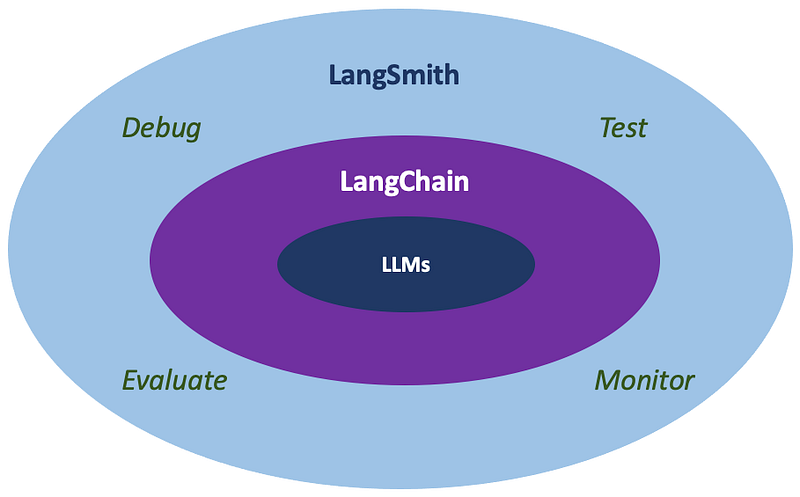
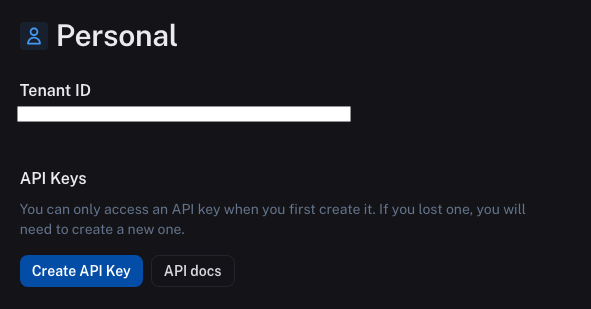
Currently, LangSmith is in closed beta. You can create a LangSmith account to get Tenant ID and Create an API key.
We enable LangSmith on top of the LangChain codebase described in this article, where we have created two examples:
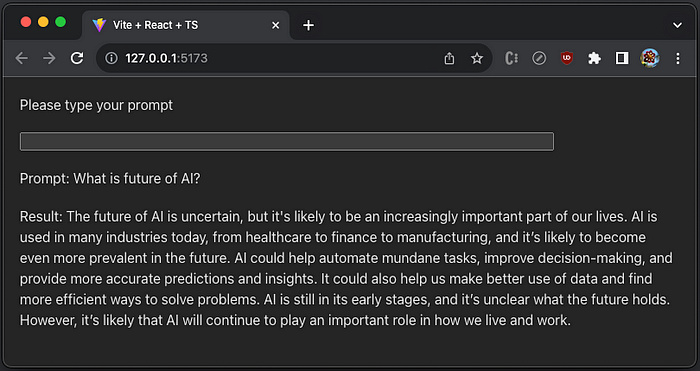
- LangChain LLMs: It is a prompt/completion UI that takes a string as input and returns a string.
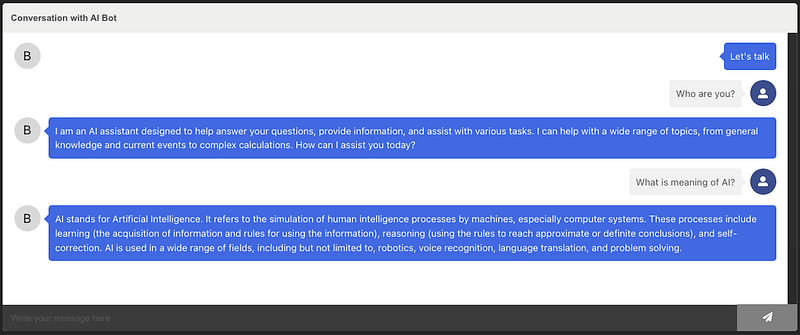
- LangChain ChatModels: It is a chatbot that mimics human conversation through text interactions.
Let’s see how LangSmith presents model training details that are essential for production-grade AI applications.
LangChain LLMs + LangSmith
We have built two LangChain examples in a Vite application using React/TypeScript.
Clone the repository:
% git clone https://github.com/JenniferFuBook/ai-chatbot-langchain.git
% cd ai-chatbot-langchain
yarn.lock file shows that LangSmith has been installed along with LangChain:
langchain@^0.0.154:
  version "0.0.154"
  resolved "https://registry.yarnpkg.com/langchain/-/langchain-0.0.154.tgz#347d5f1b89c9dd93eda8f1c6ae2c79d05d532669"
  integrity sha512-BnUvUZ9OBL/0BM4jhy53H8RF8+AmisrJq3tvNks6U/ueFC9ZKG9r4U9zqjwM2dTaWjW+oN3ig83Ioa9Y7d6ZFw==
  dependencies:
    "@anthropic-ai/sdk" "^0.6.2"
    ansi-styles "^5.0.0"
    binary-extensions "^2.2.0"
    camelcase "6"
    decamelize "^1.2.0"
    expr-eval "^2.0.2"
    flat "^5.0.2"
    js-tiktoken "^1.0.7"
    js-yaml "^4.1.0"
    jsonpointer "^5.0.1"
    langchainhub "~0.0.6"
    langsmith "~0.0.31"
    ml-distance "^4.0.0"
    object-hash "^3.0.0"
    openai "~4.4.0"
    openapi-types "^12.1.3"
    p-queue "^6.6.2"
    p-retry "4"
    uuid "^9.0.0"
    yaml "^2.2.1"
    zod "^3.21.4"
    zod-to-json-schema "^3.20.4"

langchainhub@~0.0.6:
  version "0.0.6"
  resolved "https://registry.yarnpkg.com/langchainhub/-/langchainhub-0.0.6.tgz#9d2d06e4ce0807b4e8a31e19611f57aef990b54d"
  integrity sha512-SW6105T+YP1cTe0yMf//7kyshCgvCTyFBMTgH2H3s9rTAR4e+78DA/BBrUL/Mt4Q5eMWui7iGuAYb3pgGsdQ9w==

langsmith@~0.0.31:
  version "0.0.40"
  resolved "https://registry.yarnpkg.com/langsmith/-/langsmith-0.0.40.tgz#6cafcdc06b9e0418d54055925178d9a826f384da"
  integrity sha512-R74HClnzClnm1/eFrcd7isiJ4iLQcrJV/Rm9fDZOZagQR4p+bnNCxYWCHoRex3Q9T7w1aRI0EMJIU+8WsF6rEQ==
  dependencies:
    "@types/uuid" "^9.0.1"
    commander "^10.0.1"
    p-queue "^6.6.2"
    p-retry "4"
    uuid "^9.0.0"
Set the following environment variables:
export OPENAI_API_KEY="<your-openai-key>"
export SERPAPI_API_KEY="<your-serpapi-key>"
export LANGCHAIN_API_KEY="<your-langchain-key>"
export LANGCHAIN_TENANT_ID="<your-tenant-id>"
In the LangSmith UI, create a project with the name of 'Testing'.
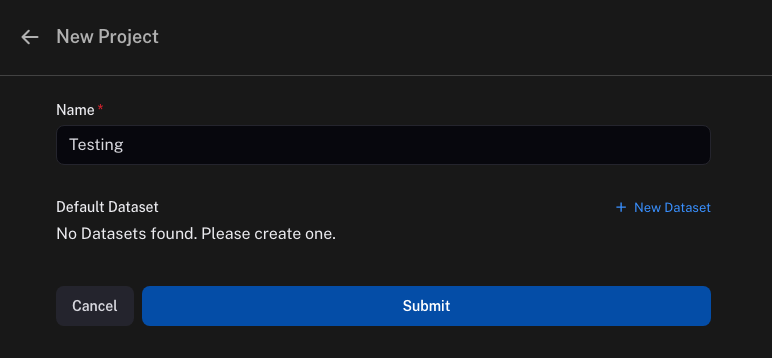
In .env, assign the following environment values, where the project name is set to 'Testing'.
VITE_OPENAI_API_KEY=$OPENAI_API_KEY
VITE_SERPAPI_API_KEY=$SERPAPI_API_KEY
VITE_LANGCHAIN_TRACING_V2=true
VITE_LANGCHAIN_ENDPOINT=https://api.smith.langchain.com
VITE_LANGCHAIN_API_KEY=$LANGCHAIN_API_KEY
VITE_LANGCHAIN_PROJECT='Testing'
VITE_LANGCHAIN_TENANT_ID=$LANGCHAIN_TENANT_ID
Modify src/App.tsx for the LangChain LLMs example by creating LangSmith LangChainTracer to trace the inner works of LLM runs.
import React from 'react';
import { OpenAI } from 'langchain/llms/openai';
import { Client } from 'langsmith';
import { LangChainTracer } from 'langchain/callbacks';

function App() {
  const [value, setValue] = React.useState<string>('');
  const [prompt, setPrompt] = React.useState<string>('');
  const [result, setResult] = React.useState<string>('');
  const tracer = React.useRef<LangChainTracer>();
  const llmRef = React.useRef<OpenAI>();

  const handleInput = React.useCallback(
    (e: React.ChangeEvent<HTMLInputElement>) => {
      setValue(e.target.value);
    },
    []
  );

  const handleKeyDown = React.useCallback(
    async (e: React.KeyboardEvent<HTMLInputElement>) => {
      if (!tracer.current || !llmRef.current) {
        return;
      }
      if (e.key === 'Enter') {
        setPrompt(value);
        setResult('Loading...');
        // agent takes a list of messages as input and returns a message
        // the tracer is attached
        const response = await llmRef.current.predict(value, { callbacks: [tracer.current] })
        setResult(response);
        setValue('');
      }
    },
    [value]
  );

  React.useEffect(() => {
    const init = async () => {
      // create a LangSmith client with endpoint and key
      const client = new Client({
        apiUrl: 'https://api.smith.langchain.com',
        apiKey: import.meta.env.VITE_LANGCHAIN_API_KEY
      });

      // create a LangChainTracer to trace the call
      tracer.current = new LangChainTracer({
        projectName: import.meta.env.VITE_LANGCHAIN_PROJECT,
        client
      });

      // create an instance for LangChain LLMs
      llmRef.current = new OpenAI({
        // use OPENAI_API_KEY
        openAIApiKey: import.meta.env.VITE_OPENAI_API_KEY,
      });
    };

    init();
  }, []);

  return (
    <>
      <div>Please type your prompt</div>
      <input value={value} onChange={handleInput} onKeyDown={handleKeyDown} />
      <div>Prompt: {prompt}</div>
      <div>Result: {result}</div>
    </>
  );
}

export default App;
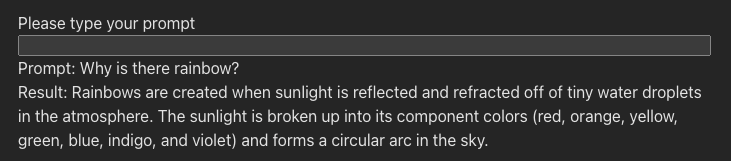
Execute yarn dev, the prompt/completion UI works as usual:
However, open the LangSmith UI, and we see a new world.
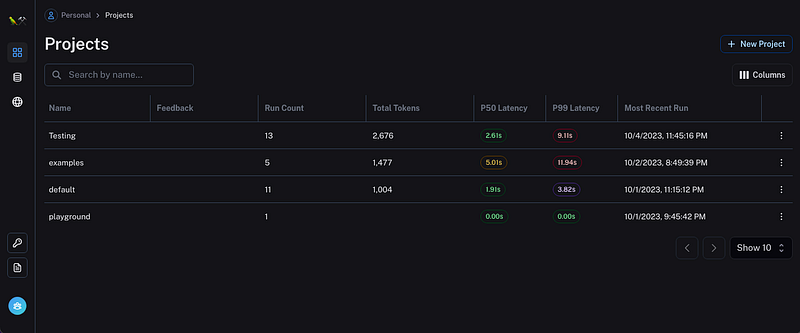
The above screenshot shows a lot of information:
- There are four projects —
Testing,examples,default, andplayground. - For the project
Testing, we had 13 runs so far. - Tokens are the basic units of text or code that an LLM AI uses to process and generate language. Tokens can be characters, words, subwords, or other segments of text or code, depending on the chosen tokenization method or scheme.
Pxyare metrics to measure the latency of services. The number denotes the percentile of total requests. P50 is the 50th latency percentile, i.e. 50% of the requests will be faster than the P50 value. P90 is the 90th latency percentile, i.e. 90% of the requests will be faster than the P 90 value.
Click the project Testing to view details. The tab Traces lists the tracing result, where the last two runs used prompts: Why is there rainbow? and What is the color of a star?
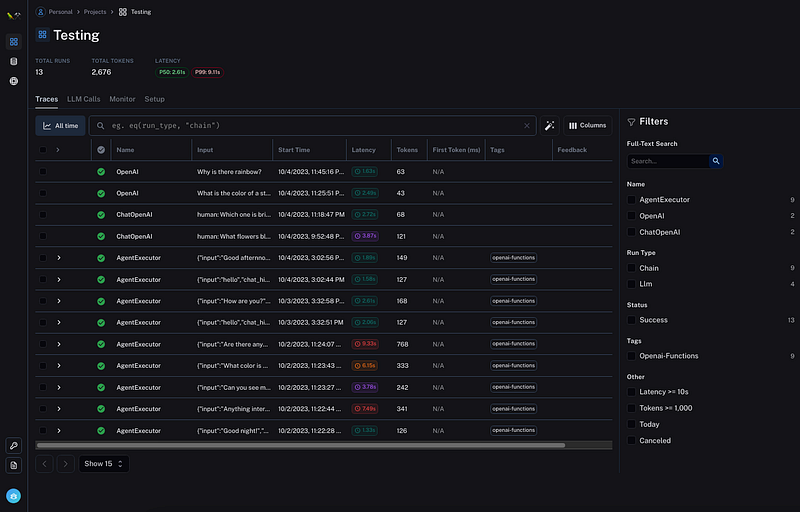
Select the first two rows, and we are able to add them to a dataset — a collection of data that is used to train the model.
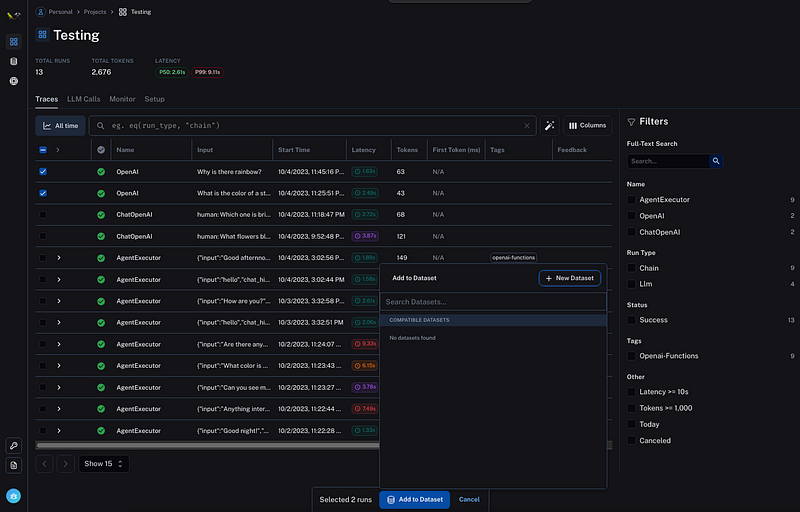
It can be added to an existing dataset, or a new one. The following is a screenshot to create a new dataset with preselected runs:
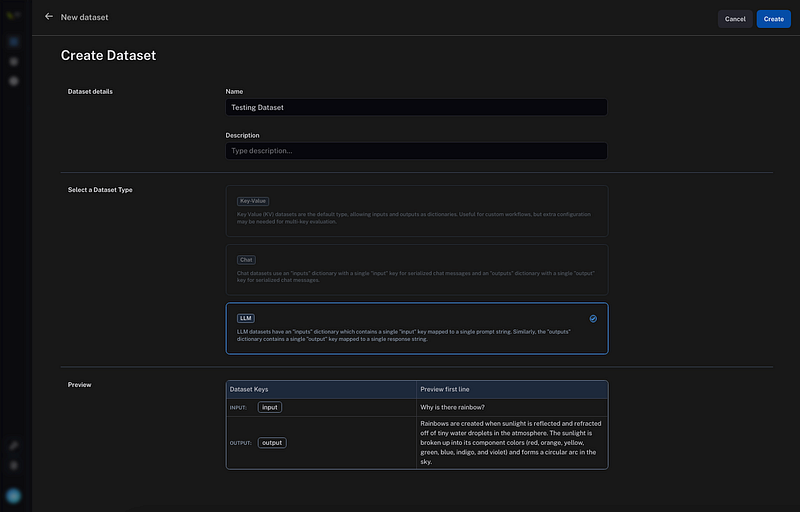
The following is the created dataset, named Testing Dataset.
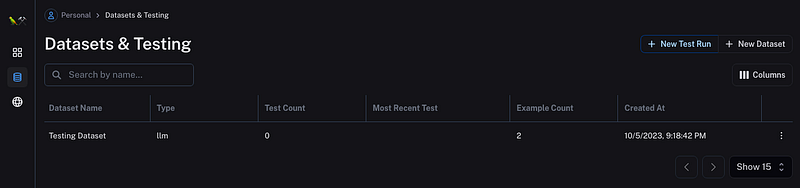
Click the row, and we see the dataset details.
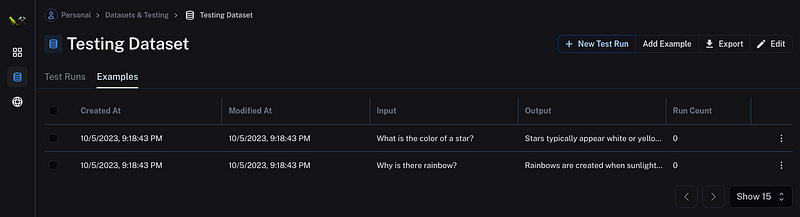
With LangSmith, LangChain LLMs runs are logged. The saved information allows us to debug, test, evaluate, and monitor AI chains.
LangChain ChatModels + LangSmith
We can also use LangChainTracer in the example of LangChain ChatModels. All we need to do is to create LangChainTracer and use it in the agent code, src/ActionProvider.tsx:
import React from 'react';
import { ChatOpenAI } from 'langchain/chat_models/openai';
import {
  initializeAgentExecutorWithOptions,
  AgentExecutor,
} from 'langchain/agents';
import { SerpAPI } from 'langchain/tools';
import { Calculator } from 'langchain/tools/calculator';
import { Client } from 'langsmith';
import { LangChainTracer } from 'langchain/callbacks';

const ActionProvider = ({ createChatBotMessage, setState, children }: any) => {
  const executor = React.useRef<AgentExecutor>();
  const tracer = React.useRef<LangChainTracer>();

  React.useEffect(() => {
    const init = async () => {
      // create a LangSmith client with endpoint and key
      const client = new Client({
        apiUrl: 'https://api.smith.langchain.com',
        apiKey: import.meta.env.VITE_LANGCHAIN_API_KEY,
      });

      // create a LangChainTracer to trace the call
      tracer.current = new LangChainTracer({
        projectName: import.meta.env.VITE_LANGCHAIN_PROJECT,
        client,
      });

      // define a model
      const model = new ChatOpenAI({
        // use OPENAI_API_KEY
        openAIApiKey: import.meta.env.VITE_OPENAI_API_KEY,
        // use GPT 4
        modelName: 'gpt-4',
        // temperature is a number between 0 and 2, with a default value of
        // 1 or 0.7 depending on the selected model. The temperature is used
        // to control the randomness of the output. When it is set higher,
        // there will be more random outputs.
        temperature: 0,
      });

      // define two tools
      const tools = [
        new Calculator(),
        new SerpAPI(import.meta.env.VITE_SERPAPI_API_KEY),
      ];

      // initialize the agent with two tools
      executor.current = await initializeAgentExecutorWithOptions(
        tools,
        model,
        {
          agentType: 'openai-functions',
          // show verbose information in browser console
          verbose: true,
        }
      );
    };

    init();
  }, []);

  const generateResponse = async (message: string) => {
    if (executor.current) {
      // agent takes a list of messages as input and returns a message
      // the tracer is attached
      const response = await executor.current.call(
        { input: message },
        { callbacks: [tracer.current] }
      );
      // the message is converted to a string message
      const botMessage = createChatBotMessage(response.output);

      setState((prev: any) => ({
        ...prev,
        // combine the previous and new messages
        messages: [...prev.messages, botMessage],
      }));
    }
  };

  return (
    <div>
      {React.Children.map(children, (child) => {
        return React.cloneElement(child, {
          actions: {
            // define the action
            generateResponse,
          },
        });
      })}
    </div>
  );
};

export default ActionProvider;
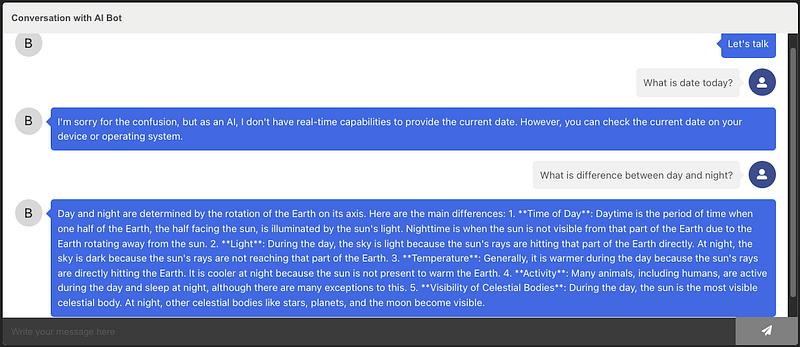
Execute yarn dev, the chatbot works as usual:
Open the LangSmith UI, we see the two new prompts sent by AgentExecutor. The response to the prompt — What is difference between day and night? — has latency of 17.15s.
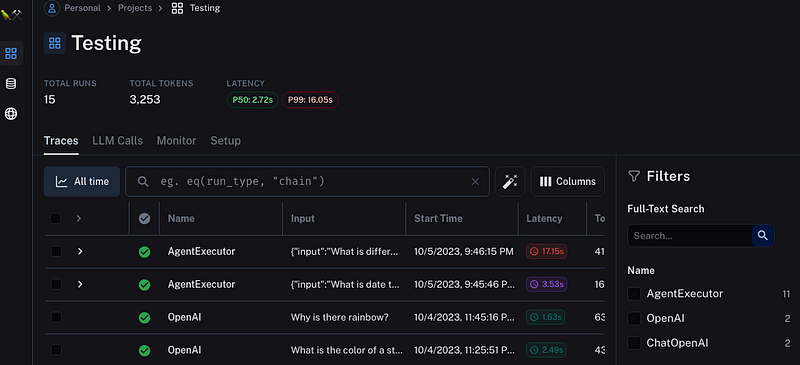
With LangSmith, LangChain ChatModels runs are logged. The saved information allows us to debug, test, evaluate, and monitor AI chains.
With combined runs of LangChain LLMs and ChatModels, the tab Monitor displays charts that visualize runs data.
Embed LangSmith UI in the App
LangChain + LangSmith are powerful. But it seems a bit of a hassle to go back and forth different UIs. We can embed the LangSmith UI in the app as an iframe.
Here is the modified src/App.tsx:
import Chatbot from 'react-chatbot-kit';
import 'react-chatbot-kit/build/main.css';

import config from './config';
import MessageParser from './MessageParser';
import ActionProvider from './ActionProvider';

function App() {
  return (
    <>
      <Chatbot
        config={config}
        actionProvider={ActionProvider}
        messageParser={MessageParser}
      />
      <iframe
        src={`https://smith.langchain.com/o/${
          import.meta.env.VITE_LANGCHAIN_TENANT_ID
        }`}
        sandbox
      />
    </>
  );
}

export default App;
src/index.css needs to be adjusted a bit:
:root {
  font-family: Inter, system-ui, Avenir, Helvetica, Arial, sans-serif;
  line-height: 1.5;
  font-weight: 400;

  color-scheme: light dark;
  color: rgba(255, 255, 255, 0.87);
  background-color: #242424;

  font-synthesis: none;
  text-rendering: optimizeLegibility;
  -webkit-font-smoothing: antialiased;
  -moz-osx-font-smoothing: grayscale;
  -webkit-text-size-adjust: 100%;
}

body {
  margin: 0;
  display: flex;
  place-items: stretch;
  min-width: 320px;
  min-height: 100vh;
}

#root {
  display: flex;
  flex-direction: column;
  padding: 20px;
  width: 100%;
}

.react-chatbot-kit-chat-container {
  width: 100%;
}

.react-chatbot-kit-chat-bot-message {
  width: auto;
}

iframe {
  flex-grow: 1;
}
Execute yarn dev. As we chat with the bot, the LangSmith UI updates with new runs.
The application is stored at this repository.
Conclusion
LangChain is a framework for developing applications powered by large language models (LLMs). It provides the capability to build AI powered systems using configurable chains, and it takes a few lines of code to develop LLM-powered applications.
LangSmith is built on top of LangChain. It can log all the runs, and hence has the capability to debug, test, evaluate, and monitor AI chains and intelligent agents. It is a platform for building production-grade LLM applications
We have implemented two examples in this article:
- LangChain LLMs + LangSmith
- LangChain ChatModels + LangSmith
While building examples, we have shown how LangSmith presents model training details that are essential for production-grade AI applications. For convenience, the LangSmith UI can be embedded in the application. As we chat with the bot, the LangSmith UI updates with new runs.
Do you want to try LangSmith, along with LangChain?
Thanks for reading!
Thanks, Ahmet Gyger and Subir Mansukhani, for working with me on Domino products.
Want to Connect?

If you are interested, check out my directory of web development articles.
In Plain English
Thank you for being a part of our community! Before you go:
- Be sure to clap and follow the writer! 👏
- You can find even more content at PlainEnglish.io 🚀
- Sign up for our free weekly newsletter. 🗞️
- Follow us on Twitter(X), LinkedIn, YouTube, and Discord.


