
Migrating From Moment.js to Day.js in Vite Applications
A practical guide for locale-based applications

Introduction
How to display a date?
Two people holding hands.
Just kidding.
Date is a day of the month or year, sometimes including the time as well.
Short format: 11/18/2023
Long format: November 18th 2023, 10:18:32 am
Although ISO 8601 unifies the date display as 2023-11-18, many web applications still prefer the locale-based display for the legal and cultural expectations.
US format: 11/18/2023 6:10 PM

German format: 18.11.2023 18:10

Korean format: 2023.11.18. 오후 6:10
Moment.js is a JavaScript library for parsing, validating, manipulating, and formatting dates. It is the granddaddy of all date libraries, which is the most popular date library in use.
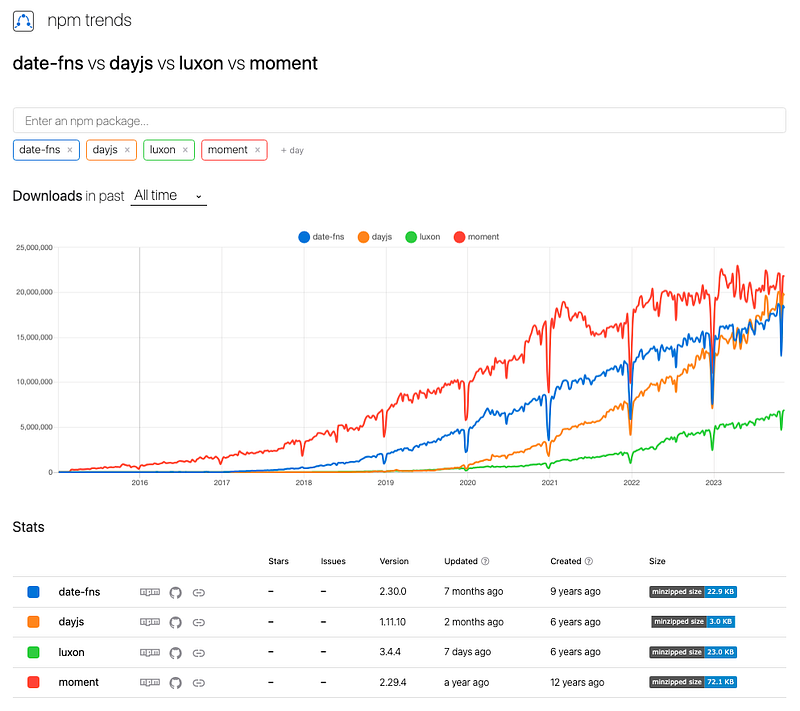
However, since July 5, 2021, Moment.js became a legacy project in maintenance mode:
- Moment.js was built for the previous era of the JavaScript ecosystem. The Moment team has prioritized stability over new features.
- Moment.js objects are mutable, and making them immutable would be a tremendous task.
- Moment.js is a 73k gzipped and minified giant package, which does not work well with modern tree shaking algorithms.
- Modern web browsers and Node.js expose internationalization and timezone support via the
Intlobject, which is leveraged by other recommended date libraries, except Moment.js.
For all these reasons, a lot of projects have moved away from Moment.js. The Moment team has recommended Luxon, Day.js, date-fns, js-Joda, and VanillaJS JavaScript. Among them, Day.js is a popular choice, as the fast 2k alternative to Moment.js.
Here is the recommendation from the Moment team:
Day.js is designed to be a minimalist replacement for Moment.js, using a similar API. It is not a drop-in replacement, but if you are used to using Moment’s API and want to get moving quickly, consider using Day.js.
We have migrated from Moment.js to Day.js in Vite Applications, and it took us 4 steps to accomplish the task:
- Use Moment.js and Day.js in Vite applications
- Simulate a geolocation
- Translate localized formats
- Build a timezone selector
Use Moment.js and Day.js in Vite applications
Our project is a Vite application. A React-based TypeScript project can be created by the following command:
% yarn create vite date-formats --template react-ts
% cd date-formats
Install the package moment.
% yarn add momentAfter the installation, it becomes part of dependencies in package.json:
"dependencies": {
  "moment": "^2.29.4"
}
Modify src/App.tsx to display some dates:
import moment from 'moment';
function App() {
const date = new Date('11/18/2023 6:10 PM');
return (
<>
<div>moment().locale(): {moment().locale()}</div>
<div>moment(date).format(): {moment(date).format()}</div>
<div>
moment(date).format('MMMM Do YYYY, h:mm:ss a'):
{moment(date).format('MMMM Do YYYY, h:mm:ss a')}
</div>
<div>
moment().format("MMM Do YY"): {moment(date).format('MMM Do YY')}
</div>
<div>moment(date).format('dddd'): {moment(date).format('dddd')}</div>
<div>moment(date).fromNow(): {moment(date).fromNow()}</div>
<div>moment(date).calendar(): {moment(date).calendar()}</div>
<div>
moment(date).add(10, 'days').calendar():
{moment(date).add(10, 'days').calendar()}
</div>
<div>
moment(date).subtract(2, 'hours').calendar():
{moment(date).subtract(2, 'hours').calendar()}
</div>
</>
);
}
export default App;Execute yarn dev, and we see the following output with the default locale of en:
moment().locale(): en
moment(date).format(): 2023-11-18T18:10:00-08:00
moment(date).format('MMMM Do YYYY, h:mm:ss a'): November 18th 2023, 6:10:00 pm
moment().format("MMM Do YY"): Nov 18th 23
moment(date).format('dddd'): Saturday
moment(date).fromNow(): 5 days ago
moment(date).calendar(): Last Saturday at 6:10 PM
moment(date).add(10, 'days').calendar(): Tuesday at 6:10 PM
moment(date).subtract(2, 'hours').calendar(): Last Saturday at 4:10 PM
Now, install the package dayjs.
% yarn add dayjsAfter the installation, it becomes part of dependencies in package.json:
"dependencies": {
  "dayjs": "^1.11.10"
}
Modify src/App.tsx to generate the same output using Day.js:
import dayjs from 'dayjs';
import relativeTime from 'dayjs/plugin/relativeTime'; // to support fromNow()
import calendar from 'dayjs/plugin/calendar'; // to support calendar()
// to support displaying the day of month with ordinal etc.
import advancedFormat from 'dayjs/plugin/advancedFormat';
dayjs.extend(relativeTime);
dayjs.extend(calendar);
dayjs.extend(advancedFormat);
function App() {
const date = new Date('11/18/2023 6:10 PM');
return (
<>
<div>dayjs().locale(): {dayjs().locale()}</div>
<div>dayjs(date).format(): {dayjs(date).format()}</div>
<div>
dayjs(date).format('MMMM Do YYYY, h:mm:ss a'):
{dayjs(date).format('MMMM Do YYYY, h:mm:ss a')}
</div>
<div>
dayjs().format("MMM Do YY"): {dayjs(date).format('MMM Do YY')}
</div>
<div>dayjs(date).format('dddd'): {dayjs(date).format('dddd')}</div>
<div>dayjs(date).fromNow(): {dayjs(date).fromNow()}</div>
<div>dayjs(date).calendar(): {dayjs(date).calendar()}</div>
<div>
dayjs(date).add(10, 'days').calendar():
{dayjs(date).add(10, 'days').calendar()}
</div>
<div>
dayjs(date).subtract(2, 'hours').calendar():
{dayjs(date).subtract(2, 'hours').calendar()}
</div>
</>
);
}
export default App;The code is almost a straight replacement from moment to dayjs, except it imports 3 plugins: relativeTime, calendar, and advancedFormat.
A Day.js plugin is an independent module that can be added to extend functionality or add new features. By default, Day.js comes with core code only and no installed plugin. We load 3 plugins based on the programming need.
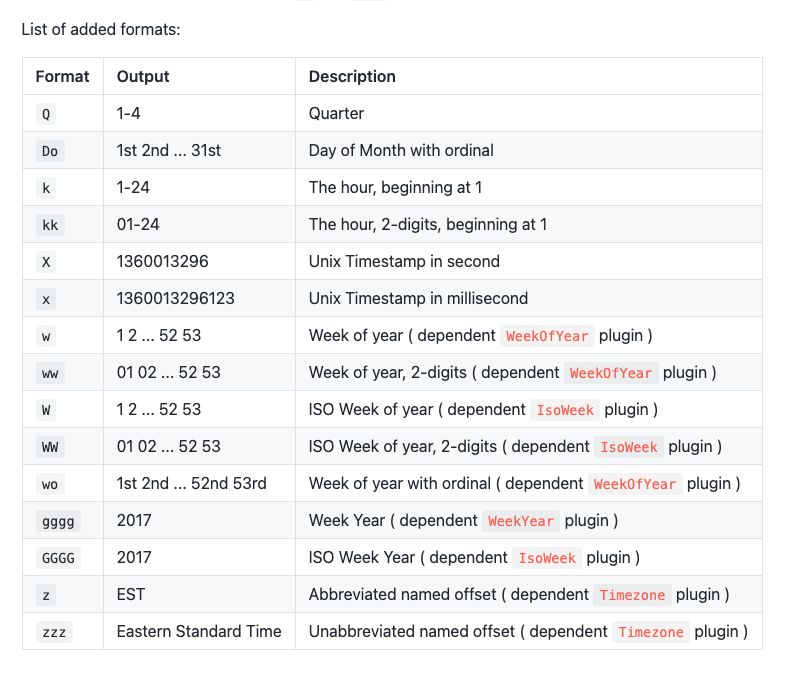
relativeTime: It adds.from.to.fromNow.toNowAPIs to format a date to relative time strings.calendar: It adds.calendarAPI to return astringto display calendar time.advancedFormat: It extendsdayjs().formatAPI to supply more format options, defined by the following table:
Simulate a geolocation
In order to display locale-based dates, we need to simulate a geolocation. This document lists a number of ways to set locale on Chrome, but we prefer to use sensors to override geolocation on Chrome. The advantage of sensors is no need to reboot the system or restart the browser. You may have to RE-select a location on the current window/tab in the inspect mode, but this is the most convenient way to change location.
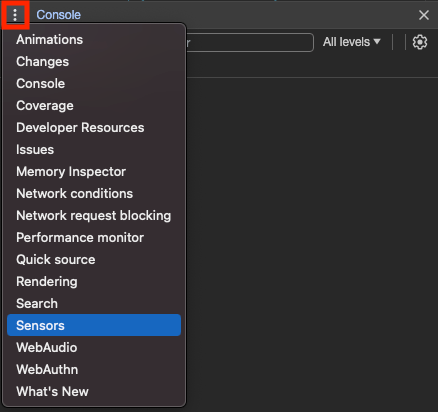
Sensors emulate device sensors. The tab can be made visible by clicking the three-dot overflow menu of Console and then selecting the choice of Sensors:
The Sensors tab shows the current location, which is San Francisco in the following example:
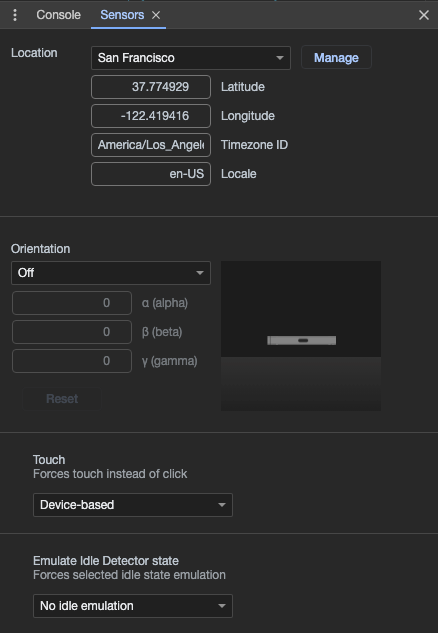
If you want to change a location, there is a dropdown list to choose from:
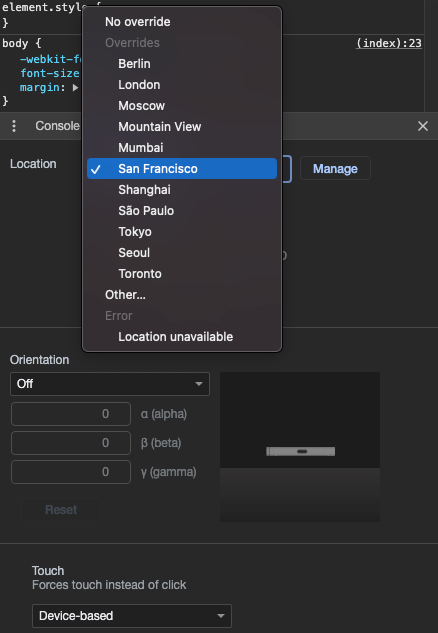
If the location is not on the list, it can be added by clicking the Manage button to provide the required properties:
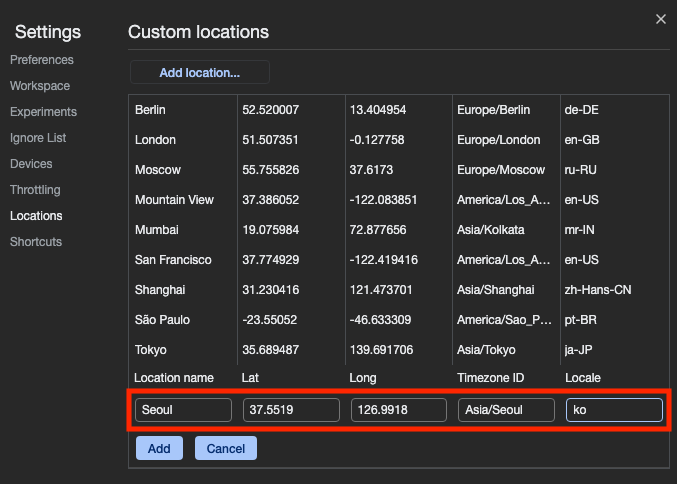
After simulating a specific location on the browser, we would like a piece of JavaScript code to read the current locale.
navigator.language is a read-only property that returns a locale string based on the Sensors location. However, it may not work in an incognito window.
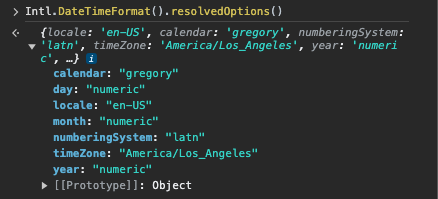
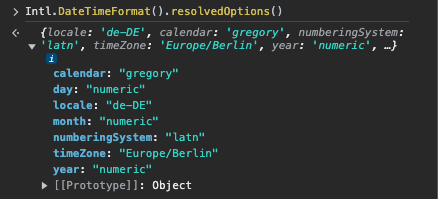
Based on our experience, Intl.DateTimeFormat().resolvedOptions().locale is the most reliable way to check locale.
Here are a few examples:
- Location:
San Francisco
- Location:
Berlin
- Location:
Seoul
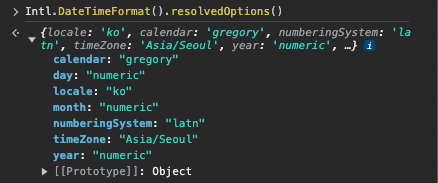
In order to make the non-default locale work, remember to RE-select a location on the current window/tab in the inspect mode.
Translate localized formats
For locale-based dates, we should use localized formats over the traditional MM/DD/YYYY style formats. Here is a list of localized formats:
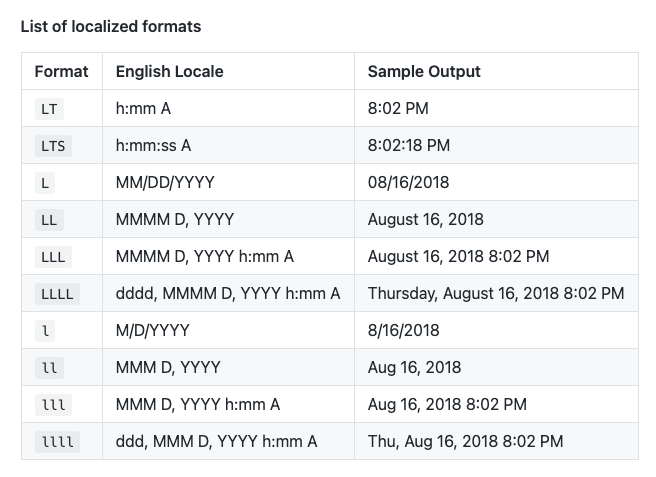
By default, Moment.js comes with English (United States) locale strings. Other locales need to be explicitly loaded into Moment.js.
For the location of Berlin, it requires import 'moment/locale/de'. For the location of Seoul, it requires import 'moment/locale/ko'. If we want to support many locations, there is a convenient way in Moment.js: import moment from 'moment/min/moment-with-locales'.
Modify src/App.tsx to use localized formats:
import moment from 'moment/min/moment-with-locales';

moment.locale(Intl.DateTimeFormat().resolvedOptions().locale);

function App() {
  const date = new Date('11/18/2023 6:10 PM');
  return (
    <>
      <div>moment.locale(): {moment.locale()}</div>
      <div>moment(date).format('LT'): {moment(date).format('LT')}</div>
      <div>moment(date).format('LTS'): {moment(date).format('LTS')} </div>
      <div>moment(date).format('L'): {moment(date).format('L')}</div>
      <div>moment(date).format('LL'): {moment(date).format('LL')}</div>
      <div>moment(date).format('LLL'): {moment(date).format('LLL')}</div>
      <div>moment(date).format('LLLL'): {moment(date).format('LLLL')}</div>
      <div>moment(date).format('L LT'): {moment(date).format('L LT')}</div>
      <div>moment(date).format('L LTS'): {moment(date).format('L LTS')}</div>
      <div>moment(date).format('l'): {moment(date).format('l')}</div>
      <div>moment(date).format('ll'): {moment(date).format('ll')}</div>
      <div>moment(date).format('lll'): {moment(date).format('lll')}</div>
      <div>moment(date).format('llll'): {moment(date).format('llll')}</div>
      <div>moment(date).fromNow(): {moment(date).fromNow()}</div>
      <div>moment(date).toISOString(): {moment(date).toISOString()}</div>
      <div>
        moment(date).toObject(): {JSON.stringify(moment(date).toObject())}
      </div>
    </>
  );
}

export default App;
Execute yarn dev.
When location is San Francisco, it shows the following result:
moment.locale(): en
moment(date).format('LT'): 6:10 PM
moment(date).format('LTS'): 6:10:00 PM
moment(date).format('L'): 11/18/2023
moment(date).format('LL'): November 18, 2023
moment(date).format('LLL'): November 18, 2023 6:10 PM
moment(date).format('LLLL'): Saturday, November 18, 2023 6:10 PM
moment(date).format('L LT'): 11/18/2023 6:10 PM
moment(date).format('L LTS'): 11/18/2023 6:10:00 PM
moment(date).format('l'): 11/18/2023
moment(date).format('ll'): Nov 18, 2023
moment(date).format('lll'): Nov 18, 2023 6:10 PM
moment(date).format('llll'): Sat, Nov 18, 2023 6:10 PM
moment(date).fromNow(): 5 days ago
moment(date).toISOString(): 2023-11-19T02:10:00.000Z
moment(date).toObject(): {"years":2023,"months":10,"date":18,"hours":18,"minutes":10,"seconds":0,"milliseconds":0}
When location is Berlin, it shows the following result:
moment.locale(): de
moment(date).format('LT'): 18:10
moment(date).format('LTS'): 18:10:00
moment(date).format('L'): 18.11.2023
moment(date).format('LL'): 18. November 2023
moment(date).format('LLL'): 18. November 2023 18:10
moment(date).format('LLLL'): Samstag, 18. November 2023 18:10
moment(date).format('L LT'): 18.11.2023 18:10
moment(date).format('L LTS'): 18.11.2023 18:10:00
moment(date).format('l'): 18.11.2023
moment(date).format('ll'): 18. Nov. 2023
moment(date).format('lll'): 18. Nov. 2023 18:10
moment(date).format('llll'): Sa., 18. Nov. 2023 18:10
moment(date).fromNow(): vor 5 Tagen
moment(date).toISOString(): 2023-11-18T17:10:00.000Z
moment(date).toObject(): {"years":2023,"months":10,"date":18,"hours":18,"minutes":10,"seconds":0,"milliseconds":0}
When location is Seoul, it shows the following result:
moment.locale(): ko
moment(date).format('LT'): 오후 6:10
moment(date).format('LTS'): 오후 6:10:00
moment(date).format('L'): 2023.11.18.
moment(date).format('LL'): 2023년 11월 18일
moment(date).format('LLL'): 2023년 11월 18일 오후 6:10
moment(date).format('LLLL'): 2023년 11월 18일 토요일 오후 6:10
moment(date).format('L LT'): 2023.11.18. 오후 6:10
moment(date).format('L LTS'): 2023.11.18. 오후 6:10:00
moment(date).format('l'): 2023.11.18.
moment(date).format('ll'): 2023년 11월 18일
moment(date).format('lll'): 2023년 11월 18일 오후 6:10
moment(date).format('llll'): 2023년 11월 18일 토요일 오후 6:10
moment(date).fromNow(): 6일 전
moment(date).toISOString(): 2023-11-18T09:10:00.000Z
moment(date).toObject(): {"years":2023,"months":10,"date":18,"hours":18,"minutes":10,"seconds":0,"milliseconds":0}
Can we accomplish the similar output with Day.js?
Almost, except that we have to import related locales in src/App.tsx:
import dayjs from 'dayjs';
import relativeTime from 'dayjs/plugin/relativeTime'; // to support fromNow()
// to support displaying the day of month with ordinal etc.
import advancedFormat from 'dayjs/plugin/advancedFormat';
// to support localized format options
import localizedFormat from 'dayjs/plugin/localizedFormat';
import toObject from 'dayjs/plugin/toObject';
import 'dayjs/locale/de'; // for location Berlin
import 'dayjs/locale/ko'; // for location Seoul
dayjs.extend(relativeTime);
dayjs.extend(advancedFormat);
dayjs.extend(localizedFormat);
dayjs.extend(toObject);

dayjs.locale(Intl.DateTimeFormat().resolvedOptions().locale);

function App() {
  const date = new Date('11/18/2023 6:10 PM');
  return (
    <>
      <div>dayjs.locale(): {dayjs.locale()}</div>
      <div>dayjs(date).format('LT'): {dayjs(date).format('LT')}</div>
      <div>dayjs(date).format('LTS'): {dayjs(date).format('LTS')} </div>
      <div>dayjs(date).format('L'): {dayjs(date).format('L')}</div>
      <div>dayjs(date).format('LL'): {dayjs(date).format('LL')}</div>
      <div>dayjs(date).format('LLL'): {dayjs(date).format('LLL')}</div>
      <div>dayjs(date).format('LLLL'): {dayjs(date).format('LLLL')}</div>
      <div>dayjs(date).format('L LT'): {dayjs(date).format('L LT')}</div>
      <div>dayjs(date).format('L LTS'): {dayjs(date).format('L LTS')}</div>
      <div>dayjs(date).format('l'): {dayjs(date).format('l')}</div>
      <div>dayjs(date).format('ll'): {dayjs(date).format('ll')}</div>
      <div>dayjs(date).format('lll'): {dayjs(date).format('lll')}</div>
      <div>dayjs(date).format('llll'): {dayjs(date).format('llll')}</div>
      <div>dayjs(date).fromNow(): {dayjs(date).fromNow()}</div>
      <div>dayjs(date).toISOString(): {dayjs(date).toISOString()}</div>
      <div>
        dayjs(date).toObject(): {JSON.stringify(dayjs(date).toObject())}
      </div>
    </>
  );
}

export default App;
In the code above, we load 2 new plugins, localizedFormat and toObject.
localizedFormat: It extendsdayjs().formatAPI to supply localized format options.toObject: It adds.toObject()API to return anobjectwith the date's properties.
There are two issues in the code:
- The locale
deis imported viaimport 'dayjs/locale/de'. The actual locale returned fromIntl.DateTimeFormat().resolvedOptions().localeisde-DE. - Instead of hardcoding import all locales, we would like to dynamically import the selected locale.
For issue #1, we need to match to the closest supported locale. The following two lines of code retrieve all supported locales by Day.js:
import localeList from 'dayjs/locale.json';
const supportedLocales = localeList.map(({key}) => key);
The supported locales are:
['af', 'am', 'ar-dz', 'ar-iq', 'ar-kw', 'ar-ly', 'ar-ma', 'ar-sa', 'ar-tn', 'ar', 'az', 'be', 'bg', 'bi', 'bm', 'bn-bd', 'bn', 'bo', 'br', 'bs', 'ca', 'cs', 'cv', 'cy', 'da', 'de-at', 'de-ch', 'de', 'dv', 'el', 'en-au', 'en-ca', 'en-gb', 'en-ie', 'en-il', 'en-in', 'en-nz', 'en-sg', 'en-tt', 'en', 'eo', 'es-do', 'es-mx', 'es-pr', 'es-us', 'es', 'et', 'eu', 'fa', 'fi', 'fo', 'fr-ca', 'fr-ch', 'fr', 'fy', 'ga', 'gd', 'gl', 'gom-latn', 'gu', 'hi', 'he', 'hr', 'ht', 'hu', 'hy-am', 'id', 'is', 'it-ch', 'it', 'ja', 'jv', 'ka', 'kk', 'km', 'kn', 'ko', 'ku', 'ky', 'lb', 'lo', 'lt', 'lv', 'me', 'mi', 'mk', 'ml', 'mn', 'mr', 'ms-my', 'ms', 'mt', 'my', 'nb', 'ne', 'nl-be', 'nl', 'nn', 'oc-lnc', 'pa-in', 'pl', 'pt-br', 'pt', 'rn', 'ro', 'sd', 'si', 'se', 'sk', 'sl', 'sq', 'sr-cyrl', 'sr', 'ss', 'sv-fi', 'sv', 'sw', 'ta', 'te', 'tg', 'tet', 'th', 'tk', 'tl-ph', 'tlh', 'tr', 'tzl', 'tzm-latn', 'ug-cn', 'tzm', 'uk', 'ur', 'uz-latn', 'vi', 'uz', 'yo', 'x-pseudo', 'zh-cn', 'zh-hk', 'zh-tw', 'zh', 'rw', 'ru']
Then, we can use the following code to get the closest supported locale:
const rawLocale = Intl.DateTimeFormat().resolvedOptions().locale ?? 'en';
let locale = rawLocale.toLocaleLowerCase();
while (
  locale.length > 0 &&
  !supportedLocales.includes(locale)
  ) {
  const lastIndex = locale.lastIndexOf('-');
  locale =
    lastIndex === -1
      ? ''
      : locale.substring(0, locale.lastIndexOf('-'));
}
If nothing is supported, the locale en will be used. The following is a few conversion examples:
San Francisco: en-US => en
Berlin: de-DE => de
Seoul: ko => ko
For issue #2, we would like to dynamically import the selected locale. JavaScript import() supports dynamic import, but it does not work with Vite applications. The issue page has mentioned a solution using @rollup/plugin-dynamic-import-vars. However, it does not work for us. Instead, we hack the solution using vite-plugin-dynamic-import, which becomes more popular in 2023.
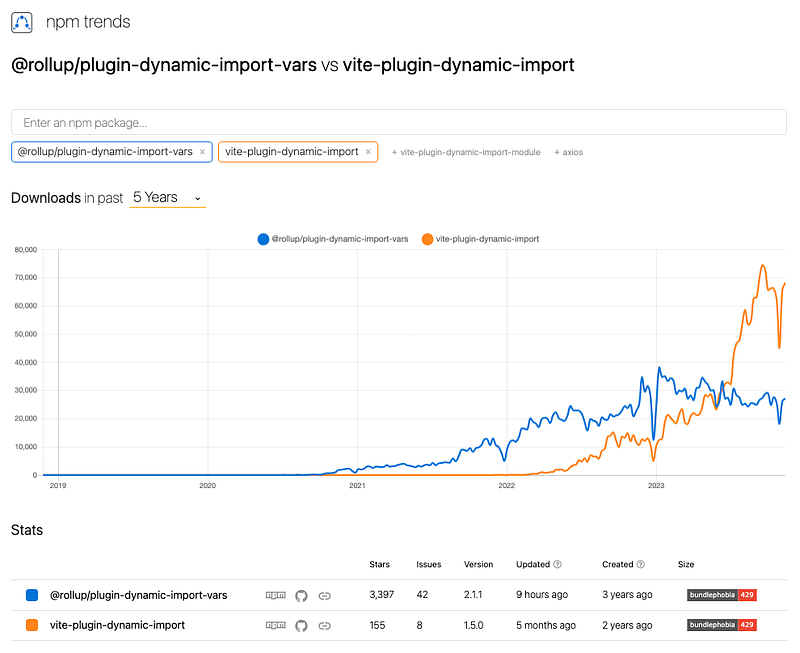
Install the package vite-plugin-dynamic-import.
% yarn add -D vite-plugin-dynamic-importAfter the installation, it becomes part of devDependencies in package.json:
"devDependencies": {
  "vite-plugin-dynamic-import": "^1.5.0"
}
Here is the modified src/App.tsx:
import { useEffect, useState } from 'react';
import dayjs from 'dayjs';
import relativeTime from 'dayjs/plugin/relativeTime'; // to support fromNow()
// to support displaying the day of month with ordinal etc.
import advancedFormat from 'dayjs/plugin/advancedFormat';
// to support localized format options
import localizedFormat from 'dayjs/plugin/localizedFormat';
import toObject from 'dayjs/plugin/toObject';
import localeList from 'dayjs/locale.json';
dayjs.extend(relativeTime);
dayjs.extend(advancedFormat);
dayjs.extend(localizedFormat);
dayjs.extend(toObject);

// retrieve all supported locales
const supportedLocales = localeList.map(({ key }) => key);

// get the closest supported locale
const rawLocale = Intl.DateTimeFormat().resolvedOptions().locale ?? 'en';
let locale = rawLocale.toLocaleLowerCase();
while (
  locale.length > 0 &&
  !supportedLocales.includes(locale)
) {
  const lastIndex = locale.lastIndexOf('-');
  locale =
    lastIndex === -1
      ? ''
      : locale.substring(0, locale.lastIndexOf('-'));
}

function App() {
  const [isLoading, setIsLoading] = useState(true);
  useEffect(() => {
    const importLocale = async () => {
      await import(`dayjs/locale/${locale}.js`);
      // for the dev mode, use a static string
      // await import(`dayjs/locale/de.js`);
      dayjs.locale(locale);
      setIsLoading(false);
    };
    importLocale();
  }, []);

  if (isLoading) {
    return null;
  }

  const date = new Date('11/18/2023 6:10 PM');
  return (
    <>
      <div>dayjs.locale(): {dayjs.locale()}</div>
      <div>dayjs(date).format('LT'): {dayjs(date).format('LT')}</div>
      <div>dayjs(date).format('LTS'): {dayjs(date).format('LTS')} </div>
      <div>dayjs(date).format('L'): {dayjs(date).format('L')}</div>
      <div>dayjs(date).format('LL'): {dayjs(date).format('LL')}</div>
      <div>dayjs(date).format('LLL'): {dayjs(date).format('LLL')}</div>
      <div>dayjs(date).format('LLLL'): {dayjs(date).format('LLLL')}</div>
      <div>dayjs(date).format('L LT'): {dayjs(date).format('L LT')}</div>
      <div>dayjs(date).format('L LTS'): {dayjs(date).format('L LTS')}</div>
      <div>dayjs(date).format('l'): {dayjs(date).format('l')}</div>
      <div>dayjs(date).format('ll'): {dayjs(date).format('ll')}</div>
      <div>dayjs(date).format('lll'): {dayjs(date).format('lll')}</div>
      <div>dayjs(date).format('llll'): {dayjs(date).format('llll')}</div>
      <div>dayjs(date).fromNow(): {dayjs(date).fromNow()}</div>
      <div>dayjs(date).toISOString(): {dayjs(date).toISOString()}</div>
      <div>
        dayjs(date).toObject(): {JSON.stringify(dayjs(date).toObject())}
      </div>
    </>
  );
}

export default App;
For the dev mode, we have to use a static string for import(). But, the dynamic import using vite-plugin-dynamic-import works for the production mode.
Execute yarn build, and then yarn preview. The program works for all locations.
In case you have issues with dynamic import, here is the code snippet to import all supported locales:
import 'dayjs/locale/af.js';
import 'dayjs/locale/am.js';
import 'dayjs/locale/ar-dz.js';
import 'dayjs/locale/ar-iq.js';
import 'dayjs/locale/ar-kw.js';
import 'dayjs/locale/ar-ly.js';
import 'dayjs/locale/ar-ma.js';
import 'dayjs/locale/ar-sa.js';
import 'dayjs/locale/ar-tn.js';
import 'dayjs/locale/ar.js';
import 'dayjs/locale/az.js';
import 'dayjs/locale/be.js';
import 'dayjs/locale/bg.js';
import 'dayjs/locale/bi.js';
import 'dayjs/locale/bm.js';
import 'dayjs/locale/bn-bd.js';
import 'dayjs/locale/bn.js';
import 'dayjs/locale/bo.js';
import 'dayjs/locale/br.js';
import 'dayjs/locale/bs.js';
import 'dayjs/locale/ca.js';
import 'dayjs/locale/cs.js';
import 'dayjs/locale/cv.js';
import 'dayjs/locale/cy.js';
import 'dayjs/locale/da.js';
import 'dayjs/locale/de-at.js';
import 'dayjs/locale/de-ch.js';
import 'dayjs/locale/de.js';
import 'dayjs/locale/dv.js';
import 'dayjs/locale/el.js';
import 'dayjs/locale/en-au.js';
import 'dayjs/locale/en-ca.js';
import 'dayjs/locale/en-gb.js';
import 'dayjs/locale/en-ie.js';
import 'dayjs/locale/en-il.js';
import 'dayjs/locale/en-in.js';
import 'dayjs/locale/en-nz.js';
import 'dayjs/locale/en-sg.js';
import 'dayjs/locale/en-tt.js';
import 'dayjs/locale/en.js';
import 'dayjs/locale/eo.js';
import 'dayjs/locale/es-do.js';
import 'dayjs/locale/es-mx.js';
import 'dayjs/locale/es-pr.js';
import 'dayjs/locale/es-us.js';
import 'dayjs/locale/es.js';
import 'dayjs/locale/et.js';
import 'dayjs/locale/eu.js';
import 'dayjs/locale/fa.js';
import 'dayjs/locale/fi.js';
import 'dayjs/locale/fo.js';
import 'dayjs/locale/fr-ca.js';
import 'dayjs/locale/fr-ch.js';
import 'dayjs/locale/fr.js';
import 'dayjs/locale/fy.js';
import 'dayjs/locale/ga.js';
import 'dayjs/locale/gd.js';
import 'dayjs/locale/gl.js';
import 'dayjs/locale/gom-latn.js';
import 'dayjs/locale/gu.js';
import 'dayjs/locale/hi.js';
import 'dayjs/locale/he.js';
import 'dayjs/locale/hr.js';
import 'dayjs/locale/ht.js';
import 'dayjs/locale/hu.js';
import 'dayjs/locale/hy-am.js';
import 'dayjs/locale/id.js';
import 'dayjs/locale/is.js';
import 'dayjs/locale/it-ch.js';
import 'dayjs/locale/it.js';
import 'dayjs/locale/ja.js';
import 'dayjs/locale/jv.js';
import 'dayjs/locale/ka.js';
import 'dayjs/locale/kk.js';
import 'dayjs/locale/km.js';
import 'dayjs/locale/kn.js';
import 'dayjs/locale/ko.js';
import 'dayjs/locale/ku.js';
import 'dayjs/locale/ky.js';
import 'dayjs/locale/lb.js';
import 'dayjs/locale/lo.js';
import 'dayjs/locale/lt.js';
import 'dayjs/locale/lv.js';
import 'dayjs/locale/me.js';
import 'dayjs/locale/mi.js';
import 'dayjs/locale/mk.js';
import 'dayjs/locale/ml.js';
import 'dayjs/locale/mn.js';
import 'dayjs/locale/mr.js';
import 'dayjs/locale/ms-my.js';
import 'dayjs/locale/ms.js';
import 'dayjs/locale/mt.js';
import 'dayjs/locale/my.js';
import 'dayjs/locale/nb.js';
import 'dayjs/locale/ne.js';
import 'dayjs/locale/nl-be.js';
import 'dayjs/locale/nl.js';
import 'dayjs/locale/nn.js';
import 'dayjs/locale/oc-lnc.js';
import 'dayjs/locale/pa-in.js';
import 'dayjs/locale/pl.js';
import 'dayjs/locale/pt-br.js';
import 'dayjs/locale/pt.js';
import 'dayjs/locale/rn.js';
import 'dayjs/locale/ro.js';
import 'dayjs/locale/sd.js';
import 'dayjs/locale/si.js';
import 'dayjs/locale/se.js';
import 'dayjs/locale/sk.js';
import 'dayjs/locale/sl.js';
import 'dayjs/locale/sq.js';
import 'dayjs/locale/sr-cyrl.js';
import 'dayjs/locale/sr.js';
import 'dayjs/locale/ss.js';
import 'dayjs/locale/sv-fi.js';
import 'dayjs/locale/sv.js';
import 'dayjs/locale/sw.js';
import 'dayjs/locale/ta.js';
import 'dayjs/locale/te.js';
import 'dayjs/locale/tg.js';
import 'dayjs/locale/tet.js';
import 'dayjs/locale/th.js';
import 'dayjs/locale/tk.js';
import 'dayjs/locale/tl-ph.js';
import 'dayjs/locale/tlh.js';
import 'dayjs/locale/tr.js';
import 'dayjs/locale/tzl.js';
import 'dayjs/locale/tzm-latn.js';
import 'dayjs/locale/ug-cn.js';
import 'dayjs/locale/tzm.js';
import 'dayjs/locale/uk.js';
import 'dayjs/locale/ur.js';
import 'dayjs/locale/uz-latn.js';
import 'dayjs/locale/vi.js';
import 'dayjs/locale/uz.js';
import 'dayjs/locale/yo.js';
import 'dayjs/locale/x-pseudo.js';
import 'dayjs/locale/zh-cn.js';
import 'dayjs/locale/zh-hk.js';
import 'dayjs/locale/zh-tw.js';
import 'dayjs/locale/zh.js';
import 'dayjs/locale/rw.js';
import 'dayjs/locale/ru.js';
Build a timezone selector
A timezone selector frequently appears in a date related UI.

Moment.js comes with some addon libraries, such as moment-timezone that supports IANA timezone. The package can be used independently from Moment.js.
Install the package moment-timezone.
% yarn add moment-timezoneAfter the installation, it becomes part of dependencies in package.json:
"dependencies": {
  "moment-timezone": "^0.5.43"
}
Here is the modified src/App.tsx that creates a timezone selector:
import momentTimezone from 'moment-timezone';

function getTimezoneString(timezone: string) { // for example of 'America/Tijuana'
  const now = momentTimezone.tz(+new Date(), timezone); // Moment object
  const gmtOffset = now.format('Z'); // '-08:00', Z stands for the Zero timezone
  const zoneAbbreviation = now.format('z'); // 'PST'
  return `(GMT${gmtOffset}) ${
    /^[A-Z]+$/.test(zoneAbbreviation) ? zoneAbbreviation : ''
  } - ${timezone}`; // '(GMT-08:00) PST - America/Tijuana'
}

const unsupportedTimezones = [ // see https://github.com/moment/luxon/issues/958
  'PST8PDT',
  'EST5EDT',
  'GMT0',
  'MST7MDT',
  'CST6CDT',
];
const timezoneList = momentTimezone.tz
  .names() // a list of IANA timezone names
  .filter((timezone: string) => !unsupportedTimezones.includes(timezone))
  .sort((tz1, tz2) => {
    const tz1Offset = momentTimezone.tz(tz1).utcOffset();
    const tz2Offset = momentTimezone.tz(tz2).utcOffset();
    return tz1Offset - tz2Offset;
  })
  .map((timezone) => getTimezoneString(timezone));

function App() {
  return (
    <select>
      {timezoneList.map((timezone: string) => (
        <option key={timezone}>{timezone}</option>
      ))}
    </select>
  );
}

export default App;
Here is content of Moment object now in the above code:
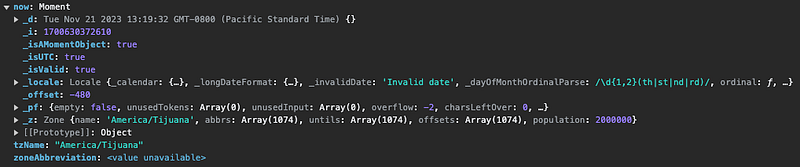
Execute yarn dev, and the timezone selector works:
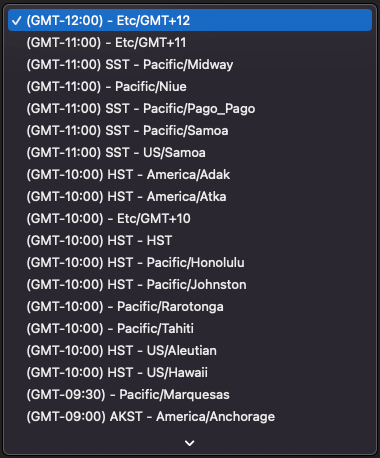
Since Day.js does not provide a list of IANA timezones, we are faced with two options:
- Continue to use
moment-timezoneas an independent package. - Build the timezone list via the
Intlobject that is exposed by modern web browsers and Node.js.
The first option requires no changes. Let’s see how the second option works with Intl.supportedValuesOf('timeZone') that lists of all time zone names in the IANA database.
Here is the modified src/App.tsx without importing any libraries:
const getFormattedElement = (timezone: string, name: string, value: string) =>
  (
    new Intl.DateTimeFormat('en', {
      [name]: value,
      timeZone: timezone,
    })
      .formatToParts()
      .find((el) => el.type === name) || {}
  ).value;

const getZoneAbbreviation = (
  timezone: string // for example of 'America/Tijuana'
) => getFormattedElement(timezone, 'timeZoneName', 'short'); // 'PST'

const getGMTOffsetString = (timezone: string) => {
  // for example of 'America/Tijuana'
  const gmtOffset = getFormattedElement(timezone, 'timeZoneName', 'longOffset');
  return gmtOffset === 'GMT' ? 'GMT+00:00' : gmtOffset; // 'GMT-08:00'
};

const getGMTOffsetNumber = (offsetString: string) => { // for example of 'GMT-9:30'
  const match = [...offsetString.matchAll(/^GMT([+-]\d{1,2}):(\d{1,2})$/g)];
  // the match result is ["GMT-9:30", "-9", "30"]
  const decimalValue = match[0][2] === '30' ? '5' : '0';
  return parseFloat(`${match[0][1]}.${decimalValue}`); // -9.5
};

type ZoneInfo = {
  zone: string;
  abbreviation: string;
  offsetString: string;
  offsetNumber: number;
};

const timezoneList = Intl.supportedValuesOf('timeZone')
  .map((zone: string) => {
    const offsetString = getGMTOffsetString(zone);
    return {
      zone,
      abbreviation: getZoneAbbreviation(zone),
      offsetString,
      offsetNumber: getGMTOffsetNumber(offsetString!),
    };
  })
  .sort((a: ZoneInfo, b: ZoneInfo) =>
    a.offsetString == b.offsetString
      ? a.abbreviation == b.abbreviation
        ? a.zone.localeCompare(b.zone)
        : a.abbreviation.localeCompare(b.abbreviation)
      : a.offsetNumber - b.offsetNumber
  )
  .map(
    ({ offsetString, abbreviation, zone }: ZoneInfo) =>
      `(${offsetString}) ${abbreviation} - ${zone}`
  );

function App() {
  return (
    <select>
      {timezoneList.map((timezone: string) => (
        <option key={timezone}>{timezone}</option>
      ))}
    </select>
  );
}

export default App;
Execute yarn dev:
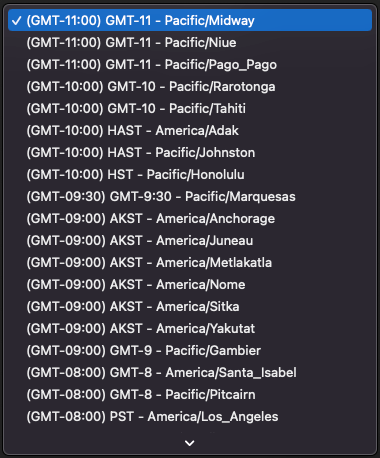
You may notice that the list is slightly different from the Moment.js timezone selector, but it works.
Conclusion
Moment.js is the granddaddy of all date libraries. It is still the most popular date library in use, although it is a legacy project in maintenance mode. However, the Moment team has recommended to use other date libraries, such as Luxon, Day.js, date-fns, js-Joda, or VanillaJS JavaScript. Among them, Day.js is a popular choice.
We have shared the experience on how to migrate from Moment.js to Day.js in Vite Applications. It took us 4 steps to accomplish the task.
Thanks for reading.
Want to Connect?

If you are interested, check out my directory of web development articles.
PlainEnglish.io 🚀
Thank you for being a part of the In Plain English community! Before you go:
- Be sure to clap and follow the writer️
- Learn how you can also write for In Plain English️
- Follow us: X | LinkedIn | YouTube | Discord | Newsletter
- Visit our other platforms: Stackademic | CoFeed | Venture


