
Google improves Data Security in BigQuery
Using Column based Data Masking in BigQuery and Data Catalog

In my eyes, a great update that Google has released today for its SaaS Data Warehouse BigQuery: The Feature of Columns level masking of data. Because besides the challenges of processing Big Data, data security is also an issue that companies should, if not must, address. An example is the European DSGVO (learn more about it here).
Companies should therefore protect sensitive data, e.g. with encryption, to protect themselves from penalties and to protect their customers, employees, etc. One possibility is the pseudonomization or anomyzation of data — here is an interesting article on the subject (with phyton examples).
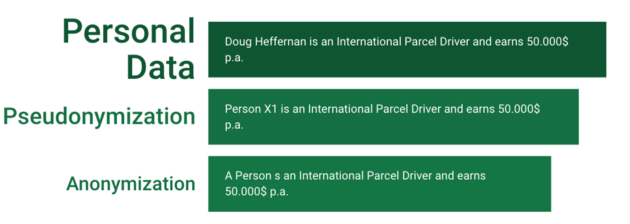
Other possibilities would be to use mechanisms, for example in your database like crambling. A possible approach for this would be to mix letters. Scrambling techniques like encryption and hashing or masking your data include hiding some information by using random characters or ****, for example. The implementation of the previously described functions could be seen as anonymization or pseudonymization. Here, it depends on who can cancel the pseudomization — here, a good data access roles and rules model is the key [1][2].
And this is exactly where Google’s feature comes in. You can now not only lock entire tables or delete individual columns, for example but also use data masking at column level. When using data masking in combination with column-level access control, you can now configure a range of access to column data based on the requirements of different groups of users [3].
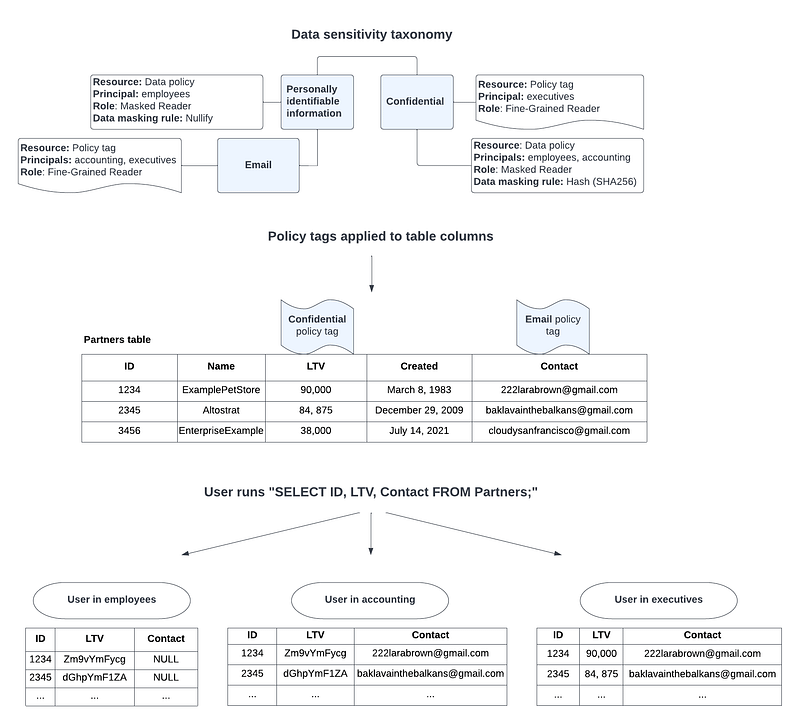
To use the new feature , just follow the follwing three steps and the links provided by Google [4]:
- Set up a taxonomy and one or more policy tags in Data Catalog.
- Configure data policies for the policy tags. A data policy maps a data masking rule and one or more principals, which represent users or groups, to the policy tag. When creating a data policy by using the Google Cloud console, you can create the data masking rule and specify the principals in one step. When creating a data policy by using the BigQuery Data Policy API, you create the data policy and data masking rule in one step, and specify the principals for the data policy in a second step.
- Assign the policy tags to columns in BigQuery tables to apply the data policies.
The follwing diagram illustrates how the new feature works together:
You can find a more detailed introduction to the feature in the links below. But I hope you now know what data masking is, how it works and also how to use it in BigQuery now.
This is a great feature, especially for the privacy-minded Europeans, but all other companies should also be concerned about data security. So instead of building data marts for different users and departments to allow different data views, delete data or implement masking in the data process itself, you can now also mask the data within the GCP with BigQuery and the data catalog. This could of course simplify issues such as data governance, while at the same time making Google’s data catalog much more interesting for customers.
Sources and Further Readings
[1] Johner Institut, Anonymisierung und Pseudonymisierung (2020)
[2] Complior, PSEUDONYMIZATION AND ANONYMIZATION OF PERSONAL DATA (2020)
[3] Google, BigQuery Release Notes (2022)
[4] Google, Introduction to dynamic data masking (2022)


