avatarChristianlauer

Free AI web copilot to create summaries, insights and extended knowledge, download it at here

2236

Abstract

was an issue remaining. The document used dark theme and the content in the external page used white background.</p><p id="0afe"><b>Hack 2: </b>Use dark-reader to automatically generate css for your external page</p><p id="f222">You can use <a href="https://darkreader.org/">dark-reader</a> to automatically apply dark style to your page. There are two options. First is to use dark-reader in your project via npm and apply dark theme automatically. For my case, this was a bit overkill and I choose the second option. Second option is to generate and export css file corresponding to dark theme of your external page and then adding that style-sheet to our <code>iframe</code>.</p><p id="df41">First install the <a href="https://darkreader.org/">dark-reader</a> add-on/extension to your browser. I have done it on Firefox. Then open your external page in that browser and enable the dark-mode in dark-reader add-on.</p><figure id="54a0"><img src="https://cdn-images-1.readmedium.com/v2/resize:fit:800/1*akq4Mmrutw6XTVdZMY9VBQ.png"><figcaption>dark-reader add-on in Mozilla Firefox</figcaption></figure><p id="ded5">When you enable dark-mode, the dark-reader has generated and applied appropriate styling to make your page dark-themed. It works great. You can also tweak around and set brightness, and contrast as well as use developer tools to further customize the design. Once you are happy with the design, click on the dark-reader browser-action button to open the popup menu and click on settings.</p><figure id="af34"><img src="https://cdn-images-1.readmedium.com/v2/resize:fit:800/1*B_-rTeDGalYJ-Ci6nyyapg.png"><figcaption></figcaption></figure><p id="0ea2">This will open up the settings view as displayed below.</p><figure id="bac9"><img src="https://cdn-images-1.readmedium.com/v2/resize:fit:800/1*dqdeQaWkTj38obrpRLEoVg.png"><figcaption></figcaption></figure><p id="1b63">Click on Manage settings and then on <b>Export Dynamic Theme</b>.</p><figure id="504a"><img src="https://cdn-images-1.readmedium.com/v2/resize:fit:800/1*eoK7sNZcYxZF-xWQ3NjEIg.png"><figcaption></figcaption></figure><p id="2bb4">Great job! This will download a css file that you can add to your page to apply the styles for dark theme. Hmmm… So far so g

Options

ood. I believe most of you would do the rest of the stuff on your own, but for the sake of completeness let us add a few lines of code to the event-listeners that we created in Hack1.</p><p id="2a64">Save the css file that was downloaded by the dark-reader as <code>dark-theme.css </code>in the <code>/public</code> directory of your Next.js app. Now, add following lines inside the <code>"load"</code> event-listener.</p><div id="d14f"><pre>const link <span class="hljs-operator">=</span> doc.createElement(<span class="hljs-string">"link"</span>)<span class="hljs-comment">;</span></pre></div><div id="e451"><pre><span class="hljs-attr">link.rel</span> = <span class="hljs-string">"stylesheet"</span><span class="hljs-comment">;</span></pre></div><div id="d811"><pre><span class="hljs-attr">link.href</span> = <span class="hljs-string">"/dark-theme.css"</span><span class="hljs-comment">;</span></pre></div><div id="214b"><pre>doc.head.appendChild(link)<span class="hljs-comment">;</span></pre></div><p id="caa5">Next time when you do this, you will be able to add existing HTML files to your project with custom themes in much lesser time than the time you spent reading this document.</p><p id="3a9a">Wish you all the best and happy coding!</p><p id="ad6f">Interested in building career in web development? Checkout E-degree in JS Frameworks</p><div id="2976" class="link-block"> <a href="https://www.eduonix.com/javascript-frameworks-mini-edegree/UHJvZHVjdC00NDExNjgw"> <div> <div> <h2>JavaScript Mini E-Degree: Master JS Frameworks To The Core!</h2> <div><h3>A perfect mini-e-degree suitable for everyone who wants to master JavaScript effectively without wasting any time…</h3></div> <div><p>www.eduonix.com</p></div> </div> <div> <div style="background-image: url(https://miro.readmedium.com/v2/resize:fit:320/0*OBLf0FHe3Jrk8Lbg)"></div> </div> </div> </a> </div><p id="79c1">Or my course on <a href="https://www.udemy.com/course/react-and-next-js-with-typescript/?referralCode=7202184A1E57C3DCA8B2">React + Next.js with TypeScript</a>.</p></article></body>

Data Anonymization with Python

How to make your Data compliant in Data Science Projects

Photo by James Wheeler on Unsplash

Personal data is the core concept of data protection. Data protection law only applies when data relates to individuals. The GDPR for example increases fines to up to 20 million EUR or, in the case of large companies and groups, up to 4% of the global group turnover of the previous year [1]. When working in the field of Big Data, Data Science or related fields it is essential to know about these laws and how anonymization and pseudonymization give the possibility of still using the data for your use cases.

What is Personal Data?

This is any information relating to an identified or identifiable person. An “identifiable” person is one who can be identified directly or indirectly, in particular by means of association with an identifier such as a name, an identification number, location data or other special characteristics. The possibility of identifying a person is sufficient here.

Personal data are, for example [2]:

  • Name
  • Address
  • E-mail address
  • Telephone number
  • Birthday

Tension between Data Protection and Big Data

In relation to the topic of Big Data, there is a certain tension with regard to data protection. This is because data is often collected and stored without it being clear in advance what analyses will later take place. However, GDPR for example says data storing and analyses need a certain purpose. A specific purpose is therefore particularly difficult to prove here.

Anonymization vs. Pseudonymization

Anonymizing data offers one solution. When data is anonymized, it is no longer personal data. The situation is different with pseudonymized data. With the appropriate additional knowledge, it is possible to determine the reference person.
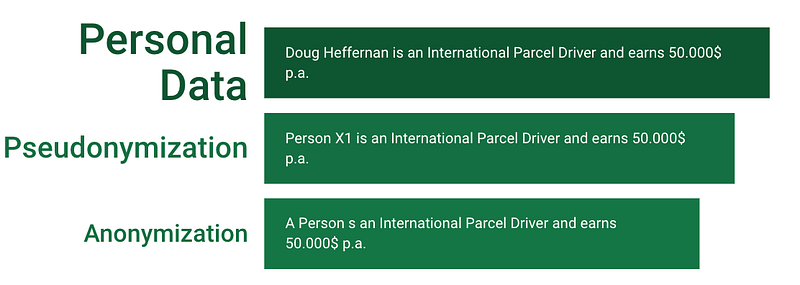
Anonymization vs. Pseudonymization — Image by Author

Data Manipulation with Python

Let’s start with generating some sample data:

#Import libs
import pandas as pd
import numpy as np


#Create some dummy data
df = pd.DataFrame({
    'id' : [1,2,3,4] ,
    'Name' : ['Ana','Paul','Marc','Ali'] 
})

print(df)

So we have a simple table with an ID and a name column:

   id  Name
0   1   Ana
1   2  Paul
2   3  Marc
3   4   Ali

The most easy way to make your data compliant is to just delete the columns which have GDPR relevant data. Often for analyst purposes it’s okay because you maybe don’t need the data. For a customer price report you may not need the name of a customer — so you can just ignore it.

#1 Possibility - Delete column
df_2 = df.drop('Name', 1)
print(df_2)
id
0   1
1   2
2   3
3   4

Another possibility is to use a label encoder and to anonymize your data:

#2 Possibility - Encode column (Anonymisation)
#Import LabelEncoder from sklearn / DataFrameMapper from sklearn_pandas
from sklearn.preprocessing import LabelEncoder
#!pip install sklearn
from sklearn_pandas import DataFrameMapper

encoders = [(["Name"], LabelEncoder())]
mapper = DataFrameMapper(encoders, df_out=True)
label_col = mapper.fit_transform(df.copy())
df_3 = pd.concat([df.drop(columns=["Name"]), label_col], axis="columns")
print (df_3)

Other possibilities would be to use mechanisms for example in your database like crambling — An approach would be to mix letters. Scrambling techniques are encryption and hashing or to mask your data— Some of the information is hidden using random characters or **** for example. Scrambling and masking and how ever you implement it it could be seen as anonymization or pseudonymization. Here, it depends on who can whether and who can cancel the pseudomization — here, a good data access roles and rules model is the key [2][3].

Summary

Data protection is becoming an increasingly important issue. Companies want to avoid the risk of horrendous fines, however we all personally should handle personal data with confidence, because everyone wants their personal information to be handled responsibly. For this, I have shown you the general basics in this article and how you can do easily anonymize or pseudonymize with python. With regard to the painfully high fines for violations of the GDPR, companies are encouraged to identify risks in advance and to develop the product in accordance with the regulations.

Sources and Further Readings

[1] GDPR.EU, What is GDPR, the EU’s new data protection law? (2021)

[2] Johner Institut, Anonymisierung und Pseudonymisierung (2020)

[3] Complior, PSEUDONYMIZATION AND ANONYMIZATION OF PERSONAL DATA (2020)

Data Science
Python
Gdpr
Gdpr Compliance
Compliance
Recommended from ReadMedium