
17 Secrets to Radically Improve Your Medium Stories
🤯 Just imagine the kind of stories YOU will write after putting these tips into practice! 💥
As a newcomer to the Medium, I recently went through a learning curve as I attempted to make the most of it. What I learned early in the process was that this platform not only very simple and intuitive — it’s also a tool can get any new user started much faster than other blogging platforms, such as Wordpress. And yet, much to my delight, there are numerous features under the hood of the Medium interface that can help your stories to cut through the noise of the internet.
I can always use a combination of simplicity and power!
Many of you are writers looking to make the most of Medium and are finding this story in times of the covid-19 / coronavirus pandemic. I hope it provides a quick introduction, with content that is easy to skim, scroll, and find; and that you can put these actionable points to use immediately after reading it.
Here are the ̶1̶5̶ 17 most helpful things I learned about Medium in the process of establishing myself as a Top Writer, including Updates I’ve done over the years to keep them fresh and relevant. Hope you enjoy it and put them to good use when writing your own stories!
The hallmark of growth on Medium: quality stories
1 | Use this simple checklist before publishing a story
Medium data scientists did a thorough and thought-provoking analysis of what makes a successful Medium post. Their key finding? Drafting time is the highest indicator of post success: it leads to higher quality content, which gets seen, shared, and commented on, turning the wheel of growth.
So I set up this checklist of four things you should check for before publishing a story. 💥 BOOM! The four vital, simplest steps in this entire article can maximize your impact on this wonderful platform.
Update February 2018
One of the four items on the checklist is to add a picture to your story. One of the sources of stories I mention is Unsplash.
Well… Unsplash just announced that their library of images is now integrated into Medium, only a couple of clicks away:
Go to a new line. Click on the “+” button on the left, or simply right-click the mouse. This opens a contextual menu with multiple options. Clicking the 🔍 icon opens the Unsplash image gallery in-line with your story. 💥 BOOM!
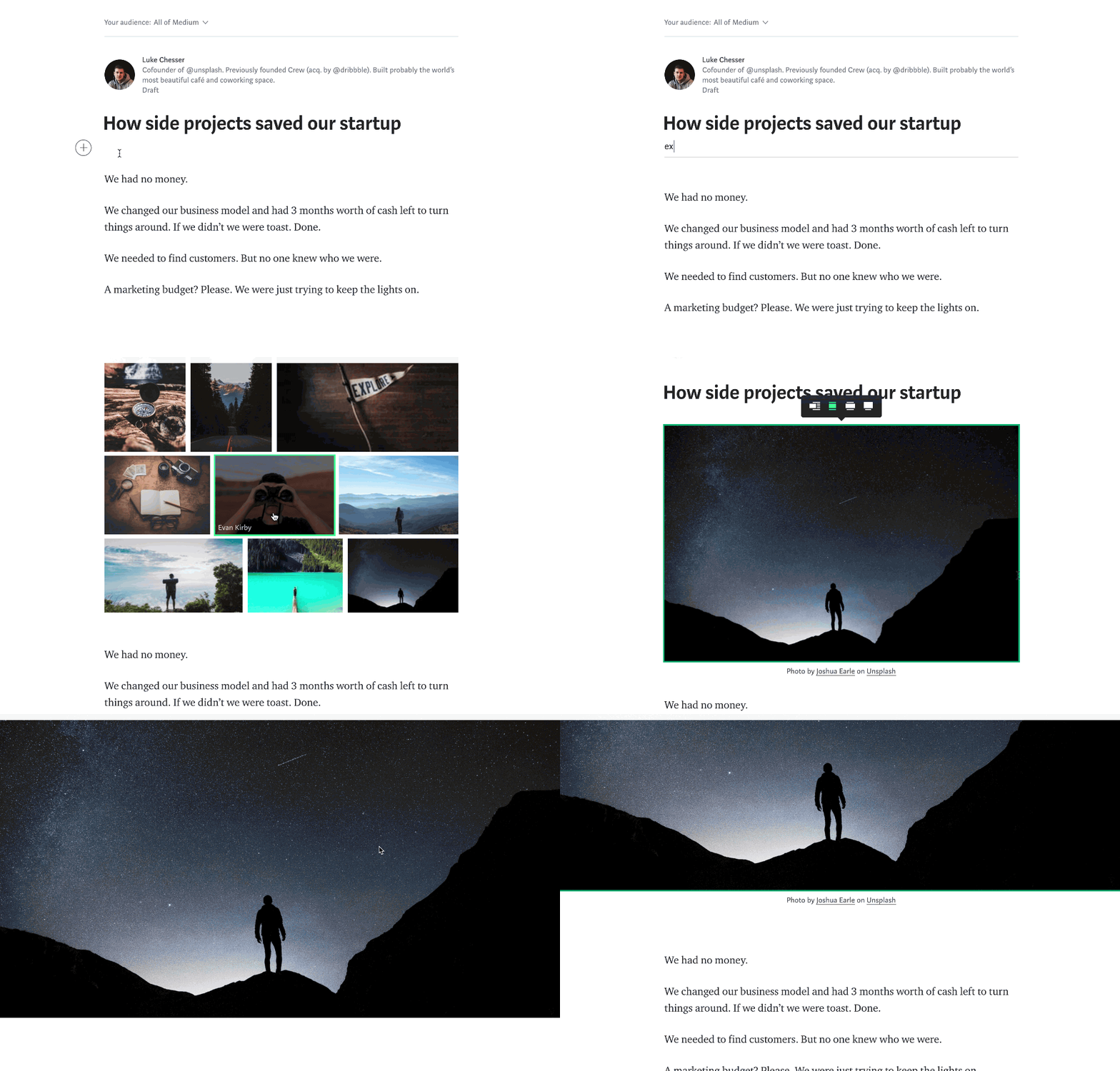
BONUS 1: after selecting an image, credits are automatically added to the image caption. 💥 BOOM! You can skip reading tip 6 in this article, originally written to help you see the relevance of credits and copyrights.
BONUS 2: speaking of upcoming tips in this article: 5 details image placement. That’s exactly what the integration allows you to do next: choose how the image should best fit your story (or is it vice-versa?).
BONUS 3: the contextual menu you just opened is actually a formatting tool chest.
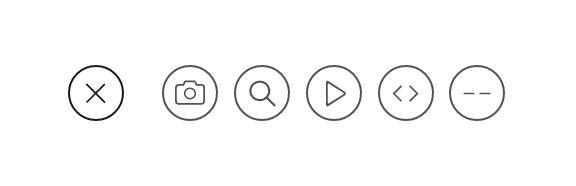
Starting from the left, click on:
📷 to add an image from your computer
🔍 to search for an image on Unsplash
▶️ to embed a video
<> to add a code snippet
💬 to add a separator as this one:
There is more content you can embed — I’m saving the details for the last tip in this story, in case you want to take a peek.
2 | Tag each story and comments
As a traction platform, Medium algorithms rely on metadata to decide what to present to each user.
One of the things a new user does when signing up for Medium is to select the key themes of their interest. As the new user reads stories, Medium progressively builds up a list of interests for that user.
When you publish a story, always add tags to it. Medium will suggest 1–3 tags; make sure they represent your story, and attempt to pick relevant tags that maximize the audience, as shown by Medium.
Medium announced in January 2017 new features that allow readers to find out who are the top writers for a particular tag.
3 | Format your text like a boss
ⓐ Every time you hit ENTER, Medium adds double space. Annoyed? Try hitting Shift + ENTER for single space between lines instead.
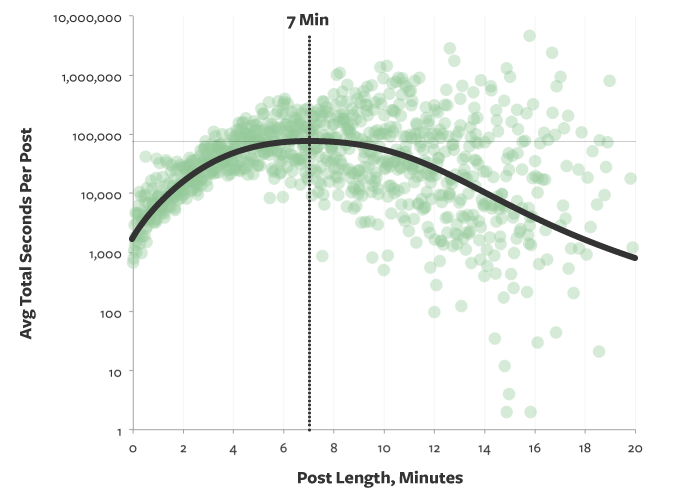
ⓑ How much have you written already? Easy way to keep track: select the entire story by hitting ⌘+A (Mac) or Ctrl+A (PC) or any passage. 💥 BOOM! Word count at the top of the page. Now, bear in mind: 7-minute posts captures the most reading time on average:
ⓒ Now, let’s say you started a paragraph and wanted to finish later. Simply type TK and a yellow visual reminder pops on the left margin. Also, before you publish, an additional reminder that your story contains a TK will be presented to you. 💥 BOOM! You just gained several formatting advantages over the next writer on Medium.
ⓓ Intrigued? Press ⌘+? (Mac) or Ctrl+? (PC) while editing to see the list of keyboard shortcuts. 💥 BOOM! Many other shortcuts will be presented to you. And her’s the full list of Medium shortcuts.
ⓔ See what I did on these bullets? You can add thousands of unexpected, interesting unicode characters to your stories! And you can format them using Medium’s formatting menu:
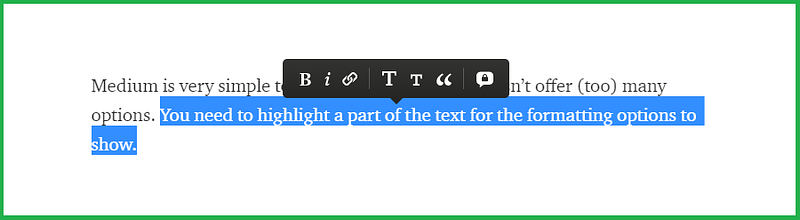
Thanks to Sahityika Poddar for bringing this 🅟 Ⓞ 🆂 🅂 ⒤ ⓑ ⓘ ⒧ 🅣 🆈 to my attention after reading this story.
Update August 2019
If you liked this trick of unicode characters, let me show you other formatting variants of it that might come handy to you:
- ̶s̶t̶r̶i̶k̶e̶t̶h̶r̶o̶u̶g̶h̶ text generator
- writing Math on Medium
- copy these and paste in your stories:
Superscript: ⁰¹²³⁴⁵⁶⁷⁸⁹⁺⁻⁼⁽⁾ᴬᴮᴰᴱᴳᴴᴵᴶᴷᴸᴹᴺᴼᴾᴿᵀᵁⱽᵂᵃᵇᶜᵈᵉᶠᵍʰⁱʲᵏˡᵐⁿᵒᵖʳˢᵗᵘᵛʷˣʸᶻ
Subscript: ₀₁₂₃₄₅₆₇₈₉₊₋₌₍₎ₐₑₕᵢⱼₖₗₘₙₒₚᵣₛₜᵤᵥₓ
- creating permalinks / anchors within your story (equivalent to
idHTML attribute) — caveat is that this method is inconsistent throughout Medium, won’t work every time.
ⓕ Don’t forget to format your story’s Title, Subtitle, Headers, and Subheaders to improve the readability of your story and SEO. Here’s a suggestion for simple and effective formatting: “Standard headline styling is title case for the headline and sentence case for the subtitle. This isn’t required but is ideal.” Here’s how to format:
- Title: First sentence of the story is considered the title. Select it and click the large “T” icon to format the title.
- Subtitle: Writing directly below the title is considered the subtitle. Select the text and click the small “T” icon to format the subtitle.
- Headers: select any text that isn’t the title or subtitle and click the large “T” icon.
- Subheaders: To set a subheader, select any text that isn’t the title or subtitle and click the small “T” icon.
ⓖ This article is packed with more tips for formatting text on Medium stories.
Master look and feel. It immediately distinguishes you from the noisy pack
4 | Use Medium features to fully exploit images
You may find it helpful to add links to your images in order to link to other assets and to improve SEO rankings. However, this is not immediately available when you click or right-click on the image. Here’s how you can do it:
- Click on the image to select it
- When the green border appears, press ⌘ + K (Mac) or Ctrl + K (PC) on your keyboard
💥 BOOM! A link box appears so you can paste the URL you want to link to. Don’t forget to click the “Publish” button on top after to save the changes.
💥 (VERY) HELPFUL TIP: By default, the first image to appear chronologically in your post is your featured image. To change it, select the image you want to feature and hit Shift + F (Mac or PC). Another shortcut is ⌘ + Alt + 8 (Mac) or Ctrl + Alt + 8 (PC).
💥 BOOM! The border of the image you selected will turn red and will be featured for that post everywhere on Medium from now on. Don’t forget to click the “Publish” button on top after to save the changes.
Update July 2017
Medium recently added a feature to select a featured image for each story:
When you click the “Publish” menu, the interface now shows the images in your post in a gallery. Pick one of them. 💥 BOOM! You just selected your featured image.

💥 TOP SECRET TIP: in order for an image to be considered an option for featured images, one of its dimensions has to be larger than 300 pixels.
While this is not documented on Medium Support articles, this helps you select the right image to promote your content.
💥 ANOTHER TOP SECRET TIP: images (static or GIF) can be set as featured. A video or another attachment (as shown in the BONUS section of this story, at the bottom) doesn’t fulfill that requirement.
💥 A SOCIAL MEDIA TOP SECRET TIP: only static images will be rendered when sharing your story on social media. GIFs are posted as a blank picture on Twitter, Facebook, Pinterest, and Instagram. Consider that if sharing stories with your social following.
5 | Find the right image size for the ideal placement
When formatting stories, you might want to play with the placement of images to improve the look and feel of the post.
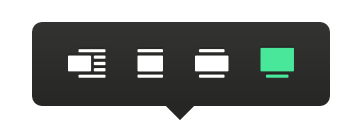
- Left-aligned image: the body text flow around your left-aligned image. No preferred size specified

- Full column-width images: this is also the default. Medium tries to match the image dimension to the column width of the body of your story. If the image isn’t wide enough to fill the whole column, it will appear centered in relation to the body of the story. Preferred size: 1400 pixels
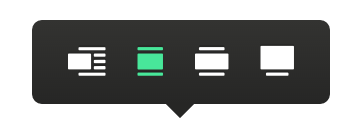
- Out-set images: when selected, the image width will exceed the body text column of your story. Preferred size: 2040 pixels
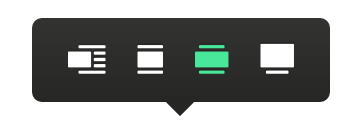
- Screen-width images: the image will fill the width of the page in your browser window. This is how the image on top of this post is set. Preferred size: 2500 pixels
6 | Use image caption to set its credit
This accomplishes two cool things:
- First, it provides the image credit that is due to its source
- Second, it links your story back to another property that might have similar keywords, potentially increasing your SEO rankings and findability
Sample on the image above.
Another way to set credit: “ Image courtesy of <source>/<copyright holder>”
7 | Winning the game of picture cropping and resizing
Medium is built with a WYSIWYG ( pronounced “wiz-ee-wig”) mentality, meaning it has very intuitive interfaces and functionality. For example, the tool allows the writer to drag and drop pictures from your computer, or to copy and paste from other websites.
In any case, there’s an overall tendency for the images pasted to look bigger on Medium, and unfortunately, the platform currently does not have the functionality to manually resize pictures.
There are many tools that can help you resize images, either on your computer or online. For simple tweaks, I use tools included in the Office package. I noticed that for an image to fit a Medium story as it fits another online page, it needs to be reduced by 64% — what I, therefore, suggest as the magic number.
So next time you’re trying to make an image look the same as it looked in its original source, try using the size functionality of your favorite picture editing software and reduce it by 64%. In the comments, let me know how that worked for you, or if you use a different number for a different program.
Update July 2017
Not only resizing is difficult; featured image cropping is another functionality causing difficulties for writers on Medium... until recently.
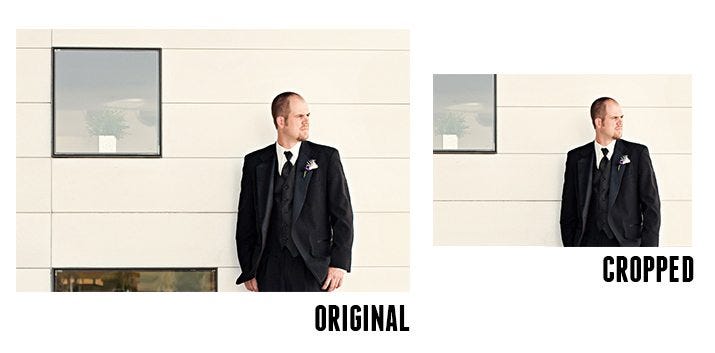
When you choose an image whose proportions are significantly different from traditional screens (namely, 4:3 or 16:9), Medium will crop your image when presenting the post to readers via their suggestion algorithm.
To give writers a bit more control, Medium now allows you to select a focal point on which the image will be cropped, around which the cropping will be centered. To set a focal point, go to the image you selected as featured. Click on it, then press Alt (PC) / Opt (Mac) and click. 💥 BOOM! The resulting green circle will serve as a focal point for automatic image cropping that appears in post listings and previews around the site.
Leverage your existing content and grow new audiences
8 | Find new audiences: import your existing content to Medium
Sometimes, you have already done the hard work: creating the content. Now, it’s time to reap the benefits of impressions, clicks, and engagement.
You should consider importing your entire blog to Medium. You don’t need to delete the original blog (or posts); in fact, the objective is precisely to keep the original content in its place. The advantages of importing all of your posts at once are:
- Efficiency: no need to copy and paste posts individually. Your content will be automatically import to Medium
- SEO (Search Engine Optimization) and Findability: when importing the posts, Medium will automatically add a CANONICAL statement to the HTML code linking to the original blog’s URL. This ensures that search engines (like Google, Bing, Yahoo) will process both links in a way that increases your search rankings for both posts (original and Medium’s) and also grows the authority of both assets: your blog and your Medium page.
If you’re ready to give the import tool a try, start here and on the comments, keep us posted of the results.
Medium’s algorithms will place your content in front a new audience that otherwise would never have heard of you
Update May 2018
I’ve done a fair number of imports into Medium and here’s the assessment:
Highlights of Medium Import Process
- Most of raw content is imported in the process
- Attempts to preserve formatting and does a good job in matching with Medium’s native formatting
- Imports most of the links correctly
Improvement Areas for Medium Import Process
- Messes up the pictures almost always: either doesn’t import a picture at all, or messes picture size or placement
- Messes with or miss some of the bullets
In case you want to import many stories (say 10+) and the content is fairly standardized, here’s my suggestion to speed up the process:
- import a story as pilot following the instructions above
- Add [Import Template] to the title of the story so it doesn’t get lost with other stories on Medium
- Click Publish, then Visibility and License options and select “Unlisted”. Easier to find on Medium stories, and doesn’t risk being seen by the public
- Next, you’ll check the quality of the content imported. Check the entire copy, formatting, bullets, and pictures because those are Medium Import’s Achilles heels.
- Likely it’s a bit messy here and there. Deep breath… you’ll start finding solutions for each of the identified problems next. Treat these as solutions for sections in your original post: header, titles, body, headers, footer, call to actions, etc. Reason for this per section treatment is that (1) you can evolve over time and (2) you’ll be surprised how often a solution in another section helps or dictates a solution in another.
- Some of the solutions you’ll find: paste the missing copy; reformat the text; fit pictures, resize if needed, add links and captions
- By now, you have a good sense of your story’s look and feel. Now that you have treated sections individually, don’t forget to have a holistic check on your story so they are consistent with one another or favors the areas in which you want to place focus on (interesting title, distinguished headers, highlights on the body, calls to action, etc)
- Medium saves your Template automatically. You can find listed in your stories as a Draft (or in Unlisted in case you publish the story at any time)
- Now you’re going to import your first story. Import the same story again. Then open the [Import Template] story side-by-side. Use the template as guidance AND as source of standard assets (title, pictures, pre-formatted sections) for each of the stories you’ll import.
- As time goes by you will notice opportunities in formatting the stories. Change [Import Template] directly and BOOM it will make it easier to import the next story using the latest and greatest template and standards.
9 | Find new audiences: repost your Medium stories as LinkedIn articles
Same content gains different traction in different social platforms. That happens because the same content will be showed to more or less people (and in different ways) depending on the platform it was written and the platform it is being shared.
For example, a Medium story will usually get less eyeballs when shared on Facebook (as a link) when compared to the same content written as (a native) post on Facebook. This happens because social platforms like Facebook, LinkedIn and YouTube favor distribution of content that is native to them. Facebook is notorious for giving preference to videos directly embedded to its posts versus videos shared as a link in YouTube.
As you start developing a collection of Medium stories, consider sharing them on LinkedIn as (native) articles. This not only likely increase the number of readers to that content, but also will get you new readers, some that will potentially cross-follow you to Medium.
Start here to post articles on LinkedIn by copying the content from Medium and pasting on LinkedIn. Remember to add a statement like this to the bottom of the post: “This article was originally published on Medium .” For more ideas on how to use the footer to improve your Medium game, read on below to number 12.
10 | Grow your Medium Publication by learning more about your readers
If you want to grow your publication, you will have to understand who your readers are: how they found your publication, what / how long they read in your publication, what is flowing or stalling their readership, where they go after reading your stories.
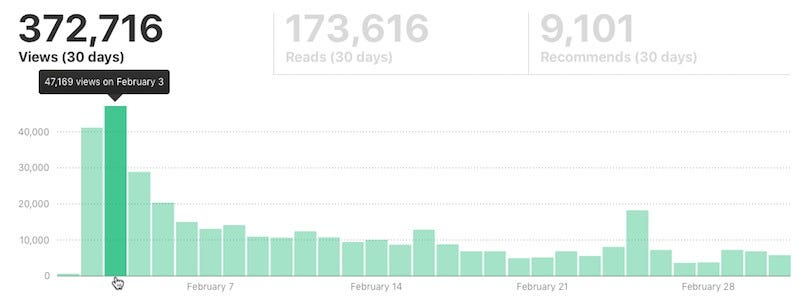
Medium has a simple and effective Stats functionality (sample) with a few insights to your posts. However, you want to know more to grow and potentially monetize your publication:
- traffic sources, like Medium itself, social media, email
- User journeys
- Bounce rates
- Search ranking
- Loading times
And much more. To get there, you need to add tracking codes to your publication’s website, provided by search engine analytic tools like Google Analytics or Bing Webmaster.
Update March 2018: up until recently, Medium helped publication owners to gain detailed analytics (among a variety of benefits) by allowing publications to set a custom domain (for example, mymediumpublication.com). For a variety of reasons, Medium decided to no longer support this procedure. I have a few theories and speculations as far as reasons to move away from custom domains:
- Custom domains don’t add to Medium search authority
- Setting up these custom domains were time-consuming for the Medium Support team without any payoff other than pleasing a few users
- As Medium users and publications grow, the process doesn’t scale. Difficult to be automated. So the problem only aggravates over time
- Potential legal liability to Medium
- In summary, a luxurious distraction for Medium
All these are speculations… and don’t change the fact that custom domains are no longer allowed.
I’ve decided to keep the original description of steps to accomplish that below; they are now relics of the history of this platform, and might inspire someone, one day, to reconsider the decision of banning custom domains.
In the past, how did one add a Google Analytics tracking code to a publication?
- Request your Medium publication to be associated with your custom domain
- Medium Support team will message you back detailed instructions on how to update your domain’s registrar (twelve A plus one CNAME entries)
- Request Medium to add Google Analytics tracking IDs to your publication
Custom domains could only be applied to publications, not to individual profiles. Also, these steps assume that you have already created (A) a Medium publication, (B) acquired a custom domain, and (C) preset a Google Analytics account and created a tracking ID for the custom domain.
For reference, here’s another story that covered the steps for setting up a Medium custom domain.
In case you already have a publication on Medium with a custom website, here are two stories to help you unlock the value I promised at the beginning of this session: How to Setup Google Analytics for Medium and How to Manage Your SEO and Google Analytics on Medium.
11 | More ways to optimize your stories for SEO
Besides link building, importing blog posts and placing image credits on captions, there are a couple of functionalities built in on Medium for you to improve the odds of having your stories, profile and publication be found.
Add custom title / subtitles: while editing your story, click the “…” button at the top and select Title/subtitle. Select Custom title. You must have a title, but a subtitle is optional.
Also, make sure to break your text into sections, and place a header for each of those sections. In each of the headers, use keywords that connect to the topic, and the title of the story. Search engines consider this structure to rank a page: the better the legibility, the higher the ranking; the more your topic and keywords on title and headers align, the higher the ranking for that particular topic and keywords. For an example, look at what I did in this story: 15 headers + a bonus one.
Gain traction across your existing social media platforms
12 | A simple yet powerful call to action: add a footer to your stories
Now that you’ve got your readers attention… invite them to take the next step in getting to know you. Add a footer note to all of your stories, preferably with these elements:
- A short bio
- Links to your other Medium stories
- Links to your social media accounts
- Link to your website, book or other project
- References or sources of the content
(AVOID) Add Newsletter Signup Forms to Each Story
Medium does a fantastic job in building your own audience (more about it in the next section), but it does not provide you with email addresses of the people that follow you. That impedes you from developing email campaigns to your followers. As your followship grows, this limitation becomes ever more painful, without any quick solution to it.
The solution is to build up an email list over time. One way to accomplish it is to add a newsletter form to each of your stories. They are usually placed at the bottom, with a proper call to action. The most pervasive free tool is Upscribe; their paid plans allow to fully customize the form.
Update May 2019
It appears that Medium decided to curb the “list building” behavior in the members-only stories:
Do not ask for claps or include other calls to action, including GIFs of clapping, requests for donations, or other links or embeds for the purpose of capturing user information or soliciting money.
Ad-free zone
Members are paying for an ad-free experience, so do not ask for claps or include other calls to action, requests for donations, email list sign-ups, or other links or embeds for the purpose of capturing user information or soliciting money.
Beware: that behavior is not limited in regular stories, but I have collected evidence in the past month of Medium removing accounts of writers that included Upscribe in their stories submitted to the Partner Program.
13 | Grow your followers: connect Medium with your Twitter and Facebook profiles
Medium is an excellent traction channel. It allows the user to link their Medium profiles to their Twitter and Facebook channels for a very specific reason: all of your connections on those platforms that have a Medium profile automatically become followers to your Medium profile. Likewise, you automatically become their followers.
This is solid follower acquisition strategy: it cuts both ways leveraging pre-existing, validated connections that are also likely active Medium users.
This is also solid content traction strategy: as soon as one of your connections post a new story on Medium, notifications go out via all the connected platforms, maximizing the chances that a particular story is seen by people that already have a connection with you… which maximizes not only clicks, but also readership.
14 | Schedule your posts to maximize audience
Even though the data scientist at Medium already analyzed the best time to post on the platform and guaranteed that there’s no difference when you are posting great content… there’s still a practical reason to schedule your posts.
If you connected Medium to your Twitter and Facebook profiles as I suggested in a previous tip, now is the time to take advantage of that connection to gain traction on your posts.
Both Twitter and Facebook command prime time hours in which your audience is much more active and likely to consume your content. Several tools, including Buffer, develop a custom model for each of your profiles, and attempt at posting pre-scheduled or queued posts at that time.
My suggestion: learn which times your audience is most active in those platforms and schedule your Medium post to be published at the overlapping range on both Twitter and Facebook. More eyeballs, more likes, more engagement. 💥 BOOM! That simple.
15 | Amplify your stories via publications
Another way to get new audiences is to publish your stories in different publications. It’s a symbiotic relationship: writers need publications to showcase their content to varied audiences; publications need great stories to feed their followers’ thirst and stimulate growth. Well played, Medium!
Please note you can only post a story to one publication at a time, but you can share different stories with different publications.
16 | Join the Medium Partner Program
In October 2017, Medium announced a program to reward its content creators (writers) with cash payments for the success of their stories within the platform. Stories published within the program would be under the subscription paywall established by the website (“Medium Membership”). While fully available to all members, stories submitted as such have limited accessibility to non-members (3 stories per month, since the program’s launch).
There are multiple answers on Quora to the debate whether it’s worth participating in the program, mostly geared at creating realistic expectations.
If you want to apply to join the program, or simply want more information, read the Join the Program article.
For ongoing updates on the program, consider following Medium Writers Team and 3 Min Read, the Medium’s official blog.
17 | Submit your stories to Medium Editorial Team
New March 2019
In 2019, Medium has launched a few publications
- OneZero, covering tech and science;
- Human Parts, publishing personal essays;
- ZORA, which is by, for, and about women of color;
- Elemental, which offers a scientific approach to health and wellness;
- Modus, on UX/UI design;
- GEN on politics, power, and culture;
- and Forge on personal development.
There are more publications on the way.
This is an opportunity for writers to work more closely with our editorial team and reach a larger readership through these publications. However, the editorial team has a set of minimum requirements for each story to comply in order to be accepted into their publications. Here’s the full version of those curation guidelines, and a summary for a quick skim.
Here are the instructions on how to submit stories to each of them. 💥 BOOM! Good luck! Keep me posted on your progress.
BONUS: Embed cool content in your stories
Medium team has been working to give us some cool functionalities. That includes the ability to embed other content in stories:
- Tweets
- Slideshare presentations
- 📄 PDFs
- 🎦 YouTube videos
- 📶 Soundcloud or podcast audio
- 📝 Other Medium stories
- <> Code snippets
To embed these and other elements to your stories, simply paste a link to the content and press ENTER.
💥BOOM! Medium leads the content and embeds in the story.
Conclusion
I guarantee that even experienced Medium writers will have found two or three fresh tips to assist in improving their presence.
Medium is a wonderful platform for blogging, storytelling, reading, sharing, and for growing. I wholeheartedly hope that you make the most out of it
Speaking of which…
If I managed to retain your attention to this point, leave a comment describing how this story made a difference for you, and what other topics about writing on Medium that you’d like answers to.
Andre Piazza is an Innovation Consultant in tech. I believe in building intelligent products, activating authentic Marketing messages and creating memorable user experiences. Connect with me on LinkedIn or say hi on Twitter, mentioning this story when you write.


