
Digital Writing
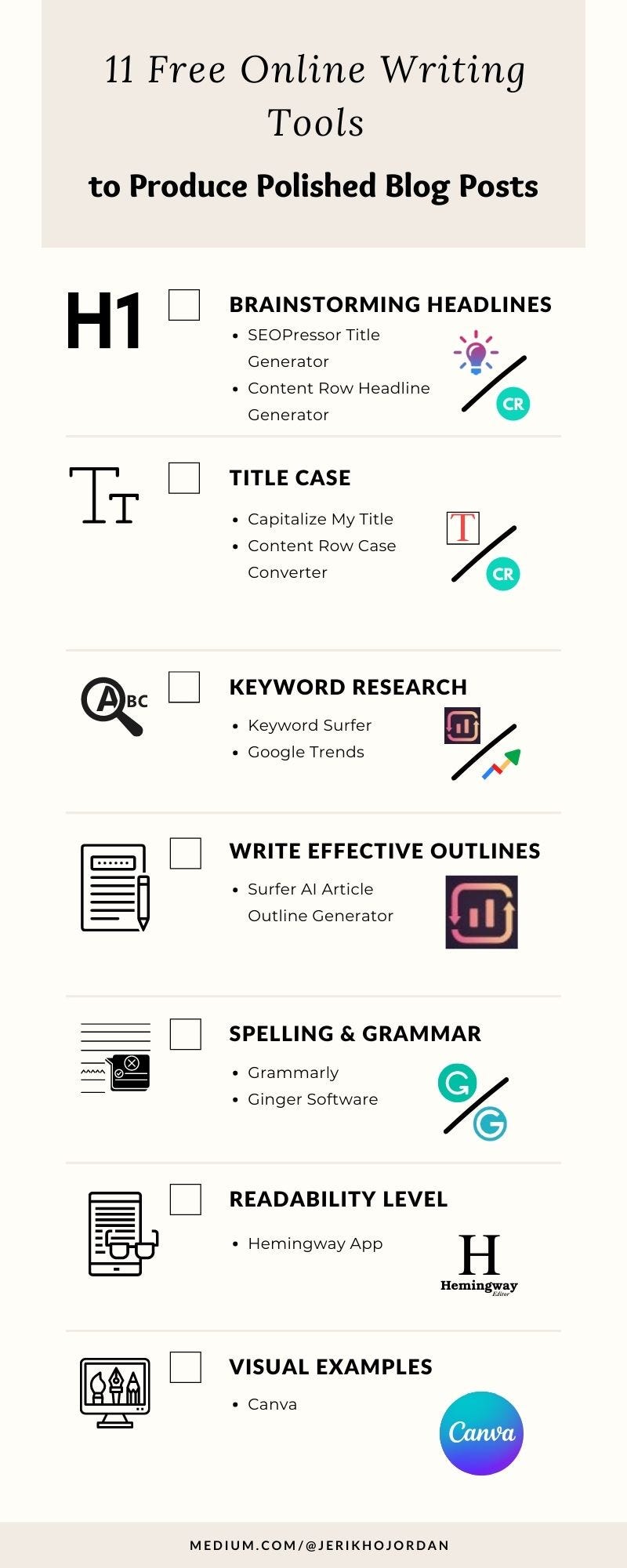
11 Free Online Writing Tools to Write Polished Blog Posts
They’re budget-friendly and easy to use!

A good blog post takes more than sharing helpful or educational content. When blogging was in its infancy, anything goes back in the day.
Keyword stuffing?
Word fluff?
Who cares because it didn’t matter!
But it’s 2022, guys. Things don’t go as easy anymore here on the interweb.
Luckily, there are many great online writing tools out there. Even better, there are free alternatives to get started with as a beginner.
I know how frustrating it is to use free tools with minimal daily usage. So the ones I’ve compiled for you are limitless!
Without further ado, let’s get started.
Coming up With Eye-Catching Headlines
So you have a topic you’d like to write about. But you couldn’t come up with a headline that would attract clicks.
Besides, coming up with a magnetic title isn’t as simple, especially with your busy schedule.
So there’s nothing wrong with getting a little help from headline generators:
2. Content Row Headline Generator
Now, using these generators doesn’t mean you’re good to go after copy-pasting the suggestions. Instead, use it to hatch better ideas on writing click-worthy headlines you’re happy to publish.
I usually use this tool during those slow days when I know what to write but am utterly clueless about the title. And the suggested headlines keep me thinking until I get a better one.
Title Case
Well-formatted titles are essential, especially when your clients don’t expect you to make such minor errors.
You can have the correct format instantly by using these title case converters:
Keyword Research
Keyword research gives you information about what your target audience is looking for on Google. Your article has a better chance of ranking higher on Google search results with the right keywords.
There are other ways to do this without using online tools. But keyword research becomes less of a hassle with these free tools:
This is a Chrome extension, so it will automatically appear in your browser after the download is complete.
To do some keyword research, just type the topic you want to write about in your search engine, and you’ll find some keyword ideas and monthly search volume.
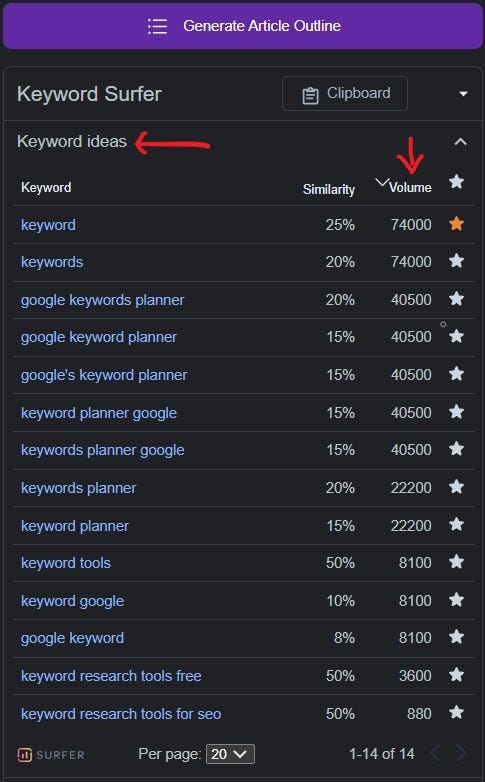
A good keyword search volume is a balanced mix of low-volume (100–1000) and medium-volume (10,000–100,000).
After collecting possible keywords from Keyword Surfer, find out the global monthly search volume percentage on Google Trends.
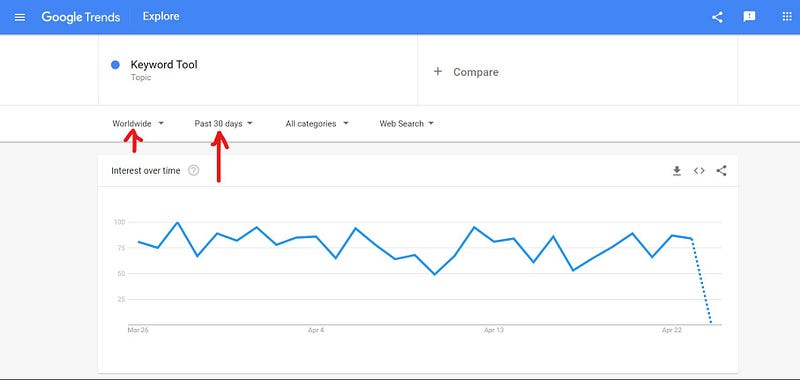
That way, you can narrow it down to the current highly searched keywords to add to your blog post.
Write Effective Outlines
Surfer AI Article Outline Generator
This is not a replacement for brainstorming subheadings. Instead, it’s a tool to help you during those days when your brain just won’t cooperate.
As it is an AI tool, the suggestions aren’t that reliable. So sometimes, you may end up with weird subheads.
But who knows?
Some of the odd suggestions might inspire you to write better ones. It happened to me several times.
I find this tool especially useful when writing long forms. It breaks down my topic to generate more ideas to add to the content.
Simply put, use it as an idea generator, not a replacement for your creativity.
Spelling & Grammar
There are many online grammar checkers, but the ones I’ve used are:
1. Grammarly
Both are available as browser extensions, but I prefer Grammarly more. And I used Ginger Software back when I was a university student.

The features available for Ginger Software aren’t as vast as Grammarly, which explains the lower subscription fee compared to Grammarly Premium.
Readable Sentences
Many people are looking up for quick answers to their problems online. So easy-to-read sentences require less effort, which will make it less likely for readers to click away without reading the whole article.
That’s why it is essential to check the readability level of your writing before publishing. Though this feature is only available if you have Grammarly Premium, the best free alternative is the Hemingway App.
Like online grammar checkers, you just have to copy-paste your article to the Hemingway Editor. The highlighted sentences indicate hard-to-read phrases and errors.
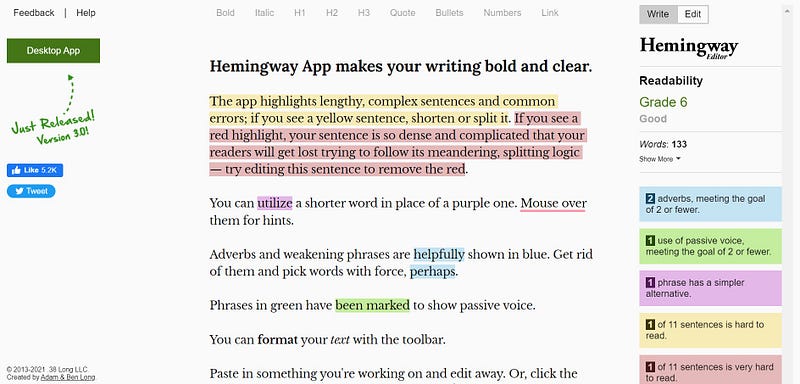
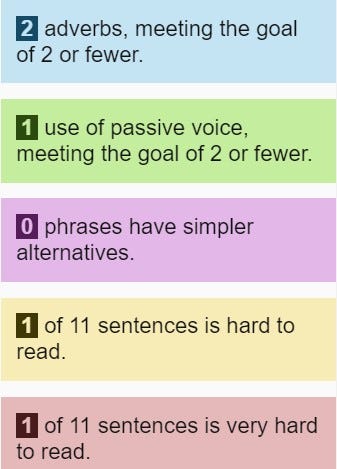
Though Hemingway Editor offers a few grammar suggestions, it is not as thorough as Grammarly.
So unless you’re a grammar wizard (I wish I am), stick with the grammar checker of your choice and use Hemingway for readability level.
Graphic Design

This goes without saying. I’m pretty sure many of you know what Canva is. But if you don’t, Canva is a graphic design tool. It’s very user-friendly, and I bet you’ll have fun using it.
I know I do!
Many blog writers use it to design the cover image of their blog posts. But you can do so much more with Canva to add some color to a wall of words.
To name a few:
- Illustrations.
- Charts.
- Comic strips.
- Infographics (the main points of your blog post).
Final Thoughts
Of course, you can’t really beat paid tools, especially for keyword research and grammar checkers. Many premium versions have extensive features to produce better-optimized and error-free content.
But if you’re still at a learning stage, using these free tools doesn’t hurt.
Do you use any of the tools I mentioned? And mind sharing your preferred free online writing tools?
If you’d like to understand more about keyword research for SEO, feel free to read my beginner-friendly post on that topic! ⬇
Have you thought of using an AI writing assistant? Check out my review on QuillBot Premium. ⬇⬇⬇
🕖 Follow and be a writer for Time To Write The Next Article, a Medium publication founded by Don Sabado.
🖋 Time To Write The Next Article welcomes pieces about writing, travels, teaching, and making money online!
📋 You can read the recently updated guideline here, and start writing the next article! 😊


