
10+ Ways to Run Open-Source Models with LlamaIndex
LlamaIndex’s open-source model integration with Hugging Face, vLLM, Ollama, Llama.cpp, liteLLM, Replicate, Gradient, and more

The CTO of Hugging Face, Julien Chaumond, posted on LinkedIn two weeks ago and predicted that “Most open source models next year will be better than OpenAI’s”.
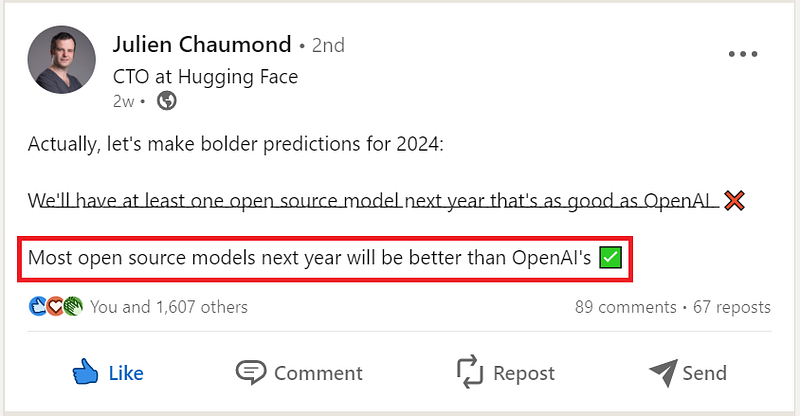
Astounding progress by the open-source community indeed! And the momentum is simply unstoppable. With many quality open-source LLMs and embedding models emerging every week, and their performance nearing that of those proprietary models, it’s a no-brainer to roll up our sleeves and experiment with them to see how well they perform for our specific use cases.
It is amazing to see the large number of integrations LlamaIndex has established with a plethora of open-source model platforms and providers, and the integration list keeps growing. In this article, let’s explore how we can run open-source models, both LLMs and embedding models, with the out-of-the-box support from LlamaIndex.
RAG Pipeline: It’s a Wonderful Life
We will use the following two models for our RAG pipeline, which loads data from the Wikipedia page of the classic movie It’s a Wonderful Life (one of my all-time favorites), and answers questions related to the movie. We will explore the different ways we can utilize these two models in building our RAG pipeline.
- LLM:
zephyr-7b-beta. A 7B parameter GPT-like model fine-tuned on a mix of publicly available, synthetic datasets. It’s a fine-tuned version of mistralai/Mistral-7B-v0.1. This will be used as our main LLM. However, some integration methods we explore in the sections below don’t support this LLM, we show the sample code snippet with a different LLM supported by that particular integration method. - Embedding model:
UAE-Large-V1. Universal AnglE Embedding (UAE), ranked number 1 on the MTEB leaderboard at the time of this writing.
We will implement the RAG pipeline with SentenceWindowNodeParser, a tool that can be used to create representations of sentences that consider the surrounding words and sentences. During retrieval, before passing the retrieved sentences to the LLM, the single sentences are replaced with a window containing the surrounding sentences using the MetadataReplacementNodePostProcessor. This is most useful for large documents, as it helps to retrieve more fine-grained details.
Let’s first lay out our RAG pipeline’s 5 steps, see the code snippet below. ServiceContext, the wrapper class for LLM and embedding model and other hyperparameters, will be a placeholder for now, and we will implement it in various ways in the following sections.
# Step 1: Load Data
from llama_index import download_loader

WikipediaReader = download_loader("WikipediaReader")
loader = WikipediaReader()
documents = loader.load_data(pages=['It\'s a Wonderful Life'], auto_suggest=False)
print(f'Loaded {len(documents)} documents')

# Step 2: Set up node parser
from llama_index import ServiceContext
from llama_index.node_parser import SentenceWindowNodeParser, SimpleNodeParser

node_parser = SentenceWindowNodeParser.from_defaults(
    window_size=3,
    window_metadata_key="window",
    original_text_metadata_key="original_text",
)
simple_node_parser = SimpleNodeParser.from_defaults()

# Step 3: Define ServiceContext, placeholder for now
from llama_index import ServiceContext

# TODO, a placeholder for now
llm = ""
embed_model = ""

service_context = ServiceContext.from_defaults(
    llm=llm,
    embed_model=embed_model
)

# Step 4: Define index, query engine
from llama_index import VectorStoreIndex

nodes = node_parser.get_nodes_from_documents(documents)
index = VectorStoreIndex(nodes, service_context=service_context)

from llama_index.indices.postprocessor import MetadataReplacementPostProcessor

query_engine = index.as_query_engine(
    similarity_top_k=2,
    # the target key defaults to `window` to match the node_parser's default
    node_postprocessors=[
        MetadataReplacementPostProcessor(target_metadata_key="window")
    ]
)

# Step 5: Run queries
from IPython.display import Markdown

query = "Why is George the richest man in town?"
response = query_engine.query(query)
display(Markdown(f"<b>{response}</b>"))
Now that we have our RAG pipeline laid out, let’s dive into the different methods to call the open-source models to fill in Step 3 above, which defines the llm and embed_model and constructs service_context.
Method 1: HuggingFaceLLM & HuggingFaceEmbedding
Hugging Face is an open-source platform for machine learning. It provides tools and resources for developers to build, train, and deploy machine learning models. It’s like a giant toolbox for AI, with pre-trained models, datasets, and infrastructure to help you get started with your projects. Think of it as a place where you can find all the building blocks you need to create amazing AI applications.
Hugging Face provides the transformers package to enable access to its open-source models. We first install transformers[torch] package:
!pip install "transformers[torch]"Now, let’s provide our Hugging Face token. Note that using your token will not charge you money. LlamaIndex wraps the transformers[torch] package into LLM entities by its class HuggingFaceLLM for LLMs and HuggingFaceEmbedding for the embedding models. See the code snippet below.
from typing import Optional

from llama_index.llms import HuggingFaceLLM
from llama_index.embeddings.huggingface import HuggingFaceEmbedding

HF_TOKEN: Optional[str] = '#####################'

# Define the locally run llm and embed_model
llm = HuggingFaceLLM(model_name="HuggingFaceH4/zephyr-7b-beta")
embed_model = HuggingFaceEmbedding(model_name="WhereIsAI/UAE-Large-V1")
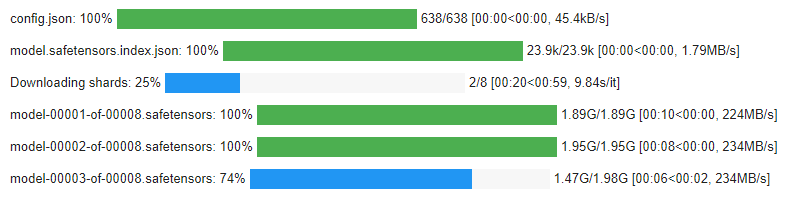
While executing the above step, we can see the progress bar for model download. For the batches, they are running sequentially. Note this, as we will compare this with how vLLM downloads the models in parallel.
With the above definition for llm and embed_model, we get the following output when asking, “Why did Harry say George is the richest man in town?”:

HuggingFaceLLM comes with a list of the constructor parameters to allow for customization. Refer to HuggingFaceLLM source code for details.
The HuggingFaceEmbedding class also comes with a list of constructor parameters, allowing customization.
LlamaPack for Zephyr query engine
LlamaIndex offers a LlamaPack for Zephyr query engine, which we can use to simplify our implementation of downloading the models locally. See the code snippet below.
from llama_index.llama_pack import download_llama_pack

# download and install dependencies
ZephyrQueryEnginePack = download_llama_pack(
  "ZephyrQueryEnginePack", "./zephyr_pack"
)

# You can use any llama-hub loader to get documents!
zephyr_pack = ZephyrQueryEnginePack(documents)

response = zephyr_pack.run("Why is George the richest man in town?", similarity_top_k=2)
Please note the out-of-the-box Zephyr query engine pack runs HuggingFaceH4/zephyr-7b-beta as its LLM, and BAAI/bge-base-en-v1.5 as its embedding model. You are welcome to customize the embedding model.
For those new to LlamaPacks, check out my previous article to understand how LlamaPacks work and how to customize a particular pack.
Method 2: HuggingFaceInferenceAPI & HuggingFaceInferenceAPIEmbedding
The Hugging Face Inference API easily integrates over 50,000 state-of-the-art(SOTA) open-source models, deployed for inference via simple API calls, with no MLOps overhead. It’s suitable for applications that need real-time responses and don’t want to handle the computational load.
Inference API comes with two plans: the pro plan and the enterprise plan. Use the free pro plan with shared infrastructure, which is great for POCs or development tasks. For production use, switch to the enterprise plan with dedicated inference endpoints. Custom pricing is based on volume commit, starts at $2k/month, with annual contracts.
LlamaIndex integrates with Hugging Face Inference API by its classes HuggingFaceInferenceAPI for LLMs and HuggingFaceInferenceAPIEmbedding for the embedding models. These two classes wrap huggingface_hub[inference] package, which we need to install first:
!pip install "huggingface_hub[inference]"Now let’s call HuggingFaceInferenceAPI to define our llm and HuggingFaceInferenceAPIEmbedding to define our embed_model.
from typing import Optional
from llama_index.llms import HuggingFaceInferenceAPI
from llama_index.embeddings import HuggingFaceInferenceAPIEmbedding

HF_TOKEN: Optional[str] = '##################'

# define llm and embed_nodel
llm = HuggingFaceInferenceAPI(
    model_name="HuggingFaceH4/zephyr-7b-beta", token=HF_TOKEN
)

embed_model = HuggingFaceInferenceAPIEmbedding(
    model_name="WhereIsAI/UAE-Large-V1", token=HF_TOKEN
)
With the above definition for llm and embed_model, we get the following output when asking, “Why did Harry say George is the richest man in town?”:

HuggingFaceInferenceAPI also comes with a list of the constructor parameters to allow customization.
The HuggingFaceInferenceAPIEmbedding class also comes with an additional list of constructor parameters besides the ones mentioned in HuggingFaceInferenceAPI, allowing for customization.
Note that the Inference API is free, your token is only used for rate limiting. Per Hugging Face API Inference FAQ:
The free Inference API may be rate limited for heavy use cases. We try to balance the loads evenly between all our available resources, and favoring steady flows of requests. If your account suddenly sends 10k requests then you’re likely to receive 503 errors saying models are loading. In order to prevent that, you should instead try to start running queries smoothly from 0 to 10k over the course of a few minutes.
Based on the above statement, it’s fair to say that the rate limiting is not much of a concern for developers working on their POCs or experiments. However, while working on this POC in Colab, I ran into the rate limiting error for both the LLM and the embedding model multiple times, which surprised me as my usage was in the “normal usage” scope. Unfortunately, the detail of the rate limiting is unclear, and I couldn’t find further information on Hugging Face’s website. My conclusion is that the rate limiting of the inference API could be a potential issue for developers in their day-to-day development activities, although the rate limiting should not pose any obstacle for a quick POC.
Method 3: TextEmbeddingsInference
We explored the Hugging Face text-embeddings-inference server a few months ago. Details can be found in my article Optimizing Text Embeddings with HuggingFace’s text-embeddings-inference Server and LlamaIndex.
With the text-embeddings-inference server, we no longer need to download the embedding model locally; we can access it through our inference server via the TextEmbeddingsInference class provided by LlamaIndex. See the sample code snippet below.
from llama_index.embeddings import TextEmbeddingsInference

embed_model = TextEmbeddingsInference(
    model_name="WhereIsAI/UAE-Large-V1",
    base_url = "http://127.0.0.1:8080", # if you have the inference server hosted in the cloud, change this url accordingly.
    timeout=60,  # timeout in seconds
    embed_batch_size=10,  # batch size for embedding
)
The TextEmbeddingsInference class has a list of constructor parameters you can customize per your need.
Key takeaways from our experiments of text-embeddings-inference server include:
- The
text-embeddings-inferenceserver on a GPU yields about 100 times better performant inference time than that on a CPU, ~3 ms versus ~300 ms. It is a truly blazingly fast embedding solution. - With the
text-embeddings-inferenceserver, you can save on the embedding token cost if you have been paying OpenAI for its embedding model. However, remember that the inference server does incur hosting charges, such as cloud costs. - The sequence length of 512 in the inference embedding model
UAE-Large-V1, and many other BERT models, poses a limitation on the chunk sizes. This can potentially impact use cases dealing with large datasets, where larger chunk sizes can significantly improve parsing performance.
Method 4: Vllm & VllmServer
vLLM is a Python library that contains pre-compiled C++ and CUDA (12.1) binaries. It is a high-throughput and memory-efficient inference and serving engine for LLMs.
vLLM utilizes PagedAttention, a new attention algorithm that effectively manages attention keys and values. vLLM equipped with PagedAttention redefines the new state of the art in LLM serving: it delivers up to 24x higher throughput than Hugging Face Transformers (HF), and up to 3.5x higher throughput than Hugging Face Text Generation Inference (TGI).
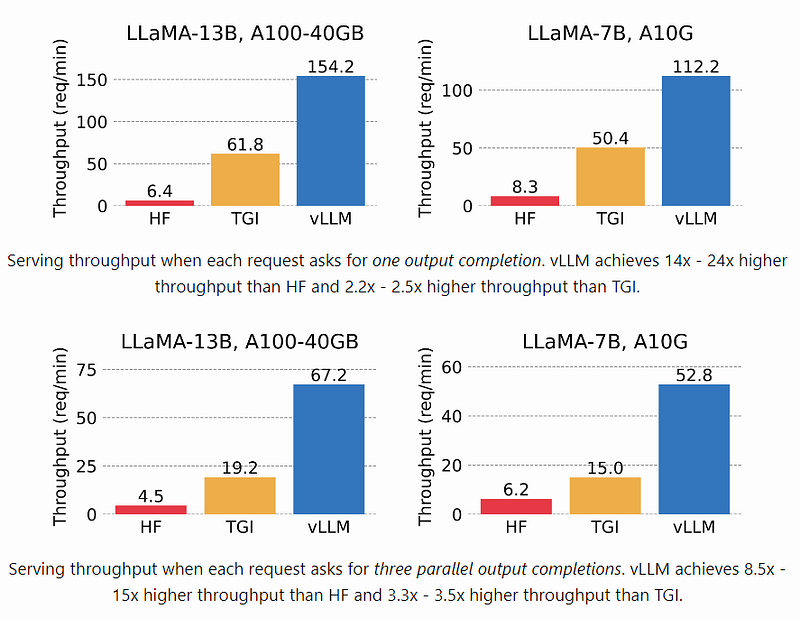
vLLM supports a variety of generative Transformer models in HuggingFace Transformers. For a full list of the model architectures vLLM supports, refer to vLLM Supported Models page.
Install vLLM with the following command:
!pip install vllm
vLLM can be used for both offline inference and online serving.
vLLM Offline Inference
To use vLLM for offline inference, LlamaIndex has integrated with vLLM through its Vllm class. See the sample code snippet below.
from llama_index.llms.vllm import Vllm

llm = Vllm(
    model="HuggingFaceH4/zephyr-7b-beta",
    dtype="float16",
    tensor_parallel_size=4,
    temperature=0,
    max_new_tokens=100,
    vllm_kwargs={
        "swap_space": 1,
        "gpu_memory_utilization": 0.5,
        "max_model_len": 4096,
    },
)
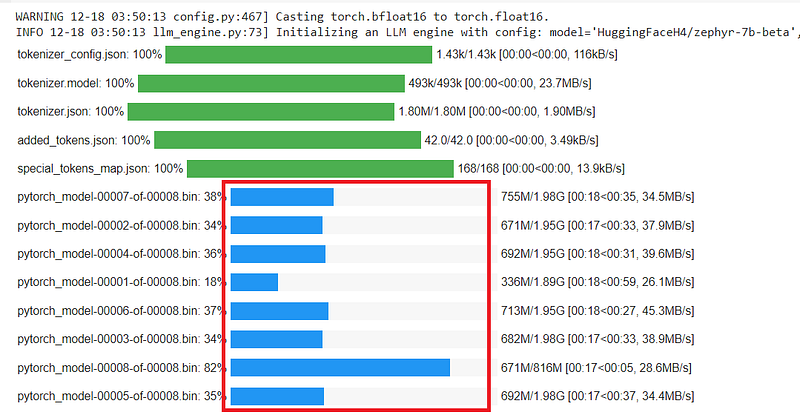
During execution, the difference between how Vllm handles the model download and how HuggingFaceLLM handles the model download is easily spotted. Vllm can download the model in parallel; see the download progress bar below.
Vllm also comes with a list of constructor parameters to allow for customization.
vLLM Online Serving
To use vLLM for online serving, you can start an OpenAI API-compatible server via the following shell command, pass in the model name:
$ python -m vllm.entrypoints.openai.api_server --model HuggingFaceH4/zephyr-7b-betaLlamaIndex also offers the VllmServer class for the integration with online serving. Once your API server is up and running, you can define your llm by constructing the VllmServer class, passing in the api_url. Modify the api_url accordingly if the vLLM server is hosted in the cloud. See the sample code snippet below.
from llama_index.llms.vllm import VllmServer

llm = VllmServer(
    api_url="http://localhost:8000/generate", max_new_tokens=100, temperature=0
)
The VllmServer also comes with a list of constructor parameters you can customize.
Compare Hugging Face Inference API Enterprise Plan with vLLM Online Serving
Both Hugging Face Inference API Enterprise Plan and vLLM Online Serving are options for deploying your LLM in production. Let’s compare them to find out their pros and cons.
Hugging Face Inference API Enterprise Plan:
Pros:
- Easy to set up and deploy, especially for Hugging Face models.
- Managed infrastructure simplifies model management.
- Strong security features and enterprise-grade support.
Cons:
- Limited model compatibility compared to vLLM.
- Less flexibility in scaling and resource control.
- Potentially higher costs for high-frequency use.
vLLM Online Serving:
Pros:
- Supports a wider range of model formats and libraries. vLLM’s flexible architecture allows you to deploy virtually any model format, as long as you can provide a custom serving function to handle inference.
- Granular control over scaling and resource allocation.
- Potentially lower cost for specific use cases due to pay-as-you-go pricing.
Cons:
- Requires more technical expertise to set up and manage.
- Security features require additional configuration.
- Less readily available support compared to Hugging Face.
Recommendation:
- Choose Hugging Face Inference API Enterprise Plan: If you primarily use Hugging Face models and value ease of use, managed infrastructure, and robust security.
- Choose vLLM Online Serving: If you have diverse model formats, require fine-grained control over resources, or cost efficiency is a major concern.
Method 5: Ollama
Ollama supports a list of open-source models available on ollama.ai/library, listed in the table below.
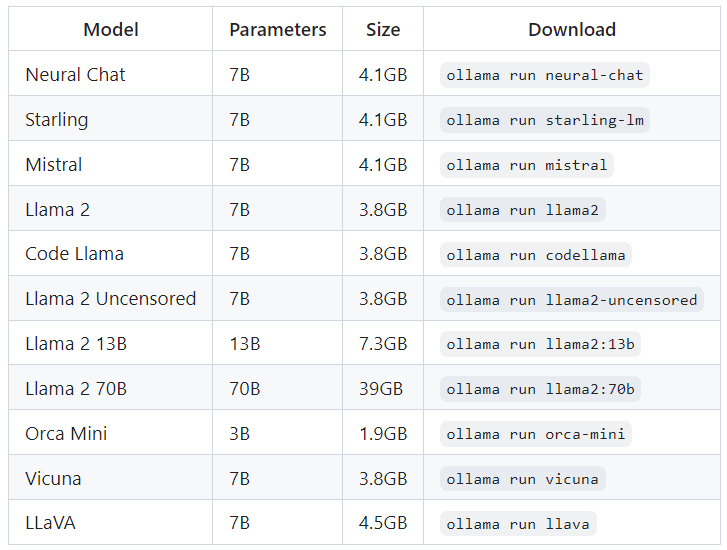
First, set up and run a local Ollama instance by following Ollama readme.
For Windows CPU, I executed the following commands to get the Ollama server up and running locally, per instructions from Ollama’s docker hub page:
docker pull ollama/ollama
ollama pull llama2
docker run -d -v ollama:/root/.ollama -p 11434:11434 --name ollama ollama/ollama
winpty docker exec -it ollama ollama run llama2
LlamaIndex offers Ollama and OllamaEmbedding classes to integrate with Ollama. Once your Ollama instance is up and running, the usage is straightforward. See the sample code snippet below for defining the llm for llama2 model. Ollama doesn’t support zephyr-7b-beta as of this writing, so we use llama2 as our LLM instead. For the embedding model, since Ollama doesn’t support UAE-Large-V1, we define the embed_model so it downloads UAE-Large-V1 locally.
from llama_index.llms import Ollama

# define llm
llm = Ollama(model="llama2")

# define embed_model, download it to local as Ollama doesn't support UAE-Large-V1
embed_model="local:WhereIsAI/UAE-Large-V1"
Ollama also comes with a list of constructor parameters for customization.
OllamaEmbedding has a list of constructor parameters as well.
LlamaPack for Ollama query engine
LlamaIndex offers a LlamaPack for Ollama query engine, which we can use to simplify our implementation of downloading the models locally. See the code snippet below.
from llama_index.llama_pack import download_llama_pack

# download and install dependencies
OllamaQueryEnginePack = download_llama_pack(
    "OllamaQueryEnginePack", "./ollama_pack"
)

# You can use any llama-hub loader to get documents!
ollama_pack = OllamaQueryEnginePack(model="llama2", documents=documents)

response = ollama_pack.run("Why did Harry say George is the richest man in town?", similarity_top_k=2)
Method 6: LlamaCPP
Llama.cpp is an open-source C/C++ library that implements Facebook’s Llama and other related models like Llama2, Falcon, Alpaca, and GPT4All. It can run on CPUs and GPUs, making it suitable for various deployment environments.
LlamaIndex offers the LlamaCPP class for integration with the llama-cpp-python library. First we need to install this library:
!pip install llama-cpp-python
We define llm by passing in the model_url. See the sample code snippet below. Note, during execution, this step downloads the specified model Llama-2–13B-chat locally; it takes a bit of time to download this model, which is over 7GB.
from llama_index.llms import LlamaCPP

# By default, if model_path and model_url are blank, the LlamaCPP module will load llama2-chat-13B
llm = LlamaCPP(
    model_url="https://huggingface.co/TheBloke/Llama-2-13B-chat-GGUF/resolve/main/llama-2-13b-chat.Q4_0.gguf"
}
With the Llama-2–13B-chat as our LLM and we ask our original question, we get the following output:

The LlamaCPP class comes with a list of constructor parameters you can customize per your need.
For more info on this integration and sample code snippets, refer to LlamaIndex’s documentation on LlamaCPP.
Method 7: liteLLM
liteLLM is an open-source Python library that acts as a unified interface for calling a variety of LLMs through a single, OpenAI-compatible API. This means that you can use liteLLM to interact with over 100 different LLMs from providers listed below:
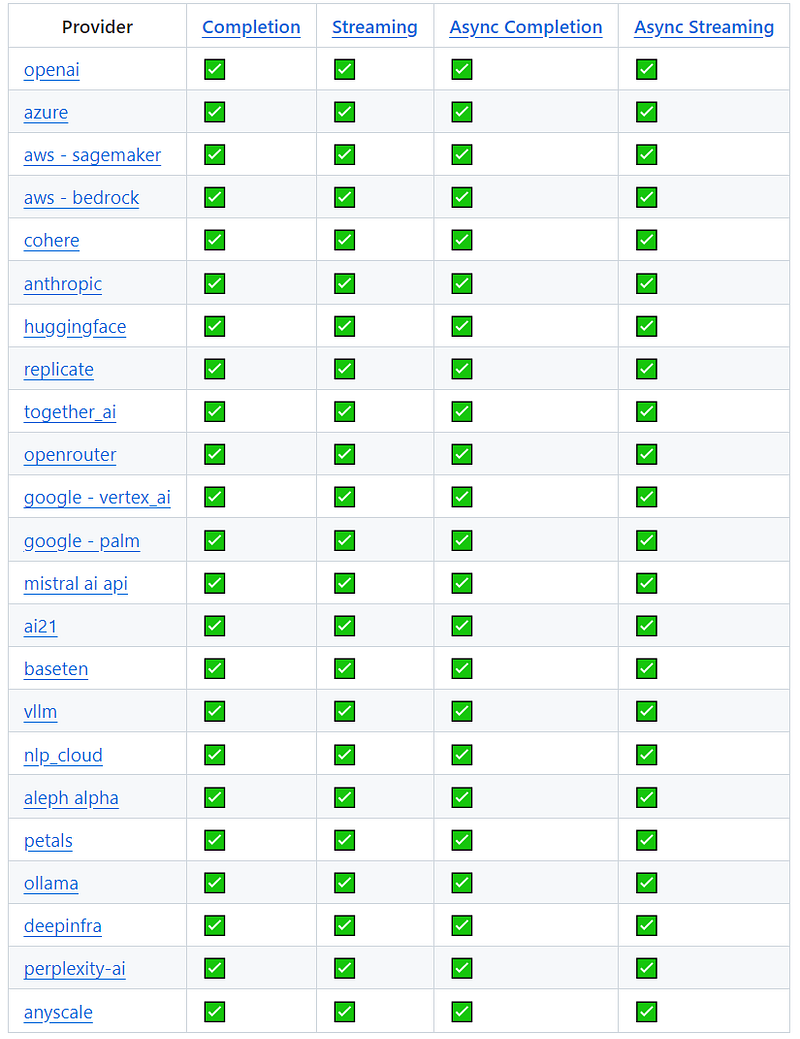
One of the key benefits of liteLLM is its simplicity. With liteLLM, you can use the same input/output format to call any of the supported LLMs, regardless of their underlying provider or API. This can save you a lot of time and effort, especially if you’re working with multiple LLMs in your project.
The cost of using liteLLM depends on the LLM that you’re calling. Each LLM has its own pricing model, and liteLLM simply passes through the costs that it incurs from the provider. However, liteLLM itself is free to use.
We need to first install litellm library:
!pip install litellm
LlamaIndex offers LiteLLM class for this integration. See below a sample code snippet:
from llama_index.llms import LiteLLM

llm = LiteLLM(
  model="huggingface/meta-llama/Llama-2-7b"
)
LiteLLM has a list of constructor parameters for customization.
Method 8: Replicate
Replicate is a platform that makes it easy to run inference on various open-source machine learning models without worrying about setting up and managing your own infrastructure.
Replicate offers deployment service for both public and private models. You only pay for what you use on Replicate, billed by the second. When you don’t run anything, it scales to zero and you don’t pay a thing. For details on the pricing for public and private models, check out Replicate pricing page.
LlamaIndex offers the Replicate class to integrate with the Replicate platform. You need to create an API key first. Then install replicate by running the following command:
!pip install replicate
You then define your llm by constructing the Replicate class, passing in the model name in the following format. If you don’t know your model name, search on Replicate Explore page to find your model name.
import os
from llama_index.llms import Replicate

os.environ["REPLICATE_API_TOKEN"] = "######################"

llm= Replicate(
    model="tomasmcm/zephyr-7b-beta:961cd6665b811d0c43c0b9488b6dfa85ff5c7bfb875e93b4533e4c7f96c7c526"
)
The query using this method returned the following output:

Check out the additional parameters Replicate offers for customization.
Method 9: GradientBaseModelLLM
Gradient is the only AI platform that allows you to combine Industry Expert AIs with your private data. Industry Expert AIs are built on state-of-the-art open-source LLMs. It’s designed to democratize AI. Models are run remotely on Gradient’s platform.
First, we need to install the gradientai library:
!pip install gradientai
LlamaIndex integrates with Gradient through its GradientBaseModelLLM class. See the code snippet below to construct the llm, you will need to pass in the gradient access token and workspace id.
from llama_index.llms import GradientBaseModelLLM

os.environ["GRADIENT_ACCESS_TOKEN"] = "####################"
os.environ["GRADIENT_WORKSPACE_ID"] = "#############################"

llm = GradientBaseModelLLM(
    base_model_slug="llama2-7b-chat",
    max_tokens=400,
)
The query output for Gradient is as follows:

The complete list of constructor parameters of GradientBaseModelLLM can be found in its source code.
Method 10: Integration with other open-source model providers
There are many other open-source model providers out there, and LlamaIndex has been shipping integration with those providers on an ongoing basis. It’s not possible to cover integration with all providers here, but to list a few:
- Anyscale: offers Llama2 and CodeLlama models.
- Clarifai: offers both free and paid access to its LLM models, depending on your usage needs and budget.
- EverlyAI: automatically optimizes the inference code path of supported models and achieves up to 20x speedup.
- OpenLLM: an open platform for operating large language models (LLMs) in production. Fine-tune, serve, deploy, and monitor any LLMs with ease.
- Llama API: a hosted API for Llama 2 with function calling support.
- LocalAI: a method of serving models through an OpenAI API spec-compatible REST API. LlamaIndex can use its
OpenAILikeLLM to directly interact with a LocalAI server. - MistralAI: provides two types of access to Large Language Models: an API providing pay-as-you-go access to our latest models, and open-source models available on Hugging Face or directly from the documentation.
- Perplexity: a powerful tool for information discovery and exploration. It is the most powerful AI research assistant.
- Many more… check out LlamaIndex documentation on LLMs and a list of supported embedding models for more details.
Models’ Self-hosting vs Third-party-hosting
Summarizing all the above methods, we can conclude that there are mainly two types of model hosting: self-hosting and third-party-hosting.
Self-hosting (local or cloud)
Pros:
- Control: You have control over the model, its configuration, and its data. This can be crucial for sensitive data or situations where customization is critical.
- Privacy: You keep your data on your own infrastructure, reducing the risk of it being shared or used for unauthorized purposes.
- Customization: You can modify and fine-tune the model to your specific needs and use cases.
- Cost-effective: In the long run, self-hosting may be cheaper than paying a vendor for access to the model.
- Hybrid Approach: It’s totally acceptable to combine local and cloud hosting and execution of the models. For example, you could run smaller models locally for quick tasks and POCs, and use a remote server for more demanding tasks such as production usage.
Cons:
- Technical expertise: Requires significant technical expertise to install, configure, and maintain the model and its infrastructure.
- Performance: Maintaining model performance and scaling resources can be a challenge, especially for complex models.
- Security: You are responsible for securing your infrastructure and data, which can be complex and resource-intensive.
- Updates: Staying up-to-date with the latest model versions and security patches can be time-consuming.
Third-party-hosting
Pros:
- Convenience: It’s much easier to get started with vendor hosting as they handle the infrastructure and technical aspects.
- Technical support: Third-party provides technical support and maintenance for the model.
- Scalability: Third-party platforms are typically designed to scale easily to meet your needs.
- Updates: Third-party automatically updates the model with the latest versions and security patches.
Cons:
- Cost: Third-party hosting can be expensive, especially for high-volume use cases.
- Control: You have less control over the model and its configuration.
- Data privacy: Your data may be stored on the vendor’s infrastructure, raising privacy concerns.
- Limited customization: Customization options may be limited or unavailable.
Additional Factors to Consider:
- The complexity of the model: More complex models require more technical expertise for self-hosting.
- Your technical resources: Do you have the staff and expertise to manage self-hosting?
- Your data privacy requirements: How sensitive is your data, and how important is it to keep it in-house?
- Your budget: Can you afford the upfront costs and ongoing fees of vendor hosting?
Overall, the best option for you will depend on your specific needs and resources.
Summary
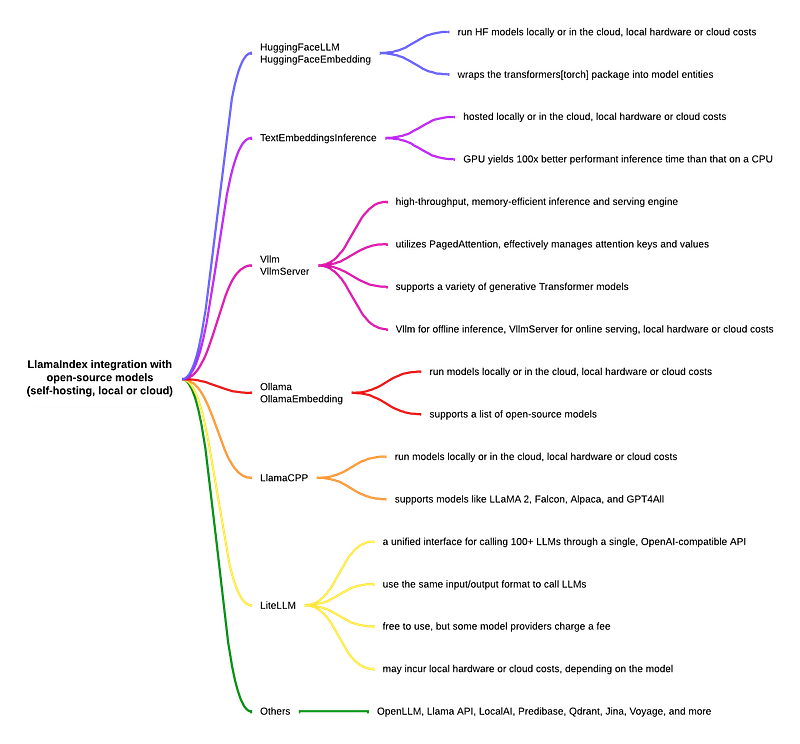
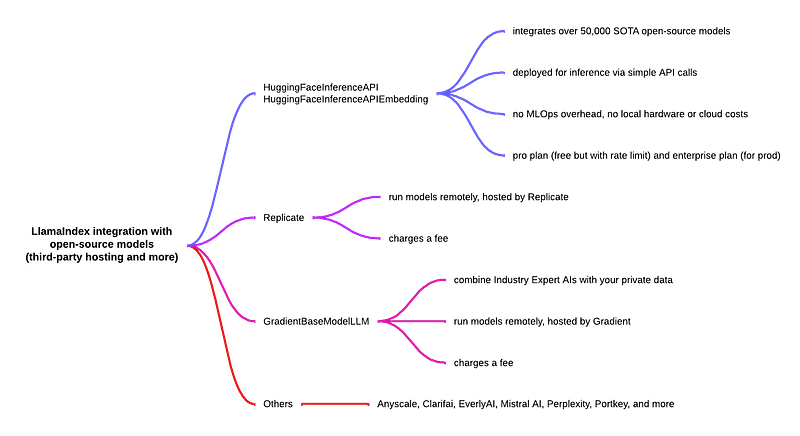
In this article, we explored the many ways LlamaIndex integrates with open-source models. The diagrams below summarize the key points of the 10+ ways to run open-source models with LlamaIndex.
The source code for this article can be found in my Colab notebook.
I hope you find this article helpful. I welcome any comments or corrections.
Happy coding!
References:
- A developer’s guide to open source LLMs and generative AI
- LlamaIndex documentation on using LLMs
- LlamaIndex documentation on embedding models
- Hugging Face LLMs
- Hugging Face Inference API
- Hugging Face API Inference FAQ
- Consuming Text Generation Inference
- Project vLLM
- vLLM: Easy, Fast, and Cheap LLM Serving with PagedAttention
- LlamaIndex vLLM notebook
- Run LLMs Locally
- Ollama - Llama 2 7B
- Ollama GitHub repo
- LlamaCPP
- liteLLM GitHub repo
- liteLLM Documentation
- Gradient Base Model


