
Llama Packs: The Low-Code Solution to Building Your LLM Apps
Templatizing your LLM app development with prepackaged LlamaIndex modules and templates

The holiday season is upon us, and LlamaIndex has special deliveries for all of us to explore! Released on Thanksgiving Eve, 2023, Llama Packs, in my opinion, is one of the most significant features across all LLM frameworks for LLM application development. In this article, let’s dive deep into this remarkable feature to better understand its brilliance and apply it in building our next LLM application.
Llama Packs
Llama Packs is both a methodology for swift and efficient LLM application building and a collection of prepackaged modules and templates to help developers kick-start LLM application building more swiftly and efficiently.
A methodology for swift and efficient LLM application building
The true brilliance of Llama Packs lies in its reusability and extensibility, thus making LLM app development super easy, intuitive, and flexible.
- Reusability: Compared to other LLM frameworks, LlamaIndex is already a highly abstracted framework. Yet the LlamaIndex founding team had an even higher vision for abstraction and reusability. With Llama Packs, many of the LlamaIndex native features, such as query strategies, from basic to advanced, and integrations with third-party vendors, are now prepackaged so developers can easily call the corresponding Llama Pack’s
runfunction to execute the logic. Such a low-code solution for LLM app development with such a rich collection of prepackaged modules and templates is simply unprecedented. - Extensibility: With reusability comes the challenge of extensibility. Again, the LlamaIndex founding team is leading the wave on this front — Llama Packs are designed to be extensible. You can easily download the prepackaged module, make a copy locally, customize and extend the functionalities as much or as little as you want, and then simply re-import the pack and use it. Community contribution for new packs to extend the existing packs is always welcome!
A collection of prepackaged modules and templates
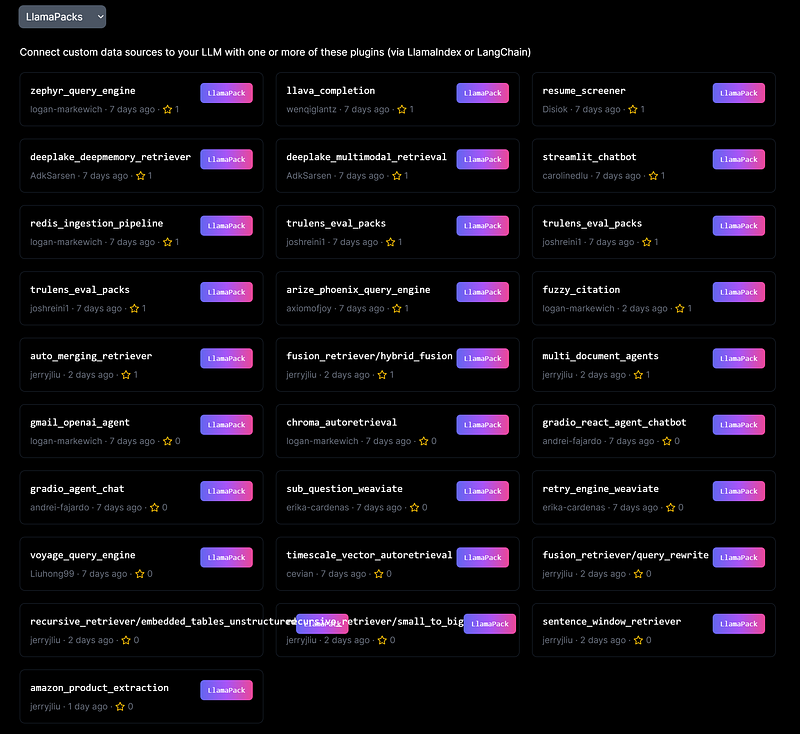
At the time of this writing, there are nearly 30 Llama Packs on Llama Hub. See the screenshot below. A wide array of LlamaIndex native features and third-party integrations are at our fingertips to help us build our next LLM app. The list will be growing as more contributions from the community come in!
Let’s continue our exploration of Llama Packs by comparing an RAG pipeline before and after implementing Llama Packs.
Comparison of a SentenceWindowNodeParser RAG pipeline before and after Llama Packs implementation
SentenceWindowNodeParser is a tool that can be used to create representations of sentences that consider the surrounding words and sentences. During retrieval, before passing the retrieved sentences to the LLM, the single sentences are replaced with a window containing the surrounding sentences using the MetadataReplacementNodePostProcessor. This can be useful for tasks such as machine translation or summarization, where it is essential to understand the meaning of the sentence in its entirety. This is most useful for large documents, as it helps to retrieve more fine-grained details.
Before Llama Packs
The complete source code in implementing a multi-doc RAG pipeline using SentenceWindowNodeParser is as follows.
import nest_asyncio
nest_asyncio.apply()

import os, openai, logging, sys
os.environ["OPENAI_API_KEY"] = "sk-#################################"
openai.api_key = os.environ["OPENAI_API_KEY"]

logging.basicConfig(stream=sys.stdout, level=logging.DEBUG)

# Load documents
from llama_index import SimpleDirectoryReader
documents = SimpleDirectoryReader("data").load_data()
print(f"loaded documents with {len(documents)} documents")

# Setup node parser and service context
from llama_index import ServiceContext, set_global_service_context
from llama_index.llms import OpenAI
from llama_index.embeddings import HuggingFaceEmbedding
from llama_index.node_parser import SentenceWindowNodeParser, SimpleNodeParser

node_parser = SentenceWindowNodeParser.from_defaults(
    window_size=3,
    window_metadata_key="window",
    original_text_metadata_key="original_text",
)

llm = OpenAI(model="gpt-3.5-turbo", temperature=0.1)
embed_model = HuggingFaceEmbedding(
    model_name="sentence-transformers/all-mpnet-base-v2", max_length=512
)
ctx = ServiceContext.from_defaults(
    llm=llm,
    embed_model=embed_model
)

from llama_index import VectorStoreIndex
# Extract nodes and build index
document_list = SimpleDirectoryReader("data").load_data()
nodes = node_parser.get_nodes_from_documents(document_list)
sentence_index = VectorStoreIndex(nodes, service_context=ctx)

# Define query engine
from llama_index.indices.postprocessor import MetadataReplacementPostProcessor
metadata_query_engine = sentence_index.as_query_engine(
    similarity_top_k=2,
    # the target key defaults to `window` to match the node_parser's default
    node_postprocessors=[
        MetadataReplacementPostProcessor(target_metadata_key="window")
    ]
)

# Run query
response = metadata_query_engine.query("Give me a summary of DevOps self-service-centric pipeline security and guardrails.")
print(str(response))
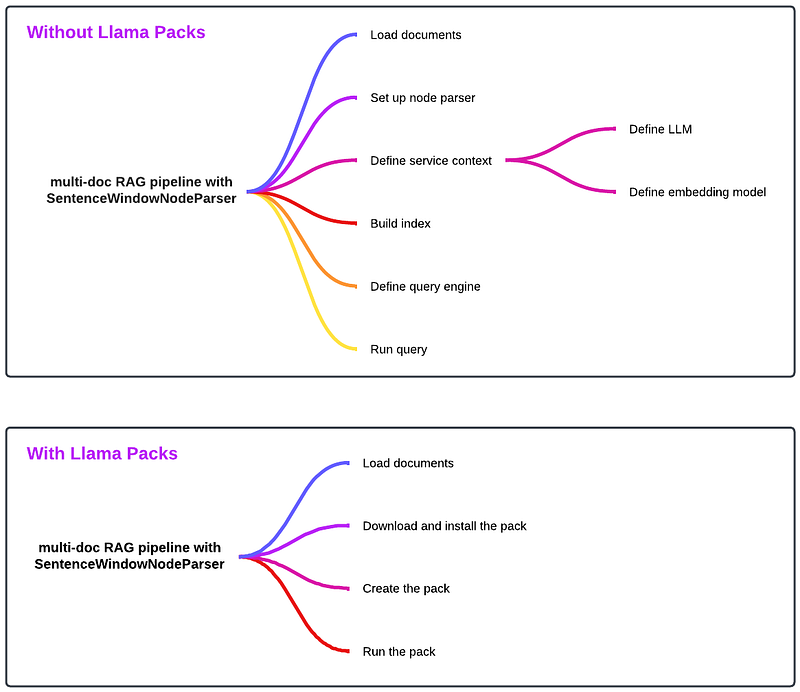
The detailed steps in the above code snippet include:
- Load documents
- Set up the node parser
- Define the service context
- Extract nodes and build the index
- Define the query engine
- Run query
After Llama Packs
import nest_asyncio
nest_asyncio.apply()

import os, openai, logging, sys
os.environ["OPENAI_API_KEY"] = "sk-#################################"
openai.api_key = os.environ["OPENAI_API_KEY"]

logging.basicConfig(stream=sys.stdout, level=logging.DEBUG)

# Load documents
from llama_index import SimpleDirectoryReader
documents = SimpleDirectoryReader("data").load_data()
print(f"loaded documents with {len(documents)} documents")

# Download and install Llama Packs dependencies
from llama_index.llama_pack import download_llama_pack
SentenceWindowRetrieverPack = download_llama_pack(
  "SentenceWindowRetrieverPack", "./sentence_window_retriever_pack"
)

# Create the pack SentenceWindowRetrieverPack
sentence_window_retriever_pack = SentenceWindowRetrieverPack(documents)

# Run query
response = sentence_window_retriever_pack.run("Give me a summary of DevOps self-service-centric pipeline security and guardrails.")
print(str(response))
As we can see, the implementation with Llama Packs is dramatically simplified! Three simple steps after loading the documents:
- Download and install the pack
- Create the pack
- Run the pack
This is impressive! Let’s put them side by side and see the difference:
What exactly is the Llama Packs doing under the hood? Let’s continue our exploration!
Inside Llama Packs
Every pack within Llama Packs follows the same structure:
__init__.py: Python package indicatorbase.py: where the main logic for the pack residesREADME.md: instruction on how to use the pack.requirements.txt: dependencies for the pack.
Drilling into the main file base.py, there are three main functions:
__init__: initializes the pack. This is where the main logic for the pack resides. In our case, this function contains the steps to set up the node parser and service context, extract nodes and build the index, and define query engine. This function is how Llama Packs “packages” the main logic into the pack, so we, as developers, don’t have to write the same detailed logic of this pack over and over again.get_modules: allows us to inspect/use the module.run: triggers the pipeline. This is where we invoke thequeryfunction on the query engine we defined in the__init__function.
Extending Llama Packs
There may be use cases where the out-of-the-box Llama Packs may not meet your requirement, such as you may need to use a different embedding model. This is the extensibility aspect of Llama Packs we mentioned above. But how exactly do we extend an existing pack? Let’s take sentence_window_retriever_pack as an example.
First, copy the downloaded pack sentence_window_retriever_pack and rename it as sentence_window_retriever_pack_copy.
Second, revise base.py in sentence_window_retriever_pack_copy directory to change its embedding model from:
self.embed_model = HuggingFaceEmbedding(
    model_name="sentence-transformers/all-mpnet-base-v2", max_length=512
)
To:
self.embed_model = "local:BAAI/bge-base-en-v1.5"Third, modify your app accordingly; instead of downloading the pack (code commented out in the snippet below), you now need to import SentenceWindowRetrieverPack from your copy pack:
# # Download and install Llama Packs dependencies
# from llama_index.llama_pack import download_llama_pack
# SentenceWindowRetrieverPack = download_llama_pack(
#   "SentenceWindowRetrieverPack", "./sentence_window_retriever_pack"
# )

from sentence_window_retriever_pack_copy.base import SentenceWindowRetrieverPack

# Create the pack SentenceWindowRetrieverPack
sentence_window_retriever_pack = SentenceWindowRetrieverPack(documents)
That’s it! Run your newly modified app and watch your latest changes take effect.
Summary
We explored one of the most significant features in all LLM frameworks — Llama Packs in this article. We examined what it is, why we need it, how to implement it, and how to extend it to meet our requirements in LLM application development.
An early Christmas gift LlamaIndex presented to the open source LLM application development community, Llama Packs is full of potentials. Currently at nearly 30 packs, it will keep growing with contributions from the community. Llama Packs truly raises the bar in building LLM apps with ease and flexibility. Try it out to build your next LLM app!
Happy coding!


