
10 Handy Automation Scripts You Should Try Using Python
List of Automation Scripts You Need To Try — Part 2

Automation is the process of completing a task without any human intervention. There are many programming languages that provide different ways to automate tasks but out of all python is a preferred and first choice. The reason is it offers a simple syntax, tons of useful packages to work with. In this blog, we are going to take a look at 10 handy automation scripts you should have using python.
This is the Second Part of the Series Automation scripts you need to try.
1. Your Friend For Reading Articles 👁🗨
This automation script scrapes the article content from medium and then reads it loud and clear. If you change the script a little bit then it can be used to read articles from other websites too. I use this script when I am not in the mood to read but to listen.
Libraries:- Beautiful Soup is a Python package for parsing HTML and XML documents. requests Let’s You Establish a Connection Between Client and Server With Just One Line of Code. Pyttsx3, converts text into speech, with control over rate, frequency, and voice.
Script Applications:-
- AudioBooks
- Read Wikipedia Articles
- Q&A Bots
2. One-Click Sketching
I just love this script. It lets you convert your amazing images into a pencil sketch with a few lines of code. You can use this script to impress someone by gifting them their pencil sketch.
Libraries:- Opencv, is a python library that is designed to solve Computer Vision problems. It has many inbuilt methods to perform the biggest tasks in fewer lines of code.

Script Applications:-
- Building OCR Software
- Detecting Number Plate
- Detecting Edges, Creating Funky Images
3. Stay Up With Top Headlines
Everyone wants to stay up to date with the latest and trending news of your country. This automation script can do the work for you. It uses an external API to extract all the trending news of your country, state, city, etc. This script increases productivity and knowledge.
The external API that is used in the script is news API by google. It offers the latest and trending news, different articles about a particular topic like tesla, business headlines, articles published by a journal, trending news between a timeline, etc.
Libraries:- Pyttsx3 is a text-to-speech Library In Python. & Requests.
Script Applications:-
- ML Fake News Detection.
4. Stocks Updates On The Start
Buying and selling stocks is one of the trendiest ways of earning money nowadays. A stock known as equity represents the ownership of a fraction of a corporation.
This automation script will give you the stock price of stock whenever you open your desktop. Also with the same script, you can generate past years' data of the stock for better knowledge of the stock.
To Run This Script On The Start, You Can Simply Add it to the window startup folder. Just Press win+r and then type shell:startup paste your script there.
Libraries:- Pyfinance, yahoo_fin
Script Applications:-
This Script Can Be Used For Creating Algo Trading Bots, Stock Analysis, Researches, etc.
5. Bulk Email Sender
In My Previous Article About Automation Scripts, I talked about how you can automate sending emails with attachments. This automation script is a level up to that script. It allows you to send multiple emails at a time with the same or different data, and messages.
Libraries:- Email, is a python library that is used to manage emails. Smtlib, defines a session object over which we can send emails and files. Pandas, Reading the CSV or Excel file.
Script Applications:-
- Can Be Used For Sending Newsletters.
- Stay Connected With All Your Clients.
Become a Genuine Medium Member With The Cost of One Pizza. It’s Just 5$ a month. You Can Use My Referral Link To Become One. “Don’t Just Read, Support The Writer Too”
6. No Time For EDA
Eda(exploratory data analysis) refers to the initial investigation done to understand the data more clearly. It is one of the most important stages of the data science project lifecycle. It is also referred to as the decision-making stage because, by the output analysis of this stage model, algorithms, parameters, weights everything is chosen.
Anyone who knows a little bit about data science will agree with me that EDA is a time-consuming process. Well, not anymore. This automation script used an amazing library Dtale and generate a quick summary report of the data given to it with just one line of code.
There are also many similar libraries that can also generate a quick summary like Dtale for example Autoviz, Sweetviz, etc.
Script Applications:-
- Gives a Quick Review About The Dataset. Best for beginners.
7. Smart Login To Different Sites
To prevent yourself from hackers you should always log out from your social media account like Facebook, Twitter, Instagram, etc. Once you are done with your session. Entering use id and password each time is not very joyful work to do. This automation script will log in to different sites for you and once you are done the session is closed automatically.
Libraries:- Selenium is an open-source web automation tool used for testing and automation.
This Automation Script Saves Time, and Increase Productivity.
8. Be Safe & Watermark Your Images
Internet is filled with digital thieves, who always look for other people’s work to use it as their own without giving proper attribution. Images are one of the most stoled properties on the internet. You clicked a masterpiece, upload it on the internet to showcase it to the world and some thief come and stole it and published it with their own name. To prevent this you should always watermark all images with your unique sign. This automation script will do the work for you. Libraries:- Opencv
Process:- We are basically overlaying one image (watermark) on top of another image (original image) with center coordinates. with little changes and a loop, you can watermark hundreds of images in minutes.
Script Applications:-
- Overlaying Two Images.
- Image Filtering & Masking.
9. Remember That
Sometimes when working on a project you get disturbed by some other task that also needs to be done the same day and most of the time you forgot it. Now anymore, this script will remember everything for you and remind you about it after a certain time as a desktop notification.
Libraries:- win10toast is a python library that sends a desktop notification.
10. Google Scraper
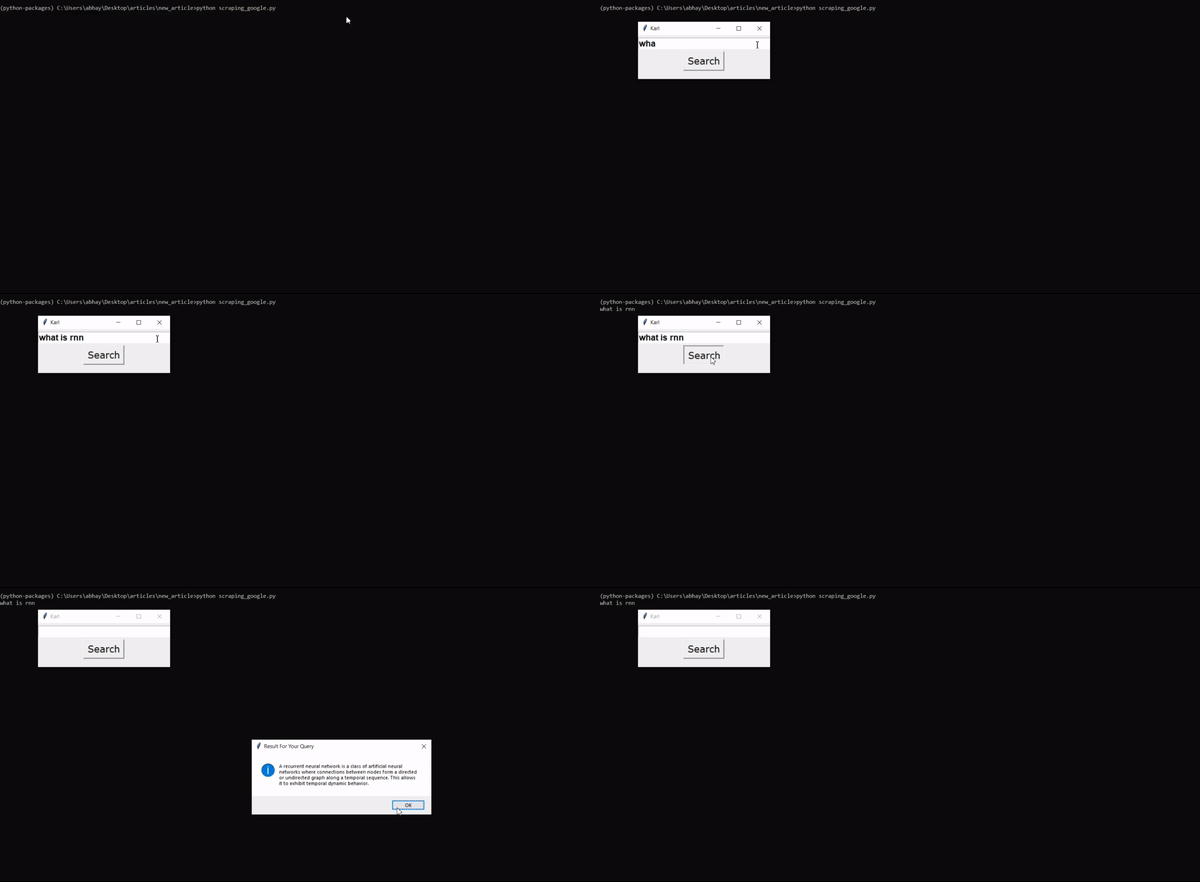
Google is one of the biggest and most used search engines. There are over 3.8 million searches done per minute around the globe. Most of them are just queries that get answered on the first result page. This script will scrape the results from google search and generate answers without even going to actual google.
Libraries:- requests, BeautifulSoup, and Tkinter a GUI library in python. Process:- At first with the help of Tkinter, a GUI is created that is used to take the query of the user. Once the user entered the query it is sent to the google scraper function that scrapes the results based on the query and generates the answers. Then with the help of the showinfo class in Tkinter, the results are shown as a pop-up notification.
Thanks For Reading Till Here, If You Like My Content and Want To Support Me The Best Way is —
- Follow Me On Medium.
- Connect With Me On LinkedIn.
- Become a Medium Member With My Referral Link. a small part of your membership fee will go to me.


