
10 Basic SQL Commands for Every Developer
And how to crush into SQL mastering them.

SQL is a very common, yet powerful tool, which can help extract, transform and load data from and into any database.
The very essence of data querying rests on SQL.
As companies and organizations find themselves dealing with rapidly increasing amounts of data, there’s a growing need for developers to effectively use databases to handle this data.
So if you want to crush into the data field, SQL is a must!
To master this language, you need to know how to work your way through some commands — and most of it is based on a few basic ones.
Let’s discover together the most important — and basic — SQL commands! 👇🏻
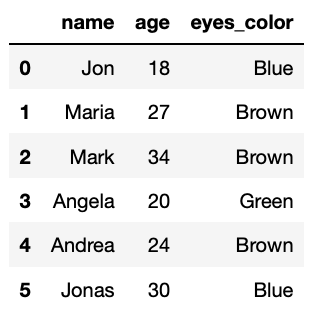
*For the whole article, I am using a self-created table containing 5 different people with their corresponding ages and eye colors.
#1. SELECT and FROM
TheSELECTcommand in SQL is the simplest, yet one of the most important ones. Every query begins with SELECTand this is how you grab data from your database.
We always need to indicate where to take the data from. And this is exactly where the FROMcommand plays its role, it indicates what is the table source of our query.
The simplest command that can be done in SQL is the following one:
SELECT
    *
FROM table
It would be the equivalent of printing “Hello World” to java or python ;)
Now you might be wondering… what’s that asterisk?
If you were so, congrats! That’s an important one. It indicates that you wish to select all the columns from the defined table.
The asterisk is a good way to figure out what data is in a table, but it’s not always recommended for production codes.
That’s why it is better to specify each column to be retrieved like follows.
SELECT
    name,
    age,
    eyes_color
FROM bbdd
The resulting table would be:
#2. DISTINCT
DISTINCT is used to view the unique values in a column. The command is used as follows:
SELECT DISTINCT
    column_1
FROM table
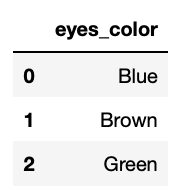
For example, suppose we would like to see all possible eye colors. In this case, we would select all distinct values from the eyes_colors columns contained in our table.
SELECT DISTINCT
    eyes_colors
FROM bbdd
The resulting output is:
#3. WHERE
Whenever you want to filter the results based on certain criteria, the WHERE command comes in. The use of this SQL command allows you to apply conditions to the SELECT statement.
SELECT
    *
FROM table
WHERE column_1 = "Given Condition"
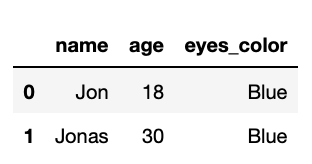
Let’s imagine we only want to know the name of the people that have blue eyes. The required query would be:
SELECT DISTINCT
    *
FROM bbdd
WHERE eyes_color = "Blue"
This query is now restricted to people who have blue eyes. The corresponding output is:
We can combine multiple conditions with both AND or OR operators.
ANDworks exactly like it does in the English language: it applies another condition to the statement.
SELECT
    *
FROM bbdd
WHERE eyes_color = "Blue"
  AND age        < 20
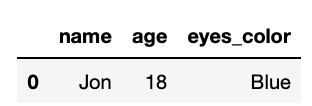
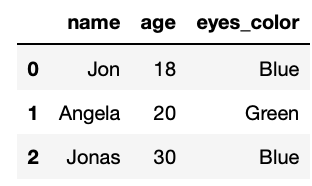
The corresponding output contains all people with blue eyes and younger than 20.
ORworks as a multiple condition tester. This means that any row that fulfills any of the conditions will be maintained.
SELECT
    *
FROM bbdd
WHERE eyes_color = "Blue"
   OR eyes_color = "Green"
In this case, the corresponding output contains all people with either blue or green eyes.
#4. ORDER BY
The ORDER BY ommand is used to sort the results in a specific order. You need to specify the column and the order, which can be ASC for ascending or DESC for descending.
SELECT
    *
FROM table
ORDER BY column1 ASC/DESC
If ASC or DESC is not defined, the sorting order will be ascending by default.
SELECT
    *
FROM bbdd
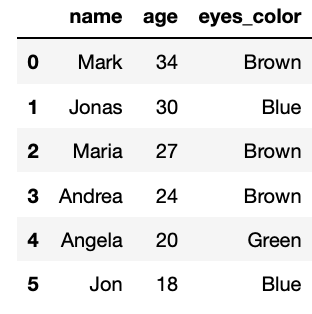
ORDER BY age DESC
In this case, our output will be sorted from older to younger people.
You can order by multiple columns as well.
SELECT
    *
FROM bbdd
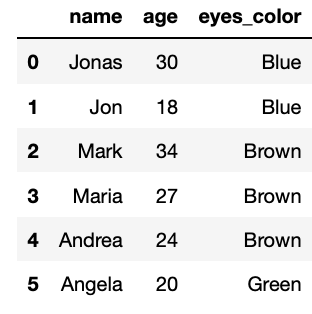
ORDER BY eyes_color, age DESC
In this second case, we obtain the table ordered by both eye_colors and age. The hierarchy of order will follow the order in which each column appears after the ORDER BY command.
#5. Aggregate Functions
Aggregate functions perform calculations on a range of values and return a single value. Some examples of aggregate functions are:
COUNT()returns the total number of rows. Usually used with theDISTINCTcommand to count unique elements.SUM()returns the sum of all the valuesMAX()returns the maximum valueMIN()returns the minimum valueAVG()returns the average value
Suppose we want to know the number of people in our dataset. In this case, we are just counting all people, without using any group by command.
SELECT
    COUNT(*)
FROM bbdd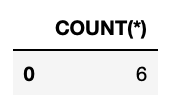
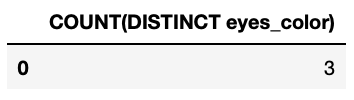
Suppose now that we want to know all possible eye colors. In this case, we repeat the previous query only counting the eyes_color column and using the DISTINCT command.
SELECT
   COUNT(DISTINCT eyes_color)
FROM bbdd
The corresponding output would be the following one.
#6. GROUP BY
GROUP BY will group data by their identical values. It is frequently used along with aggregate functions to summarise the attribute of a particular column or group of columns.
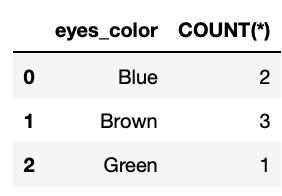
Let’s imagine now that we want to know how many people we have for each different eye color. We can repeat the previous logical query but group the result by the eyes_color column.
SELECT
            eyes_color,
            COUNT(*)

FROM bbdd
GROUP BY eyes_color
As we can check, the corresponding output contains what we expected.
#7. UNION
UNIONis a great command, as it allows you to append rows to each other. Unlike joins which append matching columns, UNION can append unrelated rows provided they have the same number and name of columns.
You can think of UNION as a way of combining the results of two queries. A union will only return results where there is a unique row between the two queries.
SELECT
    *
FROM bbdd
WHERE eyes_color = "Blue"

UNION

SELECT
    *
FROM bbdd
WHERE eyes_color = "Brown"

UNION

SELECT
    *
FROM bbdd
WHERE eyes_color = "Green"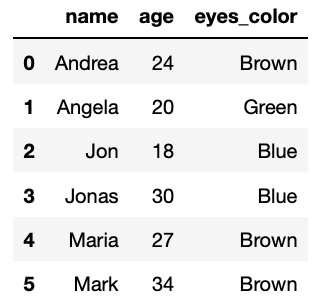
#8. AS
The AS command is used to rename a specific column or a specific table during a query. It is a nickname that exists inside the query you are running.
- Renaming columns
It is as easy as selecting the column and writing the new desired name after the command AS .
SELECT
     column_1 AS new_name
FROM bbdd- Renaming tables
In this second case, the command AS is used to assign an alias to the table immediately after it is declared.
SELECT
     A.age
FROM bbdd as A
You can use any valid name you like, but I strongly recommend to use letters of the alphabet. Before each column name, the alias is prefixed. Rather than typing a long table name, you can type a simple and easy to remember letter.
#9. CASE WHEN, ELSE and THEN
If you have used any other programming languages before, this is very similar to an if-else statement.
Effectively, in plain English, the command sounds a little something like this:
CASE WHEN— If a condition is satisfied.THEN— Do this.ELSE— Otherwise do this other thing.
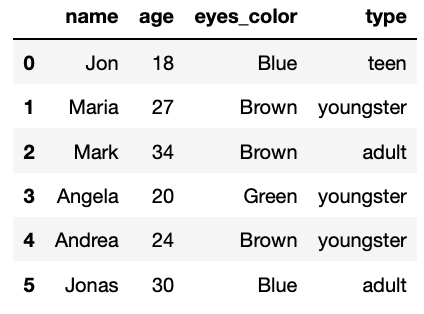
Let’s look at an example to solidify this idea. Suppose we want to create a new column that tells us if the person is a teenager, a youngster or an adult. We can easily create this segmentation from scratch using a CASE WHEN command.
SELECT
    *,
    CASE WHEN age <  20               THEN "teen"
         WHEN age >= 20 AND  age < 30 THEN "youngster"
         ELSE                         THEN "adult"
    END AS type
FROM bbdd
As you can observe, the previous query creates three different conditions:
- If age is smaller than 20, it is a Teen.
- If age is ranged between 20 and 30, it is a Youngster.
- In any other case, it is an adult.
The corresponding output contains each person with their corresponding type label.
#10. JOIN
The JOIN command is the key command to manage data. It allows us to get data from different sources and tables and merge it all together. The three most common Joins are:
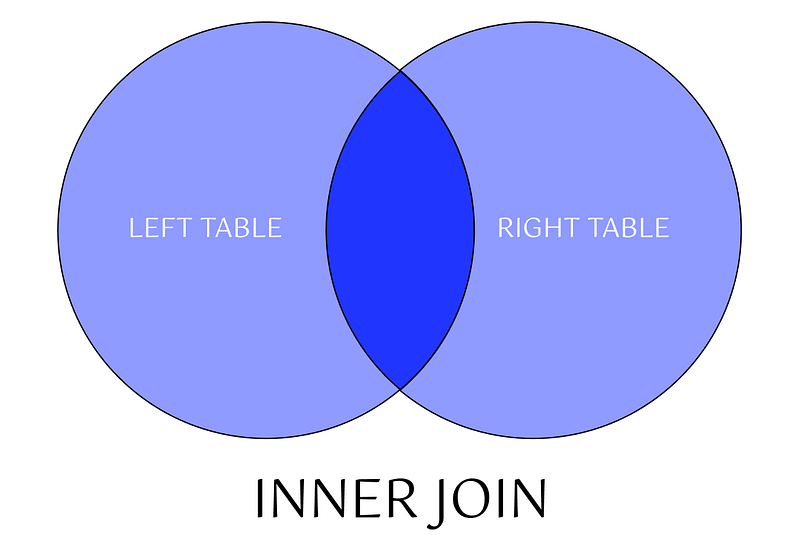
INNER JOIN— statement returns only those records or rows that have matching values and is used to retrieve data that appears in both tables.
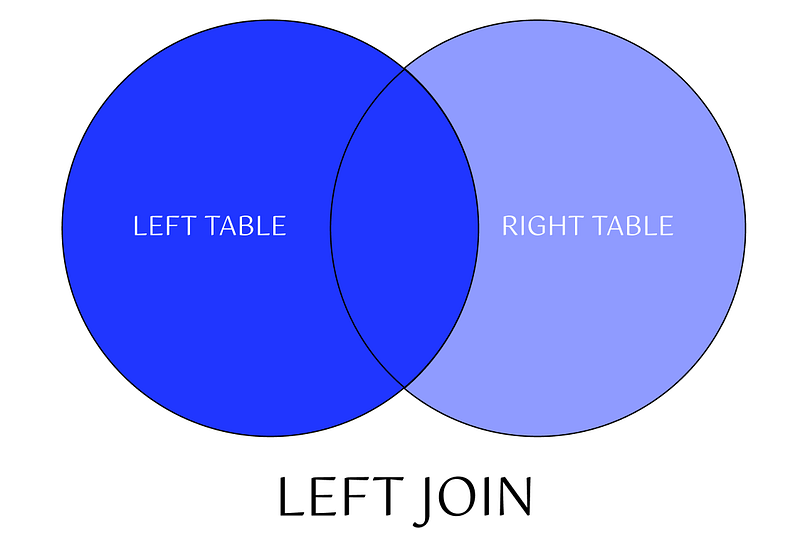
LEFT JOIN— gives the output of the matching rows between both tables following the structure of the left table. In case no records match from the left table, it shows those records with null values.
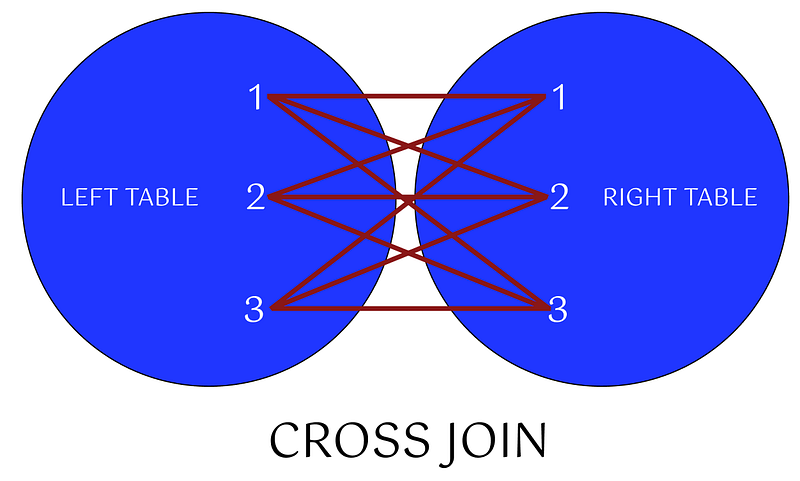
CROSS JOIN— returns all combinations of rows from each table. Note, that this join does not need any condition to join two tables.
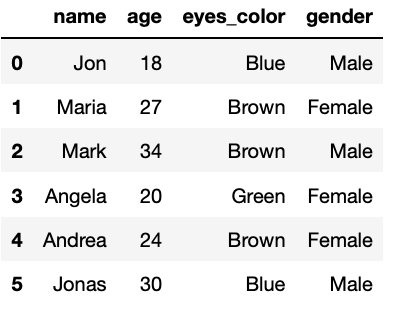
Let’s imagine now we have an additional table containing the gender of each person. Thus, using a left join, we can merge both tables into a single one connecting by a common column, in this case, by name.
SELECT T1.name,
T1.age,
T1.eyes_color,
T2.genderFROM bbdd AS T1
LEFT JOIN bbdd_gender AS T2
ON T1.name = T2.nameThe corresponding output contains all info merged into a single table.
Hope you find this story useful to understand the basics of SQL and feel free to ask me any further question! :D
Data always has a better idea — trust it.
Don’t forget to follow ForCode’Sake to get more articles like this one! ✨

Did you like this article? Then you can subscribe to my DataBites Newsletter to stay tuned and receive my content right to your mail!
I promise it will be unique!

You can also find me on X, Threads and LinkedIn, where I post daily cheatsheets about ML, SQL, Python and DataViz.
Some other nice medium related articles you should go check out! :D