avatarBhavnaa Narula

Free AI web copilot to create summaries, insights and extended knowledge, download it at here

2765

Abstract

</i> and ‘<i>Hemmingway</i>’. They are writing and publishing articles using whatever English knowledge they have. Yes, there are publications that keep suggesting downloading the above extensions for grammar and spell-check.</p><p id="8934">But wouldn’t that be great if Medium had its own grammar and spell check, like Microsoft Word does? The writer could first draft their article and after completion, could click on a button called, ‘<i>Check for errors</i>.’</p><p id="3f9e">Simple as that.</p><h1 id="b5be">3. Speech to text</h1><p id="f29a"><b>This feature is gold, I tell you.</b> If we got the option of converting our speech to text, then it would save us so much time, effort, and energy. I have read how writers suddenly have a story idea, and they use the draft section on Medium to jot it down. This draft is then used later for formulating a full-length story.</p><p id="5dae">But in my case, all the ideas come running to me when I am just about to fall asleep. In that case, if I get the freedom from typing once in a while, and my voice could save the idea for me. I would appreciate this platform even more.</p><h1 id="4180">4. Thesaurus</h1><p id="f89b">We all learned from Joey in the popular sitcom F.R.I.E.N.D.S. how important and useful a thesaurus can be. There are many writers who are not native English speakers. This impacts the quality of their work.</p><p id="57e3" type="7">You can easily see a difference between stories written by a person brought up in the United States v/s a person brought up in India.</p><p id="8b84">Having a thesaurus can help them understand certain words’ meanings, and even have some options in the form of their synonyms. This option can also be extended to readers while reading stories by their favorite authors.</p><h1 id="ab6e">5. Document recovery option</h1><p id="d555">I cannot tell you how much I had cried when I lost <a href="https://readmedium.com/5-extra-ordinary-lessons-from-my-ordinary-life-16902a265b34">my first ever article on Medium</a>. I had taken 15 days to write it and before I could submit it to any publication, I deleted it by mistake.</p><p id="e080">It took me another 15 days to get it back. My friend <a href="undefined">Shashwat Agarwal</a> suggested I approach the Medium help center and that’s how I got my article back. But, just like word, there should be a ‘<i>Document recovery option</i>’ so that we are not left at the mercy of the help center.</p><h1 id="fabc">6. Smart art</h1><p id="9a99">Smart art is in itself self-explanatory. Smart art can help people organize their data in a beautiful manner. The color options it provides just adds to the whole look of your final product.</p><p id="9e70">This option will especially be useful who are not artists but

Options

want to present their story in a smart and creative way.</p><h1 id="e323">7. Case options</h1><figure id="0aab"><img src="https://cdn-images-1.readmedium.com/v2/resize:fit:800/1*6utpcamdZplJplr68I6qhQ.png"><figcaption>Screenshot from Microsoft Word by author</figcaption></figure><p id="d728">Having casing options would be so great especially for drafting our Titles and Sub-titles. I can vouch for every writer, that using ‘title-case convertor’ every time just for changing the case of the story title is not a feel-good thing.</p><p id="bd5d">Medium is a professional website and it should offer some comprehensive features like these.</p><h1 id="15f4">8. Title and subtitle</h1><figure id="5590"><img src="https://cdn-images-1.readmedium.com/v2/resize:fit:800/1*lvnu0lNyM3WVNRL0fg8I4w.png"><figcaption>Screenshot from Microsoft Word by author</figcaption></figure><p id="d86d">Microsoft Word has an amazing selection of title and subtitle options. This is not much of a necessary thing, but it has more to do with presentation. The fact is that every writer endorses themselves and their work so they can earn a good amount of money. So providing this option only makes sense.</p><h1 id="44c4">9. Font styles</h1><p id="a929">For an advanced writing platform, there should be a variety of fonts available. People here are showcasing their creativity. Having more font options will help them get more creative with their content presentation.</p><figure id="4700"><img src="https://cdn-images-1.readmedium.com/v2/resize:fit:800/1*78CfEi4oCCdbUSUhhdIKEQ.png"><figcaption>Screenshot from Microsoft Word by author</figcaption></figure><p id="6c3d">Even the option where writers can customize their profile there are only 3 font styles available:</p><p id="5c9c">.Serif 1</p><p id="364a">.Serif 2</p><p id="f0ab">.Sans-serif 1</p><h1 id="7343">10. Format painter</h1><p id="672a">This option will be useful only if the above option is available. Once a wider selection of font styles is available, a writer can use the ‘<i>Format painter</i>’ option to change a huge chunk of paragraphs to match a particular font style.</p><p id="d209"><a href="undefined">Bhavna Narula</a>, 2021. All rights are reserved by the author.</p><p id="0820">It is not necessary that everyone has to agree with me. I have felt the need for these writing tools from time to time and thought it would be a good idea if Medium could introduce these things on its own.</p><p id="fb9a">All of these tools and options are available but they are kind of outsourced right now. If they were available right here while we are creating new content it would be of such great help.</p><p id="3f7d"><b>P.S. I still press Ctrl+S, every time I finish writing my article here. 😐</b></p></article></body>

10 Basic Features Medium Can Borrow From Microsoft Word

Bill gates won’t mind if Ev gifted him a free membership in exchange

Photo by Oleg Ivanov on Unsplash

We know Medium is not perfect, alright. It is an online platform that is binding a huge community of readers, writers, and editors together from different parts of the world and blah blah.

But let’s not forget that Medium is a platform for WRITERS.

The fact it allows us to draft articles here itself proves that it is trying to provide all the tools the writers would need to take the world by storm. But what if the writer deletes something, by mistake.

Can the writer get it back? If they haven't saved their work in Word, I am afraid NO.

Being able to Undo a mistake is amongst the most basic tools writers are missing from the Medium creators and which are available in abundance in Microsoft Word.

We should take a look at these 10 tools that can make our lives so much better, almost like a dream.

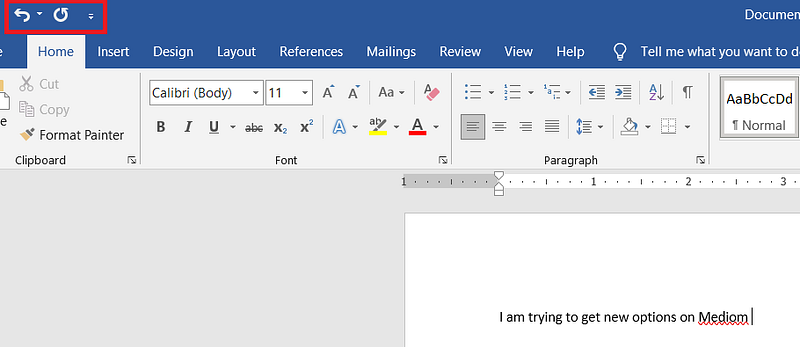
1. Undo/Redo
Screenshot from Microsoft Word by author

If Medium was being created for bots, then this feature was not required. But we are humans and humans make mistakes as I mentioned earlier. I am in constant fear if I deleted something while drafting an article here.

Once, I had selected a huge paragraph to be shifted within the article. I used keyboard shortcuts, Ctrl+C, and then instead of pressing Crtl+V, I accidentally pressed the space bar and the entire paragraph vanished.

I usually save the story after it is completed and not during the process. Because of this simple error, I had to redraft the story again.

This is a writing platform, and the option of ‘Undo’ and ‘Redo’ is amongst the most basic ones which should be included.

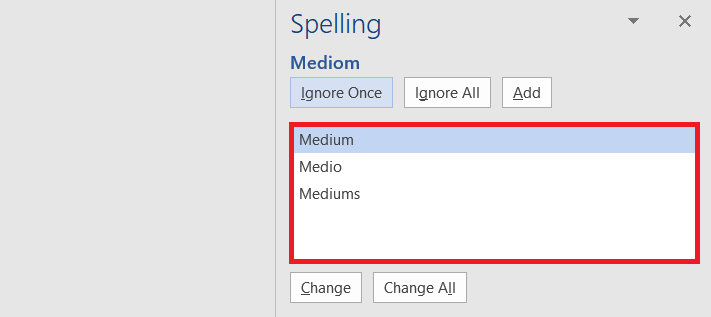
2. In-built grammar and spell check
Screenshot from Microsoft Word by author

I know a lot of people are not even aware of apps like ‘Grammarly’ and ‘Hemmingway’. They are writing and publishing articles using whatever English knowledge they have. Yes, there are publications that keep suggesting downloading the above extensions for grammar and spell-check.

But wouldn’t that be great if Medium had its own grammar and spell check, like Microsoft Word does? The writer could first draft their article and after completion, could click on a button called, ‘Check for errors.’

Simple as that.

3. Speech to text

This feature is gold, I tell you. If we got the option of converting our speech to text, then it would save us so much time, effort, and energy. I have read how writers suddenly have a story idea, and they use the draft section on Medium to jot it down. This draft is then used later for formulating a full-length story.

But in my case, all the ideas come running to me when I am just about to fall asleep. In that case, if I get the freedom from typing once in a while, and my voice could save the idea for me. I would appreciate this platform even more.

4. Thesaurus

We all learned from Joey in the popular sitcom F.R.I.E.N.D.S. how important and useful a thesaurus can be. There are many writers who are not native English speakers. This impacts the quality of their work.

You can easily see a difference between stories written by a person brought up in the United States v/s a person brought up in India.

Having a thesaurus can help them understand certain words’ meanings, and even have some options in the form of their synonyms. This option can also be extended to readers while reading stories by their favorite authors.

5. Document recovery option

I cannot tell you how much I had cried when I lost my first ever article on Medium. I had taken 15 days to write it and before I could submit it to any publication, I deleted it by mistake.

It took me another 15 days to get it back. My friend Shashwat Agarwal suggested I approach the Medium help center and that’s how I got my article back. But, just like word, there should be a ‘Document recovery option’ so that we are not left at the mercy of the help center.

6. Smart art

Smart art is in itself self-explanatory. Smart art can help people organize their data in a beautiful manner. The color options it provides just adds to the whole look of your final product.

This option will especially be useful who are not artists but want to present their story in a smart and creative way.

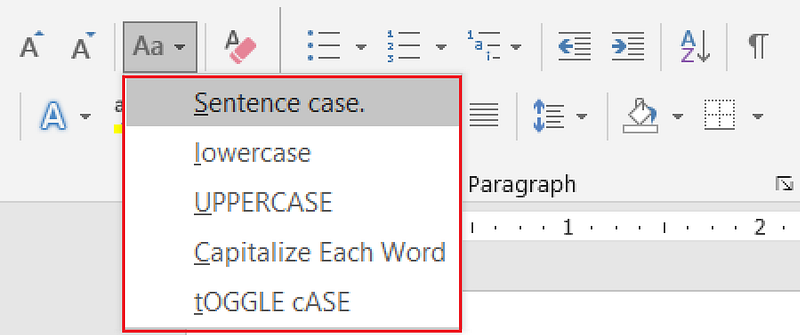
7. Case options
Screenshot from Microsoft Word by author

Having casing options would be so great especially for drafting our Titles and Sub-titles. I can vouch for every writer, that using ‘title-case convertor’ every time just for changing the case of the story title is not a feel-good thing.

Medium is a professional website and it should offer some comprehensive features like these.

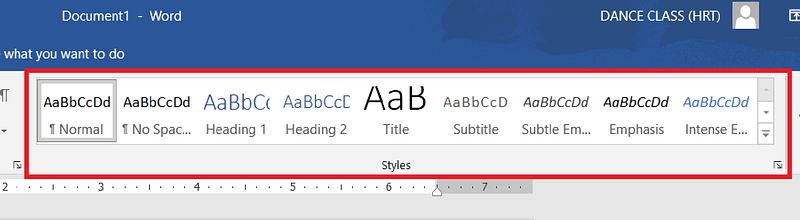
8. Title and subtitle
Screenshot from Microsoft Word by author

Microsoft Word has an amazing selection of title and subtitle options. This is not much of a necessary thing, but it has more to do with presentation. The fact is that every writer endorses themselves and their work so they can earn a good amount of money. So providing this option only makes sense.

9. Font styles

For an advanced writing platform, there should be a variety of fonts available. People here are showcasing their creativity. Having more font options will help them get more creative with their content presentation.
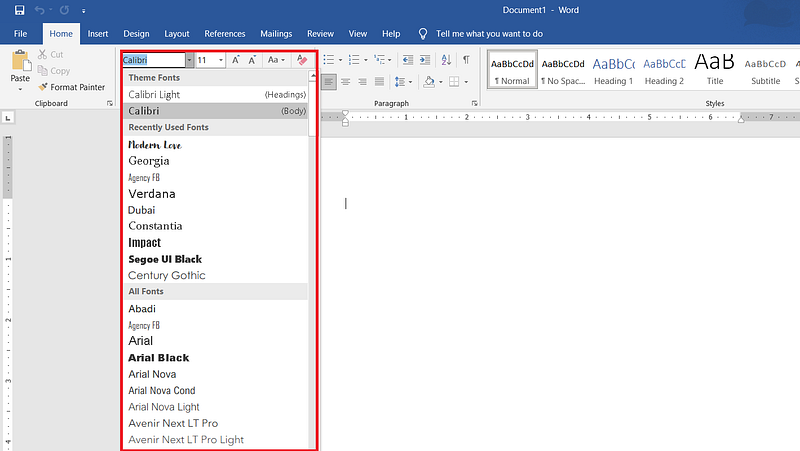
Screenshot from Microsoft Word by author

Even the option where writers can customize their profile there are only 3 font styles available:

.Serif 1

.Serif 2

.Sans-serif 1

10. Format painter

This option will be useful only if the above option is available. Once a wider selection of font styles is available, a writer can use the ‘Format painter’ option to change a huge chunk of paragraphs to match a particular font style.

Bhavna Narula, 2021. All rights are reserved by the author.

It is not necessary that everyone has to agree with me. I have felt the need for these writing tools from time to time and thought it would be a good idea if Medium could introduce these things on its own.

All of these tools and options are available but they are kind of outsourced right now. If they were available right here while we are creating new content it would be of such great help.

P.S. I still press Ctrl+S, every time I finish writing my article here. 😐

Writing
Writing Tips
Tools
Writer
Writers On Writing
Recommended from ReadMedium