
A Quick Introduction to the Programming Terms: Python Complete Course — Part 1
Before we start let me tell you that:
- This article is a part of the Python Complete Beginner to Expert Course which you can find it here.
- This article is also available as a YouTube video here.
Introduction
In this article, I’m going to define what a computer is, show you what the main computer components are, and talk about the language that the computer can understand.
After that, some important concepts will be defined such as a programming language, a program, and a translator. Finally, we will see how programs are executed on computers.
So, this article will cover the following Outlines:
- What a Computer Is
- Main Computer Components
- The Natural Language of the Computer
- What a Programming Language Is
- What a Program Is
- Translator Types
- How Programs Are Executed on Computers
Note: This article is for absolute beginners who want to learn to program for the first time. So, if you find these outlines are very familiar to you, feel free to move to the next article here (the link would be available once the next article is published).
1. What a Computer Is
The computer is an electronic device that’s able to store and process data according to the given instructions through programs, but how does the computer understand what to do?
Simply, we tell the computer what to do through some provided recipes, and these recipes are known as programs.

2. Main Computer Components
The computer does two main jobs: store data and process this data.
However, how the computer can do that? The computer has several components, that enable it from doing that.
Computers are very similar to human brains in many Points:
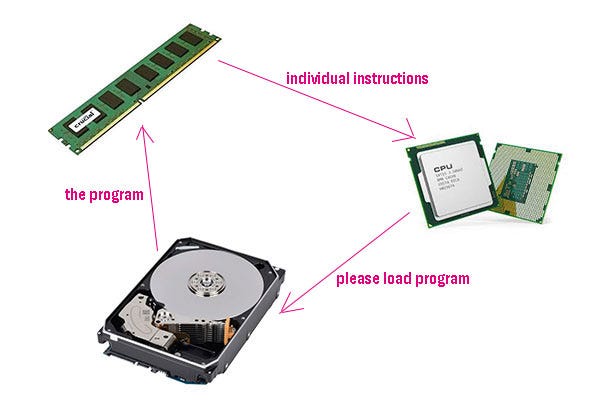
- Usually, humans use their brains to process the data that they receive through their eyes, ears, etc. On the other hand, the computer has a CPU central processing unit. So, the CPU represents the computer brain, and it does all the required calculations and processing.
- Humans have short-term memory. On the other hand, the computer has RAM. So, the RAM represents short-term memory and we call it short-term memory because it becomes empty once the computer is turned off.
- Also, there is long-term memory and we usually use this memory to store the data that we want to keep even after we turn off the computer. The hard disk represents the long-term memory in the computer.
As a result, the CPU processes the data. RAM, and hard disk store this data. Refer to Figure 1
3. The Natural Language of the Computer
A computer can understand only the binary language, in other words, a computer can understand only ones and zeros.
So for example, If I want to add one number to another I have to send add instruction and this instruction should be encoded in binary language, which will be for example 000011100010, but if I want to subtract one number from another, I have to send subtract instruction and this instruction should be encoded also in binary language, which will be for example 0000101011001.
As a result, It’s very hard for a human to remember all of these instructions, and it’s very hectic to communicate with a computer using binary language.
To overcome this issue, people have developed what we call high-level programming language.
4. What a Programming Language Is
It is a tool that we use to write programs that should be executed by the computer, and this programming language is high level because we use English keywords to communicate with computers.
The logical question is: How the computer can understand English keywords if it understands only zeros and ones?
To know the answer, we have to define what a program is first.
5. What a Program Is
A program is a set of commands written in a specific programming language in a logical order to solve a specific problem.
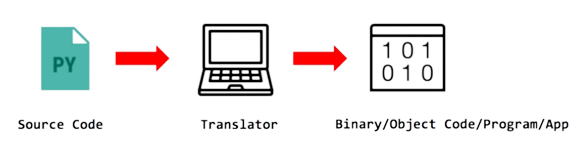
Usually, we write the programs to solve problems, and the computer can understand English keywords because when people developed a programming language they also develop what we call a translator, and the job of the translator is to take our program which is written in English keywords and translates this program into a binary code or the language that the computer can understand.
In short, the program that we write is called the source code and it will go to the translator which will translate it and convert it into the binary language the program that has been written in a binary language is called the binary code or the object code. Refer to Figure 2
6. Translator Types
Mainly, there are two types of translators:
- Compiler: It scans the whole source code and translates the whole program at a time and then this program will be sent to the CPU for execution.
- Interpreter: It translates the source code line by line. In other words, it translates one line at a time, sends this line to the execution, and then it will translate another line and send this line again to the execution and so on until the complete program is executed.
The detailed comparison between compilers and interpreters will be out of the scope of this article.
7. How Programs Are Executed on Computers
Suppose that we have a program and it has been translated into the machine language or binary language.
First of all, the program will be loaded inside the memory.
After that, the CPU will read the first instruction decode it, and then executes it.
Finally, it will write the result of the execution of this instruction to the memory again. Refer to Figure 3
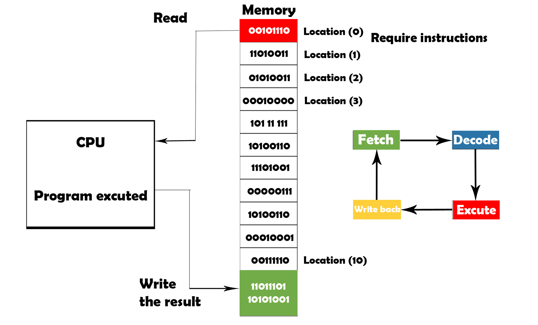
This cycle (fetch/decode/execute/store) is known as the instruction execution cycle.
As a result, the CPU will repeat this cycle for each instruction inside the program until the whole program has been executed.
Now, let us summarize what we have learned in this article:

- The computer has two main jobs: it stores and processes data.
- The main computer components are CPU — RAM — Hard Disk.
- The natural language of the computer is the binary language (0–1).
- Programming languages have been developed to make communication between humans and computers easy.
- Program: is a set of commands written in a specific programming language in a logical order to solve a specific problem.
- Programs executed on computers (Fetch — Decode — Execute — Write the result Back).
P.S.: A million thanks for your time reading my story. Before you leave let me mention quickly two points:
- First, to get my posts in your inbox directly, would you please subscribe here, and you can follow me here.
- Second, writers made thousands of $$ on Medium. To get unlimited access to Medium stories and start earning, sign up now for Medium membership which only costs $5 per month. By signing up with this link, you can directly support me at no extra cost to you.
To get back to the previous article, you can use the following link:
Python Complete Beginner to Expert Course
To move on to the next article, you can use the following link:


