
YouTube Videos For Affiliate Marketing Sales!
Affiliate Marketing With YouTube Videos For Beginners!
Medium Non-Members Can Read The Full Story HERE!
What you will learn from this article.
YouTube affiliate marketing without making videos.
Affiliate marketing descriptions for videos.
YouTube video thumbnail design.
Free video ranking and research tools for SEO.
YouTube affiliate marketing without making videos.
There are two ways to make money with YouTube videos and affiliate marketing without ever having to make a single video. Or even show your face for that matter. But do show your face in your YouTube channel profile picture.
These two different video strategies are separated by mere search phrases. With this, you can choose to drive traffic to your medium stories, and then to your affiliate offers inside your Medium stories. Or you can drive traffic to affiliate links directly.
The choice is yours, driving the traffic to medium posts though is a great idea. Which, admittedly, I came up with not so long ago. So I will be uploading these videos next. Kind of like a double whammy, getting Medium visitors and reads, but also getting affiliate offer visitors.
Videos About Medium Post Topics.
Review Videos For Affiliate Products.
Searching for these two different “categories” of videos is all about your search phrase. I just used the example “medium publications” for the purpose of this demonstration as can be seen below. Because I also have a couple of medium stories about Medium publications.
Before we continue, I would just like to focus your attention on the search volume display right beneath the search window on YouTube. That is how “Keywords Everywhere” displays the search volume for any search phrase you enter into any browser.
But we will get to the free SEO tools under the last subheading, “Free video ranking and research tools for SEO.”. Also illustrated below is the YouTube search filter, click on that for the drop-down menu as shown below. Then be sure to click on “Creative Commons”.
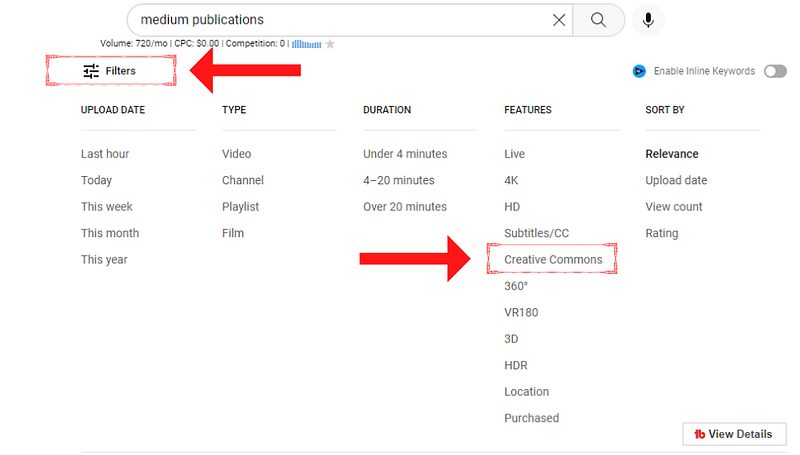
Many affiliate products have Creative Commons videos available on YouTube that you can use to promote their affiliate products. Review videos, testimonial videos and an array of options under the Creative Commons (reuse allowed) license. Let’s say you want to promote a well-known product called “12 Minute Affiliate”.
This is one of the current top sellers too, and you will find loads of reviews and testimonial videos about this product under the Creative Commons license. But I am just using it as an example because I know there are a lot of videos available for this one.
In this case, you might want to use a YouTube search phrase like, “12-minute affiliate reviews”, or “12-minute affiliate testimonials”. Just be sure you click the “Creative Commons” tab in the YouTube filter when searching.
Just to be sure the video does in fact have the Creative Commons license. Just expand the video description, and at the bottom, you should see something as illustrated below. Stating that the video license is a Creative Commons license and reuse is allowed.

To search for videos to promote your Medium stories, simply focus on your story keyword. Like, let’s say, “how to lose weight fast reviews”, “how to lose belly fat fast reviews”, or “losing belly fat testimonials”. Just search for a topic that best describes your Medium publication.
Once you have your video, you click on the video share button right beneath the video, next to the like options. Then copy the link from the popup window. Next, you want to paste this link into a YouTube downloader like (yt1s) or (yt5s).
Just enter those phrases in your browser and search, and you will come across the tools. I prefer not to include too many links. Just a personal “thing”. Then simply paste the link into the downloader and choose the size.
I suggest going with HD videos, so download the HD version where possible. Then you just save the video to your PC, and it is ready to upload to your YouTube channel. Now we're not going to get into too much video SEO as I have already discussed that elsewhere.
You might want to check out this Medium story below to be guided step by step through video SEO and ranking a video in under 60 seconds in YouTube. Or, that is how I do it anyway, but it is challenging keeping up with 14 YouTube channels.
Affiliate marketing descriptions for videos.
Regardless of which way of the two different YouTube video strategies you choose. You still going to add one of two links to the video description. Your Medium story URL, or your affiliate offer URL. Preferably a cloaked or shortened URL.
Because affiliate links are often long and “ugly”, personally I cloak both affiliate links and Medium posts with this strategy by using a plugin. But that too has been covered in a few other Medium stories. Personally, I’m not much of a URL shortener (bitly, tinyURL).
Depending on the title of your Medium story, the URL might also be a little long. Because the slug (your Medium story title) to the medium domain can make it appear a little unattractive. But if you have no other choice, then URL shorteners will do just fine.
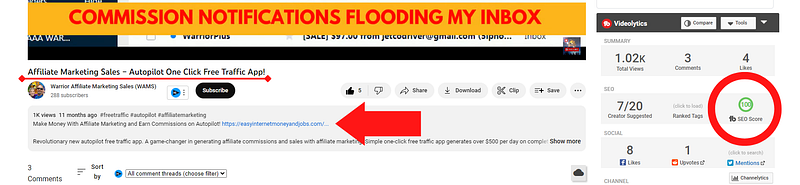
As illustrated below, a description summary will show beneath your video with views, the date uploaded and the first 3 hashtags you used. Just under that, some text, and then your affiliate (shortened or cloaked). Make that first sentence before the URL short and descriptive.
If you would like to know more about my link-cloaking strategy, you can read more in the Medium story below. Cloaking affiliate links this way, also makes them indexable in search engines, but you can read all about that in the article.
Using a shorter sentence before the URL means the URL will show in the video description summary without having to expand the description. Make the link accessible even when your viewer or visitor does not expand your video description.
Honestly, I doubt many people actually expand the video description. So it is important to be sure your affiliate link or URL to your Medium story is accessible in the video description summary. Write a proper description and include your target keywords and search phrases.
But that is all discussed in the post I shared a moment ago on how to rank a video on YouTube in 60 seconds or less. From video titles, descriptions, tags, hashtags, and much more all included in that Medium story to rank super-fast.
YouTube video thumbnail design.
The YouTube thumbnail is just as important as the SEO side of things. The video thumbnail is what shows in feeds. Make it in such a way that it will force someone to stop scrolling through the feed and take a look. Below is a thumbnail I created for my YouTube motivational channel.
I think the Lions might have been a good choice. Don’t make it “too much”, just enough to create curiosity. This is also a good place to include a “watch now” prompt for instance. Just be creative and attract attention with your video thumbnail. Preferably HD too.

For this too, you can use Canva, an image and video creating and editing tool I mentioned several times. There is even a YouTube Thumbnail template inside Canva. Along with templates for any design, you can think of. If you are not already using Canva, then you really should.
But I have a special bonus for you too, in the Medium story below. A way to get Google Ads USA targeted traffic for $0.012 cents per 30-second video view. With the option toad a “call-to-action” button, redirecting to your affiliate bridge page (not an affiliate link). Ut that is all explained.
Free video ranking and research tools for SEO.
Last, but not least, some free SEO tools to rank your videos fast. But we’re just going to briefly look at these because it is also covered in the above-mentioned post on YouTube video ranking.
There are a few free tools (browser extensions) you want to install in order to rank your YouTube videos fast. This helps with SEO, keyword research, and keyword search volume prediction.
Tube Buddy (affiliate link)
VidIQ (affiliate link)
Keywords Everywhere.
Yes, Tube Buddy and VidIQ are affiliate links. But both these browser extensions come with free and upgraded options. You do not need to upgrade. The free versions will work just as well to get you started. Then make a bit of money and go for pro when you’re ready.
When you choose YouTube video tags, my suggestion is to go for longer search phrases. With a particular affiliate product I promoted, which was about making money on TikTok. I chose the search phrases as tags illustrated below.
That is a screenshot of both VidIQ and Tube Buddy indicating the video ranking position on YouTube. Longer search phrases may be less searched, but it makes for more targeted audiences. For instance, if you use the single keyword “TikTok”.
Not only will it be nearly impossible to rank, but who is to say that someone searching for “TikTok” is doing so because they want to make money? Broadening your search phrase ensures that they do. This video would’ve never hit position one on YouTube for “TikTok”.
But it ranks number one on page one of YouTube for several longer search phrases. Directly related to making money with TikTok. Or earning commissions, or some form of income with TikTok.
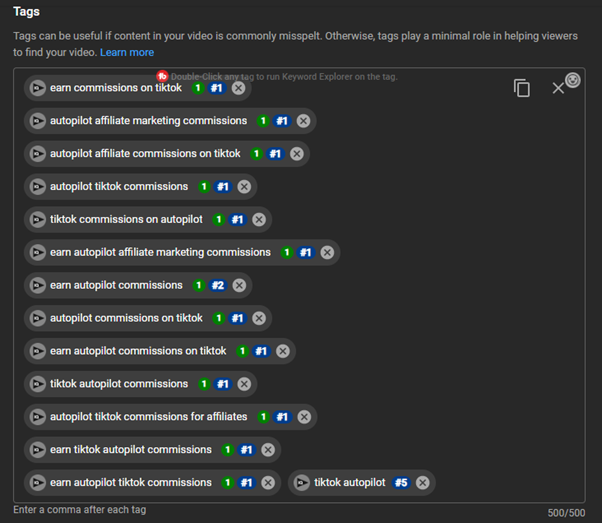
In fact, it is ranked position one on YouTube for 11 of the 14 chosen search phrases. The “poorest” ranking positions are position 2 and position 5. Which, in my opinion, is not that bad either, considering the rest is all position one!
The “Medium Publications” search phrase that was used for this demonstration in the case of Medium stories. Some longer search phrases might be something like, “writing for medium publications”, or “medium publications and writing”. You get my drift.
Choosing longer targeted search phrases just makes it so much easier to rank position one on YouTube. Just be sure that the search volume prediction of what you’re targeting shows an increase in interest over time. That is important.
Are you ready to find out how you can rank your video on the first page of Google and YouTube? Are you ready to get a ton of targeted visitors? Imagine millions of people going to Google and YouTube to search for your solution! — Source
AFFILIATE DISCLOSURE: Some of the links in this post are links to affiliate offers. If you visit them to make a purchase, I will earn a commission. The decision is yours, and whether or not you decide to buy something is entirely up to you. All offers come with a full money-back guarantee!
Free Stuff For My Medium Subscribers.
All new subscribers on Medium will receive 4 free gifts. 2 of my top traffic eBooks, and 2 free memberships (invitation only) for buyer traffic tools I use. Subscribe to me (Deon Christie) on Medium and your free stuff will be emailed to you asap. Medium has no affiliation, nor do they endorse the free giveaway in any way. It is my personal free giveaway to all new Medium subscribers.