avatarMofrad Muntasir

Free AI web copilot to create summaries, insights and extended knowledge, download it at here

3205

Abstract

AARIsAJ8HkhfdkZjXLQVEdB8bY4LzXhCn4ySVT3tHQxNM6E67NKv6jT97b4ZhRBEaAoPHEALw_wcB">Tubebuddy</a></li></ul><p id="23db">Both of them have similar features. They allow you to check titles and do other researches as well. More on those later.</p><h1 id="04df">Step 02: YouTube video tags</h1><p id="a779">When you’ll upload a video to YouTube, you’ll there is a field to add some tags. The purpose of the tags is simple. Tags provide alternate search keywords. For example, the following video has “Mafia Remake Ending” as a tag. It has been searched and found with that tag.</p> <figure id="1fa5"> <div> <div> <img class="ratio" src="http://placehold.it/16x9"> <iframe class="" src="https://cdn.embedly.com/widgets/media.html?src=https%3A%2F%2Fwww.youtube.com%2Fembed%2FzNveBe-502g%3Ffeature%3Doembed&amp;display_name=YouTube&amp;url=https%3A%2F%2Fwww.youtube.com%2Fwatch%3Fv%3DzNveBe-502g&amp;image=https%3A%2F%2Fi.ytimg.com%2Fvi%2FzNveBe-502g%2Fhqdefault.jpg&amp;key=a19fcc184b9711e1b4764040d3dc5c07&amp;type=text%2Fhtml&amp;schema=youtube" allowfullscreen="" frameborder="0" height="480" width="854"> </div> </div> </figure></iframe></div></div></figure><p id="634e">The extensions I mentioned can help you find tags. They suggest better performing tags and your rank in them.</p><p id="d0ca">You can also visit popular videos in your niche and see what type of tags they are using to get some idea. If you use Tubebuddy and click on a video, Tubebuddy will show you what tag the video is using.</p><h1 id="8048">Step 3: Video descriptions</h1><p id="8bc4">YouTube algorithm reads video descriptions to understand what the video is about. Note that your title and tags can be too flashy and clickbait-y for someone to understand what it’s truly about. But your description has to briefly describe the video. YouTube will then realize what it is about and then promotes it to users who are looking for videos in that niche.</p><blockquote id="9a46"><p><i>Don’t past your tags in descriptions. YouTube hates that and may punish you.</i></p></blockquote><p id="8745">However, you should make use of hashtags. You can put up to 3 hashtags and YouTube will show them just above your video title. That’s useful if you want to connect your videos or make your videos part of an ongoing trend.</p><h1 id="8a5f">Step 4: Custom video thumbnail</h1><p id="c5fe">Custom video thumbnails used to be a clear differentiator for YouTube videos. Now, they have become a necessity.</p><p id="a42b">You must have custom thumbnails to bring more viewers to your video. They shouldn’t be too fancy-looking. You can use the following steps to create one:</p><ul><li>High color contrast</li><li>Large and legible text</li><li>BYOG color combination (Blue, Yellow, Orange, or Green)</li><li>No YouTube color (Red, Black, or White) should be the prominent part of the thumbnail</li></ul><h1 id="3068">Step 5: Metadata for video</h1><p id="f762">When you upload a video, YouTube converts it to a string of data. It converts everything including the title, subtitle, tags, and comment. You should add your upload title as the video tit

Options

le, your tags in the video tag list, and your description in the comment section.</p><p id="6588">For that, right-click on the video, go to properties, go to details and change the title, tags, and comments.</p><h1 id="da1d">Step 6: Metadata for Thumbnail</h1><p id="97d6">You should do the same for your Thumbnail</p><p id="3f43">This is one of the boring parts of uploading a video. But this is part of the grind.</p><h1 id="e445">Step 7: Category</h1><p id="5c6f">In most cases, the category is pretty straightforward; like gaming. But for a lot of videos, it’s not.</p><p id="8303">For example, YouTube doesn’t have a cooking category. So, where do you put your cooking video? Should it be in “People & Blog”, “How to & Style” or “Entertainment”?</p><p id="53c4">You should find popular YouTubers in your niche and then follow them. See what category they are in and then you should use that too.</p><h1 id="af72">Step 8: Upload time</h1><p id="43d2">YouTube upload time has a strong role to play in video visibility. If your video has some early views and interactions, YouTube likes that.</p><figure id="1a52"><img src="https://cdn-images-1.readmedium.com/v2/resize:fit:800/0*yHrIN1kSEmYAAAyx.png"><figcaption>Image source: <a href="https://influencermarketinghub.com/best-times-to-publish-youtube-videos/#:~:text=According%20to%20Boosted%2C%20the%20highest,at%20about%208%20a.m.%20EST.">Influencer Marketing Hub</a></figcaption></figure><p id="c49e">However, there’s more you need to know. The timing varies for each category. So, it’s better to do your research for your category to find the ideal upload time.</p><h1 id="e83e">Step 9: Upload frequency</h1><p id="6068">Some people upload weekly, some twice a week, some daily, and some upload more than once per day.</p><p id="1714">It’s up to you to decide what frequency works for you. It shouldn’t be lower than once a week. YouTube values your effort. If it sees you are continuously uploading a video, it will deduce that you are serious about growing in YouTube.</p><p id="7be8">However, you must continue the frequency you choose. If you choose daily, don’t stop that after 2 weeks. It’s better to choose a frequency that’s possible for you and continue doing that.</p><p id="f705">You should also try to get some videos ready before starting the channel. That’ll allow you to schedule them for the future and you won’t have to rush to make content.</p><h1 id="42b8">To summarize</h1><p id="a079">Youtube algorithm can’t see videos but can see data and read texts. It’s your job to ensure it has enough of those to read.</p><p id="e73c">Because YouTube will ultimately give you views. It is not going to come in large numbers from other sources.</p><p id="dfd6">Other YouTube related articles —</p><ul><li><a href="https://readmedium.com/5-secrets-to-know-before-you-start-a-new-youtube-channel-for-money-8bead22e16">5 Secrets to Know Before You Start A New YouTube Channel As Side Hustle</a></li><li><a href="https://readmedium.com/mistakes-on-youtube-dont-follow-these-3-quick-hacks-if-you-run-a-youtube-channel-cabeec4e811e">Don’t Make These 3 Huge Mistakes If You Want To Grow Your YouTube Channel</a></li></ul></article></body>

YouTube Video Uploading Checklist — 9 Important Steps You Need To Know

Following these steps will increase your chances of finding more viewers
Photo by Sara Kurfeß on Unsplash

Every minute, 500 hours worth of video is being uploaded to YouTube. Just think about it in this way. You are uploading a video, fixing its title and other elements, and pressing the publish button. The whole process takes 5 minutes. In those 5 minutes, 2,500 hours worth of video has been uploaded.

Your video is a microscopic needle in a very large haystack.

How do you ensure this needle gets some visibility? How do you tell YouTube what the video is about?

Firstly, you need to understand that YouTube’s algorithm is a very sophisticated one. Its primary purpose is to keep viewers on the platform for a longer time. So, you need to know a few things:

— It looks for videos that viewers are likely to watch: That means if someone enjoys sports reviews, YouTube will promote more sports videos to them.

— It promotes videos that viewers watch for a longer time: That means YouTube will favor those videos with higher completion rates or audience retention rates. Audience retention is the average completed percentage of a video.

— The algorithm can’t see videos. It just reads data, tags, titles, etc: That means you need to make it easy for the Algorithm to understand what your video is about

If you have made a good video, YouTube would want you to succeed. You’ll need to help the algorithm understand what the video is about.

So, let’s begin —

Step 01: A well-researched title

YouTube is a video search engine. It receives more search requests than Bing and any other search engine, except Google. When users search for a video, they use a set of words or phrases. Your title needs to incorporate those.

At the same time, thousands of YouTubers might be uploading videos in the same niche. Your title might contain the most searched keywords but what if there are 100 other videos with the same keywords? Your video might be in the 100th position in the search results. That’s not good!

For that, I recommend using one of the following extensions. They check how popular your title is and then what’s the competition for it. It’s even recommended to find titles first and then make videos.

Both of them have similar features. They allow you to check titles and do other researches as well. More on those later.

Step 02: YouTube video tags

When you’ll upload a video to YouTube, you’ll there is a field to add some tags. The purpose of the tags is simple. Tags provide alternate search keywords. For example, the following video has “Mafia Remake Ending” as a tag. It has been searched and found with that tag.

The extensions I mentioned can help you find tags. They suggest better performing tags and your rank in them.

You can also visit popular videos in your niche and see what type of tags they are using to get some idea. If you use Tubebuddy and click on a video, Tubebuddy will show you what tag the video is using.

Step 3: Video descriptions

YouTube algorithm reads video descriptions to understand what the video is about. Note that your title and tags can be too flashy and clickbait-y for someone to understand what it’s truly about. But your description has to briefly describe the video. YouTube will then realize what it is about and then promotes it to users who are looking for videos in that niche.

Don’t past your tags in descriptions. YouTube hates that and may punish you.

However, you should make use of hashtags. You can put up to 3 hashtags and YouTube will show them just above your video title. That’s useful if you want to connect your videos or make your videos part of an ongoing trend.

Step 4: Custom video thumbnail

Custom video thumbnails used to be a clear differentiator for YouTube videos. Now, they have become a necessity.

You must have custom thumbnails to bring more viewers to your video. They shouldn’t be too fancy-looking. You can use the following steps to create one:

  • High color contrast
  • Large and legible text
  • BYOG color combination (Blue, Yellow, Orange, or Green)
  • No YouTube color (Red, Black, or White) should be the prominent part of the thumbnail

Step 5: Metadata for video

When you upload a video, YouTube converts it to a string of data. It converts everything including the title, subtitle, tags, and comment. You should add your upload title as the video title, your tags in the video tag list, and your description in the comment section.

For that, right-click on the video, go to properties, go to details and change the title, tags, and comments.

Step 6: Metadata for Thumbnail

You should do the same for your Thumbnail

This is one of the boring parts of uploading a video. But this is part of the grind.

Step 7: Category

In most cases, the category is pretty straightforward; like gaming. But for a lot of videos, it’s not.

For example, YouTube doesn’t have a cooking category. So, where do you put your cooking video? Should it be in “People & Blog”, “How to & Style” or “Entertainment”?

You should find popular YouTubers in your niche and then follow them. See what category they are in and then you should use that too.

Step 8: Upload time

YouTube upload time has a strong role to play in video visibility. If your video has some early views and interactions, YouTube likes that.
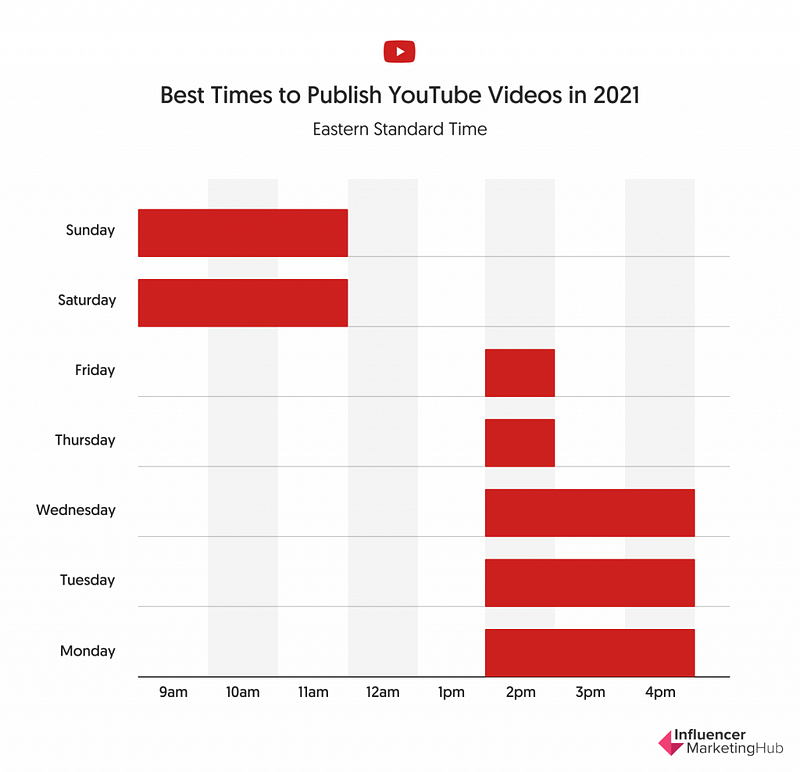
Image source: Influencer Marketing Hub

However, there’s more you need to know. The timing varies for each category. So, it’s better to do your research for your category to find the ideal upload time.

Step 9: Upload frequency

Some people upload weekly, some twice a week, some daily, and some upload more than once per day.

It’s up to you to decide what frequency works for you. It shouldn’t be lower than once a week. YouTube values your effort. If it sees you are continuously uploading a video, it will deduce that you are serious about growing in YouTube.

However, you must continue the frequency you choose. If you choose daily, don’t stop that after 2 weeks. It’s better to choose a frequency that’s possible for you and continue doing that.

You should also try to get some videos ready before starting the channel. That’ll allow you to schedule them for the future and you won’t have to rush to make content.

To summarize

Youtube algorithm can’t see videos but can see data and read texts. It’s your job to ensure it has enough of those to read.

Because YouTube will ultimately give you views. It is not going to come in large numbers from other sources.

Other YouTube related articles —

YouTube
Social Media
Social Media Marketing
Productivity
Growth Hacking
Recommended from ReadMedium