
YouTube Auto-Dub with FastAPI, OpenVoice, Docker and Cloud Run
This repository serves as a starting point for developing a FastAPI backend for dubbing YouTube videos by capturing and inferring the voice timbre using OpenVoice.
https://github.com/mazzasaverio/youtube-auto-dub
Core Features
- Voice Timbre Recognition: Utilizes OpenVoice technology to accurately recognize the voice timbre from the original YouTube video.
- Text-to-Speech Synthesis: Downloads and processes subtitles, translating them and converting them into speech, matching the original voice timbre as closely as possible.
- Flexible Deployment: Supports deployment via GitHub Actions and Cloud Build, with compatibility for Cloud Run deployment, ensuring scalability and ease of use. Currently, inference is performed using CPU. For setting up Cloud Run with Terraform, refer to the following repository for instructions: https://github.com/mazzasaverio/fastapi-cloudrun-starter
Getting Started
To get started with YouTube Auto-Dub, follow these steps:
Environment Setup
For local development, we recommend setting up a conda environment with:
conda install mamba -n base -c conda-forge
mamba create -n youtube-auto-dub python=3.9 -y
mamba install -n youtube-auto-dub pytorch==1.13.1 torchvision==0.14.1 torchaudio==0.13.1 pytorch-cuda=11.7 -c pytorch -c nvidia -y
conda activate youtube-auto-dub
pip install -r requirements.txt
Download Required Checkpoints
Download the model checkpoints necessary for voice timbre recognition and synthesis:
sudo aria2c --console-log-level=error -c -x 16 -s 16 -k 1M https://myshell-public-repo-hosting.s3.amazonaws.com/checkpoints_1226.zip -d /code -o checkpoints_1226.zip
sudo unzip /code/checkpoints_1226.zip -d backend/checkpoints
Running the Application
With the environment set up and checkpoints downloaded, navigate to the backend directory and start the application using:
cd backend
uvicorn app.main:app --reload
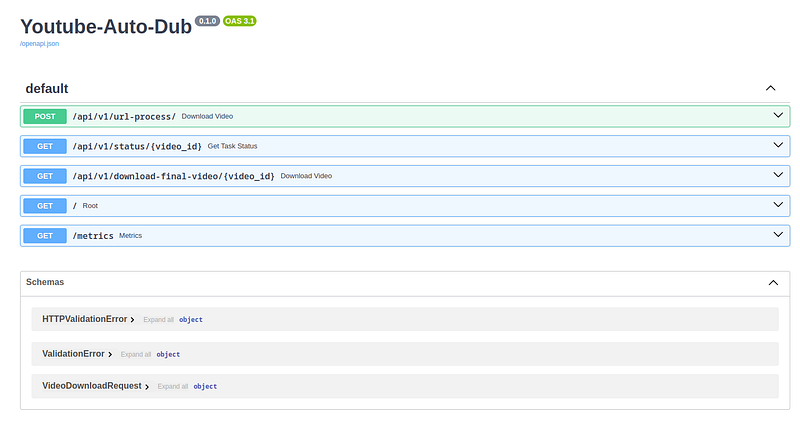
To use YouTube Auto-Dub, begin by submitting a YouTube link via the endpoint:
/api/v1/download/
The application will process the video, recognize the voice timbre, translate the subtitles, synthesize the translated speech matching the original timbre, and then assemble the final video. The processed video will be saved in backend/data/final_videos. With the video ID returned in the output, you can check the processing status through the endpoint:
/api/v1/status/{video_id}Finally, you can download the final video by using the endpoint:
/api/v1/download-video/{video_id}inserting the video’s ID.
This project is designed with cloud deployment in mind. The provided cloudbuild.yaml and Terraform configurations facilitate deployment on Google Cloud Platform, specifically using Cloud Run for scalable, serverless application hosting.
The development of YouTube Auto-Dub was inspired by the following repository:
- OpenVoice: Instant voice cloning technology by MyShell, utilized for voice timbre recognition and synthesis in this project.
Future Directions
- Model Improvements: Explore and integrate better models for voice recognition and synthesis.
- Serverless GPU Support: Investigate options for serverless GPU computing to accelerate processing.
- Frontend Interface: Develop a user-friendly frontend for easier interaction with the application.
- Translation Synchronization: Enhance the synchronization between translated text and video content for a seamless viewing experience.


