
You Need to Know This Life Hack for Online Classes
How to master online classes, so that you can make the most out of your time.

There was a crossover for a few months between the pandemic start, and the end of my college course.
I wasn’t the biggest fan of the Zoom classes…
We had a Zoom class, twice a week. This may not seem like a lot, but they weren’t the most exciting thing and it was time that could've been spent working (or watching Netflix).
Also, I had finished all of the college work we had left. So in my eyes, I had already completed the course.
I didn’t want to annoy my teacher as he was just doing his job, and had to continue until everyone had finished. So I decided to come up with a plan…
There's a video of the finished Zoom-Hack at the bottom of this article.
The drawing board:
Everyone had to have their cameras switched on the whole time to show that you were there and actively listening. However, your microphone could be muted.
I thought I could make better use of the 2 hours of prime-working-time taken by these classes. I wanted to try to deceive my teacher, just enough so that he thought I was there and (kind of) listening.
I had three ideas:
- Print a high-quality photo with light glaring on the camera, so you couldn’t make out that I wasn’t moving. Then create a cardboard rig around my webcam (which could have been external, allowing me to use my computer for other work).
- Scan and 3D print a small bust of myself (with the help of some prop builder friends). Then position the bust with a small, scaled back of a chair so it would seem like I was seated. I like this idea as it seemed the most creative and would offer a depth effect.
- Record a perfect loop of myself looking into my webcam, then attach an open box/green screen to the webcam allowing the video to play as a virtual background.
Can you guess what I did?
Option 3 was my weapon of choice…
The rig:
Sadly, I don’t have any photos of the rig when it was in use. But I have recreated a similar hookup for the purpose of this blog.
To make this work, you need to create a small box that allows light in. The end of a tissue box, part of a playing card box, or the bottom of a coffee cup are all viable options.
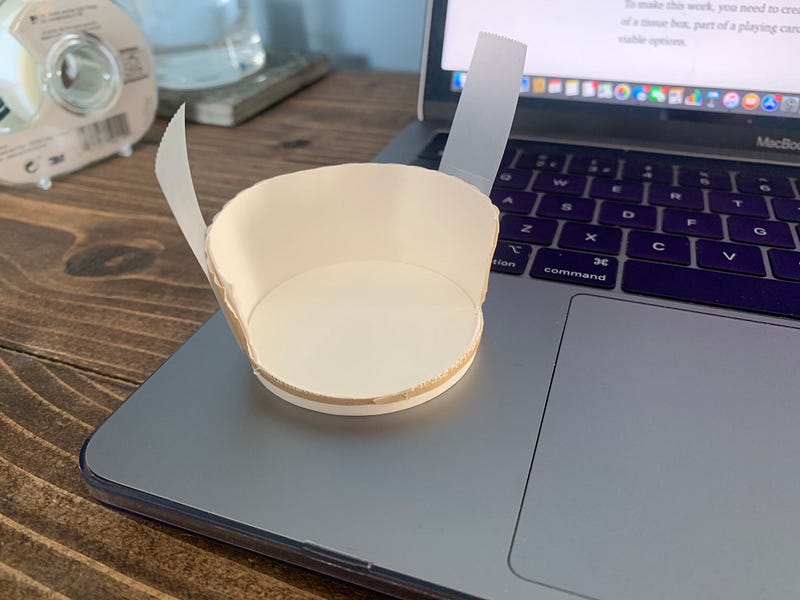
As you can see, I have made a few incisions on the bottom of a coffee cup. This allows light to be let in through the top, and a flat cut surface to allow me to attach it to the webcam.
I have used magic tape to attach it but… use whatever you want. Get crafty.
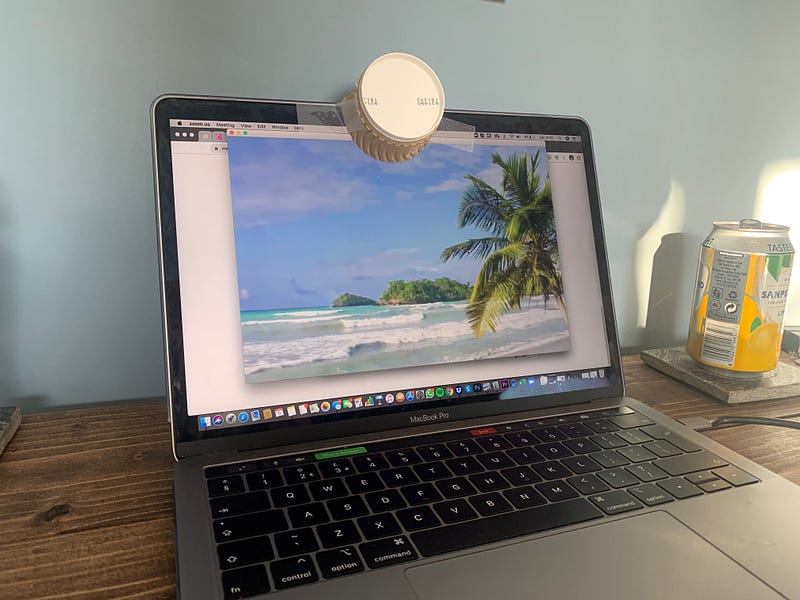
As you can see from the above photo, the rig has worked flawlessly. I have been magically transported to a tropical island.
The loop:
This is arguably the most important piece of the puzzle. If you don’t have a convincing video, you may get called out.
There are a few factors that go into making a convincing video:
- Making it a loop, allowing it to play on for as long as necessary.
- Making yourself look intrigued at what the tutor is talking about, but not overly interested.
- Making yourself look presentable, but not overly dressed/high quality. It should look like you just switched on your computer.
Zoom has a built-in loop feature, this means that whatever length video used will automatically replay for the entirety of the meeting.
There are a few ways to disguise the jump cut between takes. You could use your favorite editing software and add a Wi-Fi glitch to your two-minute-masterpiece. You could duck out of frame to ‘pick up that pen you dropped’ or ‘grab a glass of water’. Exiting and reentering the frame will be the easiest, best bet. I opted for the pen trick.
To make yourself look intrigued, there's a couple of poses you could make. Why not hold a pen to your chin? Or better yet, act like you’re taking notes and pausing mid-thought… There’s plenty of ways to make yourself look interested for a couple of minutes.
Ideally, you want to film this production on your webcam. This way, it is accurate and will not look overproduced (it may look suspect if you use an iPhone camera or DSLR).
If your camera quality is too good, your tutor may think you’re a cam girl/boy… and if you are a cam girl/boy, get off that class and start making some money.
Putting it all together:
You should now have everything ready. All that is left is to set that virtual background (before the class) and attach the rig. You should now be able to work in peace, without the distraction of your irrelevant class.
Here’s how it should look:
Just a quick endnote to this story, for anyone from my work reading.
I have never used this trick in one of our meetings, and I don’t plan on it. As the meetings are important, and I am paid to be there.
So, don’t worry, I do listen to everything… Including how your weekend was, and what your cats are getting up to xx


