
AI ARTICLE
You can now access Bing Chat in your Chrome Browser but how to?
Microsoft officially brings Bing AI Chat to Google Chrome

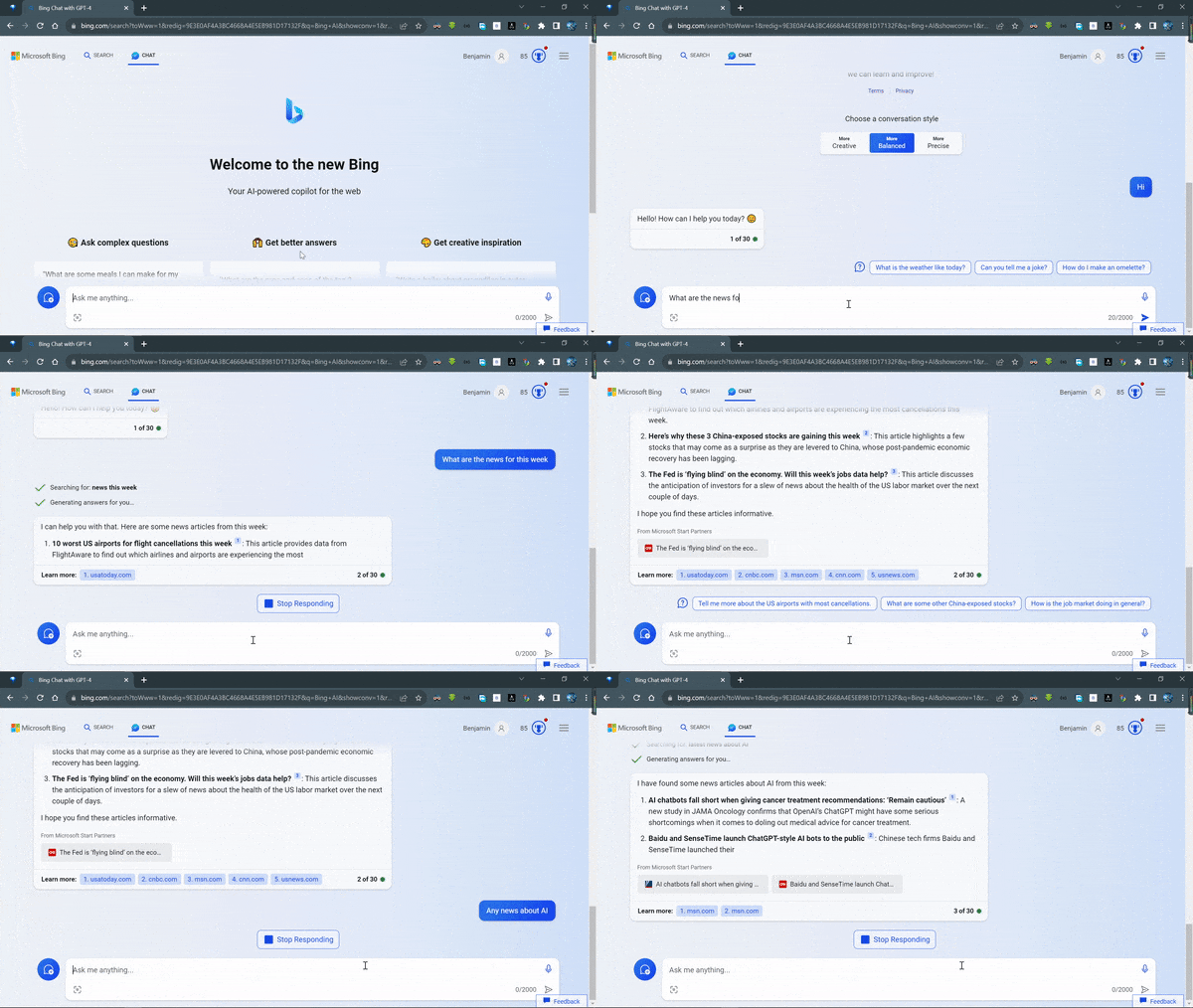
Hi! I hope this article finds you well. Over six months back, in February, Microsoft introduced Bing AI chat to the world, but it has largely been locked to the Edge browser. You couldn’t access it via third-party browsers ( Any browser different than Edge), but no more. The company’s AI-powered chatbot is now officially available via Google’s Chrome browser.
In fact, on Friday(August 25th), the company officially launched Bing Chat in Google’s popular Chrome browser.
If you don’t like the experience with the Edge browser, well you now have got more than one to choose from.
So, Chrome users on Windows, macOS, and Linux can now chat with the AI simply by going to bing.com/chat in their browser.
However, you’ll likely need to sign in with a Microsoft account before you can start conversing.
You also need to update your Chrome browser to the latest stable release, Microsoft says.
Well, now, you’ll no longer need to rely on Microsoft’s Edge browser to access the ChatGPT-powered program.
I was able to utilize it in Chrome on the Windows system. It also worked in the Firefox browser if you are asking.
But hold on;
Bing Chat is only available to Chrome desktop users. If you try to access the chatbot via Chrome on a smartphone, you’ll be told to download the Edge mobile app, for now.
In addition to Chrome, Microsoft revealed other updates. Enterprise users can now access the corporate version of Bing Chat within the Bing mobile application when signed in with work accounts.
Bonus
Do you know the other interesting way you can access Bing Chat is via SwiftKey — Yeah, you might ask what is Switftkey again.
It’s a popular Microsoft-owned virtual keyboard app for Android and iOS.
Back in April, Microsoft began integrating the chatbot into SwiftKey, allowing users to access Bing Chat while using other third-party apps on their smartphones.
The company now says you can use Bing Chat via SwiftKey for 30 turns per day without needing to sign in with a Microsoft account.
Yeah definitely, I gave it a try!

Final words
Microsoft still encourages the adoption of its Edge browser for the full experience, by offering exclusive features, including lengthier conversations, chat history access, and higher character limits per request.
However, functionally, it operates similarly across browsers. You can select conversation styles, pose questions, and generate text or images. The key difference now is the expanded accessibility of the technology beyond Edge and Bing.
The Bottom Line
Alright, there you have it. Expanding Bing Chat access beyond Edge is a nice move. After all, Chrome dominates the desktop browser market, right? With over 60% share. That’s it for today! Thanks for reading!
Source:
If you like the article and would like to support me, make sure to:View More Content📰| Subscribe 📬| Follow Me On LinkedIn, Twitter💙
Read More articles from my curated lists below:


