
Yes, You Can Edit Schemas In BigQuery–But Not How You Think
A hacky workaround for one of the biggest problems in SQL.

Creating Derivative Table Schemas In BigQuery SQL
I don’t keep data on the percentage of my pipelines, both personal and professional, that fail on their first deployment. But if I did, I have a pretty good guess what one of the biggest culprits would be: An incorrect schema.
From unreliable auto-detection to mismatched types to omitted fields, a schema is one of the easiest bits of the pipeline to create.
It’s also the easiest to mess up.
So, as a data engineer one of my (somewhat futile) quests has been to find ways to streamline schema design.
My latest trick is the ability to recover and edit a schema in BigQuery using the JSON sourced from a table’s metadata.
The goal is to write a simple query to end up with a JSON schema like the following that can be used to construct a new table using the BigQuery UI’s edit as text option in the create table window.
[{
  "name": "domain",
  "type": "STRING",
  "mode": "NULLABLE"
}, {
  "name": "num_comments",
  "type": "FLOAT64",
  "mode": "NULLABLE"
}, {
  "name": "score",
  "type": "FLOAT64",
  "mode": "NULLABLE"
}, {
  "name": "title",
  "type": "STRING",
  "mode": "NULLABLE"
}, {
  "name": "ups",
  "type": "FLOAT64",
  "mode": "NULLABLE"
}, {
  "name": "upvote_ratio",
  "type": "FLOAT64",
  "mode": "NULLABLE"
}, {
  "name": "dt_updated",
  "type": "TIMESTAMP",
  "mode": "NULLABLE"
}]
I’ll show you how to generate a SQL query that follows the required naming conventions of BigQuery so we can copy/paste in the UI instead of having to manually create our schema–all in under 5 minutes.
Note that this is different from simply creating a copy of a table. When you copy a table you also copy all its records. Our goal is to only copy the schema so you can have a fresh start.
My hope is to spare you unnecessary brain power and keep your index finger strain-free.
The Secret To Your Schema Is Hidden In This Overlooked Table
This example will use data I scraped from Reddit’s various news-related subreddits. You can reference my earlier work for a more in-depth walkthrough of building a similar pipeline.
Like many of the best kept secrets of BigQuery, this trick relies on an understanding of a data source too many overlook–table metadata.
If you’re familiar with the “under the hood” aspects of BigQuery, you’ll remember the INFORMATION_SCHEMA. BigQuery’s INFORMATION_SCHEMA is derived from the idea of an information_schema which is a read-only view that allows users to see important metadata about a table like name, type, partition, mode, etc.
In INFORMATION_SCHEMA you can drill down to column-level attributes using .COLUMNS.
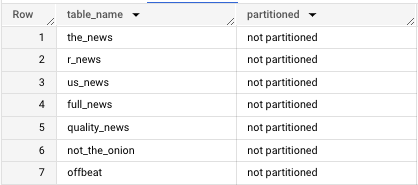
.COLUMNS yields a lot of information that can be helpful. For instance, you can find which of your tables in a particular dataset are or are not partitioned using a version of this query:
SELECT table_name, CASE WHEN is_partitioning_column = 0 THEN "not partitioned" ELSE "partitioned" END AS partitioned
FROM (
SELECT table_name, CASE WHEN is_partitioning_column = "NO" THEN 0 ELSE 1 END AS is_partitioning_column
FROM `************.reddit_news.INFORMATION_SCHEMA`.COLUMNS
GROUP BY table_name, is_partitioning_column
)
However, for our purposes, we don’t need to worry about partitioning.
In fact, we only need to focus on three columns:
- Column_name
- Data_type
- Mode
Create A Derivative Schema In 3 Lines Of SQL
Since INFORMATION_SCHEMA will return information for every table in a particular dataset, you’ll also need the table_name field to constrain the query results.
In this case, I just want to return information for the table “us_news”, so we’ll filter for that result.
SELECT column_name, data_type FROM `**********.reddit_news.INFORMATION_SCHEMA`.COLUMNS
WHERE table_name = 'us_news'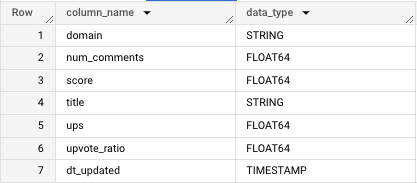
To make this match the JSON Google expects, we’ll alias the columns so they’re in the proper format. Since this is a flat table, I can manually specify that all columns will be NULLABLE.
SELECT column_name AS name, data_type AS type, "NULLABLE" AS mode
FROM `**********.reddit_news.INFORMATION_SCHEMA`.COLUMNS
WHERE table_name = "us_news"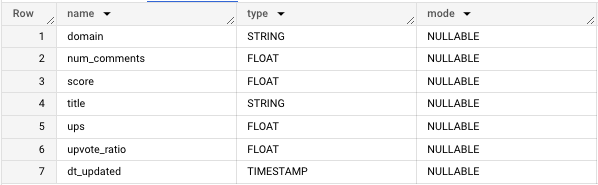
After running the query, instead of hitting “Results”, we can navigate to “JSON”…
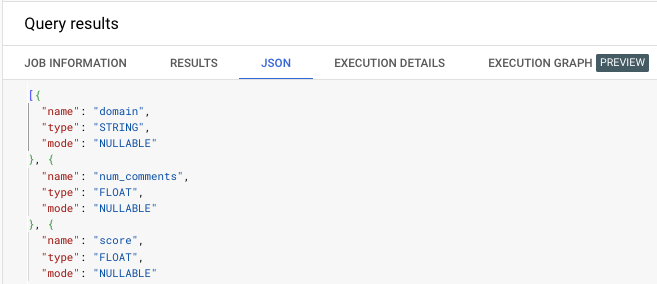
And copy and paste the result into a new “Create table” window.
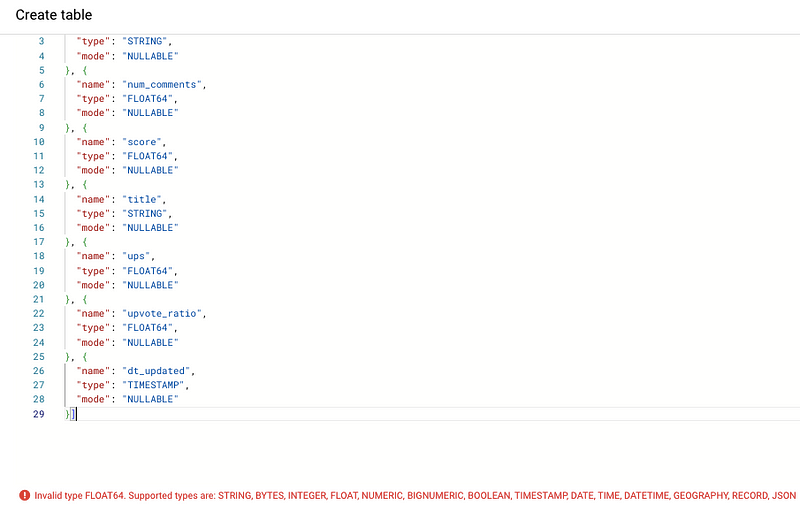
Uh oh!
There is one more transformation we have to make to conform to BigQuery naming standards.
While JSON accepts types with lengths/constraints like FLOAT64 or INT64, the BigQuery UI will raise an error.
You can get around this by converting the FLOAT64 metadata field value.
SELECT column_name AS name,
CASE WHEN data_type = "FLOAT64" THEN "FLOAT" ELSE data_type END AS type,
"NULLABLE" AS mode
FROM `*******.reddit_news.INFORMATION_SCHEMA`.COLUMNS
WHERE table_name = "us_news"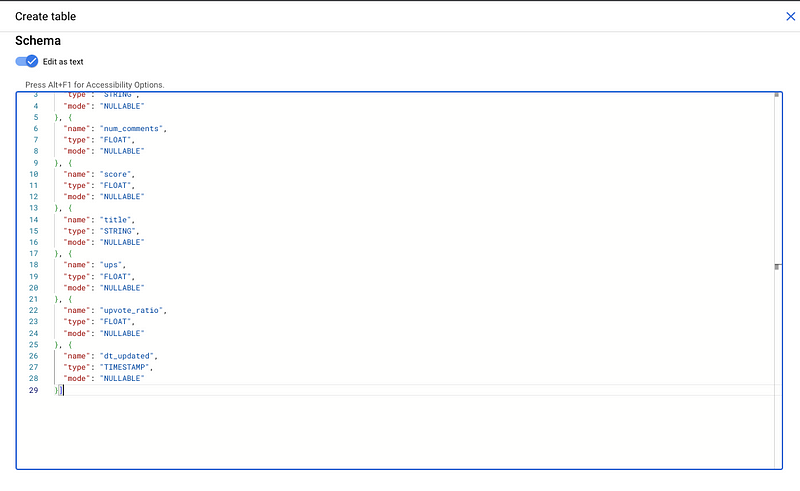
Now it works!
We now have a metadata query that will automatically generate a JSON schema based on a previous query result.
Unfortunately, since this hack is contingent on a query run, it can’t be used to generate a schema from scratch. If you’re curious, I’ve created a function that will do that from a list of field names and types.
However, this will serve some use cases:
- Creating a test table based on an existing table
- Generating a schema to specify in your pipeline script
- Materializing a view (i.e. creating a static table from a preexisting view)
Takeaway
As a data engineer who has spent hours on tedious but important tasks like schema design and QA using test tables, finding a workaround for a repetitive task, no matter how “hacky”, is always helpful.
This may or may not be considered a proper approach, but I hope this emphasizes that SQL, like any other tool, should be wielded in a way that is efficient and convenient.
Besides, in my opinion, one of the best things to learn, after you’ve gained proficiency, is a shortcut.
Go from SELECT * to interview-worthy project. Get our free 5-page guide.


