avatarElye - A One Eye Developer

Free AI web copilot to create summaries, insights and extended knowledge, download it at here

7310

Abstract

9c"><pre><span class="hljs-function"><span class="hljs-keyword">class</span> <span class="hljs-title">MyViewModel</span><span class="hljs-params">(<span class="hljs-comment">/.../</span>)</span> : ViewModel(), LifecycleObserver {</span></pre></div><p id="ac7b">After that, we just annotate a function with <code>@OnLifecyecleEvent</code> together with the intended Lifecycle enum (e.g. <code>ON_PAUSE</code> below).</p><div id="2a86"><pre><span class="hljs-meta">@OnLifecycleEvent(Lifecycle.Event.ON_PAUSE)</span> <span class="hljs-function"><span class="hljs-keyword">fun</span> <span class="hljs-title">anyNameFunction</span><span class="hljs-params">()</span></span> { <span class="hljs-comment">// Do what one does when onPause</span> }</pre></div><p id="b496"><b>In the Activity</b>, it just needs to add the ViewModel as an observer to the <code>lifecycle</code> registry using the <code>addObserver</code> API.</p><div id="31da"><pre>lifecycle.addObserver<span class="hljs-comment">(viewModel)</span></pre></div><p id="d745">This makes the <code>ViewModel</code> capable of knowing all the essential lifecycle, i.e. <code>onCreate</code>, <code>onStart</code>, <code>onResume</code>, <code>onPause</code>, <code>onStop</code>, <code>onDestroy</code>, and also <code>onAny</code> of them, if it has any function that annotates the enum.</p><h2 id="0350">3. Persist state when ViewModel is destroyed by Android OS</h2><p id="71c2">Before 2019, this is one of the missing bits that makes the Architecture ViewModel solution incomplete. Back then, it does have the ability to retain state <code>onConfigurationChanged</code> but not when it is killed by the Android OS.</p><div id="ecbd" class="link-block"> <a href="https://readmedium.com/architecture-viewmodel-a-half-baked-solution-466378162ba7"> <div> <div> <h2>Architecture ViewModel — a half-baked solution?</h2> <div><h3>The Architecture Component is great. The LiveData, the LifecycleOwner…. but the ViewModel usage is questionable…</h3></div> <div><p>medium.com</p></div> </div> <div> <div style="background-image: url(https://miro.readmedium.com/v2/resize:fit:320/1*omdwMQ0rcOukNmWWXYASlg.png)"></div> </div> </div> </a> </div><p id="5dbe">Gratefully in 2019, Google came up with the <a href="https://developer.android.com/reference/androidx/lifecycle/SavedStateHandle"><code>savedStateHan</code>dle</a> that solves this problem.</p><p id="caa5">To get the <code>savedStateHandle</code>, one just needs to add it as a parameter. It will be provided (almost) AUTOMATICALLY!</p><div id="e207"><pre><span class="hljs-keyword">class</span> <span class="hljs-symbol">MyViewModel</span>( <span class="hljs-symbol">private</span> <span class="hljs-symbol">val</span> <span class="hljs-symbol">savedStateHandle: <span class="hljs-symbol">SavedStateHandle</span></span>) : <span class="hljs-symbol">ViewModel</span>()</pre></div><p id="9904">With it, one could just <code>set</code> and <code>get</code> with the KEY accordingly. It essentially could replace what <code>savedInstanceState</code> is done in Activity/Fragment, and more as below</p><ol><li>In the ViewModel, one could access to <code>savedStateHandle</code> any time, and hence the save and retrieve could be performed any time as needed instead of just on a particular lifecycle event.</li><li>Other than storing a normal primitive and serializable object, it also allows us to store LiveData! The nice bit about storing Livedata is, one just needs to get the Livedata from <code>SavedStateHandle</code> as below, and then any value updated to the LiveData would be automatically stored in the <code>savedStateHandle</code>.</li></ol><div id="bf8c"><pre><span class="hljs-keyword">private</span> val showTextLiveData = savedStateHandle.getLiveData<<span class="hljs-type">String</span>>(<span class="hljs-keyword">KEY</span>)</pre></div><p id="7bc3">To read more about saving/restoring LiveData in SavedStateHandle, read</p><div id="b315" class="link-block"> <a href="https://medium.com/@elye.project/unintuitive-livedata-savedstatehandle-3d01fbdbfc01"> <div> <div> <h2>Peculiar LiveData SavedStateHandle</h2> <div><h3>Last year, Google introduced SavedStateHandler for the ViewModel of Architecture Component. It could also save…</h3></div> <div><p>medium.com</p></div> </div> <div> <div style="background-image: url(https://miro.readmedium.com/v2/resize:fit:320/0*5EGy0RX2kQQ56qm7)"></div> </div> </div> </a> </div><h2 id="6663">4. Handling dependencies Service e.g. Repository</h2><p id="cf99">Unlike Activity/Fragment, the ViewModel provides the flexibility of one to inject the Dependencies through the Constructor.</p><p id="cde6">For example, we could inject <code>repository</code> as below, which is something we can’t do in Activity/Fragment.</p><div id="ea7f"><pre><span class="hljs-keyword">class</span> <span class="hljs-symbol">MyViewModel</span>( <span class="hljs-symbol">private</span> <span class="hljs-symbol">val</span> <span class="hljs-symbol">savedStateHandle: <span class="hljs-symbol">SavedStateHandle</span>, <span class="hljs-symbol">private</span></span> <span class="hljs-symbol">val</span> <span class="hljs-symbol">repository: <span class="hljs-symbol">Repository</span></span>) : <span class="hljs-symbol">ViewModel</span>(), <span class="hljs-symbol">LifecycleObserver</span></pre></div><p id="4c63">However, unlike conventional developer-created MVP or MVVM, it also has <code>savedStateHandle</code>. The ViewModel doesn’t really get manually instantiated, so injecting the dependencies into it is not something one could do directly.</p><p id="9eb0">If the ViewModel created doesn’t depend on any services (e.g. Repository), we would create the ViewModel with the <code>ViewModels</code> delegate within the Activity. This will create the ViewModel with <code>savedStateHandle</code> automatically injecting it into it.</p><div id="559b"><pre><span class="hljs-keyword">private</span> val viewModel: <span class="hljs-function">MyViewModel <span class="hljs-keyword">by</span> <span class="hljs-title">viewModels</span>()</span></pre></div><p id="20e1">However, if the ViewModel is dependent on some Services (e.g. Repository), we would first need to create a factory for the ViewModel, as below, with the parameter for the dependencies to be injected.</p><div id="afa6"><pre><span class="hljs-keyword">class</span> <span class="hljs-symbol">MyViewModelFactory</span>( <span class="hljs-symbol">owner: <span class="hljs-symbol">SavedStateRegistryOwner</span>, <span class="hljs-symbol">private</span></span> <span class="hljs-symbol">val</span> <span class="hljs-symbol">repository: <span class="hljs-symbol">Repository</span>, <span class="hljs-symbol">defaultArgs</span>: <span class="hljs-symbol">Bundle</span></span>? = <span class="hljs-symbol">null</span> ) : <span class="hljs-symbol">AbstractSavedStateViewModelFactory</span>(<span class="hljs-symbol">o

Options

wner, <span class="hljs-symbol">defaultArgs</span></span>) { <span class="hljs-keyword">override</span> fun <T : ViewModel> create( key: String, modelClass: Class<T>, handle: SavedStateHandle ): T { <span class="hljs-keyword">return</span> MyViewModel(handle, repository) as T } }</pre></div><p id="89d8">then we could then create the ViewModel in the Activity using the Factory.</p><div id="ff11"><pre><span class="hljs-keyword">private</span> <span class="hljs-keyword">val</span> viewModel: MyViewModel <span class="hljs-keyword">by</span> viewModels{ MyViewModelFactory(<span class="hljs-keyword">this</span>, Repository()) }</pre></div><p id="263a">Notice in the code above, it has 2 things to inject into the ViewModel factory, ie. the <code>this</code> (which is the <code>SavedStateRegistryOwner</code>, which is also the Activity itself), and the <code>Repository</code>. So this means the Activity needs to have the <code>Repository</code> as well.</p><p id="ba80">The need of having the <code>Repository</code> in activity is a pain point as we need to inject the <code>Repository</code> into Activity, which is <a href="https://medium.com/@elye.project/why-android-apps-uses-dagger-2-552b693a8f85">not something we could do through constructor for now</a>.</p><p id="d0a1">There’s some way to use Dagger (or other approaches e.g. Koin, Kodein) to help with the injection for now. You could refer to the below blog on how to inject through Dagger 2.</p><div id="7191" class="link-block"> <a href="https://proandroiddev.com/saving-ui-state-with-viewmodel-savedstate-and-dagger-f77bcaeb8b08"> <div> <div> <h2>Saving UI state with ViewModel SavedState and Dagger</h2> <div><h3>Keeping UI state after process stop with the new ViewModel SavedState module advanced usage combined with dependency…</h3></div> <div><p>proandroiddev.com</p></div> </div> <div> <div style="background-image: url(https://miro.readmedium.com/v2/resize:fit:320/1*ixBILv0Ox0ht6ktGXn-jdw.png)"></div> </div> </div> </a> </div><h2 id="89cd">5. Bonus: Unit Testing ViewModel</h2><p id="d376">The ability to easily unit test the ViewModel itself is already enough reason we should move all core development of screen from Activity to ViewModel as much.</p><p id="2fa5">To perform the needed Unit Test, we just need to add <code>InstantTaskExecutorRule()</code> as below</p><div id="f444"><pre><span class="hljs-keyword">class</span> <span class="hljs-symbol">MyViewModelTest</span> {</pre></div><div id="a59a"><pre><span class="hljs-variable">@get:</span>Rule var <span class="hljs-attribute">rule</span>: TestRule = <span class="hljs-built_in">InstantTaskExecutorRule</span>()</pre></div><div id="f380"><pre><span class="hljs-meta">@Test</span> <span class="hljs-function"><span class="hljs-keyword">fun</span> my testing<span class="hljs-params">()</span></span> { <span class="hljs-comment">// All testing.</span> }</pre></div><p id="6a93">Using <a href="https://github.com/mockk/mockk"><code>Mo</code>ckk</a>, I could mock the <code>SavedStateHandle</code> and even <code>LiveData</code> if I needed to. Below is one example where I mock everything the ViewModel is dependent on.</p><div id="3d86"><pre><span class="hljs-meta">@Test</span> <span class="hljs-function"><span class="hljs-keyword">fun</span> test <span class="hljs-keyword">init</span> with default value<span class="hljs-params">()</span></span> { <span class="hljs-keyword">val</span> savedStateHandle = mockk<SavedStateHandle>() <span class="hljs-keyword">val</span> repository = mockk<Repository>() <span class="hljs-keyword">val</span> liveData = mockk<MutableLiveData<String>>()</pre></div><div id="948f"><pre><span class="hljs-keyword">every</span> { liveData.<span class="hljs-keyword">value</span> } returns <span class="hljs-string">"Default Value"</span> <span class="hljs-keyword">every</span> { savedStateHandle.getLiveData<span class="language-xml"><span class="hljs-tag"><<span class="hljs-name">String</span>></span>(KEY) } returns liveData</span></pre></div><div id="aeac"><pre><span class="hljs-attribute"> val viewModel</span> = MyViewModel(savedStateHandle, repository)</pre></div><div id="1991"><pre>verify { savedStateHandle.getLiveData<String>(KEY) } Assert<span class="hljs-selector-class">.assertEquals</span>(viewModel<span class="hljs-selector-class">.showTextDataNotifier</span><span class="hljs-selector-class">.value</span>, <span class="hljs-string">"Default Value"</span>) }</pre></div><p id="ad13">Having the 4 needing responsibilities sits in ViewModel, the ViewModel is now the new Activity. The core of development could now reside in ViewModel while letting the Activity/Fragment handles the UI-specific tasks. Maybe the ViewModel should be named Activity instead 😅</p><p id="8e66" type="7">The ViewModel in now the new Activity</p><p id="eec5">I think the next thing Google might be tackling is the ability to automatically inject the Dependencies into the ViewModel, as it is the sole pain point the ViewModel has today. Check out the below.</p><div id="0a29" class="link-block"> <a href="https://levelup.gitconnected.com/googles-plan-for-dagger-2-beyond-2019-37e2f7d994e3"> <div> <div> <h2>Google’s Plan for Dagger 2 for 2020 and Beyond</h2> <div><h3>In Android Dev Summit 2019, Google states its opinion on how to develop App in Android. Manuel Vivo and Daniel Santiago…</h3></div> <div><p>levelup.gitconnected.com</p></div> </div> <div> <div style="background-image: url(https://miro.readmedium.com/v2/resize:fit:320/1*E4TjLhJFEVEvT0syUqWq0g.png)"></div> </div> </div> </a> </div><p id="c0ec">The above example code with the unit test on ViewModel is in</p><div id="628e" class="link-block"> <a href="https://github.com/elye/demo_android_viewmodel_complete"> <div> <div> <h2>elye/demo_android_viewmodel_complete</h2> <div><h3>Demo Architecture ViewModel with SaveStateHandle, Factory for Dependencies injection, Lifecycle Aware and LiveData. A…</h3></div> <div><p>github.com</p></div> </div> <div> <div style="background-image: url(https://miro.readmedium.com/v2/resize:fit:320/0*2PReoz2nX8IUUlnT)"></div> </div> </div> </a> </div><p id="49ef">Thanks for reading. You can check out my other topics <a href="https://medium.com/@elye.project/">here</a>.</p><p id="e8b1">Follow me on <a href="https://medium.com/@elye.project"><i>medium</i></a><i>,</i> <a href="https://twitter.com/elye_project"><i>Twitter</i></a><i>, <a href="https://www.facebook.com/elyeproj/">Facebook</a></i> or <a href="https://www.reddit.com/user/elyeproj/"><i>Reddit</i></a> for little tips and learning on mobile development etc related topics. Elye</p></article></body>

Learning Android Development

Year 2020: Migrating from Activity to ViewModel

Time to move toward the Google preferred architecture for Android

Picture by Chris Briggs on Unsplash

For a span of 10 years, from 2007 to 2017, Android development revolved around Activity/Fragment as the heart of its development for each screen. Some developers tried to shift the logic out using MVP, MVVM, etc, but Google had yet to endorse anything back then.

In 2017, Architecture Component was introduced by Google. Android now has its own specialized ViewModel. However, it was still incomplete. It can’t save the state when the Activity is killed by Android OS. It still relies on Activity to provide the bundle to save and restore the state.

In 2019, SavedStateHandle was added to Android’s ViewModel. This now enables ViewModel capable of being the heart of Android Development for each screen.

So let’s dedicate this year, 2020, as a paradigm shift whereby each screen core development should be in ViewModel instead of Activity/Fragment.

Relook into Activity-Based Development

In order to demonstrate that the ViewModel is capable of replacing Activity/Fragment as the heart of each screen development, let’s look at the Activity-Based Development, using the below diagram.
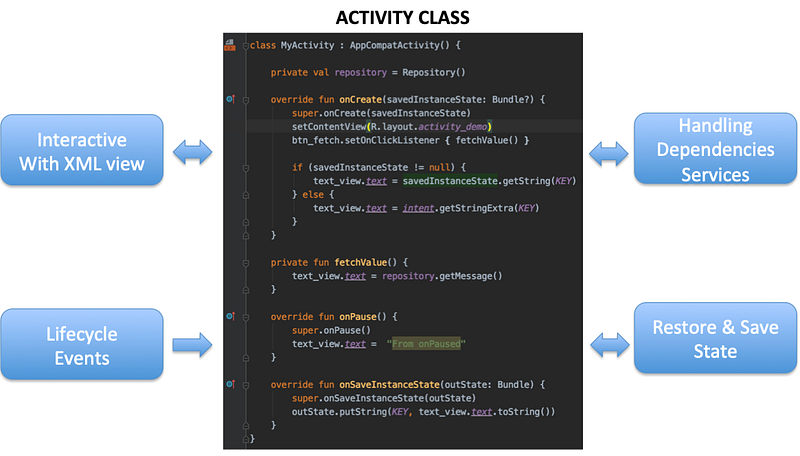
From the diagram above, we could see that the Activity performs the following:

  1. Interacts with the XML View to perform UI-related activities
  2. Get informed on Lifecycle event changes from Android OS
  3. Save and restore state, if the activity is killed by the Android OS
  4. Handling dependencies Service e.g. Repository

As you could see, Activity is pretty much the center of the screen development since it is aware of many things and need to handle all of them.

The challenges posed by Activity/Fragment-Based Development

Having Activity/Fragment as central of development for the screen post several issues as below.

  1. Activity/Fragment can’t be easily injected with Dependencies. That’s one of the reasons Dagger was made so popular.
  2. Activity/Fragment is not easily testable with Unit Test. Robolectric was introduced. However, it’s a very painful framework to work, on and yet to be endorsed by Google after so many years.
  3. Activity/Fragment is still pretty much a VIEW in many regards. It is not an ideal place for any business logic.
  4. Interim data has to be explicitly restored/saved using SavedStateInstance. This can only happen on a special lifecycle event i.e. onCreate and onSaveInstanceState only.

In knowing such disadvantages, the developer community recommends MVP (and later MVVM) as the workaround. This enabled us to move the logic part from the Activity to the Presenter, as well as the dependent services. However, the other parts of Activity/Fragment responsibilities (e.g. response to lifecycle event, state persistency) are still pretty much an Activity/Fragment controlled area. Hence making the developer made MVP and MVVM a half-baked solution.

Architecture Component ViewModel: the new core

This is 2020. The Android ViewModel is now fully equipped to alleviate the Activity/Fragment from other nonessential activities. It can now be the core.

Below is the exact replica Activity class logic (in the diagram above) but implemented in ViewModel instead. Based on the diagram below, let’s look into how each is handled.
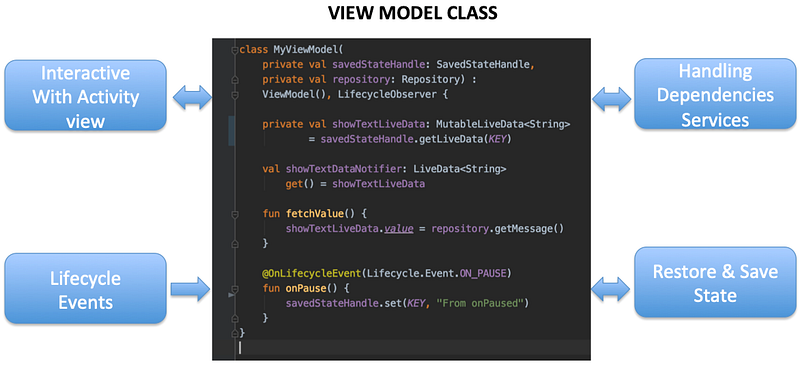
1. Interacting with the View (Activity/Fragment)

Instead of interacting with the XML view directly, the ViewModel interacts with Activity/Fragment. This leaves Activity/Fragment to continue to handle XML as that’s what it’s should be responsible for (e.g. hiding/showing view, animating, etc)

To interact with the Activity/Fragment, the ViewModel instantiates some LiveData.

val showTextDataNotifier: LiveData<String>
    get() = showTextLiveData

Once the LiveData value is updated, it will broadcast to the Activity/Fragment that is observing it, and perform the needed UI update.

In the Activity, we just need to instantiate observer, with the action, it wants to perform upon receiving the signal,

private val textDataObserver =
    Observer<String> { data -> text_view.text = data }

then register the observer with the liveData from the ViewModel as below.

viewModel.showTextDataNotifier.observe(
    this /*activity*/, textDataObserver)

LiveData is a great data communicator, as it is aware of the Activity/Fragment lifecycle before interacting with it. To get a good understanding of LiveData, check out

2. Get Lifecycle Events to respond

Lifecycle continues to be something that is made known to Activity/Fragment. However, on top of that, the ViewModel could be aware of the Activity/Fragment’s Lifecycle by implementing LifecycleObserver

class MyViewModel(/*...*/) : ViewModel(), LifecycleObserver {

After that, we just annotate a function with @OnLifecyecleEvent together with the intended Lifecycle enum (e.g. ON_PAUSE below).

@OnLifecycleEvent(Lifecycle.Event.ON_PAUSE)
fun anyNameFunction() {
    // Do what one does when onPause
}

In the Activity, it just needs to add the ViewModel as an observer to the lifecycle registry using the addObserver API.

lifecycle.addObserver(viewModel)

This makes the ViewModel capable of knowing all the essential lifecycle, i.e. onCreate, onStart, onResume, onPause, onStop, onDestroy, and also onAny of them, if it has any function that annotates the enum.

3. Persist state when ViewModel is destroyed by Android OS

Before 2019, this is one of the missing bits that makes the Architecture ViewModel solution incomplete. Back then, it does have the ability to retain state onConfigurationChanged but not when it is killed by the Android OS.

Gratefully in 2019, Google came up with the savedStateHandle that solves this problem.

To get the savedStateHandle, one just needs to add it as a parameter. It will be provided (almost) AUTOMATICALLY!

class MyViewModel(
    private val savedStateHandle: SavedStateHandle) :
    ViewModel()

With it, one could just set and get with the KEY accordingly. It essentially could replace what savedInstanceState is done in Activity/Fragment, and more as below

  1. In the ViewModel, one could access to savedStateHandle any time, and hence the save and retrieve could be performed any time as needed instead of just on a particular lifecycle event.
  2. Other than storing a normal primitive and serializable object, it also allows us to store LiveData! The nice bit about storing Livedata is, one just needs to get the Livedata from SavedStateHandle as below, and then any value updated to the LiveData would be automatically stored in the savedStateHandle.
private val showTextLiveData 
    = savedStateHandle.getLiveData<String>(KEY)

To read more about saving/restoring LiveData in SavedStateHandle, read

4. Handling dependencies Service e.g. Repository

Unlike Activity/Fragment, the ViewModel provides the flexibility of one to inject the Dependencies through the Constructor.

For example, we could inject repository as below, which is something we can’t do in Activity/Fragment.

class MyViewModel(
    private val savedStateHandle: SavedStateHandle,
    private val repository: Repository) :
    ViewModel(), LifecycleObserver

However, unlike conventional developer-created MVP or MVVM, it also has savedStateHandle. The ViewModel doesn’t really get manually instantiated, so injecting the dependencies into it is not something one could do directly.

If the ViewModel created doesn’t depend on any services (e.g. Repository), we would create the ViewModel with the ViewModels delegate within the Activity. This will create the ViewModel with savedStateHandle automatically injecting it into it.

private val viewModel: MyViewModel by viewModels()

However, if the ViewModel is dependent on some Services (e.g. Repository), we would first need to create a factory for the ViewModel, as below, with the parameter for the dependencies to be injected.

class MyViewModelFactory(
    owner: SavedStateRegistryOwner,
    private val repository: Repository,
    defaultArgs: Bundle? = null
) : AbstractSavedStateViewModelFactory(owner, defaultArgs) {
    override fun <T : ViewModel> create(
        key: String, 
        modelClass: Class<T>, 
        handle: SavedStateHandle
    ): T {
        return MyViewModel(handle, repository) as T
    }
}

then we could then create the ViewModel in the Activity using the Factory.

private val viewModel: MyViewModel by viewModels{
    MyViewModelFactory(this, Repository())
}

Notice in the code above, it has 2 things to inject into the ViewModel factory, ie. the this (which is the SavedStateRegistryOwner, which is also the Activity itself), and the Repository. So this means the Activity needs to have the Repository as well.

The need of having the Repository in activity is a pain point as we need to inject the Repository into Activity, which is not something we could do through constructor for now.

There’s some way to use Dagger (or other approaches e.g. Koin, Kodein) to help with the injection for now. You could refer to the below blog on how to inject through Dagger 2.

5. Bonus: Unit Testing ViewModel

The ability to easily unit test the ViewModel itself is already enough reason we should move all core development of screen from Activity to ViewModel as much.

To perform the needed Unit Test, we just need to add InstantTaskExecutorRule() as below

class MyViewModelTest {
@get:Rule
    var rule: TestRule = InstantTaskExecutorRule()
@Test
    fun `my testing`() {
        // All testing.
    }

Using Mockk, I could mock the SavedStateHandle and even LiveData if I needed to. Below is one example where I mock everything the ViewModel is dependent on.

@Test
fun `test init with default value`() {
    val savedStateHandle = mockk<SavedStateHandle>()
    val repository = mockk<Repository>()
    val liveData = mockk<MutableLiveData<String>>()
every { liveData.value } returns "Default Value"
    every { savedStateHandle.getLiveData<String>(KEY) } 
        returns liveData
    val viewModel = MyViewModel(savedStateHandle, repository)
verify { savedStateHandle.getLiveData<String>(KEY) }
    Assert.assertEquals(viewModel.showTextDataNotifier.value, 
       "Default Value")
}

Having the 4 needing responsibilities sits in ViewModel, the ViewModel is now the new Activity. The core of development could now reside in ViewModel while letting the Activity/Fragment handles the UI-specific tasks. Maybe the ViewModel should be named Activity instead 😅

The ViewModel in now the new Activity

I think the next thing Google might be tackling is the ability to automatically inject the Dependencies into the ViewModel, as it is the sole pain point the ViewModel has today. Check out the below.

The above example code with the unit test on ViewModel is in

Thanks for reading. You can check out my other topics here.

Follow me on medium, Twitter, Facebook or Reddit for little tips and learning on mobile development etc related topics. ~Elye~

Android App Development
Android
Mobile App Development
App Development
Google
Recommended from ReadMedium