
Yarn Workspaces — A Primer to Monorepos with Minimal Tooling

In this article, Let’s take a look at a feature of the Yarn package manager called workspaces. We’ll discuss what workspaces are and when they would be useful.
We’ll also walk through a use case of developing a design system, which utilizes a monorepo architecture, to demonstrate a practical use case for yarn workspaces.
Please note that this article will focus on the set-up, configuration and tooling rather than building a design system itself.
The Philosophy of Monorepos In the Context of A Design System:
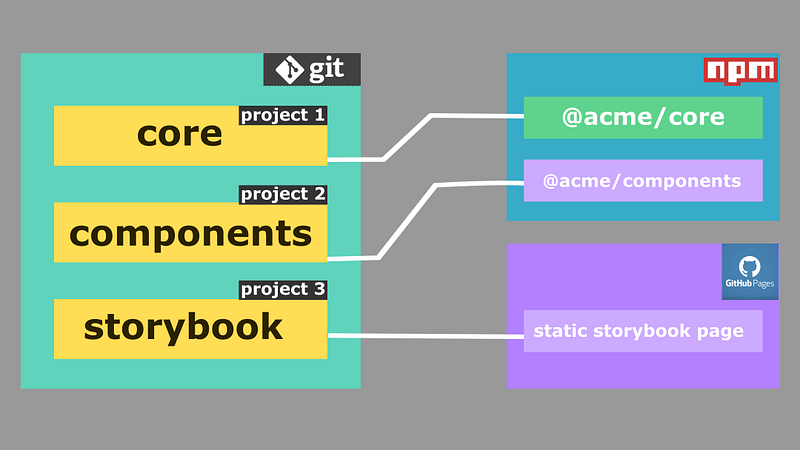
The general idea of a monorepo is that we have all our code as a single version-controlled unit while maintaining the separation of concerns within the individual projects that compose the monorepo.
In this article, let’s narrow down the scope of the monorepo philosophy to the front-end, and further scale it down to the context of a design system.
So, translating the introductory paragraph of this section to our scope, we understand that we will be having just a single git repository to manage the different entities that form our design system.
Each different entity within the design system could be considered a project of its own. These self-sufficient projects interact with each other to form the complete system, but can also be consumed as individual entities. Thus enabling them to be consumed as a whole system or in parts by any other third-party application or a downstream repository.
For our hypothetical design system for the fictitious Acme organization, our end goal is to publish two different scoped packages to the npm registry and a storybook documentation to a Github page.
These scoped packages are:
@acme/core: This is the base for our design system. It contains the underlying definitions for atomic components such as Buttons, Texts, Links, etc. We intend to publish this as a separate consumable package because these atomic components work on their own and could be combined in any fashion by the consuming applications to form a variety of complex components, that still adhere to the rules of the design system (since those new components will be built by combining these atoms which adhere to the design system of Acme).@acme/components: This package may house some commonly used pre-built components that the end-users can consume out-of-the-box. It depends on both of the above modules as their constituents are built by just piecing them together modules in various permutations and combinations with some additional component-specific logic.
The Intentions for Adopting a Monorepo Pattern for This Use Case:
The three packages are part of a single system. Hence, they will definitely share external dependencies (third-party node modules).
By adopting a monorepo pattern, we could share those third-party dependencies among the three projects from just a single source (one node_modules directory).
These packages tend to depend on each other (for instance, components depend on the core). Co-locating them would make version updates of the intra-dependencies easier and release cycles more manageable.
Tooling Choice:
Although there are some advanced and complex tools that are specifically designed for this purpose, such as Lerna, TurboRepo and Nx, I chose to just utilize yarn workspaces and some bash scripts for this article, just to prove the point that monorepos don’t inherently need complex tooling, but the tooling is rather influenced by what we are trying to accomplish with the monorepo architecture.
Yarn Workspaces:
Yarn workspaces are the simplest way to get started with a monorepo. You could have multiple directories within a single repo and each of these directories can be a separate project on its own. We just need to tell yarn which directories it should consider as a workspace (project).
In this way, yarn effectively manages shared node_modules between workspaces and will also allow intra-dependencies between workspaces in a sensible way.
Storybook:
This will enable us to develop our components in isolation and will also serve as documentation for the components in the design system.
Bash Scripts:
In this demo, some scripting will be used to publish packages to the scoped npm registry. If we decide to add a tool like Lerna, later in the project’s lifecycle, we could get rid of these scripts as tools like Lerna have inbuilt capabilities to perform similar actions.
Yarn Workspace Setup:
We will be using Yarn version 1 for this article since that is predominant in the supply chain infrastructure of most organizations and would make it easier for most consuming applications to utilize and integrate our packages into their applications.
Let’s set up our workspaces in the package.json at the root directory as follows:
{
  "version": "1.0.0",
  "license": "MIT",
  "author": "Parthipan Natkunam",
  "private": true,
  "workspaces": [
    "packages/*",
    "storybook"
  ],
  "scripts": {
    "publish:all": "chmod +x ./scripts/publish.sh && ./scripts/publish.sh"
  }
}
The two crucial lines here are:
"workspaces":[..] and "private": true. We have to set this private property to true to enable yarn workspace capabilities.
The workspaces field here indicates to yarn that all subdirectories within the packages directory are to be treated as a separate workspace and also to treat the directory named storybook that would lie outside packages directory as a workspace of its own.
The scripts field will contain the invocation command for the bash script to publish packages, which we would look at later.
So the folder structure would be something like this:
acme
|___ packages
     |
     |___ core
          |___ package.json
          |___ ...
     |___ components
          |___ package.json
          |___ ...
|___ storybook
     |
     |___ package.json
     |___ ...
|___ package.json
As you can see, each project (workspace) will have its own package.json file.
The Base TypeScript Configuration for Packages:
The following base config will be extended by each workspace in the packages directory:
The Core:
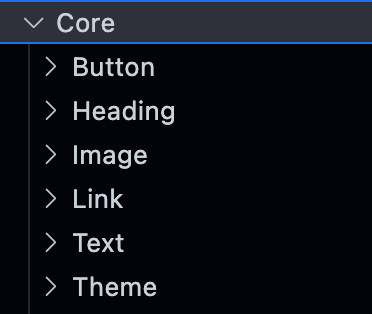
For the sake of simplicity, let’s just consider two core modules, namely Text and Buttons.
These will be separate sub-directories within the core directory:
Core Package.json:
Core Typescript Configuration:
{
 "extends": "../tsconfig.base.json",
 "compilerOptions": {
   "outDir": "dist"
 },
 "include": [ "./**/*.tsx" ],
 "exclude": ["node_modules"]
}
The index file for The Core:
// acme/core/index.tsexport type Space = "xs" | "sm" | "md" | "lg" | "xl" | "xxl";export type Size = "xs" | "sm" | "md" | "lg";export type Weight = "light" | "normal" | "medium" | "bold";export type Headings = "h1" | "h2" | "h3" | "h4" | "h5" | "h6";export type TextTags = Headings | "p" | "span";export type { TextProps } from "./Text";export { Text } from "./Text";export type { ButtonProps } from "./Button";export { Button } from "./Button";The Text Atom:
The Button Atom:
The Components:
Now, let’s create the second project in the monorepo, named components and quickly build a component that utilizes the core modules from our design system.
But first, let’s add the package.json for the components project:
Package.Json for Components:
Typescript Configuration for Components:
{
  "extends": "../tsconfig.base.json",
  "compilerOptions": {
    "outDir": "dist",
  },
  "include": [ "index.tsx" ],
  "exclude": ["node_modules"]
}
Card Component:
The index File for Components:
// acme/components/index.tsxexport type { CardProps } from "./Testimony";
export { Card} from "./Testimony";The NPM Configuration:
Now that we have two projects @acme/core and @acme/components which we would like to publish as separate packages to the npm registry, let’s add a .npmrc file to both the projects individually at core/ and components/ respectively, with the following contents in it:
//registry.npmjs.org/:_authToken=${ACME_PUBLISH_TOKEN}Here, the ACME_PUBLISH_TOKEN is an npm token with write access, set as an environment variable.
The StoryBook:
This will be the third workspace in our repository which contains the storybook documentation for our project.
To add storybook and initialize it, you can follow the documentation here: Installing Storybook.
The package.json:
A Sample Story for Text:
Thus we have set up and configured a monorepo with 3 different projects in it. The only thing left is to look at the part where we take care of the publishing part (deployments):
Publishing Projects:
In this article, we’ll use a Bash script to publish our artefacts. This later could be triggered by a Github action, if we’d want to set up a CI/CD for the project. In this article, it will just be a manual step of running the publish:all command from the root.
The NPM Publication Script:
#!/bin/bashecho Building Core...
cd ./packages/core
rm -rf dist
yarn buildecho Building Components...
cd ../components
rm -rf dist
yarn buildecho Publishing Packages...
cd ../core
yarn publish --access publicecho Building Storybook...
cd ../../storybook
rm -rf storybook-static
git worktree add storybook-static gh-pages
yarn build-storybookecho Publishing Storybook...
git commit -am "update storybook deployment"
git push origin gh-pages
git worktree remove storybook-staticAfter building the packages individually, they would have their own dist directories, a single publish command will publish both projects as separate packages to the npm registry under the scope @acme/<package_name> (defined in the package.json file of each project).
Note:
- For the scoped package publishing to work, you should have a corresponding organization with the name matching the scope name.
- For the GitHub pages deployment to work the gh-pages branch should be set up to be the static page branch from the GitHub settings.
Conclusion:
Thus we have configured a monorepo setup with just yarn workspaces and a Bash script. However, this is a very rudimentary set-up, which could be further improved and built on top to do some complex actions.
This setup lacks a CI/CD set-up, but if you have followed till here, that would be as simple as adding a workflow yaml to the .github directory at the root of the monorepo.
Finally, most of the custom Bash scripts could be removed if we migrate to a tool like Lerna when we get to a point of being more serious about the things we’d like to do with our releases such as proper semversioned package increments (major, minor, patch), effectively bootstrapping inter-dependencies, etc.
If you’d like to have a look at a repository set up this way, you can have a glance at this Github Repository of a hobby design system in development.
Thanks for reading through this article, I hope you got some value out of it. Let’s catch up in the next article.
Cheers :)


