
XSRF Protection with Angular and Express

As a web developer, it is part of your job to take care of the security of your application. One of the most common vulnerabilities is XSS but XSRF also represents a risk you should not underestimate. Luckily, if you are building an Angular/Express application, protecting your users is extremely easy.
What is XSRF?
XSRF (or CSRF, therefore sometimes pronounced “sea-surf”) stands for Cross-Site Request Forgery.
Let’s say I want to check my husband’s chat history on a social media platform www.unsafe.com. By playing around the website with the network tab open, I noticed that to change a password, www.unsafe.com emits a GET request to the url www.unsafe.com/changePassword?password=123456. (It is weird to send a GET, but we could technically find a way to make it work with another request type anyway.)
Sending this request out of nowhere would normally not work. The backend should expect some cookies with the request, for identification. If my husband is logged into his account though, and if I can get to make him click on the link www.unsafe.com/changePassword?password=123456 (by sending him an email assuring him it is a hilarious cat picture for example), all the cookies will be present and the server will accept the request. From the server’s side, there is no way to know that the request is not legit. It was emitted by the right client, with the right cookies. The password will be changed, and I will have access to his account.
It is not that easy to exploit as you have to find that reproducible link that does the real damage and you need a bit of luck as the victim has to be logged into the target website. Now, if you target a real mainstream social media platform or if you somehow manage to get your hand on all the users' email addresses for a given website… Jackpot!
How to protect your website?
A common suggestion you might find is to use only POST requests. While it makes it harder to exploit, it is still possible to trick the victim into making that POST request.
We have to find a way to make the server understand when a request is legit, and when it is not, even though it has all the right cookies and the right origin. A common mechanism, and one that Angular HttpClient supports by default, is to use a X-XSRF-TOKEN.
The idea is simple: the server can’t rely on the session cookie, or token cookie, as they are automatically set by the browser. But, if the frontend uses JavaScript, it can set a header to each request.
Your JavaScript code has to be running in the browser tab from which the request comes from for this header to be set. A request coming from a click on an email link will not have the correct header. If your server expects this header and rejects all requests that don’t provide it, then you’re protected from this kind of attacks.
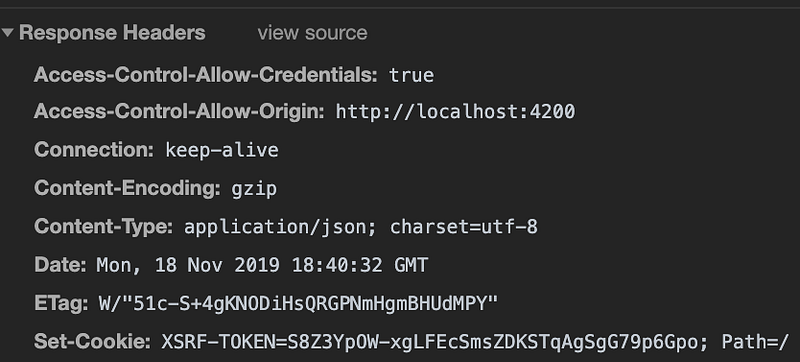
In the example my token was hard-coded ‘token’, this is of course not how it works. When the frontend sends the first request to the server, the server sets a XSRF-TOKEN cookie to its response. The JavaScript code intercepts that token and keeps it somewhere. Only JavaScript running on the same origin will have access to this token. This token changes every time. When sending any new request, the JavaScript code will set a X-XSRF-TOKEN in the headers. If the header is missing, the server knows the request hasn’t been sent by its client and is probably not legit.
Example with Express and Angular
Server side: send the XSRF-TOKEN
The first step in the protection mechanism happens on the server. In this example, I use the Express framework and TypeScript.
Every XSRF-TOKEN must be unique and unpredictable. There is a nice library taking care of most of the work for us: csurf
You can install it like any npm package
npm i csurf — saveand install its types package as well, as we use TypeScript (skip that if you don’t).
npm i @types/csurf — save-devFollowing the documentation, we also need cookie-parser that you can install the same way. Now, we can set the XSRF-TOKEN cookie on every response:
We initiate the XSRF token creation and validation middleware following the library documentation, with two options:
- cookie: true, to store the token secret in a cookie (by default it is stored in the user session, but we don’t have a session in this example)
- ignoreMethods: [‘GET’, ‘HEAD’, ‘OPTIONS’]. We only have to check the token for methods that can alter our data, in our case POST, PUT and DELETE. If you have GET requests that can alter your data, like our changePassword request earlier, you should not ignore GET. But you should also consider not using GET in that case.
And we can see, the XSRF-TOKEN is sent as a cookie.
Client side: Intercept the cookie and set the token for each request
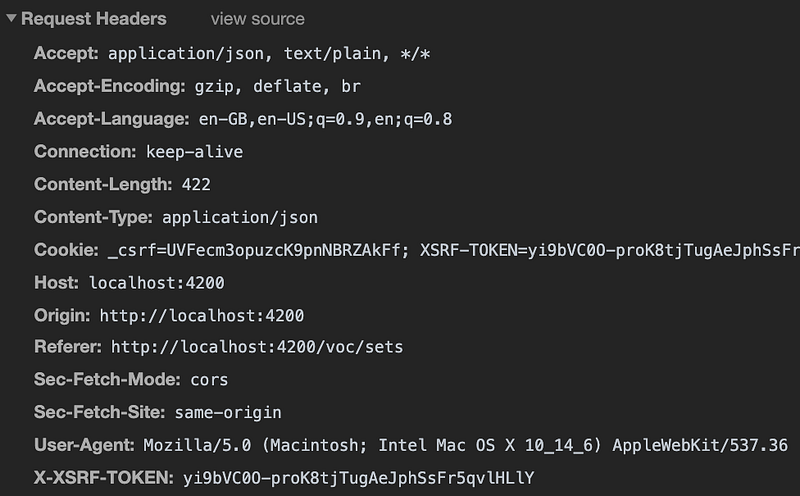
On the client side, we need to get that token and add it to the headers on any new request.
This is where Angular comes to help: it does it for us. If you check the headers of the next request, you’ll find your X-XSRF-TOKEN.
A few prerequisites
Angular does the job for us, but there are a few prerequisites for it to work:
- The XSRF-TOKEN cookie must be httpOnly: false. That makes sense, the cookie needs to be accessed by JavaScript. You have to set this option in the backend when setting the cookie.
- The frontend and the backend must have the same origin. If your frontend and backend run on different ports, you can use a proxy to redirect your requests to your backend:
- Create a proxy.conf.json file:
- In your HTTP services, replace your paths http://localhost:8080/api by /api. The proxy will redirect them correctly.
- In your package.json, change your start script to:
"start": "ng serve --proxy-config proxy.conf.json"Angular taking care of setting the XSRF token in the headers for us, protecting your application against XSRF attacks only requires you to implement the token generation and the request verification parts in the backend. Libraries, like the one we used for the example, make it extremely easy with Express, but I would assume similar libraries exist for all types of backends.
I hope you found this article useful.


