avatarMenaka Jayawardena

Free AI web copilot to create summaries, insights and extended knowledge, download it at here

4435

Abstract

"hljs-number">0</span>/menu' -k</pre></div><div id="816b"><pre><span class="hljs-selector-attr">[2018–05–26 23:34:22,955]</span> <span class="hljs-selector-tag">DEBUG</span><span class="hljs-selector-tag">wire</span> <span class="hljs-selector-tag">HTTPS-Listener</span> <span class="hljs-selector-tag">I</span>/<span class="hljs-selector-tag">O</span> <span class="hljs-selector-tag">dispatcher-1</span> >> “<span class="hljs-selector-tag">GET</span> /<span class="hljs-selector-tag">pizza</span>/<span class="hljs-number">1.0</span>/<span class="hljs-selector-tag">menu</span> <span class="hljs-selector-tag">HTTP</span>/<span class="hljs-number">1.1</span><span class="hljs-selector-attr">[\r]</span><span class="hljs-selector-attr">[\n]</span><span class="hljs-selector-attr">[2018–05–26 23:34:22,956]</span> <span class="hljs-selector-tag">DEBUG</span><span class="hljs-selector-tag">wire</span> <span class="hljs-selector-tag">HTTPS-Listener</span> <span class="hljs-selector-tag">I</span>/<span class="hljs-selector-tag">O</span> <span class="hljs-selector-tag">dispatcher-1</span> >> “<span class="hljs-selector-tag">Authorization</span>: <span class="hljs-selector-tag">Bearer</span> <span class="hljs-number">388</span><span class="hljs-selector-tag">d26d7</span><span class="hljs-number">0571</span><span class="hljs-number">35</span><span class="hljs-selector-tag">a6-ba97</span><span class="hljs-number">8315</span><span class="hljs-selector-tag">cad6e9a3</span><span class="hljs-selector-attr">[\r]</span><span class="hljs-selector-attr">[\n]</span></pre></div><div id="f3c4"><pre><span class="hljs-comment">[2018–05–26 23:41:04,136]</span> DEBUG — wire HTTPS-Listener I/O dispatcher-1 >> “POST /token HTTP/1.1<span class="hljs-comment">[\r]</span><span class="hljs-comment">[\n]</span><span class="hljs-comment">[2018–05–26 23:41:04,138]</span> DEBUG — wire HTTPS-Listener I/O dispatcher-1 >> “Content-Type: application/x-www-form-urlencoded; charset=UTF-8<span class="hljs-comment">[\r]</span><span class="hljs-comment">[\n]</span><span class="hljs-comment">[2018–05–26 23:41:04,138]</span> DEBUG — wire HTTPS-Listener I/O dispatcher-1 >> “Authorization: Basic eDU1YVdaWV9iVUJtTXY4U3IzOXJMbWdTSmZBYTpOcGNKdUdFM1JQcldlY3NQQ0wwQ2htd2xucmNh<span class="hljs-comment">[\r]</span><span class="hljs-comment">[\n]</span><span class="hljs-comment">[2018–05–26 23:41:04,140]</span> DEBUG — wire HTTPS-Listener I/O dispatcher-1 >> “grant_type=client_credentials<span class="hljs-comment">[\r]</span><span class="hljs-comment">[\n]</span></pre></div><div id="9064"><pre><span class="hljs-selector-attr">[2018–05–26 23:41:04,199]</span> DEBUG — wire HTTPS-Sender <span class="hljs-selector-tag">I</span>/O dispatcher-<span class="hljs-number">1</span> >> “HTTP/<span class="hljs-number">1.1</span> <span class="hljs-number">200</span> OK<span class="hljs-selector-attr">[\r]</span><span class="hljs-selector-attr">[\n]</span><span class="hljs-selector-attr">[2018–05–26 23:41:04,200]</span> DEBUG — wire HTTPS-Sender <span class="hljs-selector-tag">I</span>/O dispatcher-<span class="hljs-number">1</span> >> “{“access_token”:”c1900c8c-<span class="hljs-number">10</span>f4–<span class="hljs-number">3</span>cb8–<span class="hljs-number">9</span>c89–<span class="hljs-number">077</span>ec35bff49<span class="hljs-string">",”scope”:”am_application_scope default”,”token_type”:”Bearer”,”expires_in”:567}”</span></pre></div><div id="f8cb"><pre><span class="hljs-selector-attr">[2018–05–26 23:41:04,215]</span> DEBUG — wire HTTPS-Sender <span class="hljs-selector-tag">I</span>/O dispatcher-<span class="hljs-number">2</span> << “GET /pizzashack/<span class="hljs-number">1.0</span>.<span class="hljs-number">0</span>/<span class="hljs-selector-tag">menu</span> HTTP/<span class="hljs-number">1.1</span><span class="hljs-selector-attr">[\r]</span><span class="hljs-selector-attr">[\n]</span><span class="hljs-selector-attr">[2018–05–26 23:41:04,215]</span> DEBUG — wire HTTPS-Sender <span class="hljs-selector-tag">I</span>/O dispatcher-<span class="hljs-number">2</span> << “Authorization: Bearer c1900c8c-<span class="hljs-number">10</span>f4–<span class="hljs-number">3</span>cb8–<span class="hljs-number">9</span>c89–<span class="hljs-number">077</span>ec35bff49[\r][\n]”</pre></div><div id="9b6c"><pre>[<span class="hljs-number">2018</span>–<span

Options

class="hljs-number">05</span><span class="hljs-number">26</span> <span class="hljs-number">23</span>:<span class="hljs-number">41</span>:<span class="hljs-number">04</span>,<span class="hljs-number">224</span>] <span class="hljs-keyword">DEBUG</span> — wire HTTPS-Sender I/O dispatcher<span class="hljs-number">-1</span> >> “HTTP/<span class="hljs-number">1.1</span> <span class="hljs-number">200</span> OK[\r][\n]” [<span class="hljs-number">2018</span><span class="hljs-number">05</span><span class="hljs-number">26</span> <span class="hljs-number">23</span>:<span class="hljs-number">41</span>:<span class="hljs-number">04</span>,<span class="hljs-number">224</span>] <span class="hljs-keyword">DEBUG</span> — wire HTTPS-Sender I/O dispatcher<span class="hljs-number">-1</span> >> “[{“<span class="hljs-type">name</span>”:”BBQ Chicken Bacon”,”description”:”Grilled white chicken, hickory-smoked bacon <span class="hljs-keyword">and</span> fresh sliced onions <span class="hljs-keyword">in</span> barbeque sauce”,”price”:”<span class="hljs-number">14.99</span>",”icon”:”/images/6.png”},{“name”:”Chicken Parmesan”,”description”:”Grilled chicken, fresh tomatoes, feta and mozzarella cheese”,”price”:”20.99",”icon”:”/images/<span class="hljs-number">1.</span>png”},{“<span class="hljs-type">name</span>”:”Chilly Chicken Cordon Bleu”,”description”:”Spinash Alfredo sauce topped <span class="hljs-keyword">with</span> grilled chicken, ham, onions <span class="hljs-keyword">and</span> mozzarella”,”price”:”<span class="hljs-number">27.99</span>",”icon”:”/images/10.png”},{“name”:”Double Bacon 6Cheese”,”description”:”Hickory-smoked bacon, Julienne cut Canadian bacon, Parmesan, mozzarella, Romano, Asiago and and Fontina cheese”,”price”:”16.99",”icon”:”/images/<span class="hljs-number">9.</span>png”},{“<span class="hljs-type">name</span>”:”Garden Fresh”,”description”:”Slices onions <span class="hljs-keyword">and</span> green peppers, gourmet mushrooms, black olives <span class="hljs-keyword">and</span> ripe Roma tomatoes”,”price”:”<span class="hljs-number">11.99</span>",”icon”:”/images/3.png”},{“name”:”Grilled Chicken Club”,”description”:”Grilled white chicken, hickory-smoked bacon and fresh sliced onions topped with Roma tomatoes”,”price”:”11.99",”icon”:”/images/<span class="hljs-number">8.</span>png”},{“<span class="hljs-type">name</span>”:”Hawaiian BBQ Chicken”,”description”:”Grilled white chicken, hickory-smoked bacon, barbeque sauce topped <span class="hljs-keyword">with</span> sweet pine-apple”,”price”:”<span class="hljs-number">22.99</span>",”icon”:”/images/7.png”},{“name”:”Spicy Italian”,”description”:”Pepperoni and a double portion of spicy Italian sausage”,”price”:”9.99",”icon”:”/images/<span class="hljs-number">2.</span>png”},{“<span class="hljs-type">name</span>”:”Spinach Alfredo”,”description”:”Rich <span class="hljs-keyword">and</span> creamy blend <span class="hljs-keyword">of</span> spinach <span class="hljs-keyword">and</span> garlic Parmesan <span class="hljs-keyword">with</span> Alfredo sauce”,”price”:”<span class="hljs-number">9.99</span>",”icon”:”/images/5.png”},{“name”:”Tuscan Six Cheese”,”description”:”Six cheese blend of mozzarella, Parmesan, Romano, Asiago and Fontina”,”price”:”18.99",”icon”:”/images/<span class="hljs-number">4.</span>png”}][\r][\n]”</pre></div><p id="17ea"><b>If you are using WSO2 API Cloud…</b></p><p id="0e72">You can use the above sequence and configurations as it is in API Cloud as well. But, if you use <b>regional gateways</b>, you have to do some modifications.</p><p id="8127">The governance and config registry databases are configured as read only in regional gateways. So we would not be able to create the necessary registry artifacts. In this scenario, we will be using the local registry instead of the governance registry. For this we only have to modify the following property mediator configurations in the above sequence.</p><p id="cf06">(Note the the governance registry has been changed to local registry)</p> <figure id="18c6"> <div> <div>

            <iframe class="gist-iframe" src="/gist/menakaj/073bc0e24f3d0bc3a07233c4c6657c84.js" allowfullscreen="" frameborder="0" height="undefined" width="undefined">
          </div>
        </div>
    </figure></iframe></div></div></figure><p id="34c5">Hope you enjoy…!!!</p><p id="f45f">Thanks.</p></article></body>

WSO2 HOW TO : Using OAuth2 Protected Back-ends With API Manager.

Generally with API Management scenarios, we expose our backend APIs as managed and Secured APIs via API Manager. These backend apis can be secured or unsecured. WSO2 API Manager supports back-ends with Basic and Digest OAuth protocols out of the box.

But, if our back-end is secured with OAuth2, how could we make it possible to integrate them with API Manager?

To begin with, I start publishing a new API. (If you are new to API Manager, here is how to publish an API. You can always follow the official documentation for more information and tutorials.)
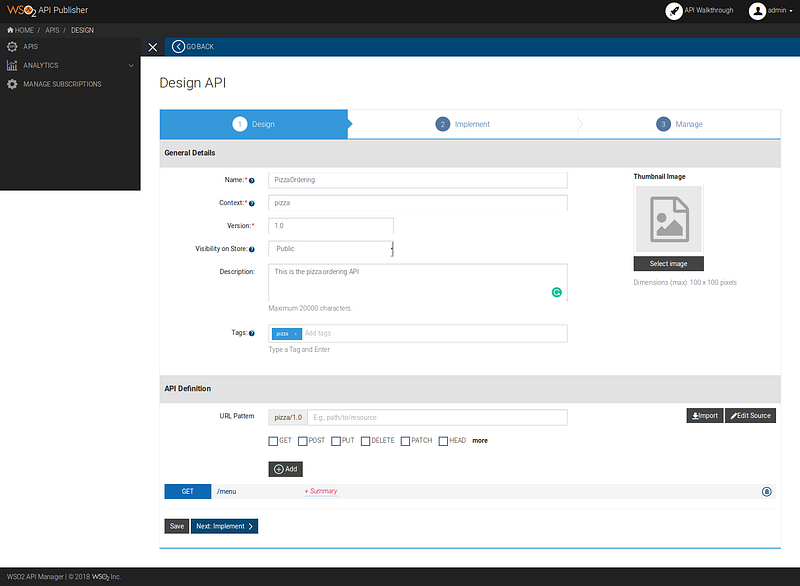
The API Design Step

In the next step, let’s provide the back-end url and click Next > Manage.
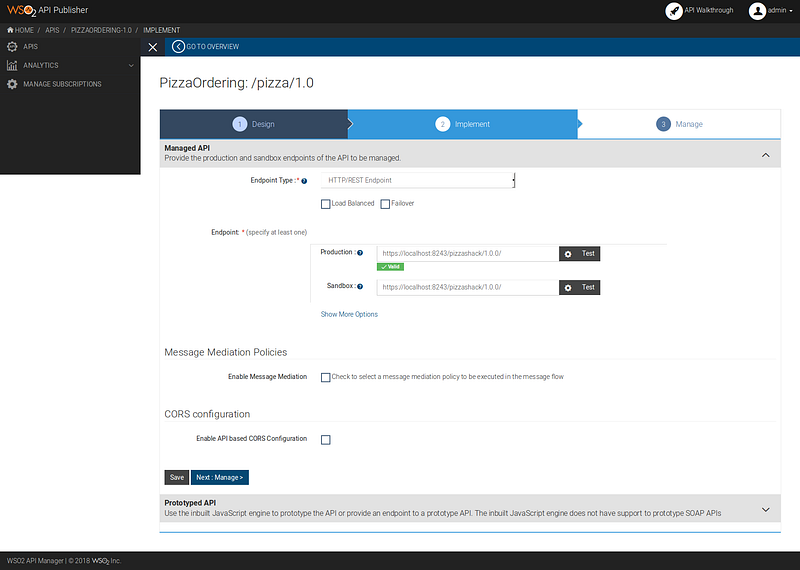
The API Implement Step.

In the Manage step, select a subscription tier and publish the api.

Now, go to the API Store, subscribe to the new api that we have created and invoke it.

{“fault”:{“code”:900902,”message”:”Missing Credentials”,”description”:”Required OAuth credentials not provided. Make sure your API invocation call has a header: \”Authorization: Bearer ACCESS_TOKEN\””}}

(In my example, I have used a the api manager it self as the backend. So, the error would be like the above. But, based on the backed that you use, the error could be different)

Ok, let’s fix this. Here is how the extensibility of API Manager really shines.

API Manager is equipped with Apache Synapse engine, which is the heart of Message mediation in WSO2 EI/ ESB. We are going to write a mediation sequence which generates an access token for our back-end.

The properties, access_token and generated_time are two registry resources which are used to store the token. Let’s create those registry resources.

  1. Login to API Manager carbon console. https://localhost:9443/carbon.
  2. In the Main tab, click on Browse in the Resources section.
  3. Now create a new collection for our API resources. I name it as pizzaOrderingAPI.
  4. Then create 2 resources with the type, text/plain
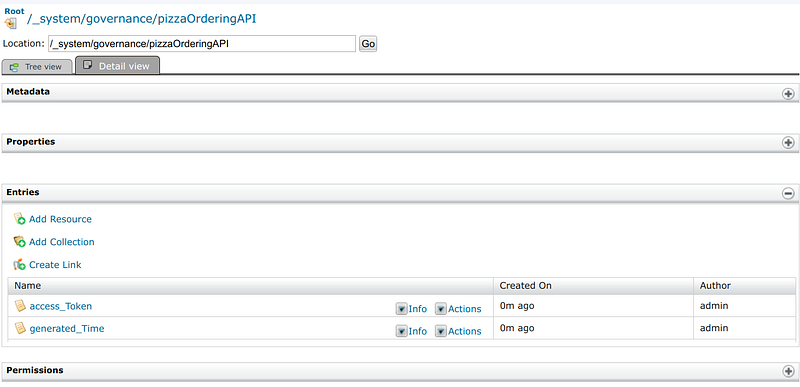
Adding Registry Resources

Now, as the final step, let’s add our sequence to the API.

  1. Log in to the API Publisher.
  2. Select our api and click on edit.
  3. Go to the Implement tab, and check ‘Enable Message Mediation’.
  4. Upload the sequence as the In-Flow and republish the api.
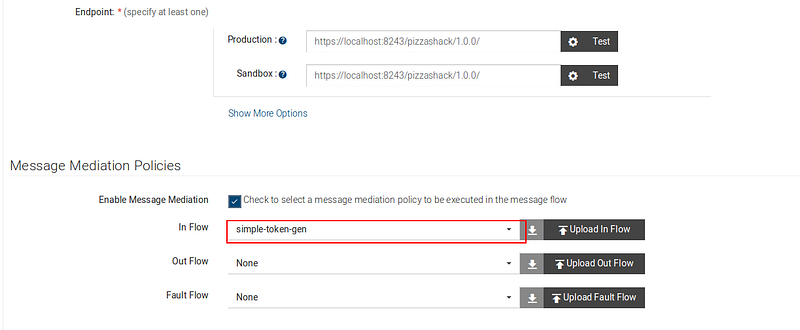
Sequence is uploaded for In Flow

Now let’s invoke our api again. In this time, we can see that the sequence is now calling the token endpoint to get the token and we receive a proper response.

curl -X GET — header ‘Accept: application/json’ — header ‘Authorization: Bearer 388d26d7–057135a6-ba97–8315cad6e9a3’ ‘https://172.17.0.1:8243/pizza/1.0/menu' -k
[2018–05–26 23:34:22,955] DEBUGwire HTTPS-Listener I/O dispatcher-1 >> “GET /pizza/1.0/menu HTTP/1.1[\r][\n][2018–05–26 23:34:22,956] DEBUGwire HTTPS-Listener I/O dispatcher-1 >> “Authorization: Bearer 388d26d7057135a6-ba978315cad6e9a3[\r][\n]
[2018–05–26 23:41:04,136] DEBUG — wire HTTPS-Listener I/O dispatcher-1 >> “POST /token HTTP/1.1[\r][\n][2018–05–26 23:41:04,138] DEBUG — wire HTTPS-Listener I/O dispatcher-1 >> “Content-Type: application/x-www-form-urlencoded; charset=UTF-8[\r][\n][2018–05–26 23:41:04,138] DEBUG — wire HTTPS-Listener I/O dispatcher-1 >> “Authorization: Basic eDU1YVdaWV9iVUJtTXY4U3IzOXJMbWdTSmZBYTpOcGNKdUdFM1JQcldlY3NQQ0wwQ2htd2xucmNh[\r][\n][2018–05–26 23:41:04,140] DEBUG — wire HTTPS-Listener I/O dispatcher-1 >> “grant_type=client_credentials[\r][\n]
[2018–05–26 23:41:04,199] DEBUG — wire HTTPS-Sender I/O dispatcher-1 >> “HTTP/1.1 200 OK[\r][\n][2018–05–26 23:41:04,200] DEBUG — wire HTTPS-Sender I/O dispatcher-1 >> “{“access_token”:”c1900c8c-10f4–3cb8–9c89–077ec35bff49",”scope”:”am_application_scope default”,”token_type”:”Bearer”,”expires_in”:567}”
[2018–05–26 23:41:04,215] DEBUG — wire HTTPS-Sender I/O dispatcher-2 << “GET /pizzashack/1.0.0/menu HTTP/1.1[\r][\n][2018–05–26 23:41:04,215] DEBUG — wire HTTPS-Sender I/O dispatcher-2 << “Authorization: Bearer c1900c8c-10f4–3cb8–9c89–077ec35bff49[\r][\n]”
[20180526 23:41:04,224] DEBUG — wire HTTPS-Sender I/O dispatcher-1 >> “HTTP/1.1 200 OK[\r][\n]”
[20180526 23:41:04,224] DEBUG — wire HTTPS-Sender I/O dispatcher-1 >> “[{“name”:”BBQ Chicken Bacon”,”description”:”Grilled white chicken, hickory-smoked bacon and fresh sliced onions in barbeque sauce”,”price”:”14.99",”icon”:”/images/6.png”},{“name”:”Chicken Parmesan”,”description”:”Grilled chicken, fresh tomatoes, feta and mozzarella cheese”,”price”:”20.99",”icon”:”/images/1.png”},{“name”:”Chilly Chicken Cordon Bleu”,”description”:”Spinash Alfredo sauce topped with grilled chicken, ham, onions and mozzarella”,”price”:”27.99",”icon”:”/images/10.png”},{“name”:”Double Bacon 6Cheese”,”description”:”Hickory-smoked bacon, Julienne cut Canadian bacon, Parmesan, mozzarella, Romano, Asiago and and Fontina cheese”,”price”:”16.99",”icon”:”/images/9.png”},{“name”:”Garden Fresh”,”description”:”Slices onions and green peppers, gourmet mushrooms, black olives and ripe Roma tomatoes”,”price”:”11.99",”icon”:”/images/3.png”},{“name”:”Grilled Chicken Club”,”description”:”Grilled white chicken, hickory-smoked bacon and fresh sliced onions topped with Roma tomatoes”,”price”:”11.99",”icon”:”/images/8.png”},{“name”:”Hawaiian BBQ Chicken”,”description”:”Grilled white chicken, hickory-smoked bacon, barbeque sauce topped with sweet pine-apple”,”price”:”22.99",”icon”:”/images/7.png”},{“name”:”Spicy Italian”,”description”:”Pepperoni and a double portion of spicy Italian sausage”,”price”:”9.99",”icon”:”/images/2.png”},{“name”:”Spinach Alfredo”,”description”:”Rich and creamy blend of spinach and garlic Parmesan with Alfredo sauce”,”price”:”9.99",”icon”:”/images/5.png”},{“name”:”Tuscan Six Cheese”,”description”:”Six cheese blend of mozzarella, Parmesan, Romano, Asiago and Fontina”,”price”:”18.99",”icon”:”/images/4.png”}][\r][\n]”

If you are using WSO2 API Cloud…

You can use the above sequence and configurations as it is in API Cloud as well. But, if you use regional gateways, you have to do some modifications.

The governance and config registry databases are configured as read only in regional gateways. So we would not be able to create the necessary registry artifacts. In this scenario, we will be using the local registry instead of the governance registry. For this we only have to modify the following property mediator configurations in the above sequence.

(Note the the governance registry has been changed to local registry)

Hope you enjoy…!!!

Thanks.

Oauth
Wso2
Api Management
Wso2 Api Manager
Mediation
Recommended from ReadMedium