
Writing Matters: How to Write Well On Medium
Tips by an experienced writer on Medium for getting your writing read
The Background
Over the five years plus that I’ve been reading and writing on Medium, I have learned a lot about successful writing on Medium.
In November 2018 I joined Medium as a paying member. Since then I have had 722 stories published and I’m a writer for around 40 Publications on Medium, including “Human Parts.”
My biggest earners are my boosted stories and my articles about working with Medium. And no, I don’t write trashy, get rich quick or inaccurate articles about Medium.
My technical skills and genuine wish to help writers has been put to use to share useful guides based upon my experiences and facts. For example, my guides on tipping platforms to use on Medium and my thorough guideline on using Mastodon have been highly useful to many Medium writers.
In this article I share what I have learned from publishing stories on Medium, running 3 Publications of my own, and being a nominator for the boost program.
Table of Contents
· The Background · Main Titles · Subtitles · Using a Headline Analyzer · Crafting the content of your story · The use of AI in stories · Using section headings and sub-headings · Other essential story elements ∘ Follow the Submission Guidelines of publications ∘ Use images appropriately ∘ Using formatting ∘ Use tags ∘ Turn on private notes ∘ Using video embeds and other embeds ∘ Use links sparingly ∘ Use Calls to Action (CTAs) sparingly · Citations or references used · Plagiarism · Summary

Main Titles
- Ensure that the Main Title of your story has an effective number of words that describe the purpose of the story. Neither have too many words or too few in the title. The average is between 8 and 14 words.
- Browse through Medium to see the number of words used in titles and the types of titles used by stories that are well-read on Medium. Some well -read stories can be found by looking at the number of fans and claps of stories and finding high numbers of these.
- Choose keywords that people will likely type into search engines if you want readers to find your article online through an internet search.
- The Title should have the main words capitalized. Refer to the American Psychological Association (APA) guide for complete information about capitalization of your Main Title. DON’T have a full stop at the end of your titles!
- The focus of your writing should be on the reader. If all your story titles are about you, by your using the word I in your titles, you may lose some readers who would otherwise read your story. Try not to use “I’ about yourself all or most of the time. This is because while your friends and family may be interested in your stories as personal diary entries and reflections, most readers on Medium won’t be. Turn the Title into a YOU.
The Title should capture the attention of readers.
This might be done by using words like:
how, why, what, what [ insert ] teaches us about [ insert ], this is why, the best, get [ insert ] done by [ insert ], better, good, power, benefits, how to, the [ day / afternoon other time period ], amazing, magical, surprising, what to do when, how to get, how to make, why you should, you, and your.
I have read advice by other writers on Medium and have discovered for myself that many readers are not personally interested in the writer, on the whole. Think about it, people read what they’re interested in, rather than most readers primarily use Medium to make friends.
Of course, over time you may have Followers who become interested in you and read your stories. But the average passerby is just looking for something interesting & useful for her or him to read and is not interested in following your personal life.
Yes, the passerby may look at your other stories or at your profile page, out of curiosity, and/or to find more helpful content from you. But this is not guaranteed!
If none of the words above fit your conceived title, that is fine but make sure you title clearly describes the purpose or subject of your story in a captivating manner.

Consider that there are a million readers of Medium stories around the world and around 10,000 stories published every day.
It’s human nature for people, when looking at story titles, to see what’s in the story for them, not what’s in it for you.
Your story title is critical to getting hits or views of your story backed up by complete reads of your story due to the content being gripping and relevant.
Consider the following titles.
Why It’s Okay To Be Self-ish (By The Time You Turn Sixty) ←-boosted
Why I Decided to Be Self-ish Before I Turned Sixty
Does the second Title appeal to you?
Note that if your Main Title contains more than about 12 words, readers may not see the complete Title on some Publication pages, as demonstrated below with the title on the right.

Writers can tend to try cram an idea into the words of a Main Title. A title of no more than 12 words as an alternative to the too-long title above would be:
Don’t Wake up in Your Eighties Knowing You’ve Wasted Precious Time
Clickbait is a marketing and engagement strategy using sensationalist or misleading, deceptive or withholding content to entice clicks and drive page views.
Your story’s title should be authentic, whatever words it uses, and not lure readers into a content that doesn’t deliver what’s promised in the title!
Subtitles
- The Subtitle should be written in sentence case (first word only capitalized) with no full stop at the end.
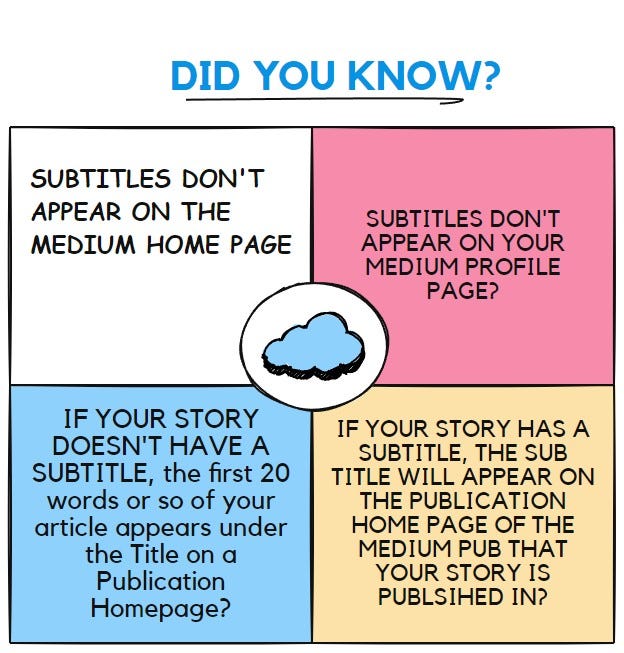
- The Subtitle should NOT be a huge paragraph or many sentences. The Subtitle should be a maximum of 12 to 15 words and add value by explaining a precise point about the story purpose. I think that it is distracting to have more than one sentence as a sub-title. Maybe others don’t get annoyed with sub-titles having one point of many from the content in it. For example, hypothetically, consider a Main Title as “How To Win Friends Easily” and the sub-title is “Number 3: Write Letters.” Why is Number 3 there? Surely all the points are equally important.
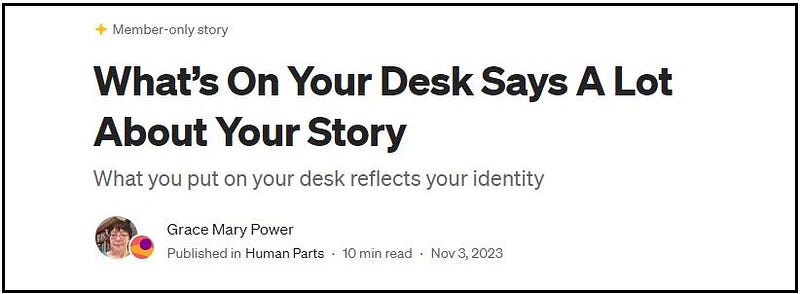
- The Subtitle shouldn’t continue or repeat what’s in the Main Title. It shouldn’t be meaningless or not relevant by not adding any clarification. If your Main Title doesn’t benefit from being clarified or expanded, you don’t need a subtitle (unless the Editor of the Publication that you are writing for insists, for some reason, on having a sub-title). It’s annoying to the reader if the purpose of a story is broken up or divided among the main and the sub titles. For example, hypothetically a Main Title is “I Went To San Francisco” and the subtitle is “And there I saw the Queen of England.” Why the heck not have the Main Title as “Amazingly We Spotted None Other Than A Queen in San Francisco” with the subtitle “The Queen of England and We Visited The Golden Gate Bridge.” Here the subtitle clarifies who the Queen is that you saw!
Did You Know?
The purpose of the Main Title is to present the purpose of your story in one engaging and appealing clear to read sentence where your carefully chosen words accurately and clearly reflect one main issue or point of your article.
Important: if you change your story’s Main Title or Subtitle, you must change it in the Edit mode as well for the changed title to show up when your story is published.
To do this, click on the 3 little dots next to “Publish” then on “Change display title / subtitle.” Make your change(s) then click on “Done.”
Using a Headline Analyzer
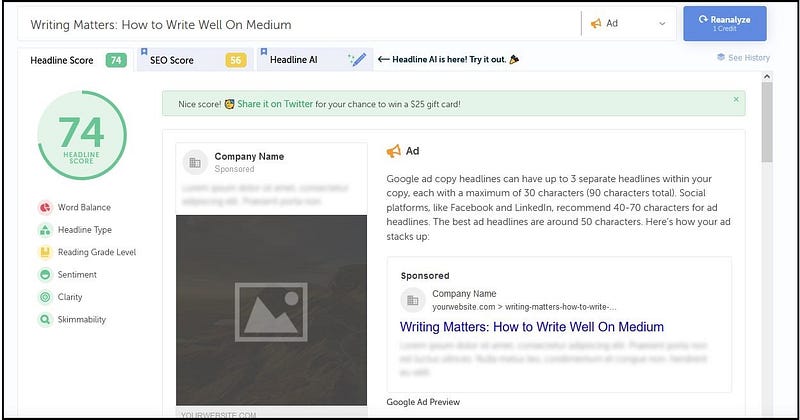
To create great titles and subtitles, consider using a headline analyzer.
CoSchedule offers a free version of their Headline Studio title analyzer. Registering with this site will let you type or paste in a title (i.e. a headline). When you press “Analyze”, your title is scored on a scale from o to 100. For best results, you should strive for 70 and above.
Crafting the content of your story
As a nominator for Medium’s pilot Boost programme, I have observed that the following is important to the Medium curators.
- Your story must not be rambling. A story that “rambles” is one that does not have a tight cohesive structure. Articles should have an introduction, a middle, and a summary. The middle section should have elements in a logical, helpful order, building upon the previous elements. You need to be ruthless and remove any and all irrelevant parts or words. If a sentence or a paragraph is not essential, even if you love it, delete it.
- Introduce the purpose of your story at the beginning and summarize it at the end. A longer summary with points can be placed under the last section titled “The Take Away”. Your take away should be brief or you will loose the interest and the patience of your readers.
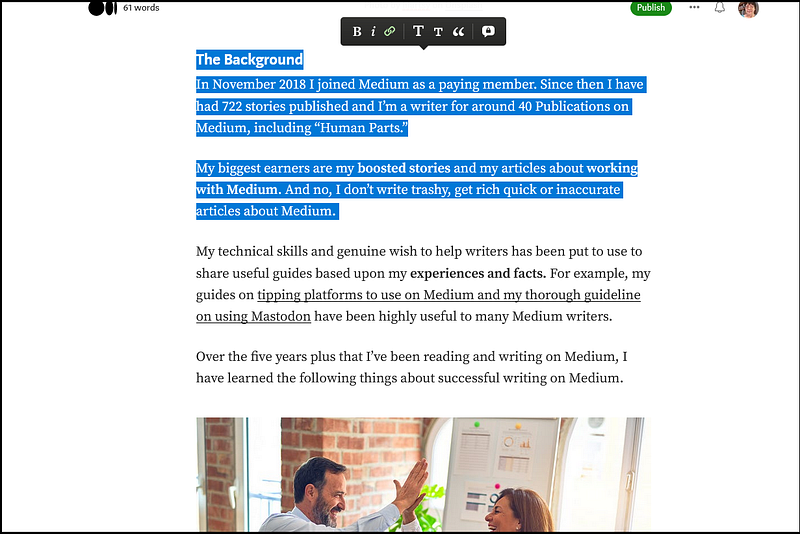
- Readers will tend to read articles, of interest to them, that are around 7 minutes reading duration, in full. Technical content, like this one, can be an exception. A 7 minute read comprises approximately 1,400 words. You can check your own published stories for what makes a 7 min read. Did you know that you can highlight some or all of the words in your story and the number of words will flash up briefly at the top left corner, as shown below? 😃
- Your story should not be a personal journal or diary entry with no constructive or useful point(s) for the widespread readers, if you want your story read by many. These sort of articles can be shared on your Medium Profile page, your personal social media pages or personal blog. Think about a “traveler” or a passerby on Medium seeing a story about how your day went and when they read it, they find there’s no strong or unusual lesson or advice in your story for them. As mentioned, unless the reader is your loyal follower, interested in you personally, this sort of story won’t hold appeal for most Medium readers.
- However, your story should have some personal element, for example, if you are writing a factual or technical article, it’s best to refer to your credentials and/or experience. This is required for Medium curators to consider boosting your story and will give authenticity to your story. If your story is mostly about sad or negative things and does NOT give advice that uplifts the reader and does NOT have a strong useful point, then it likely won’t be widely read. You need a balance between the “diary type” story and illustrating and advising the reader how she can make her life better. Be ruthless and change your draft if necessary by deleting details about your sad story and retaining or increasing helpful points for the reader.
- The first paragraph of your story is very important. It needs to be catchy and promising, to draw the readers in. Then the next few paragraphs should also be interesting and should support the purpose of your content, as a form of introduction.
- Don’t have huge long paragraphs (even if you see others using them) but don’t have too many short paragraphs. You need to break up your story ideas or concepts into concise or short paragraphs. Too much white space due to numerous paragraphs of one or two sentences only is just as annoying to the average reader as is having walls of text.
- Obviously, your story needs to be well written and online tools like Grammarly may help you with this. Running your story through the free Grammarly site picks up grammar errors, such as missing punctuation, among other things.
- A tip to review your draft story is to listen to it in draft form! Do this by clicking on the 3 dots next to “Publish” at the top of a draft story. Click on “Share draft link” and copy the web address/URL. Then open a new page on your browser and paste the URL into a new browser page. You can then click on the arrow in the circle to listen to your draft being read out via the Speechify software! You can pick up errors by listening.
- Try to make your story stand out by the topic, point or message, and the content being unique or unusual or otherwise memorable. Score mega points if all of these are achieved! The Medium curators look for stories that meet the criteria remembered by the acronym COWMA. This stands for Constructive, Original, Well-written, Memorable, and Authentic.
- What’s constructive or helpful to one person may not be to another. For your story to be considered boost-worthy by Medium, let alone worthwhile being read without being boosted, aim for your story to be highly useful (i.e. constructive) to quite a few readers!
- Unless you want to start a battle with publishing a controversial story and you’re able to deal with that, put forward your opinions clearly as YOUR OPINION. Be careful of SLANDER. Your story must meet Medium’s Rules.
- Do not ridicule others or “flame” (purposely irritate) any type of reader. For example, if you feel some people don’t understand what’s it like for you with a particular condition, if you choose to be scornful of people who don’t understand it, in your writing, you won’t come across as being a “nice” person deserving of empathy. There’s no need to attack anyone.
- Frustrations and observations about what’s not working in your life can be written politely. If they’re not, it will certainly put some readers off from reading your work. Your friends and supporters might like your rants and vitriol, but will all the millions of readers on Medium like them?
- Take time and effort to craft your story. This includes leaving the draft and returning to it hours or a day or two later to review it. Re-write your story if necessary, to fine tune it to be the best it can be for your readers.
The use of AI in stories
Human beings and tools are in place to identify stories written using Artificial Intelligence (AI). The following is from the official Medium Blog.
- Medium is not a place for fully AI-generated stories, and 100% AI-generated stories will not be eligible for distribution beyond the writer’s personal network. We currently allow the responsible use of AI-assistive technology on Medium. To promote transparency, and help set reader expectations, we require that any story incorporating AI assistance be clearly labeled as such.
- AI-assisted text without a disclosure at the beginning of the story (within the first two paragraphs), or other AI-generated content not labeled as such (for example, AI-generated images should include captioning identifying them as such, along with proper sourcing) will similarly be restricted to distribution to the writer’s personal network.
Using section headings and sub-headings
Section headings are used to break up large blocks of text. Sketching out or outlining your story, especially a technical article, will help you decide where to use these headings.
Your story title is regarded as Heading 1 (i.e. H1) and a Main Section Heading is referred to as Heading 2 (i.e. H2). Think of a H2 as a Chapter Title in a book.
Sub-headings are divisions of Main Sections, referred to as Heading 3 (i.e. H3). The Writing Cooperative says:
Main section headings (H2) can be written in title case or sentence case. The choice between title case and sentence case should be consistent throughout the story for headings. Main section headings should be one sentence long at maximum.
The large T icon in the formatting Toolbar is used for Main Section H2 headings. To use the Toolbar, type in your text and highlight the part you want to format. Click on your choice when the formatting Toolbar pops up.
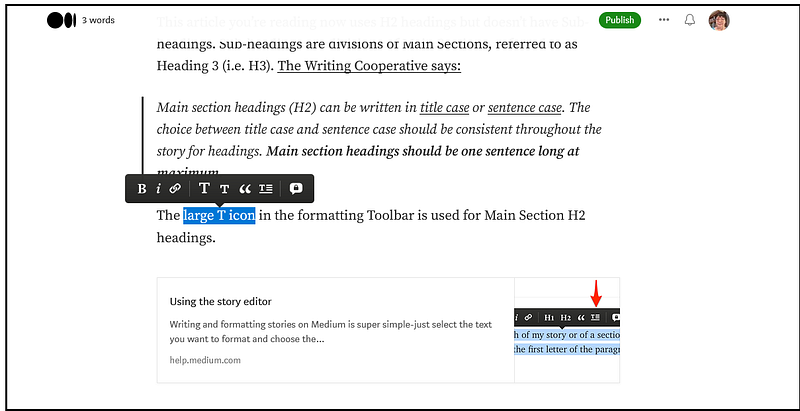
You use Sub-headings if your main sections have got a lot of different or unique technical or narrative or explanatory points in them. Medium’s official guidelines on formatting can be read at the page below.
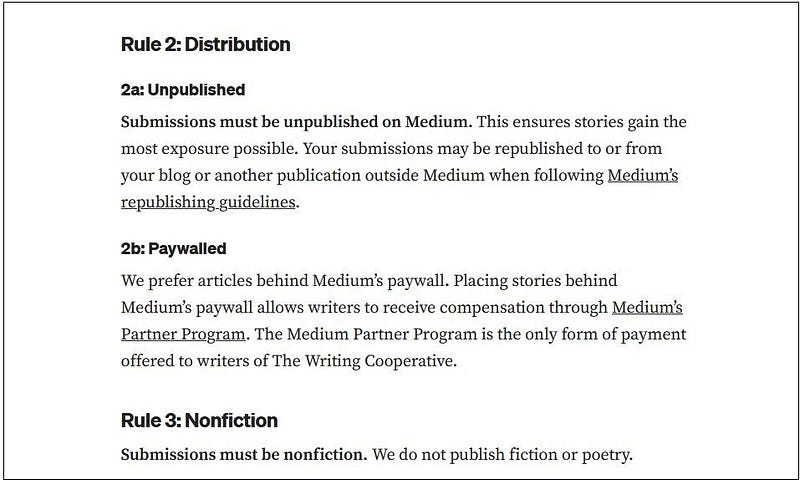
The Writing Cooperative’s “Submission Requirements” guidelines is an excellent example of the use of Section Headings (H2) and Sub-section Headings (H3). For this scholarly type article, an example is shown below. “Rule 2: Distribution” and “Rule 3: Nonfiction” are Section Headings. 2a and 2b are Sub-section Headings.
Other essential story elements
Follow the Submission Guidelines of publications
This is important. When you apply to become a writer for a Publication and you’re accepted, do the courtesy of following the Publication’s guidelines or rules. If you don’t, you run the risk of not only your stories being rejected, but of you as a writer being removed from the Publication.
Publication Editors are people like you, with lives outside of Medium. So be patient with them and be realistic. Editors may suggest changes to your story to try to make it boost worthy or fit for their Publication.
Editors have the right to not accept your draft story for un-stated reasons.
I confess that in the past I have felt annoyed or upset about some of my stories not being accepted into Publications. However, I have found that the reason is usually that the combination of my story’s content and purpose doesn’t resonate with the Publication Editor.
And it’s best to accept the Editors’ decisions. Getting angry with an Editor who doesn’t accept your draft story or trying to fight it out with them by spamming them or otherwise doing something immature is not going to help anyone.
If your story is not accepted, read the Publication’s Submission Guidelines or Rules again and read some of the stories published in the Publication. Then make sure that from then on you follow the instructions.
Some Publication Editors have very high standards for the content of stories in their Publications. Literally, this means that your story needs to have a certain high usefulness in keeping with what the Editors are accepting.
Regarding waiting time for acceptance or otherwise of your draft story, I wait for a maximum of 7 days for Publications which provide no wait timeframe for assessing stories for publication. On the 8th day I withdraw my submission OR contact an editor, if possible, to enquire when they will be reading my draft story.
Use images appropriately
Medium likes a relevant image to appear straight under the Title(s) of your story. This header image should not be full-screen unless that is important to your story’s theme, e.g. for a photo-story. A huge image is really distracting, especially on smaller monitors.
Don’t have your Title, then a paragraph, and then the first image. If you look at the other stories on Medium, you will find the first image is a Header Image. This means the first image should appear immediately under the Sub-title if you use one or under the Main Title, ABOVE any text!
Great images can significantly attract and retain reader interest in your story content. Take time finding the best image to support a concept or thought in your story.
All images should be used with permission and captioned with the source, e.g. Pixabay, Unsplash, and FreeImages. Try not to use images which you see frequently on Medium (because they are old and tired or over-used).
It is fantastic if you have your own photos or own images to use, with captions saying so. For example, “Image created by the author” or “Photograph provided by [ your name ].”
The Medium curators like original photos and artwork, especially for boosting purposes.
Don’t use fast flashing or fast moving or color changing animated gifs because some readers are sensitive to them. Be thoughtful or courteous by not harming someone by using flashy animated gifs.
Use tasteful, credited (i.e. with the source acknowledged) and relevant images strategically placed throughout your story to break up the text.
Images other than on websites offering free images may be copyrighted. You will have to contact the person who uploaded a copyrighted image to the internet to ask permission to use it in your story.
Kristina God has published an excellent article on sites that provide free-to-use images.
Medium’s Help Centre, link below, gives instructions on how to add images.
Using formatting
To format an article on Medium, select the text you want to format and choose the relevant option from the toolbar. The options are: bold, italic, quote, pull quote, and drop cap. To see what these are and learn about bulleted points, numbered points, superscript, and emojis, refer to Medium’s Help Centre at the page below.
There are no fixed or “hard and fast” rules on when and how to use bulleted and numbered lists. Generally, single sentences related to parts of a concept are bulleted. If there are parts that should be followed in a certain order or are best presented in order of significance, a numbered list is used.
Your style of writing is unique to you, so let your uniqueness show, within the ambit of adhering to the proven sound elements of good writing.
Use tags
It’s critical to use 5 Tags to help have your stories discovered. Take your time thinking about the Tag names for each story. Browse the topics directory on Medium and stories on Medium for ideas, if you like.
You do not need to use the name of the Publication that your story is being published in as a Tag, UNLESS the Editor of the Publication requires you to do so.
If you use the Publication name as a tag without having to, you are wasting one of your maximum of five Tags.
Readers can find stories in a Publication by typing in the Publication name into the Search field, currently at the top left of the Medium homepage, and then clicking on “Publications.”
The first tag name that you add to your story will show up as a Tag under your story title on your Medium profile page and on the Medium home page. So choose your first tag wisely because it’s the first tag that readers will see.
Check the Rules or Guidelines of the Publication your story is being submitted to. It may include suggestions of Tag names to use. Some Publications have dedicated Pages (captioned across the top of the Publication’s homepage) for particular Tag names.
For example, “Thirty Over Fifty” stories that are tagged with “Food” will appear on a page titled ‘Food.”
Turn on private notes
As a writer for a Publication on Medium you need to have private notes turned on. This is so the Editor of the Publication can privately message you if she/he wants you to make changes (edits) to your draft story or otherwise message you.
To turn on allowing Private Notes, click on Settings under your Avatar (round picture at the top right corner of the Medium homepage). Then tick on “Publishing.” Tick “Allow readers to leave private notes on your stories.”
Respond politely as soon as you can to private notes from Editors of Publications that request edits to your draft story. You will see Notifications “in-house”, i.e. via the Medium platform, of private notes being left or posted on one of your draft stories.
When an Editor writes a private note on your story, it will be visible to you and the Editors of the Publication.
When you reply to or write a private note on your story, it will be visible to you and to all of the Editors of the Publication.
Note that if someone other than a Publication Editor, leaves a private note on your story, it will be visible to you, to the note writer, and to all of the Editors of the Publication.
Conversely, if you write a private note on someone else’s story that’s in a Publication, the Editors will be able to see your note, not just you and the story writer. This doesn’t mean that the Editors will read your note, but that such is enabled.
Using video embeds and other embeds
The Medium editor lets you embed a YouTube or other video or other element into your story content.
You must have permission to embed a video. For example, look for videos created by a person and uploaded by that person to YouTube and available to share. Be careful with commercial videos uploaded to YouTube.
People should not upload videos they didn’t make, or use content in their videos that someone else owns the copyright to. If you don’t have a license or a permit from the copyright owner, it’s best not to embed the video.

Be aware that too many embeds or not well placed embeds may be annoying or irrelevant and thus distracting to a reader.
Medium’s instructions for embedding content from third-party services, such as Twitter, GitHub, and more can be read by clicking on the link below. Your website links can appear as “embedded” as shown below. The instructions in the link below show how to do this.
Use links sparingly
When pasting a link into your story, your link needs to start with “https://” or “http://”.
Be aware that too many links or irrelevant or not well placed links to webpages may be distracting to a reader.
Use links sparingly and don’t use them in the introduction of your story. This is because a reader seeing a link in the first paragraph or early part of your story may click on it and get distracted, and not return to your story to read all of it.
Inline links to sources of information are preferable to having numerous embedded links to webpages in your story.
An inline link means that a section of highlighted text is linked to another page on the internet. For example, the text “it’s best not to embed the video” above screenshot 7 represents an inline link.
Highlight the immediate focus or just the significant information that you want to refer readers to an external page to, when inserting your link.
Don’t have links just for the sake of it. Too many links or too many in one area of your story can be distracting or put a reader off from continuing to read your story.
Use a link when you feel that it’s really important to provide context or extra information for a highlighted fact or thought.
See screenshots 4 & 5 for the Formatting Toolbar. The icon third from the left looking like the links of a chain is the one to click on to link a section of highlighted text to a webpage.
The embedded link below takes you to Medium’s Help Centre page about using embeds.
About affiliate links, Medium’s official rules are below.
Affiliate links, such as links out to Amazon with an affiliate code, or any other link out where you will receive a commission or other value, are allowed in posts. However, per Federal Trade Commission law, you must disclose the inclusion of these links in your post. This can be a simple sentence in the footer. (for further guidance, see FTC Rules and Guides).
Use Calls to Action (CTAs) sparingly
A CTA or “a Call to Action” comprises text and a link or links at the end of a story calling the reader to do something.
Usually the CTA asks the reader either to subscribe to the writer’s stories by email or to read suggested stories written by the writer. Some stories end with multiple CTAs.
My opinion is that the former is not needed because when a reader clicks on the name of a writer, she can easily see the icon looking like an envelope.
Hovering a mouse over it tells the reader that they can click on it to subscribe to receive emails whenever the writer publishes on Medium.
As a nominator for the boost I recommend if you really want to have further stories of yours as suggested reads, that you limit the amount to one or two important or significant and relevant stories only.
Citations or references used
Sohani Sirdeshmukh has written an excellent guide on making references to sources of information used in your story. Readers will want to know how you know what you’ve presented as facts.
You can provide inline links to sources of information or provide a list of links at the end of your story with or without superscripts.
Even those writers who cobble together bits and pieces that they have copied from all over the internet into a whole should really list or provide their sources of information for verification.
Plagiarism
- Presenting or using someone else’s words or ideas as your own, without proper credit, acknowledgement, or permission.
- Copying ideas and/or text directly from other sources, whether whole articles, paragraphs, or sentences without permission or fair use.
- Slightly rewriting or paraphrasing someone else’s work without permission or fair use.
- Using artificial intelligence tools to rephrase, summarize, remix, or otherwise modify existing content in a manner that results in a derivative work which closely resembles the original content in concept, structure, or essential elements.
Users found in violation of Medium’s copyright and plagiarism rules will be suspended, and not be eligible for warning, appeal, or restoration.
Summary
The first thing toward getting your stories read is to write well utilizing the elements put forward in this article. Many stories contain interesting and useful content, but the presentation of the stories needs attention.
By using the guidelines in this article and learning from (not copying) the style and story elements used by successful writers on Medium, you can write well on Medium.
The next step is to get your stories read! The article below will help you on your journey. Travel well with peace, positivity, gratitude, and joy.


