Writing GStreamer Plugin with Python
This post shows how to write GStreamer plugins in Python with examples.
A GStreamer plugin is a software component that can be used in the GStreamer pipeline. People write new plugins to add new functionalities, such as supporting new audio or video formats, applying effects, interacting with hardware devices etc.
There are several benefits to writing GStreamer plugins with Python:
Ease of Development
Python is a high-level, interpreted language that is known for its simplicity and readability. Writing GStreamer plugins in Python can be faster and easier than using C. Python’s dynamic typing, extensive standard library, and large community of developers and resources can further streamline the development process.
Flexibility and Extensibility
Python’s dynamic nature allows developers to quickly prototype and test new ideas, making it well-suited for exploring new GStreamer plugin concepts.
Rapid Prototyping and Integration
Python’s interactivity and rapid development cycle make it ideal for rapid prototyping of GStreamer plugins. The ability to quickly write, test, and iterate on code can accelerate the development process and allow developers to experiment with different plugin designs.
Environment
- Ubuntu 22.04
- Python 3.10
- GStreamer 1.20.3
Install GStreamer Python Bindings on Ubuntu 22.04
$ sudo apt install python3-gst-1.0 gstreamer1.0-python3-plugin-loader
After installing the packages, gst-inspect-1.0 python should return the Plugin details as follow;

If the command doesn’t work, delete the GStreamer registry cache file and try again;
$ rm ~/.cache/gstreamer-1.0/registry.x86_64.binReference
https://github.com/GStreamer/gst-python/
The provided link contains several Python examples of GStreamer plugins which could serve as a great starting point for your own plugin development. I use one of them, identity.py to check the buffer.pts.
Example #1
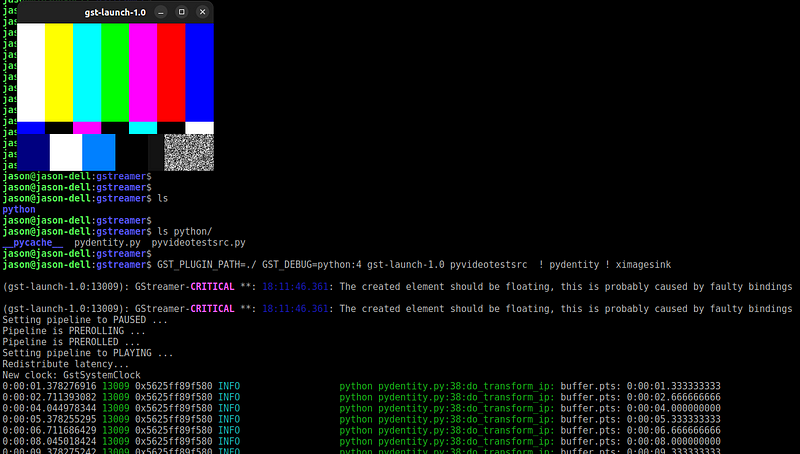
Unlike other source examples, this example uses Gst.Bin as the base class and uses the videotestsrc inside the Bin. pyvideotestsrc is just a wrapper of videotestsrc element.
Source Code
#!/usr/bin/env python3
#
# $ GST_PLUGIN_PATH=./ gst-launch-1.0 pyvideotestsrc num-buffers=50 ! ximagesink

import gi
gi.require_version('Gst', '1.0')
from gi.repository import Gst, GLib, GObject

Gst.init(None)

ANY_SRC_TEMPLATE = Gst.PadTemplate.new("src",
                                       Gst.PadDirection.SRC,
                                       Gst.PadPresence.ALWAYS,
                                       Gst.caps_from_string("ANY"))
DEFAULT_NUM_BUFFER = -1

class PyTestSrc(Gst.Bin):
    '''
    '''
    GST_PLUGIN_NAME = "pyvideotestsrc"
    __gstmetadata__ = ("videotestsrc in python",
                       "Source",
                       "videotestsrc element",
                       "Jason Kim")
    __gproperties__ = {
        "num-buffers": (int,
                        "num-buffers",
                        "Number of Buffers to produce",
                        -1, # unlimited
                        GLib.MAXINT,
                        DEFAULT_NUM_BUFFER,
                        GObject.ParamFlags.READWRITE)
    }
    __gsttemplates__ =(ANY_SRC_TEMPLATE)

    def __init__(self):
        super(PyTestSrc, self).__init__()
        self._videotestsrc = Gst.ElementFactory.make("videotestsrc", "source")
        self._videotestsrc.set_property("num-buffers", DEFAULT_NUM_BUFFER)
        self.add(self._videotestsrc)

        self.add_pad(
            Gst.GhostPad.new_from_template(
                "src",
                self._videotestsrc.get_static_pad("src"),
                ANY_SRC_TEMPLATE
            ))

    def do_get_property(self, prop):
        if prop.name == "num-buffers":
            return self._videotestsrc.get_property(prop.name)
        else:
            raise AttributeError('unknown property %s' % prop.name)

    def do_set_property(self, prop, value):
        if prop.name == "num-buffers":
            return self._videotestsrc.set_property(prop.name, value)
        else:
            raise AttributeError('unknown property %s' % prop.name)


GObject.type_register(PyTestSrc)
__gstelementfactory__ = (PyTestSrc.GST_PLUGIN_NAME, Gst.Rank.NONE, PyTestSrc)
Test the plugin

Example #2
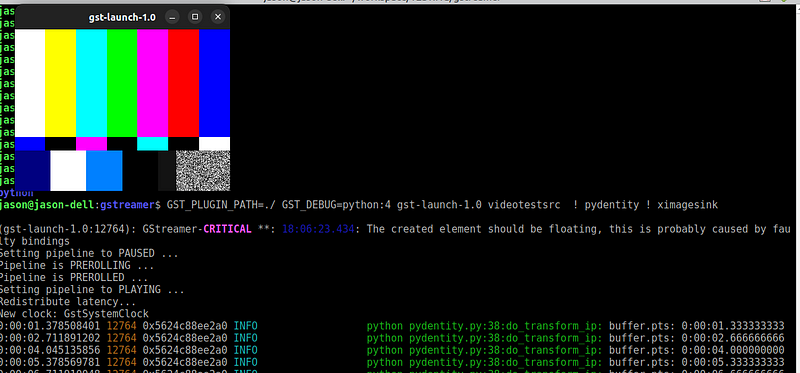
This example is from the link above. This prints the buffer’s pts. I tweaked the code a little bit to print out the pts less frequently.
Source Code
#!/usr/bin/env python3
#
# $ GST_PLUGIN_PATH=./ GST_DEBUG=python:4 gst-launch-1.0 videotestsrc  ! pydentity ! ximagesink

import gi
gi.require_version('Gst', '1.0')
gi.require_version('GstBase', '1.0')

from gi.repository import Gst, GObject, GstBase
Gst.init(None)

ANY_SRC_TEMPLATE = Gst.PadTemplate.new("src",
                                       Gst.PadDirection.SRC,
                                       Gst.PadPresence.ALWAYS,
                                       Gst.Caps.new_any())
ANY_SINK_TEMPLATE = Gst.PadTemplate.new("sink",
                                        Gst.PadDirection.SINK,
                                        Gst.PadPresence.ALWAYS,
                                        Gst.Caps.new_any())
#
# Simple Identity in python
#
class Pydentity(GstBase.BaseTransform):
    GST_PLUGIN_NAME = "pydentity"
    __gstmetadata__ = ('identity in python',
                       'Transform',
                       'python identity element',
                       'Jason Kim')
    __gproperties__ = {}
    __gsttemplates__ = (ANY_SRC_TEMPLATE, ANY_SINK_TEMPLATE)

    def __init__(self):
        super().__init__()
        self.cnt = 0

    def do_transform_ip(self, buffer):
        if self.cnt == 40:
            Gst.info("buffer.pts: %s" % (Gst.TIME_ARGS(buffer.pts)))
            self.cnt = 0

        self.cnt += 1

        return Gst.FlowReturn.OK

GObject.type_register(Pydentity)
__gstelementfactory__ = (Pydentity.GST_PLUGIN_NAME, Gst.Rank.NONE, Pydentity)
Test the plugin
Combine the two plugins
pyvideotestsrc and pydentity can be used together;
GST_PLUGIN_PATH=./ GST_DEBUG=python:4 gst-launch-1.0 pyvideotestsrc ! pydentity ! ximagesink