
Writing a Compression Tool Using Huffman
I have been intrigued by John Cricket’s coding challenges for a while, and I finally took the time to complete one of them. And I thought I should share my learning and findings in this post.
When I first read the challenge it didn’t seems like a lot of work, but it was more to it then I first realized. You will learn to handle binary trees, bits and bytes and serialization.
Here is the link to the Github repository
What’s Huffman coding
Huffman coding have been around for a long time and is still today foundation for lossless compression.
In short, Huffman coding uses prefix codes for each character in a text. The more frequent the character, the shorter prefix code. The prefix codes is constructed from ones and zeros. For instance, A can become 01, which only takes the space of 2 bits, when its normally takes 8.
To compress text with Huffman coding, the following steps are taken:
- Frequency Analysis
- Sort using a priority queue
- Build the Huffman Tree
- Generating Huffman/prefix Codes
- Encoding Data
- Serialize the tree and creating metadata to store in file
- Decoding tree and metadata
Frequency analysis
The first thing perform is a frequency analysis, which basically means to create a map over how many time each character appears in the string.
We can use following text as an example

this is a textThis will results in a frequency map like this:

A priority queue is like a list, but it’s sorted by a priority value on the item in the list.
Since I’ve used Go to implement this I’ve have used the heap interface to implement a priority queue.
This creates a item for each character in the map, and the frequency becomes the priority.
func NewPriorityQueue(ft FrequencyTable) PrioQueue {
 pq := make(PrioQueue, len(ft))

 i := 0
 for k, v := range ft {
  pq[i] = &Item{
   Value: string(k),
   Prio:  v,
   Index: i,
  }
  i++
 }

 heap.Init(&pq)

 return pq
}
Generate the tree along with prefix codes
To build the tree we need to introduce childnodes to our items in the priority queue. The child should be a left and right noode/item.
For me, this was one of the tricky parts to understand.
But I’ll try to explain.
The goal is to convert the entire list to a tree.
First step is to take the two item with lowest priority/frequency and create a new node which has the priority of the two node combined.
So using the below string as example we take h and x and create a new node with priority 2 (1+1=2). And then we put that node back in the queue which means it will end up between s and a
Then we do the same again (now h and x is removed) so we take a and e and create a new node with priority 2 and put it back.
So we are combining a tree and a queue at the same time, kind of.
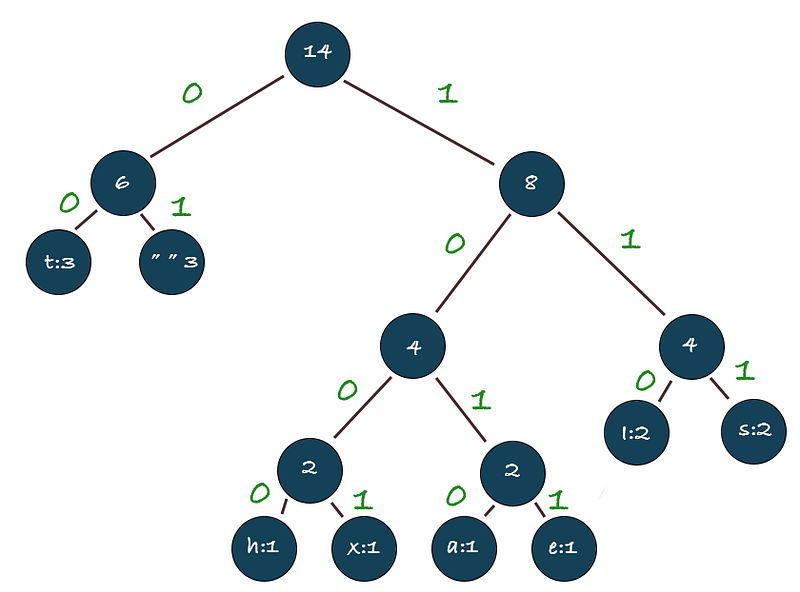
Now that the tree is generated, it’s time to calculate the actual prefix codes (green numbers in the tree). This is done by walking the tree and a left path is 0 and a right path is 1.
For example, to find the prefix code for t we go down the tree from the root. Left (0) > Left (0) which means the prefix code for t is 00
The entire list of prefix codes is the following:
As you may notice, the most frequent characters has the shortest prefix code, really clever right?
Encoding text using generated prefix codes
Now that we have generated all the prefix codes we can finally translate our original string using the prefix codes.
As we have out map ot prefix code we can simply iterate over each character in our string and change to corresponding prefix code.
So for instance: twould be 00 and i would be 110
Serialize the tree and create metadata
This step is not truly a part of the Huffman tree but rather the challenge itself.
Because the challenge is to compress and store a file. This means you need someway to decode the compressed string.
I’ve chosen to serialize the entire tree together we the bit string converted into a byte array.
Decoding the tree and bit string
For this to be useful you need someway to decompress the compressed string. First thing is to get the bytes back to a bit string containing one and zeros.
Then, for each character in the bit string (001000110) we then walk down the tree, following left for 0 and right for 1.
When we reach a leaf node, we are done and start for the root node again.
https://github.com/khlbrg/coding-challenge-compression/blob/main/compress.go#L133
What I learned
I learned a lot of new and interesting stuff building this tool. I learned the basics of compression, learned how to serialize and deserialize a binary tree, implementing a priority queue using the heap interface in go, and how to work with bits.
You can find the entire code here.
Stackademic
Thank you for reading until the end. Before you go:
- Please consider clapping and following the writer! 👏
- Follow us on Twitter(X), LinkedIn, and YouTube.
- Visit Stackademic.com to find out more about how we are democratizing free programming education around the world.