
Writer Jobs 101: Find Great Gigs Without Spending a Penny

What’s the secret to finding jobs for writers, for free?
Journalists, SEOs, and programmers have kept this research gem to themselves, but it’s time to bring it into the light for everyone to use:
Boolean search operators.
It sounds much more complicated than it is.
For those not familiar, boolean means yes/no, 0/1, true/false. It’s binary, and there are only two options.
So, Boolean search operators are simple yes/no commands that tell your favorite search engine yes to this, no to that. Combine them, and you can create a complex web of search requirements, to find pretty much anything your heart desires.
That means that you can use this technique for writing research, as well as for finding great writing work, before anyone else can apply.
A Quick Note
If you need help with starting or growing your freelance writing business, and want to learn how to source, pitch, and land legitimate writing work, check out: Finding Legitimate, Paid Writing Work.
The article you’re about to read takes a small portion of the aforementioned article, and expands upon it, focusing solely on the writer job search portion of the work seeking process. It works for freelance, contract, or in-house roles, as well as hybrid, and remote positions.
To Get Started, You’ll Need:
Keywords
Keywords that focus on your ideal writer job title, in some way, such as “writer”, “freelance writer”, “content marketer”, or “SEO writer”. I find this works better if you’re really vague with these words, especially at the start, because you can find writer jobs that evade normal search options.
Example: I served as the ‘Dating Expert’ with The New York Times / ASK / About for just shy of ten years. The meat of my work involved content creation, social media management, community management, email marketing and deep topic expertise. None of these things, obviously, were in the job title, and were only found within the job description. If I wanted to find writing work along similar lines, I would use keywords like “writer”, “dating”, and “content”.
Date Range
When seeking any sort of employment or contract work, there’s an advantage to applying before everyone else. I suggest a date range of 7 days, but you can chose whatever you like.
Deal Breakers
While this could fit in the Keywords section, I like to list this out separately.
Make a list of your requirements within a role. Do you only want contract, or freelance writing work? Remote, hybrid, or in-house? Location-specific or asynchronous? A diverse workplace, one that celebrates non-traditional backgrounds, using specific languages, or within a certain sector?
Some suggested deal breaker keywords to consider: “remote”, “asynchronous”, “DEI”, or “non traditional”.
Possibly: Location
If location is a primary requirement for you, you’ll want a list of locations that suit. There are a couple of ways to compile this information.
The easiest? Your country. If you want a role that’s open to people within your specific country province or state, add that to your list. As an example, I’m Canadian. Oftentimes U.S. employers will state in their job postings that they’re open to “Canada, US”, and thus, I want to add the word, “Canada” to my keywords.
As well, I live in the province of Quebec; many Canadian employers pre-pandemic weren’t able to offer benefits or hire people here. So, I might have wanted to limit my options to contract work, or only apply to roles within the province. The tricky part here? Many companies will list the places they cannot hire folks from, instead of where they can. Keep this in mind for later on.
For those wanting to work hybrid or in-house, you’ll want the area’s zip or postal codes and/or a list of community names that you’re willing to commute to.
Possibly: List of Sites
I will search both with, and without job sites listed — the results can differ dramatically between different sectors and roles.
It helps to have a list of job aggregators (like Indeed), job board software companies (like Lever), or sector-specific job posting sites (like Wellfound, formerly AngelList).
Make sure that any of the sites on your list do not require logging in to access the job postings. LinkedIn and Indeed, for example, aren’t listed below because they’ll just send you to their site listings, instead of listing out the postings within the search engine results.
If you have any you know, like and use already, great! If not, here are some of my favorites:
Job Aggregators
- https://monster.com [this may take some tweaking to find the right URL for your geographic location]
- https://talent.com
Hiring Software Boards
- https://greenhouse.io
- https://jobs.lever.co
- https://jobs.smartrecruiters.com
- https://jobs.jobvite.com [note: this one is tricky, and may give only top-level company results instead of direct job posts]
- https://amazon.jobs
- https://careers.google.com
- https://jobs.apple.com
Sector-Specific Boards
- https://startup.jobs
- https://otta.com [tech]
- https://wellfound.com [startups]
- https://problogger.com/jobs/ [writing work]
- https://www.mediabistro.com/jobs [media, writing — note: sometimes this doesn’t work well with this site]
- https://www.skipthedrive.com/ [remote; doesn’t have a lot of listings]
Tip: if you’re only looking for remote work, check out my remote job board listing on LinkedIn.
The Operators
Now that you have all your data ready, it’s time for a brief lesson in boolean search operators.
AND
This operator requests that both words or keywords are found in the search results. Alternatively, some search engines let you use a pipe | to signify AND.
- remote AND writer
- remote | writer
OR
Searches for either, OR the search terms you’ve listed.
- writer OR writing OR content
NOT
Excludes words or keywords, can use the word NOT or the minus sign.
- ‘NOT SEO’
- -SEO
Note: you don’t need to use the single quotes if you’re using the minus sign, just make sure not to leave a space between the minus sign and your keyword. Also, if your keyword is 2+ words, use a single or double quote around them to keep them as one term.
Brackets
Just like with algebra, you can show priority to different terms by using brackets.
- writer AND (SEO OR technical)
- freelance OR (contract AND remote)
Double Quotation Marks
Used to keep words together in the same order. Some sites use single quotes interchangeably.
- “content writer” OR “content marketing writer”
Website
Without spaces, this tells the search engine which websites you want it to search.
- site:https://otta.com
Wildcard
Use this before/after a partial string or word, to search for all permeations
- writ* [gives results including writer, writing, writers, etc.]
Location
Used for geographic location. You can use near: by itself, or with the within: operator.
- near: London within:5mi
Note: You can also search zip codes, with a between operator (two dots). Note the lack of spaces.
- 00001..87643 (Manhattan NOT New Jersey)
Outside of the US, you can search for postal codes in a similar way. This isn’t the easiest, you may need to play with it. Also, many job postings do not list zip/postal codes, so keep that in mind.
Dates
- since:2023–07–15 until:2023–07–31
Note: this is before: after: on some search engines, and others just have a date/time you can manually choose. Also, notice the format (year-month-date), which may differ depending on the search engine. Finally, only some sites use the date for job postings, or have a drop-down within the search results (like on DuckDuckGo) to choose the publication date.
Putting It All Together
Take all of your keywords and requirements from the first section, and combine them with the boolean operators, on one line.
I like to use Notepad++ or even just a Google Doc to make them easier to read, and to save the best ones. You’ll want to create multiple strings (the combination of your commands), as some will work better than others.
Then, it’s as simple as copying and pasting the line into your favorite search engine.
Example
- site:https://wellfound.com content AND remote AND Canada [Google]
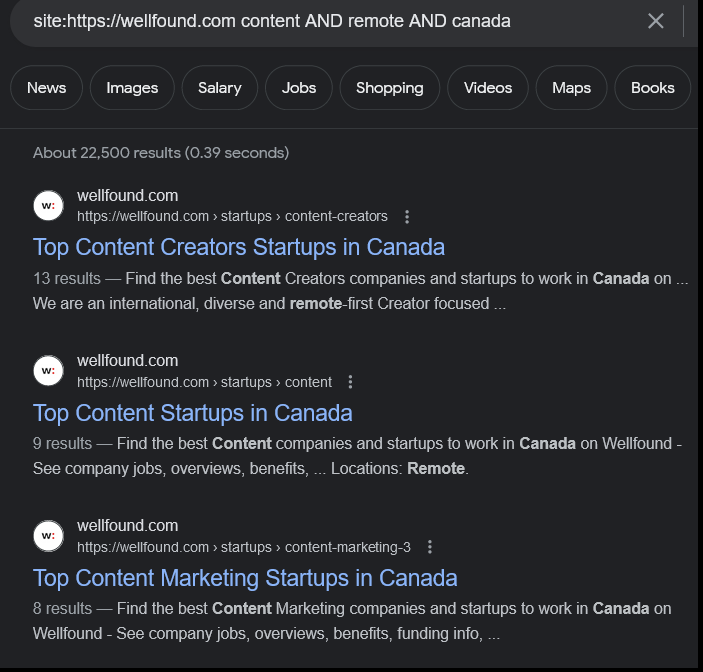
Just past these first results, which seem to be articles as opposed to job posts, I found a handful of job postings.
Let’s try a larger website with much more content, as well as a different search engine, to see if I can get better results.
- site:https://greenhouse.io content AND remote AND Canada [DuckDuckGo]
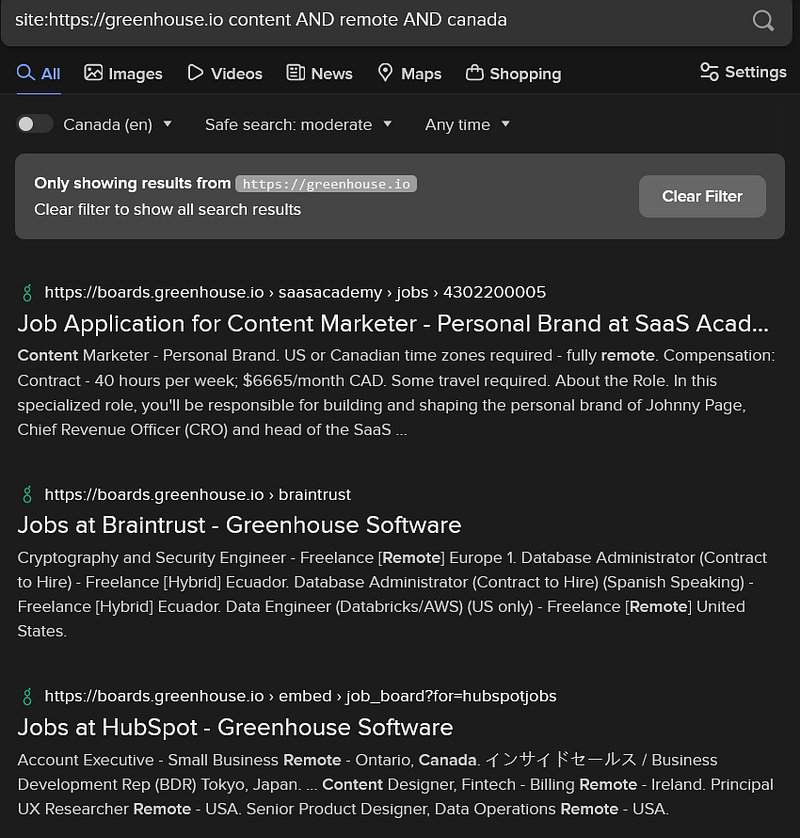
Although DuckDuckGo doesn’t list the number of search results like Google does, DDG had higher quality results that were more tailored to my search. As well, I filtering by date didn’t work so well with Google, but it worked seamlessly with DDG.
Too Much?
If you’re like many of us, you don’t have time to work all this out. Thankfully, there is a simpler solution, although it usually requires more tweaking to get the results you want.
Most search engines have an Advanced Search page, where you can input all of this manually. Check out Google’s (https://www.google.com/advanced_search), which is one of the more comprehensive options. Also, note that some search engines, like DuckDuckGo, offer some of these options at the top of the page, with every search.
If You’re Interested
How did I discover boolean search operators?
Way back when, in the Wild Wild West days of the internet, I used old school research techniques for my writing business.
We’re talking heavy microfiche and card reader usage, all while having a close relationship with every reference librarian in the area.
One of these librarian gems gave me some advice from a journalist that also used their services, in combination with the newly minted Internet Archive, or Wayback Machine, as I’ve come to know it.
I didn’t get the chance to use these skills often, until I started writing for (now defunct) Suite101, as their Work at Home Features Writer and Managing Editor. Combined with some college courses in new media and some early SEO wins, I realized that the librarian’s information was gold. I’ve used boolean operators pretty much daily, ever since.
Today, you’ll learn these concepts if you’re taking computer science or programming classes, have an SEO background, or work as a journalist. It’s a great skill to have on your resume, especially if you’re working in media, SEO, or at the juncture of content and data.
But let’s not just keep boolean search operators for writing research, okay? Use it to find writing jobs, before anyone else, so you can apply and get the gig.
Bonny Albo is the Founder of NetWriter, a full-service content, data and marketing agency. She’s a master at helping writers monetize their writing career, earn a healthy living, and live their writing dreams. Find her at https://blogving.gumroad.com