
Write your first blockchain application in minutes — with Alpha Vantage!
This is going to be your equivalent of “hello world” but for blockchain!
You’ve probably heard about the blockchain, right? You can write your first application in minutes with this tutorial. If you don’t know anything about blockchain, here are some of the main benefits:
- Decentralized: Meaning it’s open source to the max, no one owns the blockchain.
- Transparent: Every transaction or use is viewable by everyone.
- Immutable: The past can’t be changed or tampered with.
- Automatic transactions without third party intervention: It’s like having an agreement that the entire world is the enforcer of, to make sure it’s enacted.
- Security: It removes the risk of duplicate entry or fraud.
Our favorite concept of something you could build on the blockchain:
- A transparent stock exchange where all data is public, transactions are not through a brokerage, and every transaction ever made is public information. Reducing settlement periods, fraud, HFT abuse, and more.
And some people are working on that now.
Anyways, here is how you can get started:
1. Get MetaMask.io for your browser
You can learn more about MetaMask from their site, for our purposes, it allows you to create a test blockchain account and mainnet account. You’ll learn more about those later.
Here’s a video on MetaMask. You can also skip it and just go to https://metamask.io and download it for your browser. It’s currently supported by Chrome Firefox Opera Brave iOS (beta) Android (beta)
2. Open up the Remix Etherium IDE
This is your workspace for the moment. We will dive into it in a second.
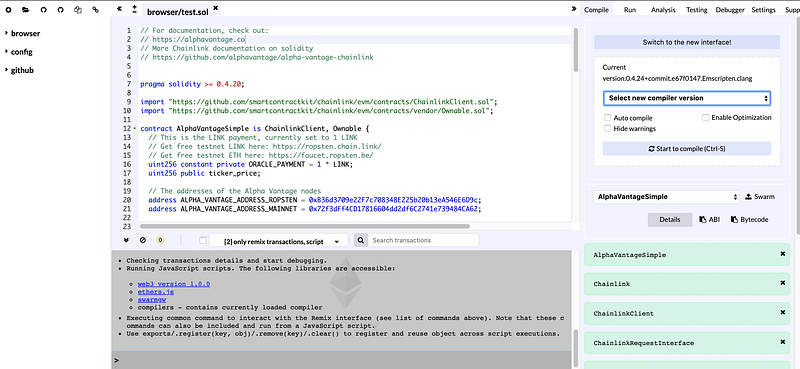
You will be asked to log into your MetaMask account, if not, go ahead and do so. When you log into MetaMask, you’ll want to change to the “Ropstean Test Network”. This is where you can test all your code on a real blockchain! You will also get some “paper” LINK and ETH to play with
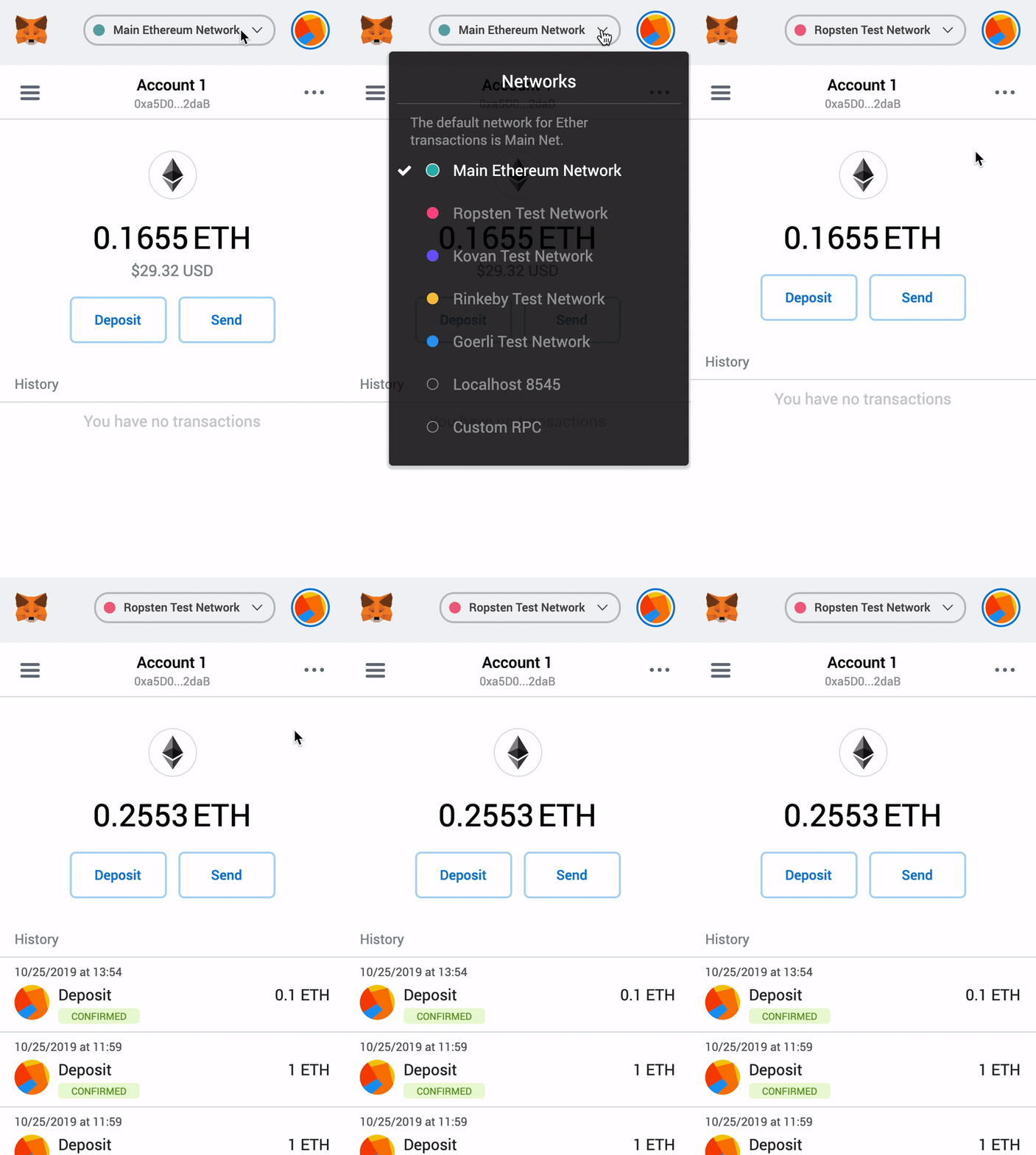
3. Compile and deploy your contract
The link should auto-populate, but if it doesn’t, copy and paste the below gist into a file. Hit “start to compile” and then go to the “run” tab.
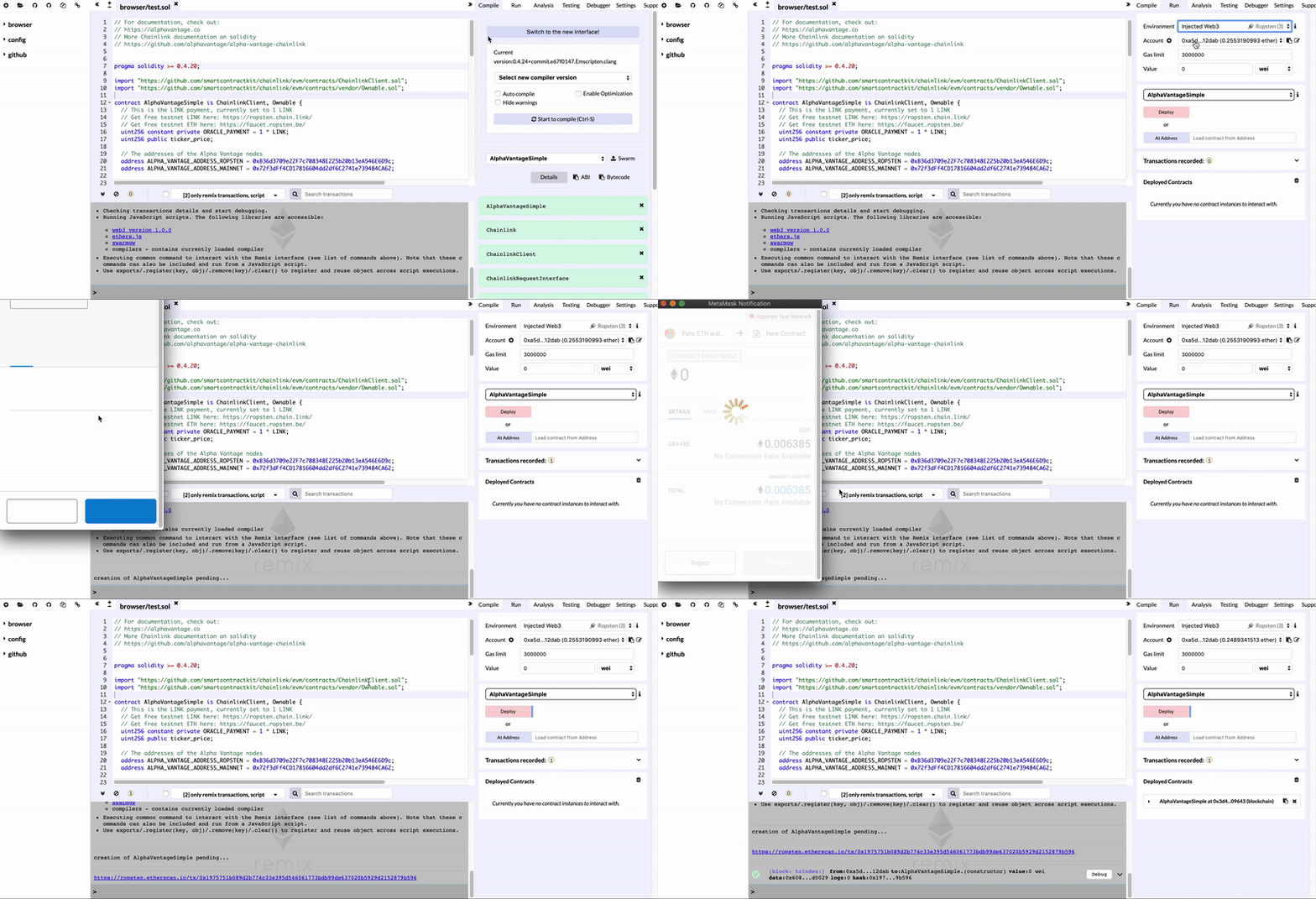
You’ll want to make sure next to “environment” you see:
- Injected Web3 and “Ropsten” grayed out.
Then hit the “deploy” button, and a “deployed contracts” entry will show up.
You have just deployed your first contract!
But it’s not active quite yet. Now you’ll have to fund your contract. Contracts only work when they are pre-funded. We will have to get you Ropsten ETH and Ropsten LINK.
4. Fund your contract
Get your MetaMask address by copying it.
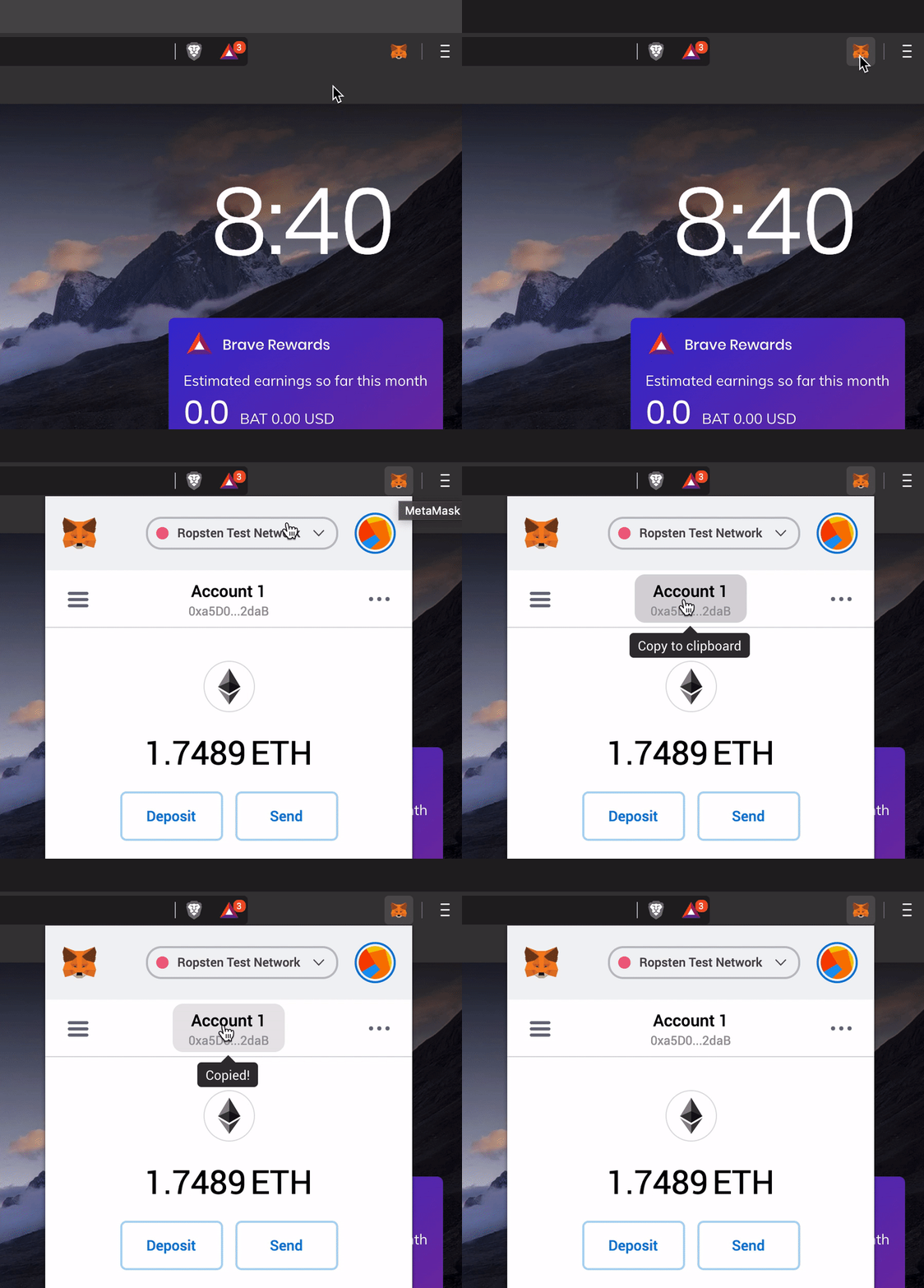
Then paste that address in each of these links to get your test funding.
In a minute or so you’ll see that you have some ETH now, and if you hit the hamburger in the top left, you’ll see you have some LINK. We need this, since smart contracts auto-execute, so they need to store the payment in them prior to running.
Copy the contract’s address from the remix IDE, open MetaMask, switch to “LINK”, hit “send”, place the address in the top, set a LINK value (5 or more should be fine), hit “next” and then “confirm.”
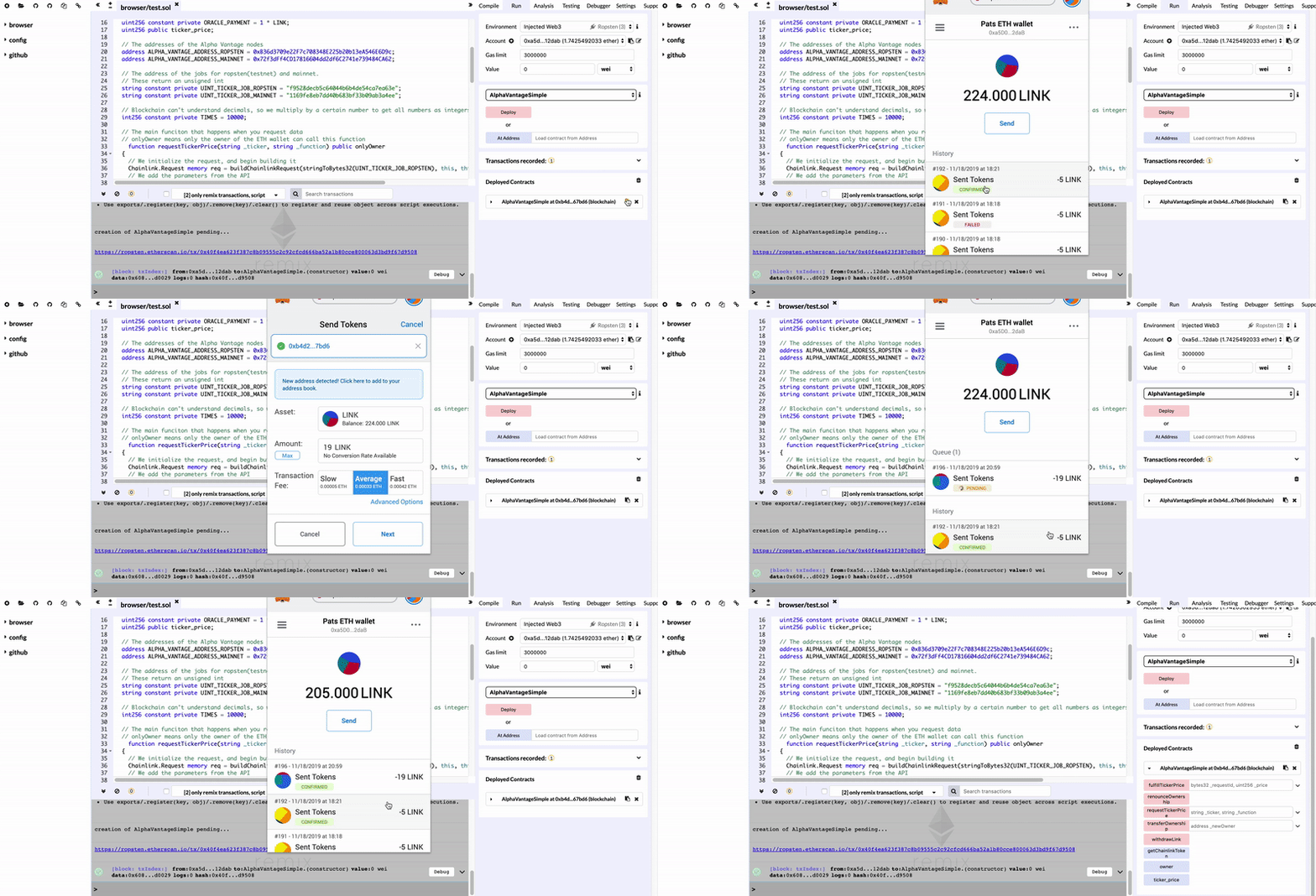
Now, you can test it! You’ll see at the bottom right there are some blue and pink buttons.
5. Run a function!
“requestTickerPrice” is a simple function that grabs data from the Alpha Vantage API, and puts it on the blockchain. We can input in a ticker and a function (the only function this specific method supports is “GLOBAL_QUOTE”) to get the EOD price of a ticker.
You can see the result of the function from the “ticker_price” button.
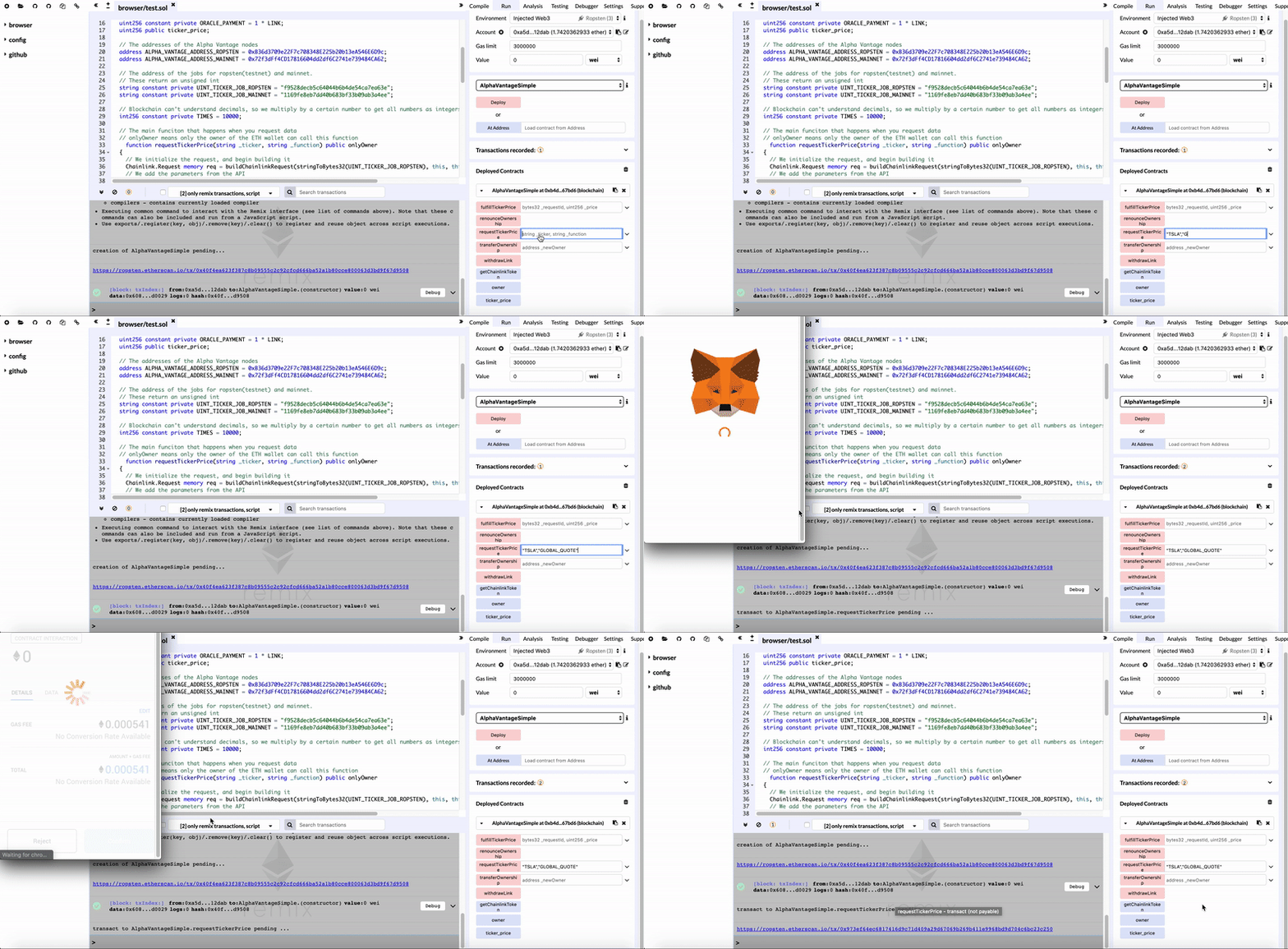
Right now, if you hit the blue “ticker_price” button, it will show 0, since we have no data for it now.
Let’s try it! Enter:
“TSLA”,“GLOBAL_QUOTE”
next to where it says “requestTickerPrice” and then hit the pink button. A pop-up will ask you to confirm. You are now running the method on the blockchain!
Now, after the blockchain confirms (may take a little longer than MetaMask tells you), you’ll be able to see the EOD price of Tesla by hitting that “ticker_price” button!
6. Spice it up!
This was just to get you started. This code from this sample explains how each of the steps work, and how you can modify it to get any data from Alpha Vantage that you want.
A Common Pitfall
If you see an error like:
gas required exceeds allowance (8000000) or always failing transactionThis generally means you haven’t funded your contract properly, go back to step 4!
Keep going….
Want to learn more? Check out Chainlink’s documentation to learn more!
Follow Alpha Vantage on Medium and see the tutorials that are coming out soon, with content such as; more in-depth Alpha Vantage-Chainlink documentation, how to build a node yourself, and solidity competitions. As well as our non-blockchain related content!
You can reach us also on slack, twitter, or discord.
#blockchain #chainlink #stockapi #fintech #finance #investing


