avatarEllane W

Free AI web copilot to create summaries, insights and extended knowledge, download it at here

2438

Abstract

t (Day).</p><ul><li>March 4th: 2021–03–04</li><li>April 3rd: 2021–04–03</li><li>December 10th: 2021–12–10</li></ul><p id="afd5">Follow this format and all those dates will sort chronologically in a digital list, just like magic (who knew, right?)! Yes, I know Excel can do that for you, but this isn’t something you want to trust to a program that thinks it makes sense to obscure the contents of a cell with annoying auto-complete pop-ups. You don’t need that kind of stress in your life.</p><h2 id="1f62">The pattern to follow is YYYY-MM-DD.</h2><p id="7b1f">That’s right, YYYY-MM-DD. Not YY-MM-DD, YYYY-MM-D, YY-M-D or any other variation. Always write the year in full, and use a leading zero when dealing with numbers lower than 10 or they won’t sort correctly.</p><p id="6935">Also, pay attention to how you name files after entering the date. I add a space followed by a dash, then another space. Whichever way you do it, be consistent and you’ll be rewarded with clean lines that are pleasing to the eye and very quick to scan through when searching for that thing you don’t yet know you’re looking for.</p><figure id="6895"><img src="https://cdn-images-1.readmedium.com/v2/resize:fit:800/1*qnuQKztmgOncO61wOx-dtA.png"><figcaption>Examples of beautiful numbers in exquisite chronological order, no matter when the file was created. Illustration by Author.</figcaption></figure><p id="3a3b">Your computer can sort files in chronological order, but that doesn’t always work the way you want it to. If the list is sorted by date created, that will only work so long as you don’t have to add a record retrospectively. Copy those files to a different location and your date created could reset to the current day.</p><p id="2a09">Having the date as the first part of a time-related file name makes good sense. It’s very helpful for my tax records and text-based calendar files, as shown in the above screenshot.</p><h2 id="c539">It’s a good idea to handwrite your short dates the same way.</h2><p id="f486">This date protocol isn’t just for digital files.</p><p id="9999">I also use it in apps like GoodNotes and Noteshelf when writing the date at the top of a blank page. These clever apps can search handwritten text, and using YYYY-MM-DD ensures that search results are listed chronologically. If you have a text expansion app, set up a keyboard shortcut to enter today’s date in this format.</p><p id="7d36">Text Expander is a good

Options

choice to automatically enter today’s date in the right format. I use Keyboard Maestro on the Mac for this and find myself typing in the shortcut many times a day. Create an action in KM to enter text by typing, and copy and paste the following to enter today’s date:</p><div id="6927"><pre><span class="hljs-meta">%</span>ICUDateTime<span class="hljs-meta">%</span>yyyy-MM-dd<span class="hljs-meta">%</span></pre></div><p id="c1d6">I also recommend people learn how to write long-form dates correctly. <a href="https://www.grammarly.com/blog/how-to-write-dates/">This page</a> from Grammarly has some good tips for placing commas in the right order and when not to use apostrophes.</p><h2 id="4802">About that headline…</h2><p id="39ba">Now for the obvious clickbaity headline. It’s all true, but I can understand your scepticism.</p><p id="805a"><b>Promise 1: You’ll lose weight </b>When you write the date correctly in all your digital doings, you’ll absolutely lose weight — the metaphorical weight of the frustration you feel when your files (and therefore your synapses) are all over the place.</p><p id="48ec"><b>Promise 2: Your productivity will increase by 50%</b> True, but that’s probably an understatement when comes to how smoothly things will run once your dates are out of the naughty corner.</p><p id="e0b5"><b>Promise 3: You’ll be wealthy in less than a week</b> If you’ve completely dismissed my last claim, you may be underestimating the value of being able to find what you need when you need it, before even lifting a finger to type in the search bar. Don’t be the person who missed that once-in-a-lifetime opportunity because you couldn’t decipher the date on the invitation!</p><p id="6684">Your friends and colleagues will hear the strains of heavenly symphonies and cry silent tears of joy when they see the beauty of your effortlessly organised and supremely searchable lists.</p><p id="22fd">Your name, my friend, will be gold! And you’ll be wealthy in the only way that really matters.</p><h2 id="9fed">Hyperbole aside, this is the system all of us need.</h2><p id="5c4b">The truth of the matter is that it doesn’t matter how you write the date, <i>if</i> you write in long-form <i>or</i> you aren’t bothered about the possibility of being misunderstood.</p><p id="7737">Join me in spreading the joys of YYYY-MM-DD date formatting around the world, and I’ll see you (on time) at the party!</p></article></body>

Date Matters: YYYY-MM-DD, Please

Get it right and you’ll lose weight, boost your productivity by 50% and become wealthy in less than a week—honest!

Photo by MI PHAM on Unsplash, modified by Author.

You think I made spurious claims with the sub-head of this piece, don’t you? Not so! I speak the truth.

Read on and you’ll see.

But first, think back to when you were 10. How were you taught to write the (short) date at the top of that lined page with the red margin down the left-hand side?

If you were a kid growing up in Australia, as I was, you’ll have written the 4th of March like this: 4/3/21. But if you grew up in the US, you probably wrote it as 3/4/21. Children in Asian countries are usually taught to write 21/3/4.
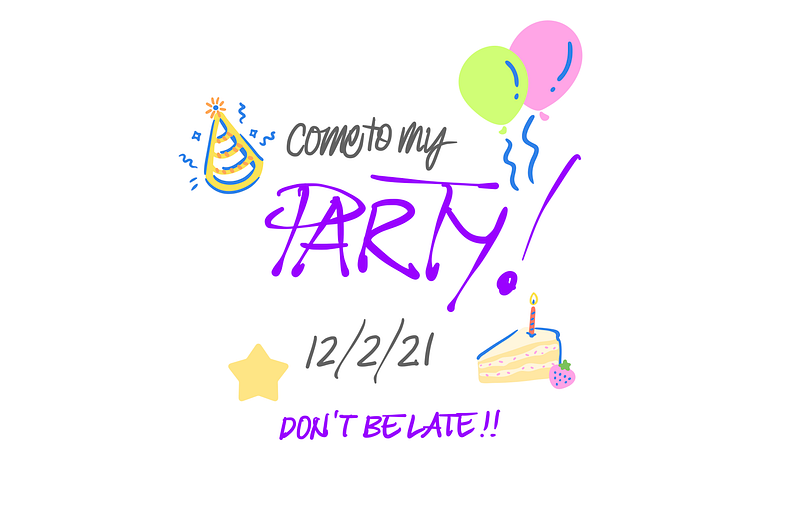
12/2/21: This palindrome could have some people rocking up nearly a year late and others missing it by a century. Don’t let this happen to you, my festive friend. Illustration compiled in GoodNotes, by Author.

You can see the problem.

The Australian kids are always going to be early (and not just because of the time zone thing) while American kids will probably be late. Asian kids will be right on time for their Aussie friends’ parties, with a hit or miss for US events.

Fast forward to adult years—things haven’t improved. Unless you’re going to write the date in full, there’ll always be the potential for confusion until on or after the 13th of each month. There’s no way to mistake 15/5/21 for anything other than the 15th day of May, even if you write it 5/15/21.

The solution to this problem is as simple as it is logical.

First write the digits that change the slowest (Year), then those that change the next slowest (Month). Finally, write the digits that change the fastest (Day).

  • March 4th: 2021–03–04
  • April 3rd: 2021–04–03
  • December 10th: 2021–12–10

Follow this format and all those dates will sort chronologically in a digital list, just like magic (who knew, right?)! Yes, I know Excel can do that for you, but this isn’t something you want to trust to a program that thinks it makes sense to obscure the contents of a cell with annoying auto-complete pop-ups. You don’t need that kind of stress in your life.

The pattern to follow is YYYY-MM-DD.

That’s right, YYYY-MM-DD. Not YY-MM-DD, YYYY-MM-D, YY-M-D or any other variation. Always write the year in full, and use a leading zero when dealing with numbers lower than 10 or they won’t sort correctly.

Also, pay attention to how you name files after entering the date. I add a space followed by a dash, then another space. Whichever way you do it, be consistent and you’ll be rewarded with clean lines that are pleasing to the eye and very quick to scan through when searching for that thing you don’t yet know you’re looking for.
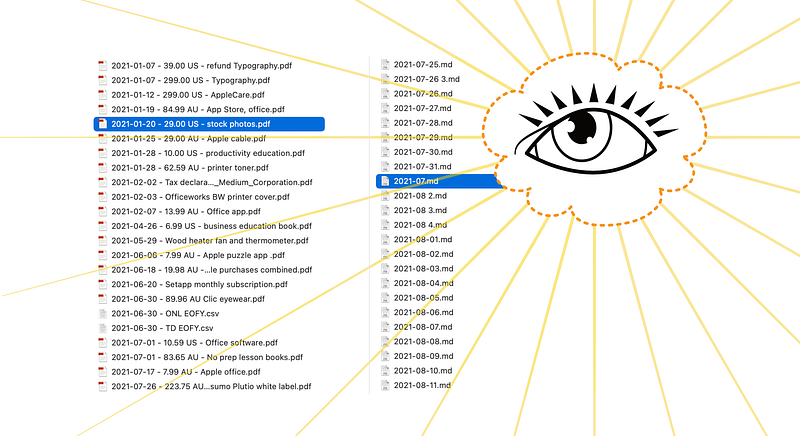
Examples of beautiful numbers in exquisite chronological order, no matter when the file was created. Illustration by Author.

Your computer can sort files in chronological order, but that doesn’t always work the way you want it to. If the list is sorted by date created, that will only work so long as you don’t have to add a record retrospectively. Copy those files to a different location and your date created could reset to the current day.

Having the date as the first part of a time-related file name makes good sense. It’s very helpful for my tax records and text-based calendar files, as shown in the above screenshot.

It’s a good idea to handwrite your short dates the same way.

This date protocol isn’t just for digital files.

I also use it in apps like GoodNotes and Noteshelf when writing the date at the top of a blank page. These clever apps can search handwritten text, and using YYYY-MM-DD ensures that search results are listed chronologically. If you have a text expansion app, set up a keyboard shortcut to enter today’s date in this format.

Text Expander is a good choice to automatically enter today’s date in the right format. I use Keyboard Maestro on the Mac for this and find myself typing in the shortcut many times a day. Create an action in KM to enter text by typing, and copy and paste the following to enter today’s date:

%ICUDateTime%yyyy-MM-dd%

I also recommend people learn how to write long-form dates correctly. This page from Grammarly has some good tips for placing commas in the right order and when not to use apostrophes.

About that headline…

Now for the obvious clickbaity headline. It’s all true, but I can understand your scepticism.

Promise 1: You’ll lose weight When you write the date correctly in all your digital doings, you’ll absolutely lose weight — the metaphorical weight of the frustration you feel when your files (and therefore your synapses) are all over the place.

Promise 2: Your productivity will increase by 50% True, but that’s probably an understatement when comes to how smoothly things will run once your dates are out of the naughty corner.

Promise 3: You’ll be wealthy in less than a week If you’ve completely dismissed my last claim, you may be underestimating the value of being able to find what you need when you need it, before even lifting a finger to type in the search bar. Don’t be the person who missed that once-in-a-lifetime opportunity because you couldn’t decipher the date on the invitation!

Your friends and colleagues will hear the strains of heavenly symphonies and cry silent tears of joy when they see the beauty of your effortlessly organised and supremely searchable lists.

Your name, my friend, will be gold! And you’ll be wealthy in the only way that really matters.

Hyperbole aside, this is the system all of us need.

The truth of the matter is that it doesn’t matter how you write the date, if you write in long-form or you aren’t bothered about the possibility of being misunderstood.

Join me in spreading the joys of YYYY-MM-DD date formatting around the world, and I’ll see you (on time) at the party!

Grammar
Writing
Productivity
Technology
Geek
Recommended from ReadMedium