Working with PDF files in Python

Introduction
PDF stands for Portable Document Format. It is needless to say that all of us are very much familiar with it as well. PDF documents are used widely in almost every domain ranging from businesses to tech. However, have you wondered how do the natural language enthusiasts and coders deal with it? A large number of data scientists receive reports from different departments in the form of PDFs for analysis, processing, and much more.
Natural Language Processing deals with a large amount of text processing. It is easy to deal with the text data if it is present in the simple text format but it becomes cumbersome when the same data is presented in a PDF format. In this article, we will learn to work with PDF files in Python and understand how can we perform operations such as open, read, write, merge, and much more on them. Excited to dive deeper into it? Let’s get started!!
This article is structured as follows:
- Installing Anaconda environment and the PyPDF2 library
- Opening a PDF in Python
- Extracting the text from a PDF file in Python
- Reading the contents of a PDF in Python
- Adding a page to another PDF using Python
- Rotating the pages of a PDF in python
Anaconda environment and the PyPDF2 library
Anaconda environment provides support for one of the versions of the programming language R or Python and the associated packages. The Anaconda distribution can be downloaded from here for Windows. If you are a Mac or Linux user, just google about the instructions and you will be good to go.
PyPDF2 is a Python library dedicated to performing operations on PDF files. It allows the merging of PDF files, rotation of a page in the PDF file, extraction of text from a PDF file, and much more. To install PyPDF2 library, go to Anaconda Command prompt-> Desired Location->type the command: pip install pypdf2. The following image shows how to do it:
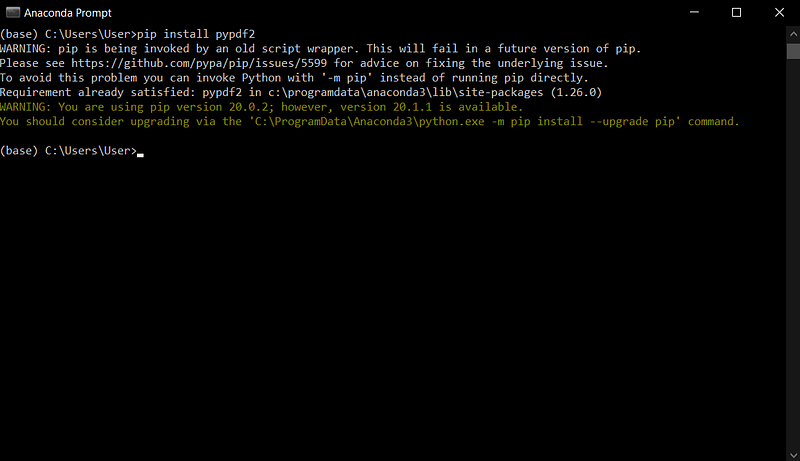
Since I have already installed it, the image above shows that the requirement is already satisfied. Once we are done with this, we can move ahead to explore our first basic operation of how to open a PDF file in Python.
Please note that I will be using Jupyter Notebook to execute the codes. Feel free to use any IDE/environment of your choice.
Open a PDF file in Python
Opening a PDf file in Python is no herculean task. It is as simple as reading a text file in Python. However, you should be careful about the mode you are opening the PDF file in. This is because a PDF file is different from a text file and closer to an image file in its nature. Also, PyPDF2 is used to extract text from the PDF’s that are made using the word processor. However, this does not imply all the word processors and it often requires software to extract text from a PDF file. To open a pdf file in Python, follow the code given below:

Here I have opened the file in “wb” mode which means that if the file does not exist, it will be created automatically. Also, the file is being considered as a binary file.
Extracting the contents from a PDF file in Python
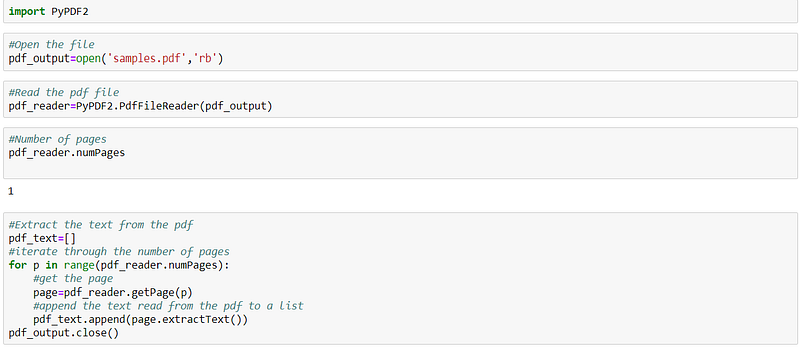
Once the file is opened, it is now time to extract the contents of the file. Just follow the code as shown in the image below and you will be good to go!
Reading the contents from a PDF file in Python
Extracted the contents successfully? Let’s read the contents then! Refer to the image below to see what the pdf contains so that you can compare it with the code output.
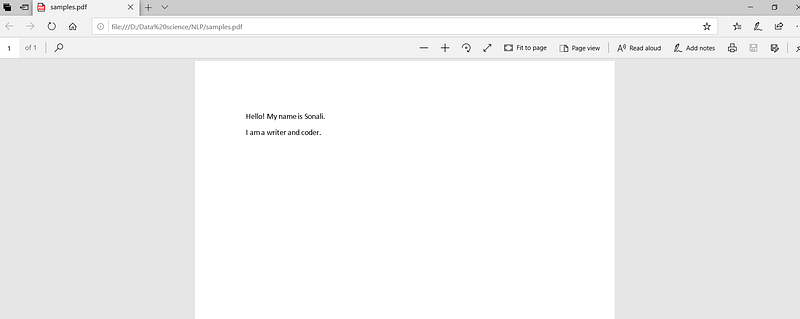
Now, follow the code below to read the contents of the PDF file:
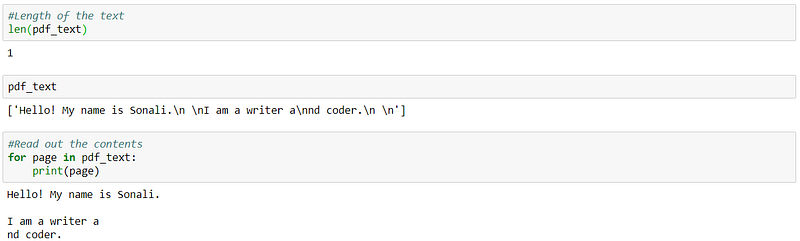
Also, make sure you close the file after you are done with it to avoid any discrepancies that might arise in the future.
Adding a page to another PDF using Python
Appending text to a PDF file is very different from a text file. You cannot do it directly like how you do it for a text file. So, in this operation, we will be copying a page of one PDF file to another. Do not worry, it’s not as complicated as it sounds. You can follow the demo given below and add a page to your PDF file:

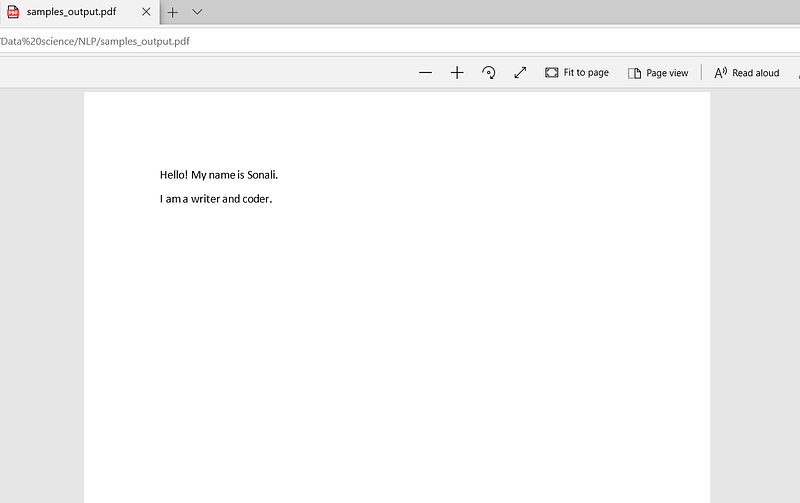
Hurrah! Now you can see the samples_output.pdf file created. The image below shows the contents of samples_output file:
Rotating the pages of a PDF in python
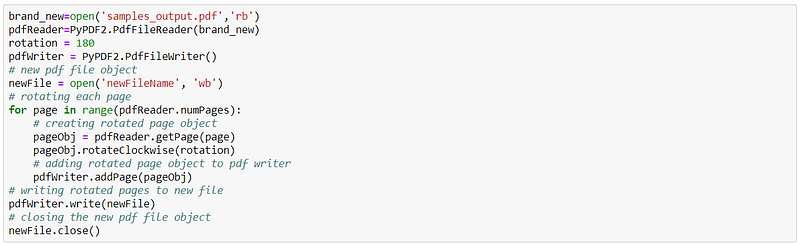
Being a person obsessed with symmetry, I hate to see the pages which are not in the proper position in my PDF. If you are facing a similar situation, trust me this piece of code will be a boon for you.
Voila! You have successfully learned the basic operations that can be performed on a PDF file in Python. I hope this was an interesting journey for all the Natural Language and Python enthusiasts. Hope to see you soon!! Thanks for reading :)