DATA STRUCTURES: JSON
Working with JSON in Go
JSON is a text-based data exchange format primarily used between browsers and servers. In this article, we are going to look at JSON encoding and decoding APIs provided by the Go.
JSON (JavaScript Object Notation) is one of the most popular data exchange formats on the web. It’s a text encoded format, which means JSON data is a string of characters written in valid JSON format. You can follow the format of JSON from RFC 7159 documentation.
The example below is a valid JSON format, however, you may need to convert this text-data into a string data-type first in order to work with JSON APIs provided by the language.
{
    "firstName": "John",
    "lastName": "Doe",
    "age": 21,
    "heightInMeters": 1.75,
    "isMale": true,
    "profile": null,
    "languages": [ "English", "French" ],
    "grades": {
        "math": "A",
        "science": "A+"
    }
}
The JSON format was created as a means to transport data between browser and server that can be easily encoded from a JavaScript object or decoded to a JavaScript object by the JavaScript engine. Hence, JSON data looks exactly like a JavaScript object but in a string format.
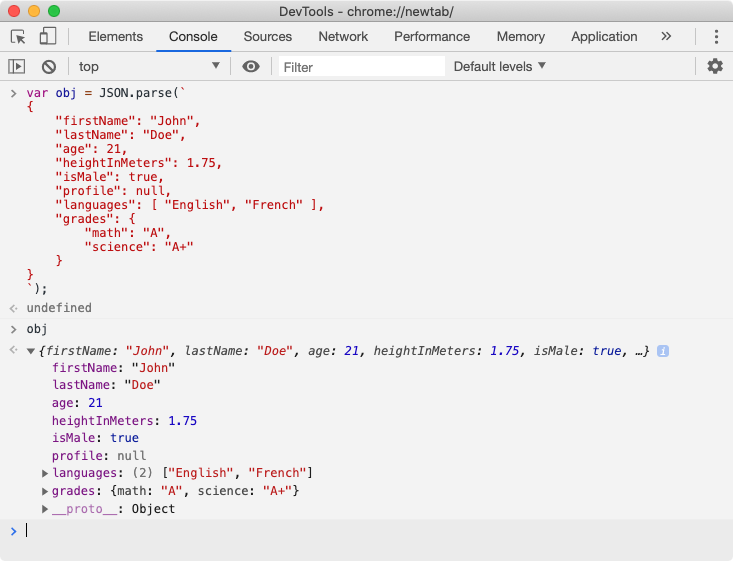
💡 A JSON object (like above) is a valid JavaScript object. You can paste this JSON data in the console of the JavaScript engine and JavaScript will construct a valid JavaScript object from it.
In JavaScript, we can use built-in JSON.parse(json_string) function to convert a JSON string to a JavaScript object. If we want to send a JavaScript object to the server, we can use JSON.stringify(js_object) function which returns a JSON string.
💡 While sending JSON data to a server, we do not need to necessarily convert JSON text-data to a
string. We can transport JSON data as binary data withapplication/json(MIME Type) as theContent-Typerequest header value. A server may handle this data appropriately by looking at this header value.
As we can see, the JSON format looks similar to the Map data structure (Object in case of JavaScript or Dictionary in case of Python) with keys and values. A JSON key is strictly a string, while the value can be any supported data type.
JSON format supports primarily 6 data types viz. string, number, boolean, null, array and object. In JavaScript, all these data types are valid data types, however, that might not be the case in other languages and a program may need to coerce the non-supported data type to a supported value.
The number data type in JavaScript can represent both signed/unsigned integers and floating-point numbers. The null isn’t actually a data type but an empty value that can translate into an empty value that a language supports for example nil in the case of Go.
[
    "John Doe",
    21,
    [ "English", "French" ],
    {
        "math": "A",
        "science": "A+"
    }
]
The example above is also a valid JSON format. A JSON can represent a dictionary or a list and items can be any supported data types. When this JSON data is decoded, it will get converted to an array in JavaScript or any supported List data structure in other languages, and vice-versa.
In Go, the closest we can get to JSON representation is through map or struct data types. Both of these data structures can store complex data in key:value pairs. Keep in mind, they are designed to do more than just that.
While decoding a JSON string, we need a container that can store the JSON data in a valid data type like a map or a struct so that we can access JSON data idiomatically. In a similar manner, while encoding JSON data, we need an object like a map or a struct that can be converted to valid JSON format.
Let’s dive into APIs provided by the Go to encode and decode JSON data. Go provides most of the JSON encoding/decoding APIs from the encoding/json package.
Encoding JSON
To encode a JSON from a suitable data structure, we use json.Marshal function provided by the json package. This function has the following syntax.
func Marshal(v interface{}) ([]byte, error)We can use a struct or map object as the argument v to the Marshal function (to encode JSON data from). This function returns a slice of bytes which is nothing but the UTF-8 encoded JSON data and an error if the object v can not be encoded as JSON string due to some reasons.
Let’s create a simple struct and encode JSON from it.
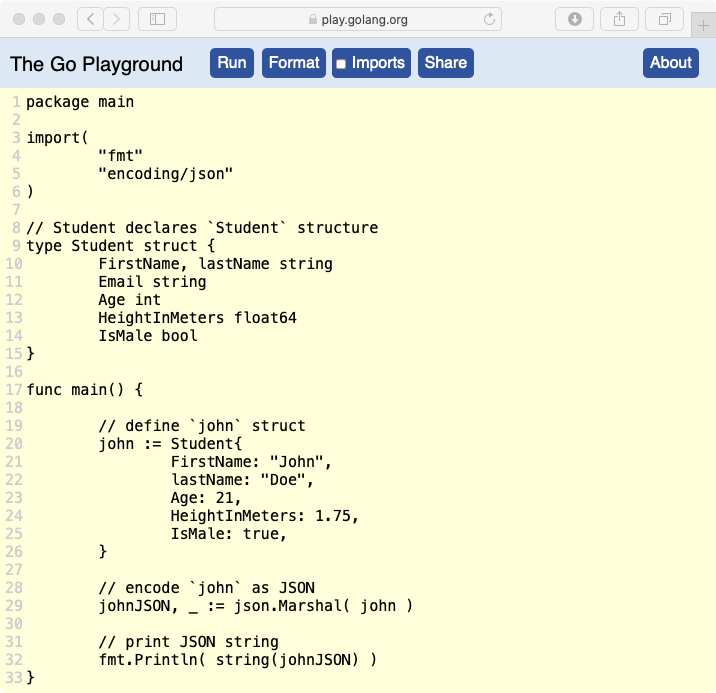
In the program above, we are declaring a Student structure type with a few fields of different data types. In the main function, we have created the john struct and initialized all Student fields except the Email field.
Later, we are passing john struct to the json.Marshal function and it should return JSON data in a slice of bytes. Since we want to print johnJSON as a string, we have used type conversion in the Println function. This program when run using go run go-json.go command yields the following result.
{"FirstName":"John","Email":"","Age":21,"HeightInMeters":1.75,"IsMale":true}💡 If you want to format the JSON with newlines and indentation, you can use
json.MarshalIndentfunction which internally calls theMarshalfunction. This function takes the prefix and indentation as the argument.
If you take a look at the above result, you might find something odd. First of all, the Marshal function considers the struct field name as the key of the JSON element, which might be handy but most of the time, we need custom field names in the JSON data. Uppercase field names seem odd.
Even though the Email field value was not assigned to the john, it made its way into the JSON. This happens since the zero-value of the string is an empty string (“”) and Marshal has no way to know whether it should be ignored, but we will fix that later.
But even the worse thing is, only field names starting with an uppercase letter made their way into the JSON. This happens because of the Marshal function only considers the exported fields for the encoding.
We can also encode map data type into JSON data. The necessary condition is that map keys should be either string or int. If a map key is an integer, it will be coerced to a string for encoding.
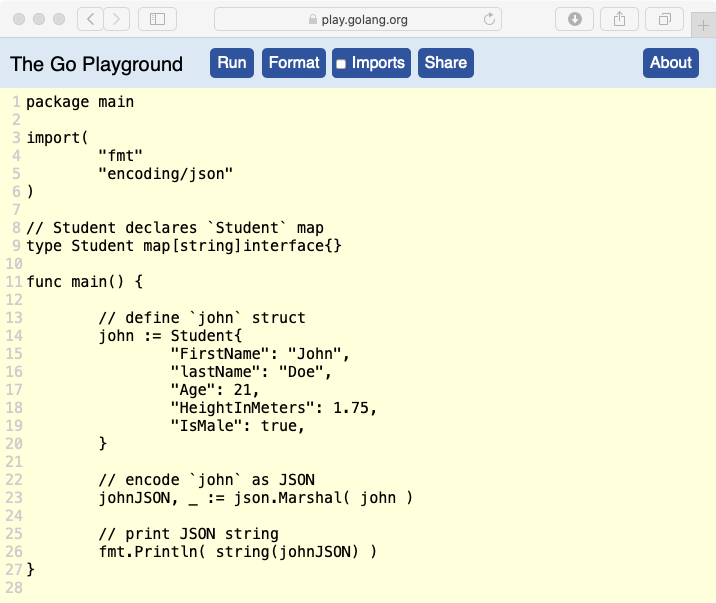
In the above example, we have declared Student as a map type whose keys are strings and values can be of any data type. Later, we have populated the john map with few key:value pairs borrowed from the previous example.
💡 If you are confused by the
interface{}type, then check out my article on Interfaces in Go. This is an empty interface which is implemented by all values and it is discussed under the “Empty interface” section.
This program when run using the same command, yields the below result.
{"Age":21,"FirstName":"John","HeightInMeters":1.75,"IsMale":true,"lastName":"Doe"}This time, we did not have to worry about dropping any fields from the JSON since we are using a map to encode the data. You may feel that map is a way to go for JSON encoding but struct brings a lot of features and it just can’t be compared with map data structure.
Data Types Handling
As we have learned, JSON supports primarily 6 data types viz. string, number, boolean, null, array and object. This can be great news for a JavaScript developer because all data types are supposed in JavaScript, but in Go, we need to consider various data types while encoding.
- Number: An
int(and other variants) or afloat(variants) or ajson.Numbervalue is encoded as a JSONnumbervalue. - String: A
stringvalue is (raw or interpreted string literal) is sanitized and encoded as JSONstring. Read more about the sanitization process from this documentation. The[]bytevalue is encoded as a Base64 string. - Boolean: A
boolvalue is encoded as JSONbooleanvalue. - Null: A
nilvalue (like of a pointer, interface or other data types) is encoded as JSONnullvalue. - Object: A
mapor astructvalue is encoded as JSONobjectvalue. - Array: An
arrayor aslicevalue is encoded as JSONarrayvalue except for the slice of bytes ([]byte).
Apart from these built-in data types, other data types like func, chan, complex64/128 can not be converted to JSON values. Trying to marshal an object which contains these data types will throw an json.UnsupportedTypeError error except when the field is unconditionally omitted using a tag (explained later in the struct tags lesson).
Abstract Data Types
In the previous examples, we have encoded values of concrete data types like int, string, bool etc. Let’s add more complex data values like struct, map and interface to an object and see how it encodes to the JSON.
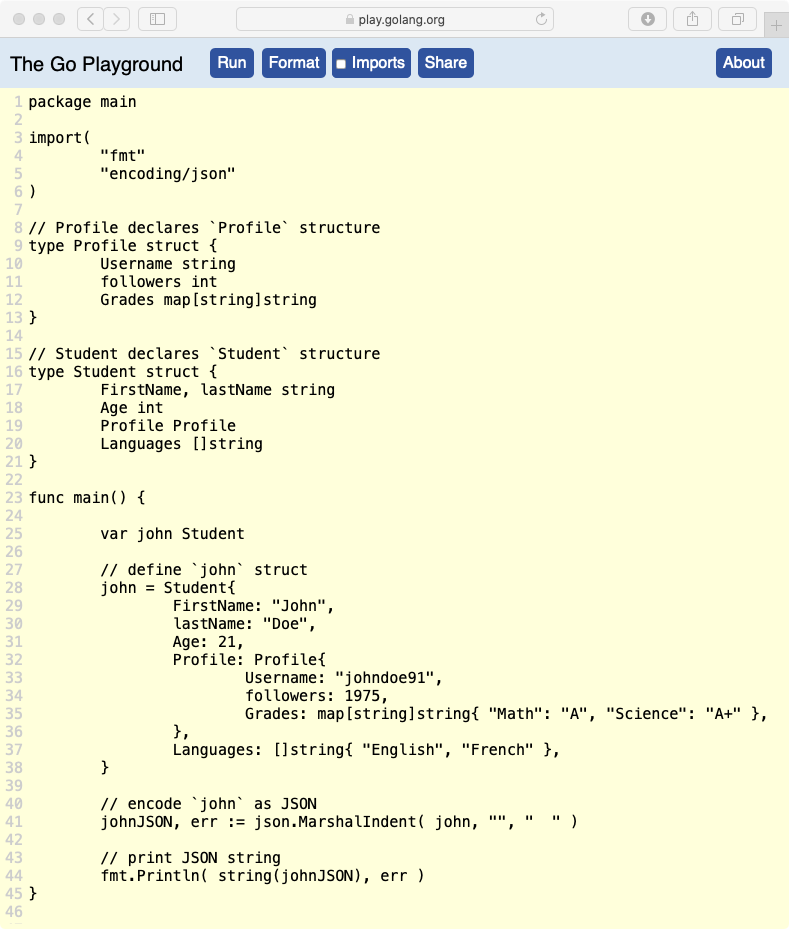
In the above example, we have added Profile and Languages field to the Student structure which has Profile and map[string]string type respectively. This program yields the following result.
{
  "FirstName": "John",
  "Age": 21,
  "Profile": {
    "Username": "johndoe91",
    "Grades": {
      "Math": "A",
      "Science": "A+"
    }
  },
  "Languages": [
    "English",
    "French"
  ]
}
If you observe this result carefully, we did not get the followers field in the Profile object because it is not exported from the Profile type.
As we have learned from the “Structures in Go” lesson, a structure can have an anonymously nested structure. In such a case, the fields of that structure (as well as methods) are promoted to the parent structure.
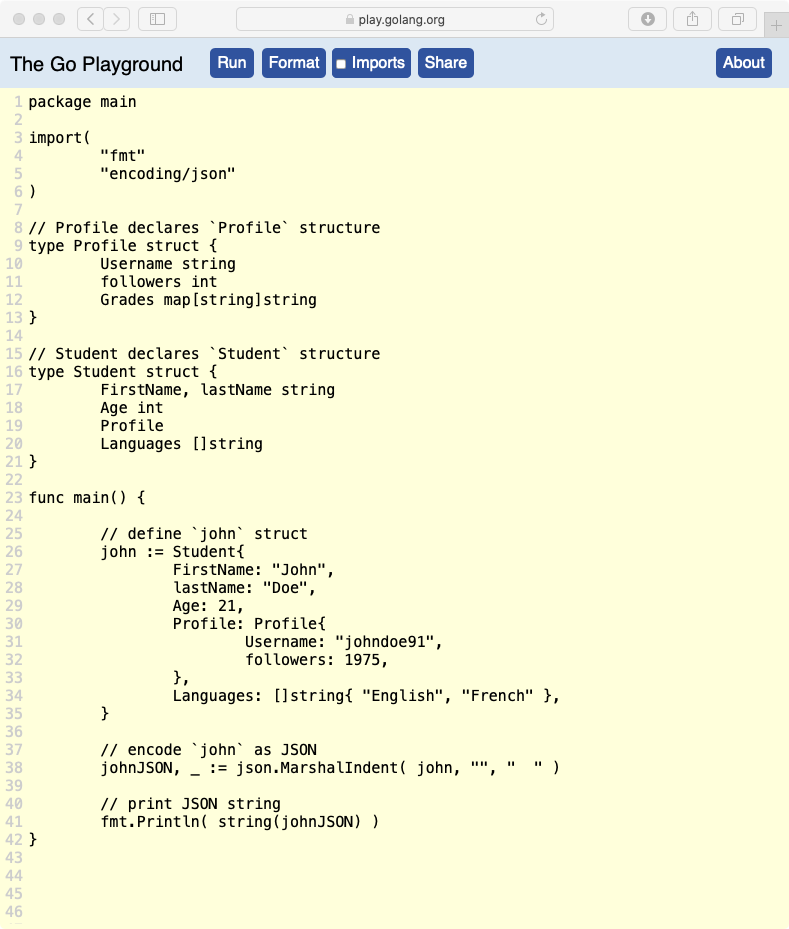
In the above example, we have made Profile field of the Student structure type anonymous. This will cause all the fields of the Profile to get promoted to the parent Student structure type. This change yields the following result.
{
  "FirstName": "John",
  "Age": 21,
  "Username": "johndoe91",
  "Grades": null,
  "Languages": [
    "English",
    "French"
  ]
}
Notice that Username and Grades fields are now part of the main object. However, the Grades field is encoded to null because it was not initialized and since zero-value of a map is nil, it was encoded as null as per the rule.
💡 If a promoted field name conflicts with the field name from the parent structure, then the least nested field is selected for the marshaling.
If a value is a pointer, then the value of the pointer is used for the marshaling. If a value is an interface, then the concrete value of the interface is used for the marshaling.
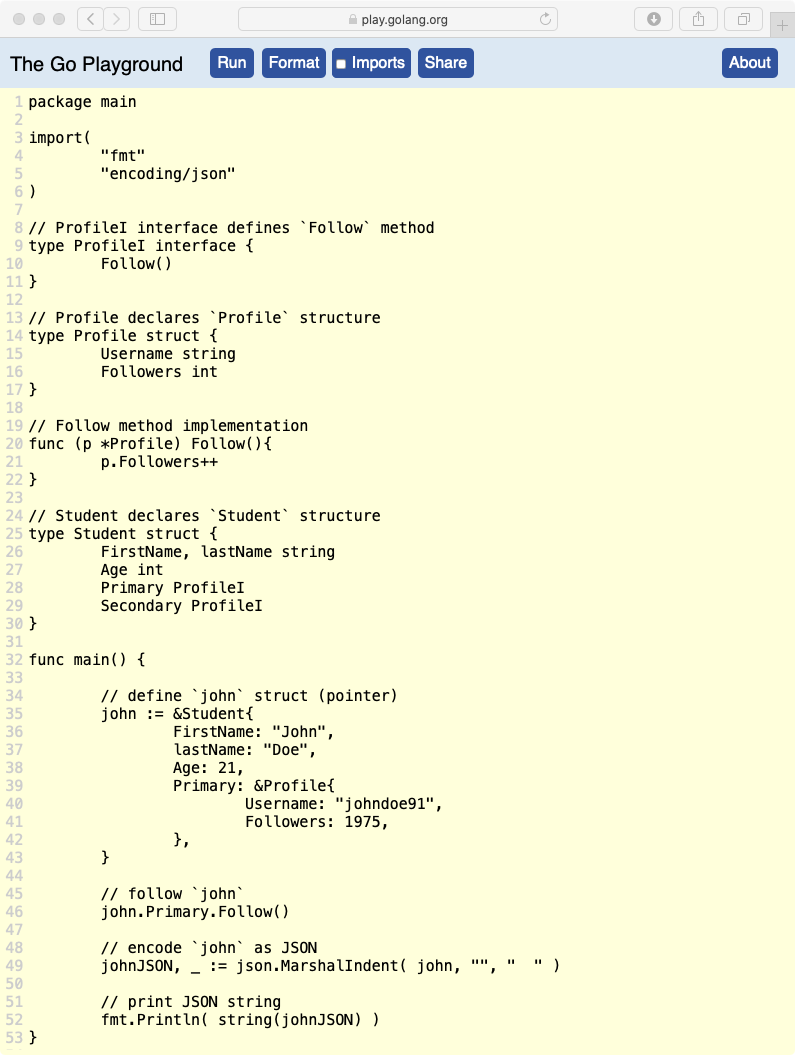
In the above example, we have created the ProfileI interface type which declares Follow method. We have implemented this method on the Profile structure type with *Profile receiver, which means, *Profile type now implements the ProfileI interface.
In the Student struct, we have added Primary and Secondary field of ProfileI interface type. That means any value that implements the ProfileI interface can be assigned to these fields.
In the main function, we have declared the john struct of type *Student by assigning a pointer of the Student type. We have not assigned the Secondary field of the john but the Primary field contains a pointer to a Profile struct. This is legal because Primary field is of the ProfileI interface type and *Profile type implements the ProfileI interface.
Later, we have called the john.Primary.Follow() method to increment the Followers count. If you notice carefully, we have passed a pointer to the MarshalIndent function which is fine because Marshal uses the value of the pointer under the hood for marshaling. This program yields the below result.
{
  "FirstName": "John",
  "Age": 21,
  "Primary": {
    "Username": "johndoe91",
    "Followers": 1976
  },
  "Secondary": null
}
The Secondary field is null because of the value of the Secondary field in the john struct is nil (zero-value of an interface is nil). The Primary field is a JSON object because Primary field is an interface and it has a pointer to the Profile struct as its concrete value.
Data Type Conversion
Sometimes, we do not want to encode a field value as it is but to provide a custom value for marshaling. This can be achieved by implementing json.Marshaler or encoding.TextMarshaler interface.
// from `encoding/json` package
type Marshaler interface {
    MarshalJSON() ([]byte, error)
}
// from `encoding` package
type TextMarshaler interface {
MarshalText() (text []byte, err error)
}If a field’s value implements one of the above interfaces, then Marshal function won’t consider the field’s value for marshaling and instead use the value returned by the method MarshalJSON or MarshalText method.
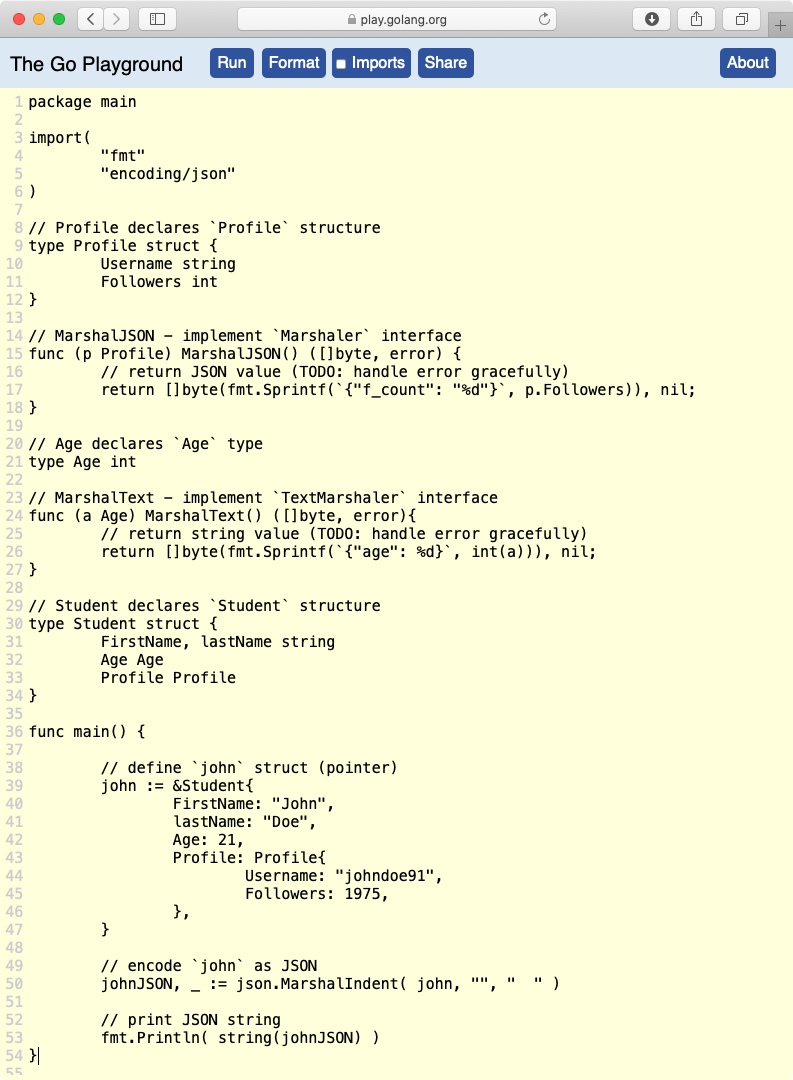
In the above example, the Profile structure type implements the MarshalJSON method, hence it implements the Marshaler interface. When Marshal encounters a value of type Marshaler, it will call this method to get the JSON data (slice of bytes) instead of marshaling the value.
We have also modified the Age field of the Student structure type. Now it holds the value of Age type which is an alias of int type. Age structure type implements the MarshalText method which means it implements the TextMarshaler interface defined in the encoding package.
When Marshal encounters a value of type TextMarshaler, it will call MarshalText method and use the value returned by this method to encode the JSON string value. Hence this program yields the following below.
{
  "FirstName": "John",
  "Age": "{\"age\": 21}",
  "Profile": {
    "f_count": "1975"
  }
}
Using Structure Tags
A struct field can hold additional metadata that can be used by other programs to process that field differently. This metadata is assigned to a field using a string literal (raw string [``] or interpreted string [“”]).
type Data struct {
  FieldOne string `json:"fname" xml:"first-name" gorm:"size:255"`
  FieldTwo string `json:"lname" xml:"last-name" gorm:"size:255"`
}
Structure tags can be used by many programs like encoder/decoder to get additional information about the field or validation engines like validator to get validation criteria or ORM engines like GORM for a table column data.
💡 Structure tags are ignored in general use cases, but you want to read the tag of a struct field, you can use built-in
reflect package (example here).
In our case, Marshal function uses the tag of a struct field to obtain additional encoding/encoding information from the field. For JSON encoding, we need to use json:"options" tag value. Here, the options are comma-separated string values.
The first option value is the name of the field that should appear in the JSON. The other option values can be omitempty to discard a field if its value is empty or string to convert the field’s value to a string.
💡 From the Go doc: The “omitempty” option specifies that the field should be omitted from the encoding if the field has an empty value, defined as false, 0, a
nilpointer, anilinterface value, and any emptyarray,slice,map, orstring. The “string” option signals that a field is stored as JSON inside a JSON-encoded string. It applies only to fields ofstring,float,int, orbooltypes.
If we want to ignore a field unconditionally, we can use - as the options value. However, - can also be a valid JSON element key, hence -, value will specify that we want the field name to be -.
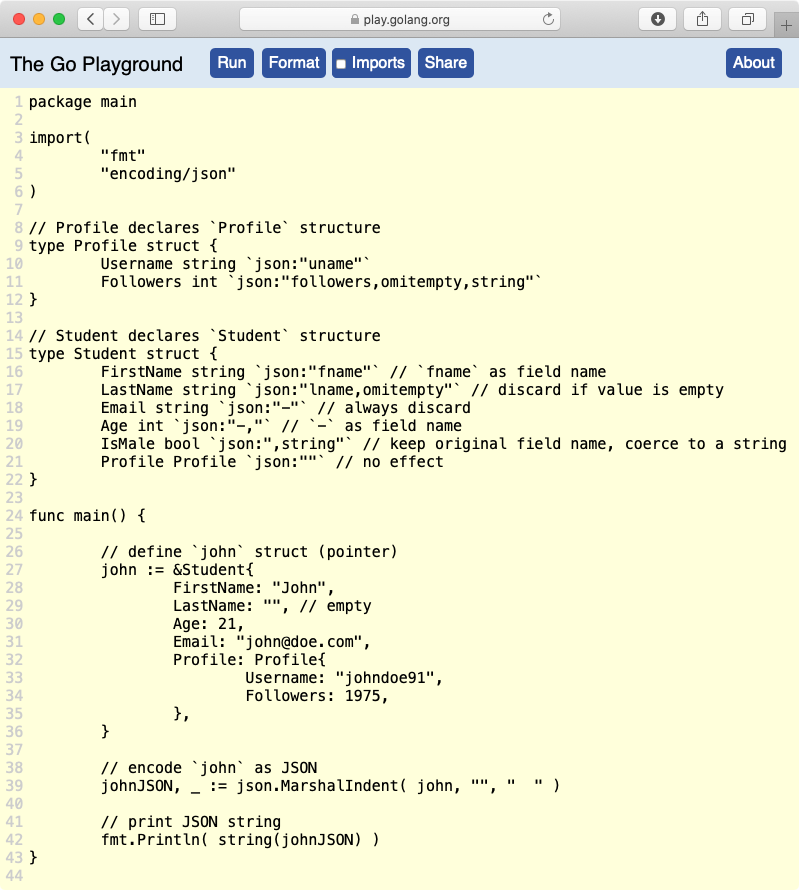
The only weird thing about the program above is the json:"" tag which doesn’t do really anything, hence it is ignored by the Marsal function. Everything else should be self-explanatory. This program above yields the following result.
{
  "fname": "John",
  "-": 21,
  "IsMale": "false",
  "Profile": {
    "uname": "johndoe91",
    "followers": "1975"
  }
}
Structure tags provide great help in dealing with promoted fields. So far, we have learned that if promoted fields conflict with the fields in the parent struct then the least nested fields are selected for marshaling.
However, tags give us more control over field promotions using this simple rule. Conflicting fields (tagged or untagged) are grouped by the JSON field names and least nested fields are selected for marshaling.
Handling Maps
In the previous map example, we saw that a map with string or int can be encoded as JSON and all int keys are converted to JSON. However, map in Go can be more complex and its keys can be of a complex data type.
In such cases, if keys of a map implements encoding.TextMarshaler interface then Marshal will try to obtain the JSON key from the MarshalText() function instead, while values can be anything (just like struct values).
Decoding JSON
Decoding JSON is a little bit tricky because we need to coerce some text-based data into a complex data structure. To decode JSON into a valid data structure like map or struct, we first need to make sure if a JSON is valid.
func Valid(data []byte) boolWe can use json.Valid function to check if JSON is valid. This function returns true if JSON data is valid or false otherwise.
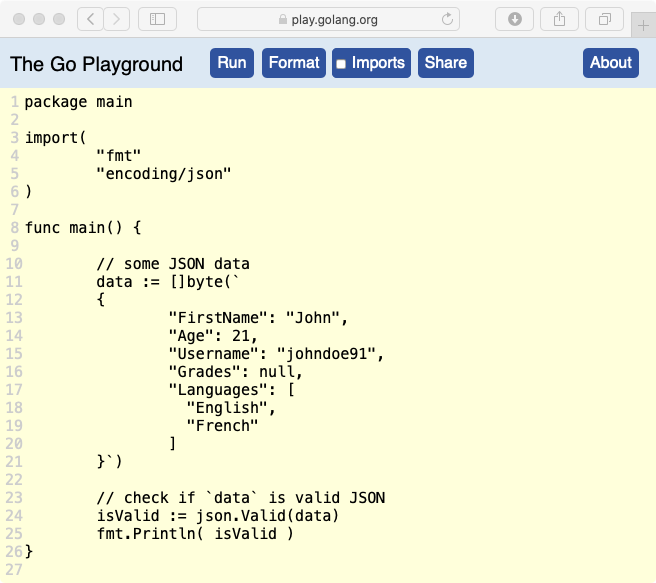
In the above program, we have some JSON data stored inside data variable and we are simply using json.Valid(data) function to check whether data contains valid JSON (so that can be decoded without an error). Since the JSON represented above is valid, it returns true.
Like we used the json.Marshal function to encode JSON data from a data structure, we have to use json.Unmarshal function to decode JSON data into a data structure like map or struct.
func Unmarshal(data []byte, v interface{}) errorThe Unmarshal function takes the JSON data as the first argument and the container v that will hold the data as the second argument. The v argument is either a pointer to a valid data structure or to an interface.
💡 If
vis eithernil(except for anilinterface) or not a pointer thenUnmarshalreturnsjson.InvalidUnmarshalErrorerror. It also returns an error if the JSON can not be unmarshalled into the value stored inv.
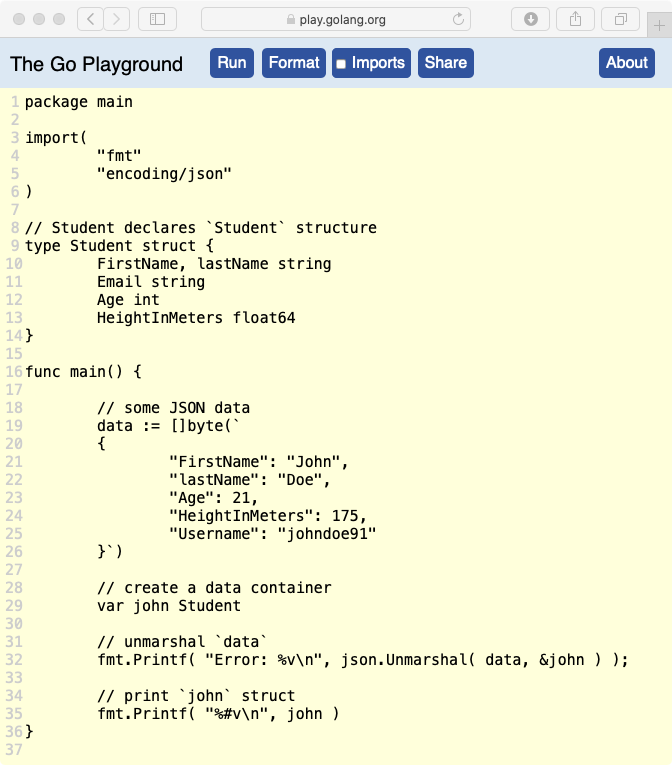
In the example above, we have declared a simple Student structure type with basic fields. In the main function, the data object contains some valid JSON data. Some of the field names in this JSON matches the Student structure.
Later, we’ve declared an empty struct john of type Student. As things go with struct, an empty struct will have all its fields set to their respective zero-values (like 0 for integers and “” for strings). Then we used the pointer to john inside Unmarshal function. This program when run using go run go-json.go command yields the following result.
Error: <nil>
main.Student{FirstName:"John", lastName:"", Email:"", Age:21, HeightInMeters:175}
As we can see from the result, the lastName field remains empty because it was unexported despite the same field existed in the JSON data. Any additional JSON fields, if not declared in the struct, won’t be unmarshalled.
You can also observe that HeightInMeters field of the JSON is a whole integer but it was successfully unmarshalled into float64. As we know, JSON only has number data type to represent numbers, hence Unmarshal will coerce the number value to an float64.
Unfortunately, the reverse is not true. Unmarshal will return an error if JSON field contains a floating-point number and the respective field is designated as an int. Hence, it’s better to designate a number field as float32/64 in scenarios where a field can either be an integer or a floating-point number.
Error: json: cannot unmarshal number 1.75 into Go struct field Student.HeightInMeters of type int💡 If a field in JSON does not contain the value of the data type declared in the structure,
Unmarshalwill not coerce that value to an appropriate data type of the field and instead, it will return an error.
Handling Complex Data
If a JSON contains complex data like object or array, then a structure must declare the fields of appropriate types in order to unmarshal the JSON without an error.
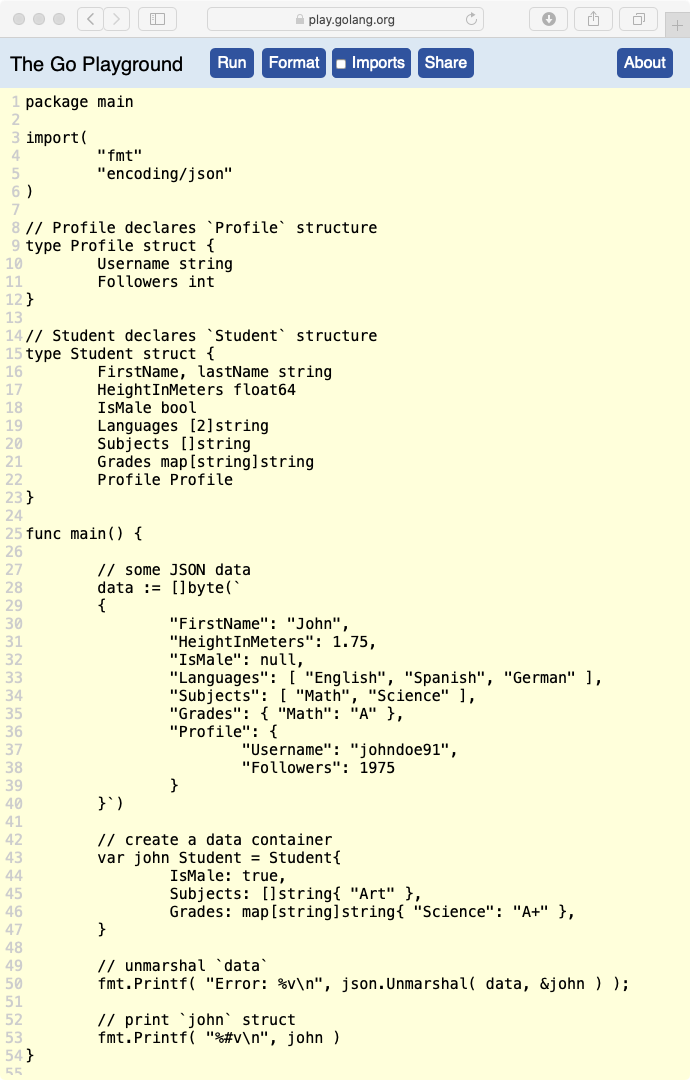
In the above program, we have declared the Profile structure type and modified Student structure to contain a field Profile of Profile type.
We have also introduced some new fields in the Student structure type of array, slice and map data structure. We have also provided the JSON data for these fields in the data value.
The one extra thing we did was to initialize the john struct with some field values. We have initialized the Subjects field of slice data type and Grades field of map data type. This program yields the following result.
Error: <nil>
main.Student{
    FirstName: "John",
    lastName: "",
    HeightInMeters: 1.75,
    IsMale: true,
    Languages: [2]string{
        "English",
        "Spanish"
    },
    Subjects: []string{
        "Math",
        "Science"
    },
    Grades: map[string]string{
        "Math": "A",
        "Science": "A+"
    },
    Profile: main.Profile{
        Username: "johndoe91",
        Followers: 1975
    }
}
There is a lot going on here, so let’s go through the result one at a time.
- The fields that are unexported in the
structor missing from the JSON are not unmarshalled. If a field value in the JSON isnulland its corresponding field type’s zero-value isnil(likeinterface,map,pointer, orslice) then the value is replaced withnil, else that field is ignored for unmarshalling and retains its original value. - If
Unmarshalencounters anarraytype and array values in the JSON are more than the array can hold, then extra values are discarded. If array values in JSON are less than the length of the array, then the remaining array elements are set to their zero-values. Thearraytype should be compatible with the values in the JSON. - If
Unmarshalencounters aslicetype, then theslicein thestructis set to0length and elements from the JSON array are appended one at a time. If the JSON contains an empty array, thenUnmarshalreplaces theslicein thestructwith an emptyslice. Theslicetype should be compatible with the values in the JSON. - If
Unmarshalencounters amaptype and the map’s value in thestructisnil, then a newmapis created and object values in the JSON are appended. If themapvalue isnon-nil, then the original value of themapis reused and new entries are appended. Themaptype should be compatible with the values in the JSON.
If Unmarshal encounters a pointer field and the value of that field in the JSON is null then that field is set to nil pointer value. If the field in the JSON is not null then new memory is allocated for the pointer in case the pointer is nil or the old value of the pointer is reused.
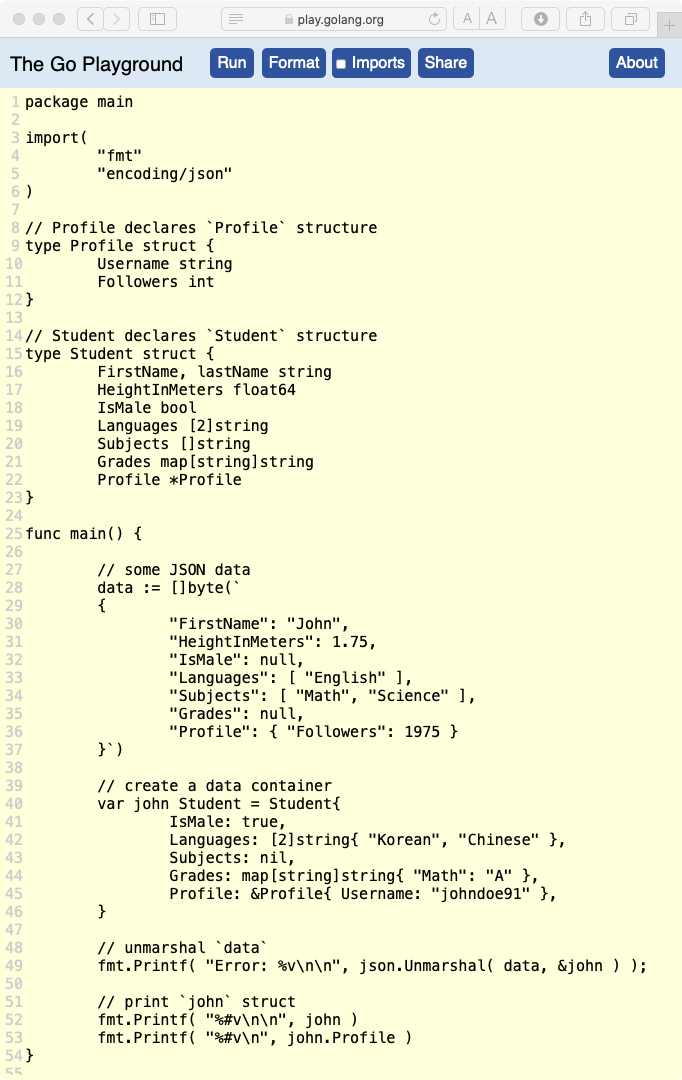
In the program above, Subject field is set to nil explicitly (it will be nil implicitly since its zero-value is nil). The Profile field of the Student structure holds a pointer to Profile type and it is initialized with the Username field value.
In the JSON data, we have set Grades field to null. We have also provided the value of the Profile.Followers field. Let’s see the result of this program.
Error: <nil>main.Student{FirstName:"John", lastName:"", HeightInMeters:1.75, IsMale:true, Languages:[2]string{"English", ""}, Subjects:[]string{"Math", "Science"}, Grades:map[string]string(nil), Profile:(*main.Profile)(0xc00000c080)}&main.Profile{Username:"johndoe91", Followers:1975}As we can see from the result, the Languages array field value was overridden by the values in the JSON. The Grades field was set to nil because it is a map field (and its zero-value is nil) and is value in the JSON is null.
Since Profile field is a pointer and its value in the john struct is non-nil, Unmarshal allocates uses the existing pointer value and assigned field values from the JSON. If the value of the Profile field in the JSON was null, then john would’ve unconditionally set the value Profile field to nil.
Promoted Fields
If a structure contains anonymously nested struct field, the nested structure field will get promoted to the parent struct. Hence, the JSON must contain the field values on the parent object.
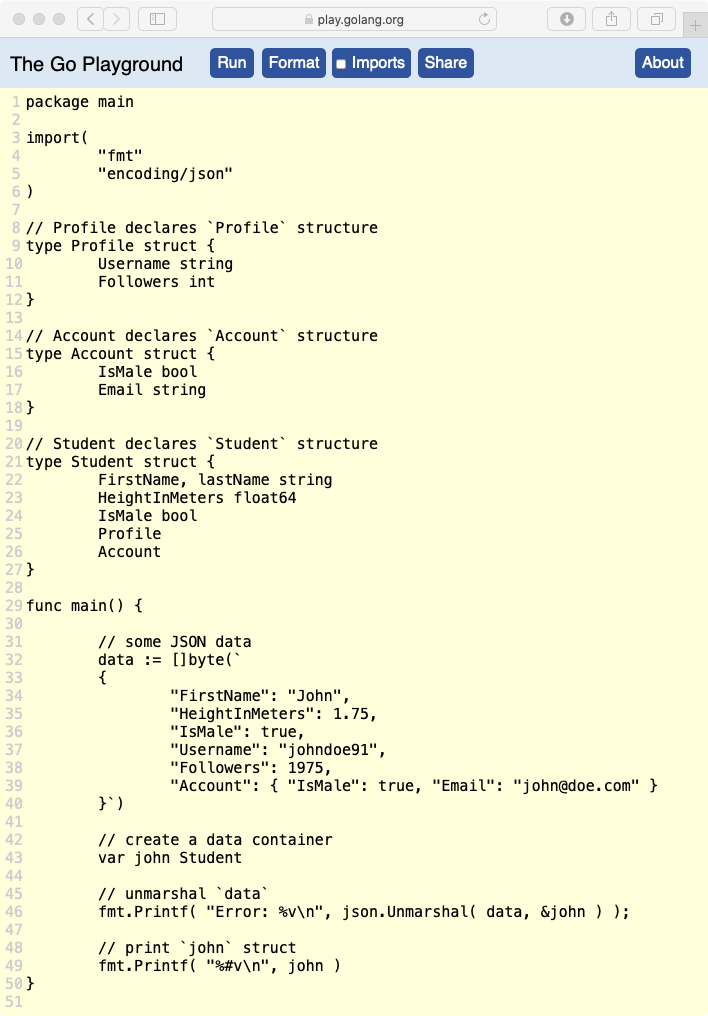
As we can see from the above example, both Account and Profile structures are anonymously nested inside Student structure. In the JSON data, we have added Username and Followers fields of the Profile structure on the main object but Account field data is provided through the Account object.
Error: <nil>main.Student{FirstName:"John", lastName:"", HeightInMeters:1.75, IsMale:true, Profile:main.Profile{Username:"johndo
e91", Followers:1975}, Account:main.Account{IsMale:false, Email:""}}From the result of this program above, we can see that Account field was not unmarshalled because this field is anonymously nested struct and it expected the field values to be present on the parent object.
Using Structure Tags
In the JSON encoding lesson, we learned that structure field tags can be very helpful to decide field names and omission criteria. We can also use the structure tags to interpolate JSON field names to struct field names.
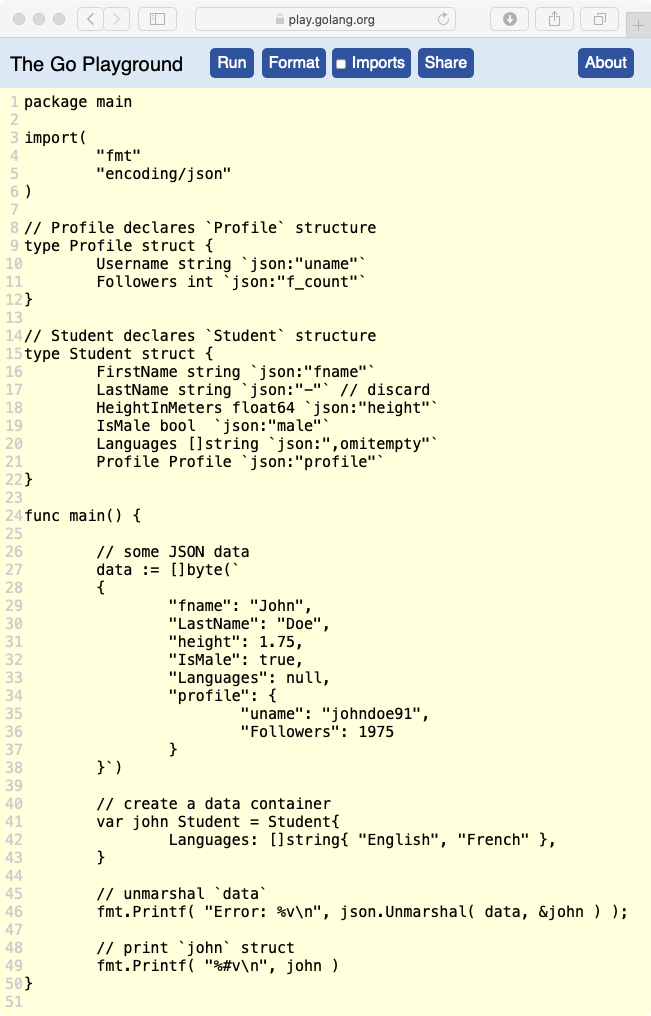
In the program above, we have tagged all structure fields with appropriate JSON field names. However, we have tagged LastName field with json:"-" which means this field will not be considered for unmarshalling.
Error: <nil>main.Student{FirstName:"John", LastName:"", HeightInMeters:1.75, IsMale:false, Languages:[]string(nil), Profile:main.Profile{Username:"johndoe91", Followers:0}}As you can see from the result above, IsMale field in the JSON did not get unmarshalled because it’s tagged with male field name (same with Followers nested field).
Unfortunately, omitempty option does not work. You might’ve expected that the Unmarshal function will ignore a field if its value is null in the JSON by looking at the omitempty option value but unfortunately that’s not the case. I hope, Go will consider adding this feature in the future.
Working with Maps
Since a JSON contains string keys and values of supported data types, a map of type map[string]interface{} is a suitable candidate for storing JSON data. We can pass a pointer to nil or non-nil pointer of the map to the Unmarshal function and all JSON field values will be populated inside the map.
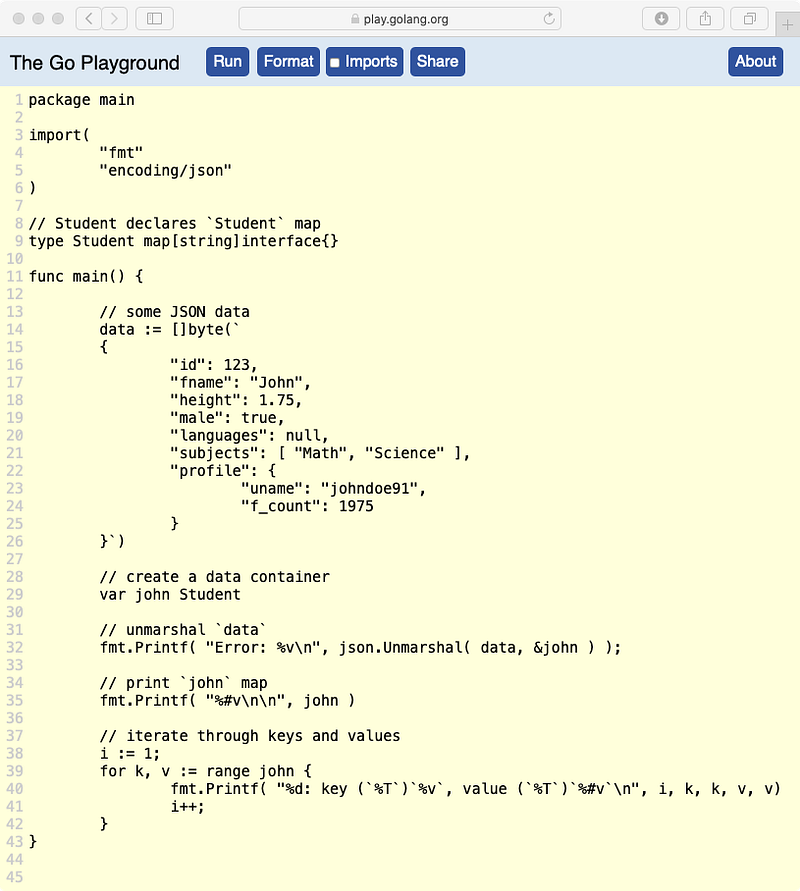
In the above example, we have created a Student map of data types of which holds keys string data types and values of interface{} data types. If our JSON contains specific data type values, then we can customize the map data type according to it, for example map[string]float64 for JSON integer values.
We have created an empty map variable john which is nil at the moment. We have passed the pointer of john to the Unmarshal function and this function will initialize a map to store the JSON decoded data.
Error: <nil>
main.Student{"fname":"John", "height":1.75, "id":123, "languages":interface {}(nil), "male":true, "profile":map[string]interface {}{"f_count":1975, "uname":"johndoe91"}, "subjects":[]interface {}{"Math", "Science"}}1: key `languages` of type `string` has value `<nil>` of type `<nil>`
2: key `subjects` of type `string` has value `[]interface {}{"Math", "Science"}` of type `[]interface {}`
3: key `profile` of type `string` has value `map[string]interface {}{"f_count":1975, "uname":"johndoe91"}` of type `map[string]interface {}`
4: key `id` of type `string` has value `123` of type `float64`
5: key `fname` of type `string` has value `"John"` of type `string`
6: key `height` of type `string` has value `1.75` of type `float64`
7: key `male` of type `string` has value `true` of type `bool`From the above result, we can see that all fields got populated inside the john map. But take a look at is the data types of the map values. There are certain rules Unmarshal functions follows to store the JSON values in a map.
- A JSON
stringvalue is stored asstring. - A JSON
numbervalue(int or float) is stored asfloat64. - A JSON
booleanvalue is stored asbool. - A JSON
nullvalue is stored asnilvalue. - A JSON
arrayvalue is stored as asliceof type[]interface{}. - A JSON
objectvalue is stored as amapof typemap[string]interface{}.
The interesting things to look at in the result are the values of JSON array and object. The array values were stored in a slice of type []interface{} and object values are stored in a map of type map[string]interface{}.
As we know, a valid JSON format can be an object (like in the example above) or an array. Since Unmarshal is capable of allocating memory for a pointer as well as it can create containers to hold decoded JSON data on its own, we can store complex JSON data without defining a container-type.
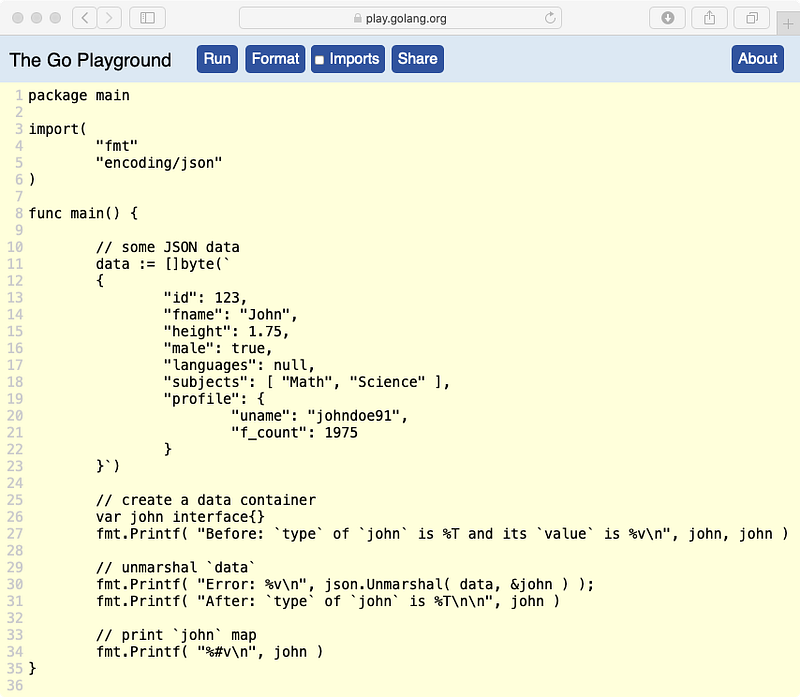
In the example above, we have created the john container of type interface{}. Its default value is nil because, at the moment, the interface doesn’t have a concrete value. We are passing a pointer of the interface john as the argument to the Unmarshal function.
The Unmarshal function will extract the concrete value of the interface and if it finds it nil, it will assign it with a suitable data type to store decoded JSON data. The program above yields the following result.
Before: `type` of `john` is <nil> and its `value` is <nil>
Error: <nil>
After: `type` of `john` is map[string]interface {}map[string]interface {}{"fname":"John", "height":1.75, "id":123, "languages":interface {}(nil), "male":true, "profile":map[string]interface {}{"f_count":1975, "uname":"johndoe91"}, "subjects":[]interface {}{"Math", "Science"}}As we can see from the result above, Unmarshal function stored a map if type map[string]interface{} as the concrete value of the interface. If the JSON were an array instead of an object, it would have stored a slice of type []interface as the concrete value.
Remember, at the moment, john is an interface and to access map values, we first need to extract the concrete value of the interface. To do that, we need to use type assertion syntax of interface.(Type) (read more from here).
johnData := john.(map[string]interface{})Using Unmarshaler and TextUnmarshaler
A struct field can take responsibility for unmarshaling the JSON data on its own. In such a case, the field value must implement the json.Unmarshaler interface which provides the declaration of UnmarshalJSON method.
type Unmarshaler interface {
    UnmarshalJSON([]byte) error
}
This method is used to delegate the responsibility of unmarshalling a field back to the field itself. If Unmarshal finds a field of type Unmarshaler, it will call the UnmarshalJSON function with JSON data of that field (even for null) and it becomes the responsibility of that field to initialize/assign a value.
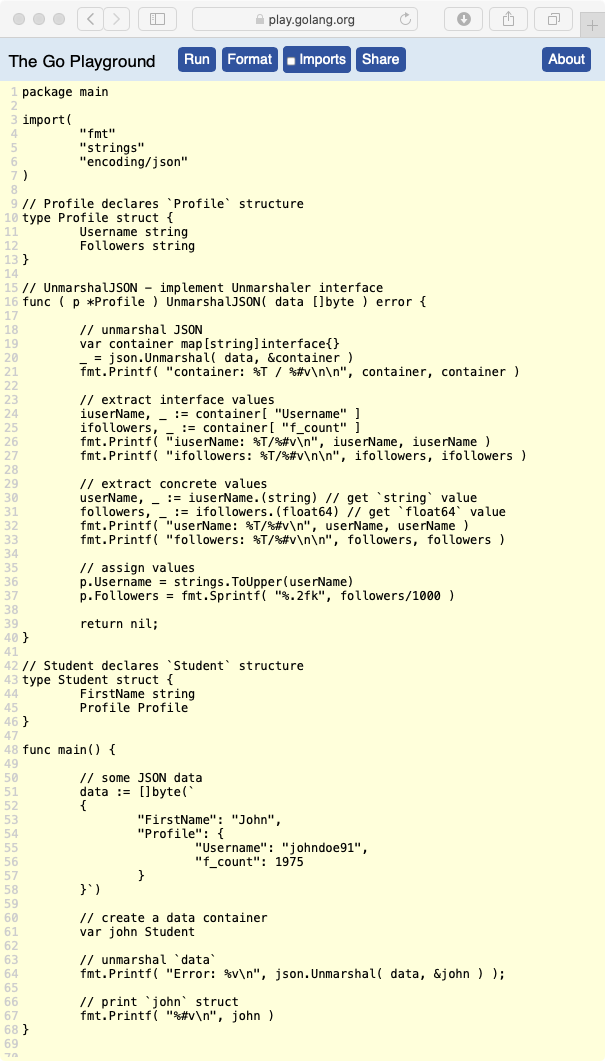
In the program above, the Profile field value implements the Unmarshaler interface. This program yields the result below.
container: map[string]interface {} / map[string]interface {}{"Username":"johndoe91", "f_count":1975}iuserName: string/"johndoe91"
ifollowers: float64/1975userName: string/"johndoe91"
followers: float64/1975Error: <nil>
main.Student{FirstName:"John", Profile:main.Profile{Username:"JOHNDOE91", Followers:"1.98k"}}If a field implements encoding.TextUnmarshaler interface and the JSON field value is a string, Unmarshal calls that value’s UnmarshalText method with the unquoted form of the string.
Encoder and Decoder
Go provides json/Encoder and json/Decoder structure types to encode JSON from a data stream and decode JSON to a data stream. This is helpful to process JSON as some data is available.
Encoder
The json/Encoder structure type lets you create a struct that holds a io.Writer object and provides Encode() method to encode JSON from an object and write to this io.Writer object.
func (enc *Encoder) Encode(v interface{}) errorBut first, we need to create an *Encoder object from a io.Writer using the NewEncoder function.
func NewEncoder(w io.Writer) *EncoderEach time the Encode() method is called, JSON is marshaled from v and appended to the w with a trailing newline.
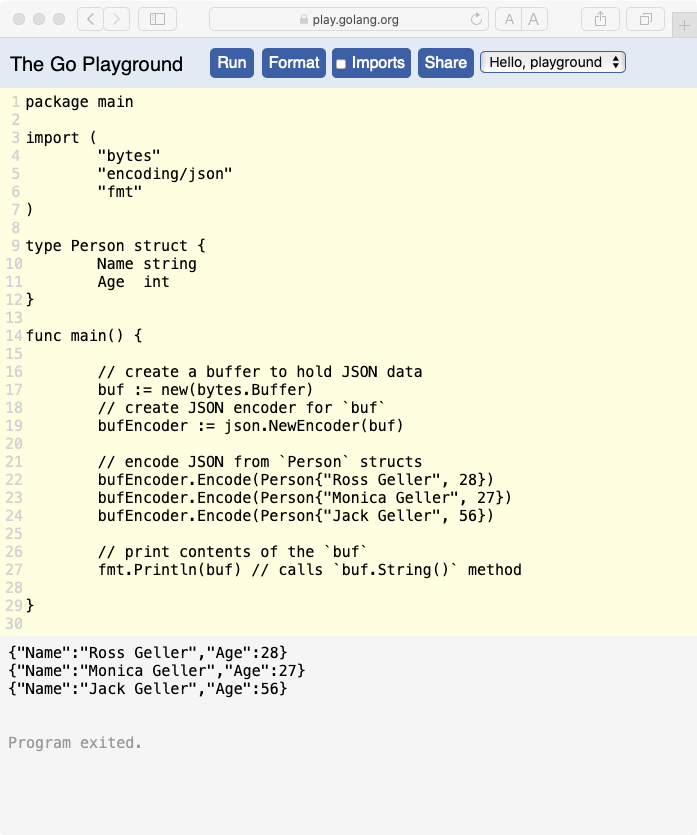
💡 In the example above, we have used a
*Bufferbecause it implements theio.Writerinterface by implementingWrite method.
Decoder
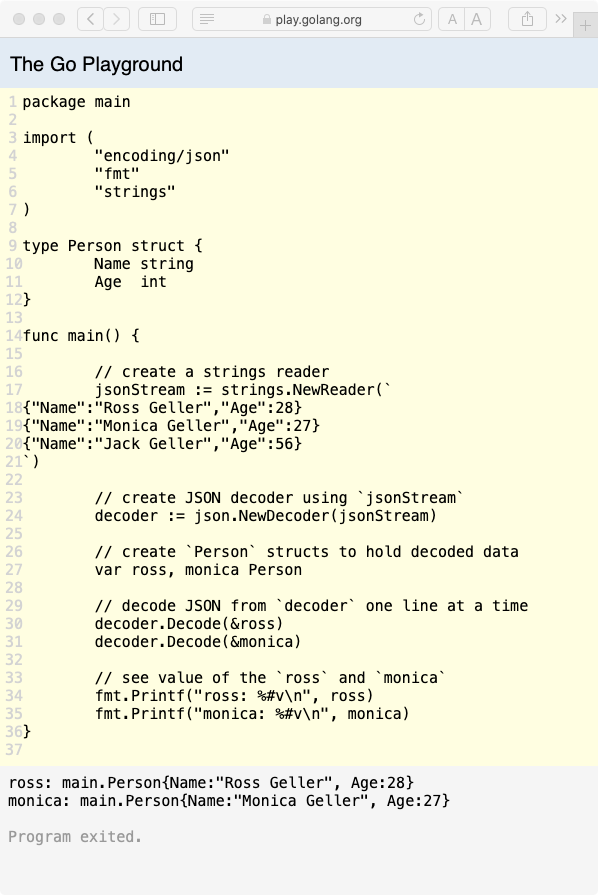
The json/Decoder structure type lets you create a struct that holds a io.Reader object and provides Decode() method to decode JSON from this io.Writer object and write to an object.
func (dec *Decoder) Decode(v interface{}) errorIf all the lines in the io.Reader has been read, then next Decode call returns io.EOF error. But first, we need to create an *Decoder object from a io.Reader using the NewDecoder function.
func NewDecoder(r io.Reader) *DecoderEach time the Encode() method is called, JSON is unmarshaled from r by reading a line (trailing with a newline character) and saved to v.