
Work With Persistent Volumes in Azure Webapps and Docker
Persistent volumes are now available in azure web apps

I work with Azure Web apps for a while. Now I discovered the docker support in Azure Web apps. this is a nice feature, but there are some settings that are not very well documented (in my opinion). One of them is the mounting of volumes for a persistent storage
I will show you, how to create a WordPress application in Azure with a persistent volume.
What are volumes?
A volume in docker allows you to persist data that live outside of your container. So Volumes are like external shared for docker
So let’s spin up the azure command shell in the browser

The docker-compose.yml
I will use docker-compose this will be supported in azure web apps, and it is very easy to handle.
to create a docker-compose.yml in the azure shell you simply type
nano docker-compose-wordpress.ymlAfter that, you can copy the following yml content
version: '3.3'services:
db:
image: mysql:5.7
volumes:
- db_data:/var/lib/mysql
restart: always
environment:
MYSQL_ROOT_PASSWORD: somewordpress
MYSQL_DATABASE: wordpress
MYSQL_USER: wordpress
MYSQL_PASSWORD: wordpresswordpress:
depends_on:
- db
image: wordpress:latest
ports:
- "8000:80"
restart: always
environment:
WORDPRESS_DB_HOST: db:3306
WORDPRESS_DB_USER: wordpress
WORDPRESS_DB_PASSWORD: wordpress
volumes:
db_data:this is your base setup. It defines the MySQL database and the WordPress instance. The WordPress will wait for the database, to spin up and start then the web instance. Now it’s time to generate the web application
Create a Web app
To create a web app from the YAML Template, you will create a Resource group first, will call them myResourceGroup:
az group create — name myResourceGroup — location “West Europe”
After that, you must create an App Service Plan that will later host the webpage
az appservice plan create — name myAppServicePlan — resource-group myResourceGroup — sku S1 — is-linuxNow it’s time to spin up the WordPress hosted by a multi docker image composed by docker-compose
az webapp create — resource-group myResourceGroup — plan myAppServicePlan — name myWebApplication — multicontainer-config-type compose — multicontainer-config-file docker-compose-wordpress.ymlAfter this, you can navigate then to your page and you will see the installation WordPress installation wizard appearing. So far so good.
The Problem
If your web application now goes to sleep or you restart it or you redeploy it then the configuration that you did the last time gets lost. To prevent this, it will be required to store the data outside of the container. Here come the persistent volumes to the rescue.
Persistent Volumes
Initially, the web application does not have the persist volume feature enabled. You can do this by the following az command in the shell
az webapp config appsettings set --resource-group myResourceGroup --name myWebApplication--settings WEBSITES_ENABLE_APP_SERVICE_STORAGE=TRUEThis will set the Setting WEBSITES_ENABLE_APP_SERVICE_STORAGE to true, to tell the web app that it must use the Shared Store. Typically it will be mounted into the /home directory. You can see this, by using the df -h command
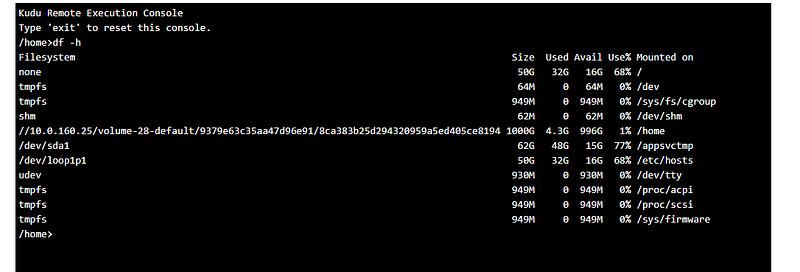
After that, you must now use the ${WEBAPP_STORAGE_HOME} variable to reference the /home directory. So you can now modify the compose definition like this, to store the data (MySQL and WordPress) onto the persistent storage
version: '3.3'services:
db:
image: mysql:5.7
volumes:
- ${WEBAPP_STORAGE_HOME}/site/db:/var/lib/mysql
restart: always
environment:
MYSQL_ROOT_PASSWORD: somewordpress
MYSQL_DATABASE: wordpress
MYSQL_USER: wordpress
MYSQL_PASSWORD: wordpress
wordpress:
image: wordpress:latest
volumes:
- ${WEBAPP_STORAGE_HOME}/site/wwwroot:/var/www/html
ports:
- "8000:80"
restart: always
environment:
WORDPRESS_DB_HOST: db:3306
WORDPRESS_DB_USER: wordpress
WORDPRESS_DB_PASSWORD: wordpressFrom now on the database data will be stored in /home/db and any application-based data on /home/site/wwwroot. If you scale up the service to use 2 or more nodes, this does not matter, because the /home directory will be shared through each instance.
Final words
I like the docker support in azure, with the persistent volumes you will have the ability to store the data outside the container. So the manually entered data will be stored in a safe way so that a recreation of the container will not destroy the complete work. What do you think about this support?
Want to Connect?Say Hello on: LinkedIn, GitHub, and Blog.