avatarUrwa Nasrullah

Free AI web copilot to create summaries, insights and extended knowledge, download it at here

2958

Abstract

ure><p id="1c0b">Now click on Create a Design as highlighted in the above picture, a popup will appear with two options:</p><p id="3fc5">1: Browse from templates</p><p id="2730">2: Start from scratch</p><p id="4a6b">Now click on start from scratch and the following page will appear:</p><figure id="40b8"><img src="https://cdn-images-1.readmedium.com/v2/resize:fit:800/1*dmAoRda5bgWVi04DvQUscA.png"><figcaption>Design Sizes available at PosterMyWall</figcaption></figure><p id="21c2">After selecting the size of your choice, you will be redirected to the design page where you’ll create your design using different PosterMyWall tools. After making your design you’ll click on the save button as highlighted below:</p><figure id="bfcf"><img src="https://cdn-images-1.readmedium.com/v2/resize:fit:800/1*6my0tjpQmNQIuSYyUwsCaQ.png"><figcaption>Design Creation Page of PosterMyWall</figcaption></figure><p id="8a26">After clicking on the save button, another popup window will appear:</p><figure id="d4e8"><img src="https://cdn-images-1.readmedium.com/v2/resize:fit:800/1*kNaE1X3z01Gx-WqSSfkKdg.png"><figcaption>My Stuff Popup</figcaption></figure><p id="82f0">You have to click on the My Stuff and it will again redirect you to the designer’s dashboard. From here you can explore the different options but the option we are concerned with is in the bottom menu of the home page.</p><figure id="7f5d"><img src="https://cdn-images-1.readmedium.com/v2/resize:fit:800/1*Vwocn17b4FeMxnlsQ-eeNA.png"><figcaption>Postermywall Bottom Menu</figcaption></figure><p id="679c">After clicking the sell your designs you will be prompted to a new page.</p><figure id="b620"><img src="https://cdn-images-1.readmedium.com/v2/resize:fit:800/1*hip8mV3rnoHaLOdYp4X7xQ.png"><figcaption>Sell Your Designs Page of Postermywall</figcaption></figure><p id="e556">You can explore the different options here including the tutorial on how to submit your first design. However, we need to find an option named <a href="https://www.postermywall.com/index.php/sell/details">Get Started</a>.</p><figure id="6a6f"><img src="https://cdn-images-1.readmedium.com/v2/resize:fit:800/1*xPz5O_6INE_3jvNZhwHyZw.png"><figcaption>Option of Get Started to Sign up as a designer</figcaption></figure><p id="4fc6">After clicking on getting Started, you’ll be redirected to a new page:</p><figure id="49e2"><img src="https://cdn-images-1.readmedium.com/v2/resize:fit:800/1*96M3_iTQnMTOAIfX04hR-w.png"><figcaption>Choose a Design</figcaption></figure><p id="034b">Now click on choose a design as it has been highlighted in the picture. A new page will appear, where you will have to select your self-made template as PosterMyWall doesn’t accept editing of the existing templates for resale purposes. After selecting your template, a new window will appear:</p><figure id="4232"><img src="https://cdn-images-1.readmedium.com/v2/resize:fit:800/1*c_9sWzMamo-rGIl6tTzWMg.png"><figcaption>Description of your desig

Options

n</figcaption></figure><p id="fdd5">Here you will have to put appropriate topic, tags and category and after checking the boxes for quality assurance, click on the setup royalty payments.</p><figure id="722e"><img src="https://cdn-images-1.readmedium.com/v2/resize:fit:800/1*fmO7Mh2gJzTIiYGG3EUr5w.png"><figcaption>Payment Details to be added here</figcaption></figure><p id="86dd">Here you have to put your payment details and then by clicking on next mailing address, you will be sent to another page, picture of which is shown below:</p><figure id="cfc4"><img src="https://cdn-images-1.readmedium.com/v2/resize:fit:800/1*RfaIqLAP2MC6fqLDCm1YgQ.png"><figcaption>Mailing details</figcaption></figure><p id="058e">Here you have to click on the submit design template and you are all done. Now if you go back to your dashboard, you will find it different with a details of your earned income as well.</p><figure id="fcdd"><img src="https://cdn-images-1.readmedium.com/v2/resize:fit:800/1*F7VLK-4MqNGIzzz2bEffBw.png"><figcaption>Designer Dashboard</figcaption></figure><p id="ad95">Now the more templates you make, more are the chances of your earning.</p><h2 id="708a">Payment Mechanism of PosterMyWall:</h2><p id="4224">The first thing you need to now is that PosterMyWall only pay you through PayPal and for countries where PayPal is not working there is no need to worry as well because they are various legal methods through which you can have PayPal. The minimum withdrawal limit is 50 dollars and payment is made in the first week of month. If you have reached your limit, then there is no need to request for withdrawal, your payment will be automatically sent to you in the first week of next month. Unlike fiverr where you can sell your design for once, on PosterMyWall your template can even be sold 100 times.</p><p id="07c8">If you work hard and make 300 templates and then stop working on PosterMyWall. PosterMyWall will still pay you whenever your templates will be sold. If you make more templates, you can expect a higher monthly stipend in the months when you don’t want to work anymore.</p><p id="9dfd">Details of royalty payments are given below:</p><figure id="1c09"><img src="https://cdn-images-1.readmedium.com/v2/resize:fit:800/1*PgciTKzmCjuP43zUoSBR7Q.png"><figcaption>Royalty Payments from PosterMyWall</figcaption></figure><h2 id="f25b">Bonus Point of Working at PosterMyWall</h2><p id="b131">There are various positive points of PosterMyWall. Your account is instantly approved at the moment you logged in, Your designs immediately get accepted without staying under review for years, You don’t have to deal with customers and your templates can be sold as many times as possible. So if you are a struggling designer and unable to compete among million of gigs, this is the perfect platform for you.</p><p id="f61c">Hire me for your design projects: <a href="https://www.fiverr.com/grapholic_urwa">click here</a></p></article></body>

Work For Days Earn For Life Time, Start Working on PosterMyWall Now

Everyone wants to work where he/she can earn for a lifetime in the same way everyone wants to invest where he/she can get profits. For graphics designers, this dream has become possible as they can now work online and can earn for a lifetime even after quitting work. Yesss! you are reading it right and there is no misunderstanding, You can work on PosterMyWall and it will keep paying you even after you stopped working on it.

Image by Tumisu on Pixabay

What is PosterMyWall?

PosterMyWall is a templated-based website tool where designers can make designs using the tools available on PosterMyWall, which means you don’t have to be a pro in Photoshop and Illustrator as they are not required here. After publishing these designs as templates, here comes the role of buyers who can edit these templates according to their needs and can buy them. Some portion of that sale price will go to the PosterMyWall and the remaining will go to the designer’s earnings. There are plenty of options available for both designers and buyers to fulfill their needs, from Instagram ads to Web ads of different sizes and from book covers to printable poster designs, you can design and buy anything.

How to make an account on PosterMyWall?

Making an account is not as difficult as it is on its competitors like Canva and Vista Create and your account is accepted as soon as you log into your account. For that click on this link, and a page like this will appear.
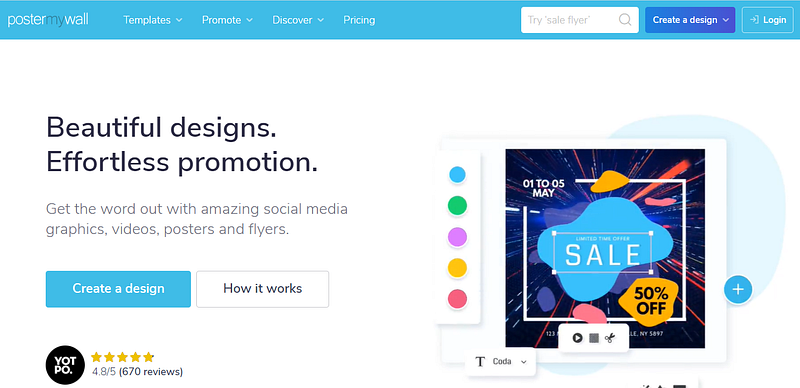
PosterMyWall Home Page

From here you’ll click on login and then will log in with the help of google and guess what your account is created.
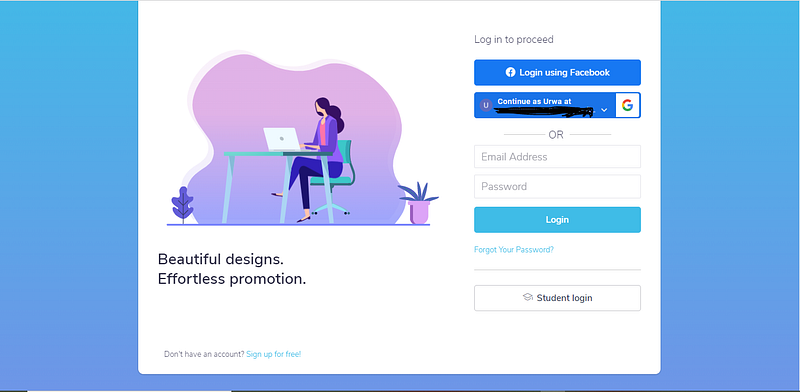
Log in Page of PosterMyWall

Uploading Your First Template For Sale:

After which you’ll be redirected to your designer’s dashboard as shown below:
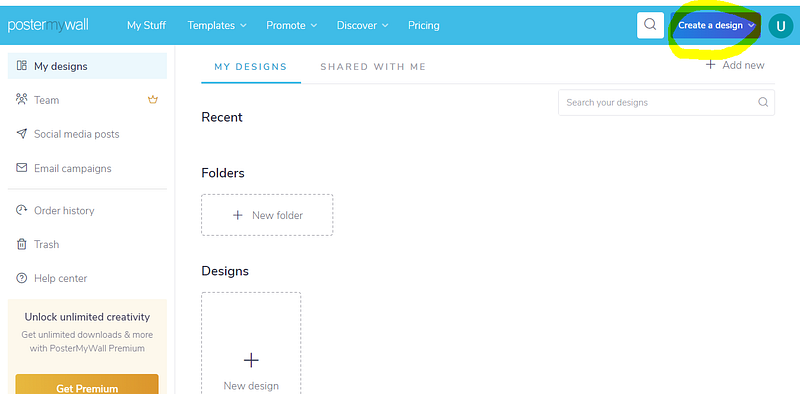
Designer Dashboard of PosterMyWall

Now click on Create a Design as highlighted in the above picture, a popup will appear with two options:

1: Browse from templates

2: Start from scratch

Now click on start from scratch and the following page will appear:
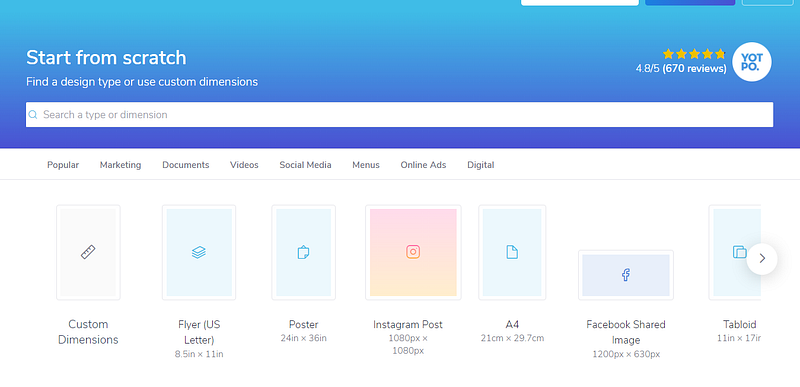
Design Sizes available at PosterMyWall

After selecting the size of your choice, you will be redirected to the design page where you’ll create your design using different PosterMyWall tools. After making your design you’ll click on the save button as highlighted below:
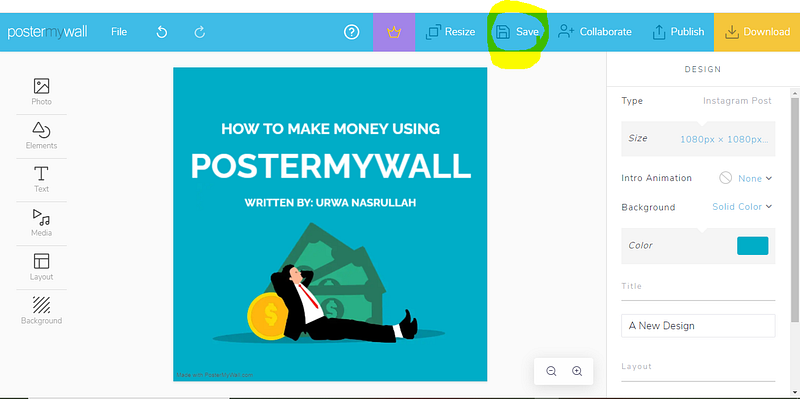
Design Creation Page of PosterMyWall

After clicking on the save button, another popup window will appear:
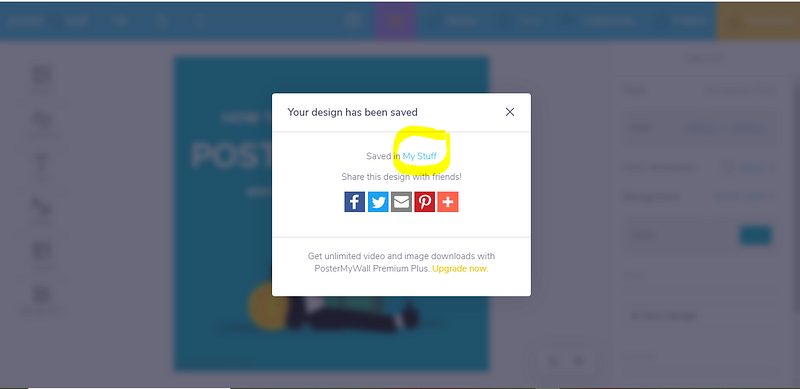
My Stuff Popup

You have to click on the My Stuff and it will again redirect you to the designer’s dashboard. From here you can explore the different options but the option we are concerned with is in the bottom menu of the home page.
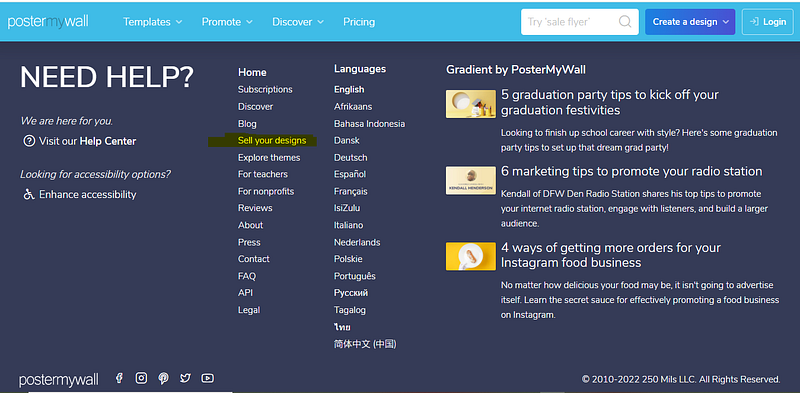
Postermywall Bottom Menu

After clicking the sell your designs you will be prompted to a new page.
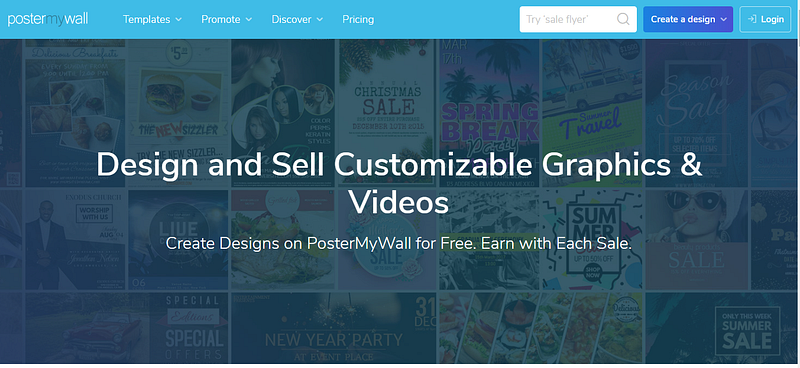
Sell Your Designs Page of Postermywall

You can explore the different options here including the tutorial on how to submit your first design. However, we need to find an option named Get Started.
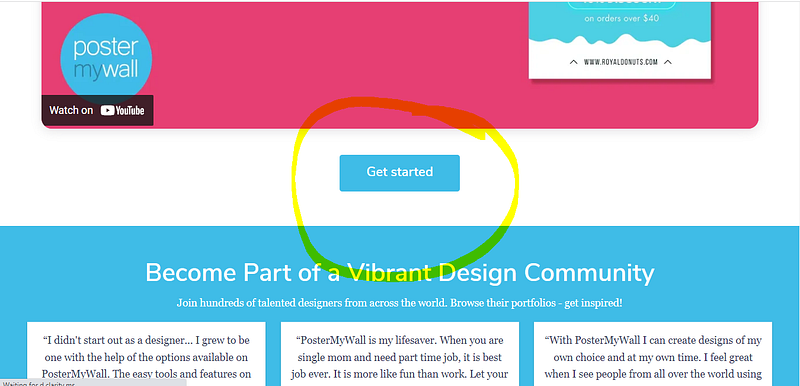
Option of Get Started to Sign up as a designer

After clicking on getting Started, you’ll be redirected to a new page:
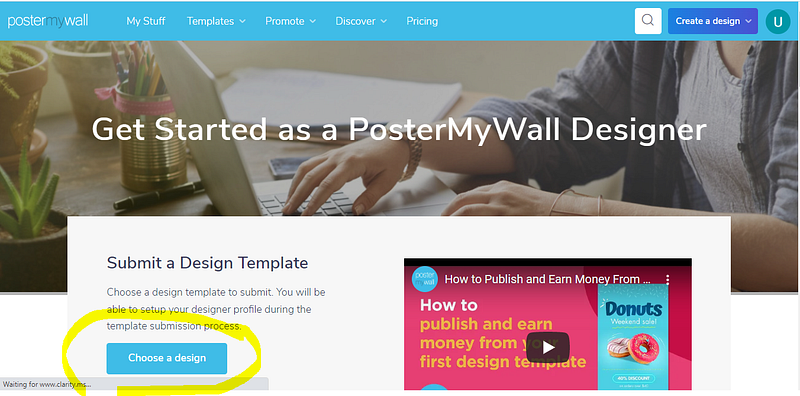
Choose a Design

Now click on choose a design as it has been highlighted in the picture. A new page will appear, where you will have to select your self-made template as PosterMyWall doesn’t accept editing of the existing templates for resale purposes. After selecting your template, a new window will appear:
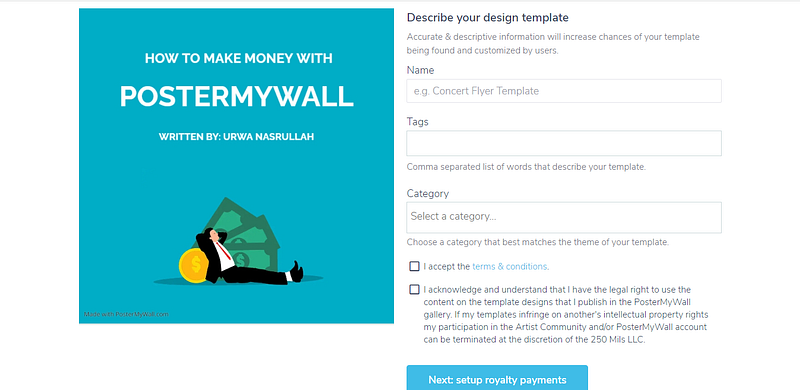
Description of your design

Here you will have to put appropriate topic, tags and category and after checking the boxes for quality assurance, click on the setup royalty payments.
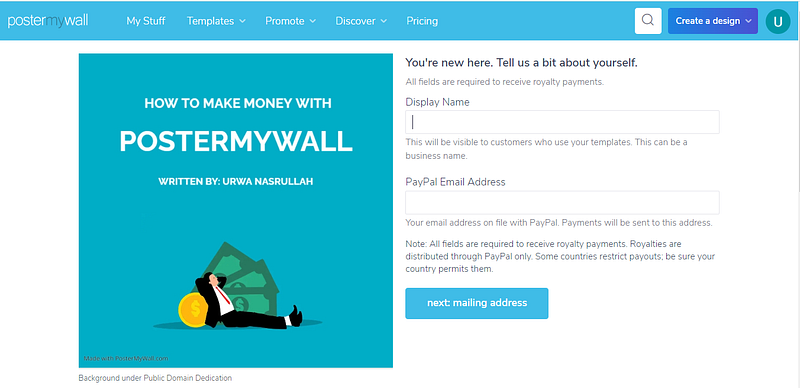
Payment Details to be added here

Here you have to put your payment details and then by clicking on next mailing address, you will be sent to another page, picture of which is shown below:
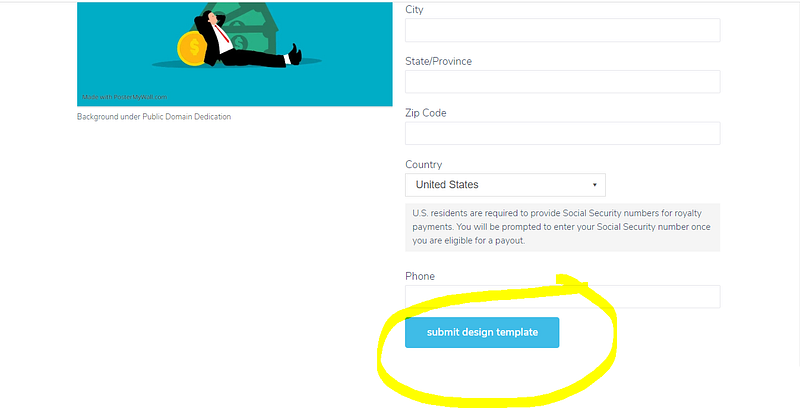
Mailing details

Here you have to click on the submit design template and you are all done. Now if you go back to your dashboard, you will find it different with a details of your earned income as well.
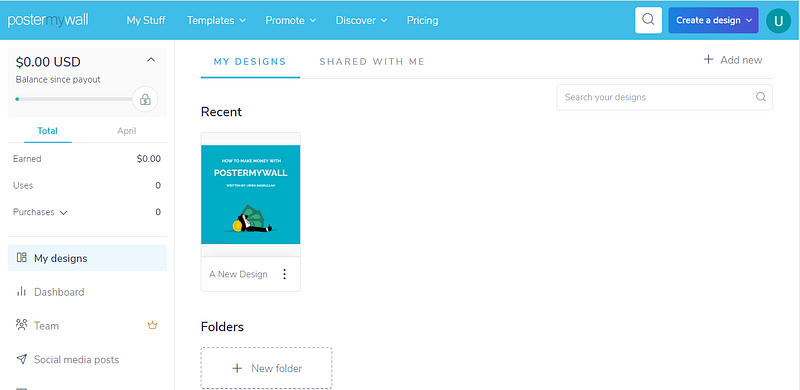
Designer Dashboard

Now the more templates you make, more are the chances of your earning.

Payment Mechanism of PosterMyWall:

The first thing you need to now is that PosterMyWall only pay you through PayPal and for countries where PayPal is not working there is no need to worry as well because they are various legal methods through which you can have PayPal. The minimum withdrawal limit is 50 dollars and payment is made in the first week of month. If you have reached your limit, then there is no need to request for withdrawal, your payment will be automatically sent to you in the first week of next month. Unlike fiverr where you can sell your design for once, on PosterMyWall your template can even be sold 100 times.

If you work hard and make 300 templates and then stop working on PosterMyWall. PosterMyWall will still pay you whenever your templates will be sold. If you make more templates, you can expect a higher monthly stipend in the months when you don’t want to work anymore.

Details of royalty payments are given below:
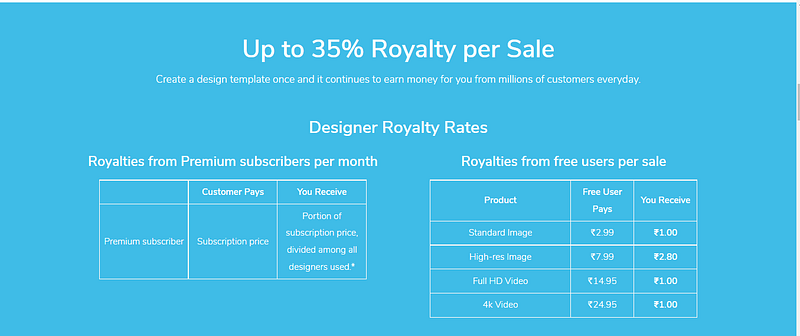
Royalty Payments from PosterMyWall

Bonus Point of Working at PosterMyWall

There are various positive points of PosterMyWall. Your account is instantly approved at the moment you logged in, Your designs immediately get accepted without staying under review for years, You don’t have to deal with customers and your templates can be sold as many times as possible. So if you are a struggling designer and unable to compete among million of gigs, this is the perfect platform for you.

Hire me for your design projects: click here

Online Earning
Work From Home Jobs
Graphics Designing
Postermywall Earning
Start Earning Online
Recommended from ReadMedium