Windows Event IDs That Every Cybersecurity Analyst MUST Know
Uncovering Threats with Critical Windows Event IDs
Introduction
In the world of cybersecurity, staying ahead of potential threats is crucial. One of the best ways to do this is by keeping a close eye on Windows Event IDs. These event IDs are like digital breadcrumbs, providing valuable informations about what’s happening on your system. Whether you’re new to the field or a seasoned pro, knowing which Event IDs to monitor can make a big difference in how effectively you can protect your environment.
Here’s a rundown of some of the most important Windows Event IDs that every cybersecurity analyst should be familiar with:
1- Event ID 1116 — Antivirus Malware Detection
This event is particularly important because it logs when Defender detects a malware. A surge in these events could indicate a targeted attack or widespread malware infection.
Microsoft Defender Antivirus has detected malware or Other potentially unwanted software.

   Name: HackTool:Win32/MimikatzD
   ID: 2147729891
   Severity: High
   Cateqory: Tool
   Path: file:
   Detection Oriqin: Local machine
   Detection Type: Concrete
   Detection Source: Real-Time Protection
   User KNOWLEDGEBASE\brs
   Process Name: C:\Windows\explorer.exe
   Security intelligence Version: AV: 1.329.963.0 AS: 1.329.963.0, NIS: 1.329.963.0
   Engine Version: AM: 1.1.17700.4, NIS: 1.1.17700.4
2- Event ID 4624 — Successful Account Logon
This log helps you track who’s accessing the system and when. Monitoring these logins is key for spotting unusual access patterns that might indicate unauthorized activity.
The account login was successful.

Object :
 Security ID: System
 Account name: Example$
 Account domain: WORKGROUP
 Login ID: 0x3A6

Login information:
 Login type: 5
 Restricted administrator mode: -
 Remote Credential Guard: -
 Virtual account: No
 High Token: Yes

Impersonation Level: Impersonation

New login:
 Security ID: System
 Account Name: System
 Account domain: NT AUTHORITY
 Login ID: 0x868
 Linked Logon ID: 0x8
 Network account name: -
 Network Account Domain:-
 Logon GUID: {00000-0000-0000-0000-00}

Process information:
 Process ID: 0x895j
 Process name: C:\Windows\System32\services.exe


Detailed authentication information:
 Login process: ****
 Authentication package: Negotiate
 Services in transit:-
 Package name (NTLM only): -
 Key length: 0

This event is generated when a logon is created. It is generated on the computer where the logon was performed.
3- Event ID 4625 — Failed Account Logon
Failed login attempts are captured by Event ID 4625. These logs are vital for identifying potential brute-force attacks or unauthorized access attempts. By keeping an eye on these events, you can spot suspicious behavior early and take action before things escalate.
Failed to log in to an account.

Subject :
 Security ID: System
 Account name: Example$
 Account Area: WORKING GROUP
 Login ID: 0x3A1

Login type: 2

Account for which login failed:
 Security ID: NULL SID
 Account name: Gamer
 Account domain: Example

Failure information:
 Failure reason: Unknown username or incorrect password.
 Status: 0xC000006D
 Substate: 0xC000006A

Process information:
 Caller process ID: ***
 Caller process name: C:\Windows\System32\svchost.exe

Detailed authentication information:
 Login process: User32
 Authentication Package: Negotiate
 Services in transit:-
 Package name (NTLM only): -
 Key length: 0

This event is generated when a logon request fails. It is generated on the computer on which access was attempted.
Failure Information: Sub Status and Status code explain the failure reason in this case we have the code “0xC000006A” indicate that the user name is correct but the password is wrong.
Here is a table show all the failure reasons code:
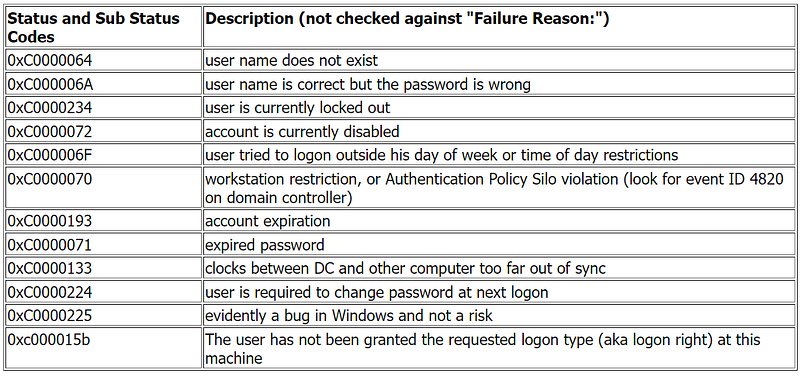
These codes are typically generated by Windows operating systems when a user fails to log in. They offer valuable information to help troubleshoot and resolve login issues.
4- Event ID 4672 — Special Privileges Assigned to New Logon
When a user is granted special privileges, Event ID 4672 is logged. This event is crucial for spotting privilege escalation, which could be a sign of an attacker gaining elevated access. Regularly checking these logs helps ensure that privilege changes are legitimate.
Privilèges spéciaux attribués à la nouvelle ouverture de session.

Sujet :
 ID de sécurité :  Example\Gamer
 Nom du compte :  Gamer
 Domaine du compte :  Example
 ID d’ouverture de session :  0x1****

Privilèges :  SeSecurityPrivilege
   SeTakeOwnershipPrivilege
   SeLoadDriverPrivilege
   SeBackupPrivilege
   SeRestorePrivilege
   SeDebugPrivilege
5- Event ID 4688 — New Process Creation
Event ID 4688 records the creation of new processes. This is important for identifying suspicious or unauthorized applications that might be running on your system. Keeping track of process creation helps in spotting potential threats early.
A new process has been created.

Creator Subject:
    Security ID:        Système
    Account Name:        -
    Account Domain:        -
    Logon ID:        0x3**

Target Subject:
    Security ID:        NULL SID
    Account Name:        -
    Account Domain:        -
    Logon ID:        0x**

Process Information:
    New Process ID:        0x***
    New Process Name:    C:\Windows\System32\smss.exe
    Token Elevation Type:    ****
    Mandatory Label:        Étiquette obligatoire\Niveau obligatoire système
    Creator Process ID:    0x**
    Creator Process Name:
    Process Command Line:

Token Elevation Type indicates the type of token that was assigned to the new process in accordance with User Account Control policy.
6- Event ID 4689 — Process Termination
When a process is terminated, Event ID 4689 is triggered. This helps you understand the lifecycle of processes and can be useful for correlating with process creation events. It’s another piece of the puzzle in monitoring system activity.
A process has exited.

Subject:

   Security ID:  Example\Gamer
   Account Name:  Gamer
   Account Domain:  WIN-R9H529RIO4Y
   Logon ID:  0x1**

Process Information:

   Process ID: 0x**
   Process Name: C:\Windows\System32\notepad.exe
   Exit Status: 0x0
7- Event ID 4720 — User Account Created
Event ID 4720 logs the creation of new user accounts. This is crucial for monitoring who’s being added to your system and ensuring that account creation follows your organization’s policies. Unexpected new accounts could be a red flag.
A user account was created.

Subject:
   Security ID:  ACME-FR\administrator
   Account Name:  administrator
   Account Domain:  ACME-FR
   Logon ID:  0x20f9d

New Account:
   Security ID:  ACME-FR\John.Locke
   Account Name:  John.Locke
   Account Domain:  ACME-FR

Attributes:
   SAM Account Name: John.Locke
   Display Name:  John Locke
   User Principal Name: [email protected]
   Home Directory:  -
   Home Drive:  -
   Script Path:  -
   Profile Path:  -
   User Workstations: -
   Password Last Set: <never>
   Account Expires:  <never>
   Primary Group ID: 513
   Allowed To Delegate To: -
   Old UAC Value:  0x0
   New UAC Value:  0x15
   User Account Control:
    Account Disabled
    'Password Not Required' - Enabled
    'Normal Account' - Enabled
   User Parameters: -
   SID History:  -
   Logon Hours:  <value not set>

Additional Information:
   Privileges  -
8- Event ID 4726 — User Account Deleted
When a user account is deleted, Event ID 4726 is recorded. This helps you track changes to user accounts and spot any potentially malicious deletions. Monitoring these events ensures that account management is done securely.
A user account was deleted.

Subject:
   Security ID:  WIN-R9H529RIO4Y\Administrator
   Account Name:  Administrator
   Account Domain:  WIN-R9H529RIO4Y
   Logon ID:  0x1fd23

Target Account:
  Security ID:  WIN-R9H529RIO4Y\bob
  Account Name:  bob
  Account Domain:  WIN-R9H529RIO4Y

Additional Information:
   Privileges -
9- Event ID 4732 — A Member Was Added to a Security-Enabled Local Group
This event logs when a user is added to a security group with elevated privileges. It’s important for monitoring changes in user permissions and preventing unauthorized privilege escalation.
A member was added to a security-enabled local group.

Subject:
   Security ID:  WIN-R9H529RIO4Y\Administrator
   Account Name:  Administrator
   Account Domain:  WIN-R9H529RIO4Y
   Logon ID:  0x1fd47

Member:
   Security ID:  WIN-R9H529RIO4Y\bob
   Account Name:  -

Group:
   Security ID:  BUILTIN\Users
   Group Name:  Users
   Group Domain:  Builtin

Additional Information:
   Privileges:  -
   Expiration time:  -
10- Event ID 4771 — Kerberos pre-authentication failed
This event is similar to 4625 (failed logon) but specifically for Kerberos authentication. An unusual amount of these logs could indicate an attacker attempting to brute force your Kerberos service.
Kerberos pre-authentication failed.

Account Information:
   Security ID:  ACME\administrator
   Account Name:  Administrator

Service Information:
   Service Name:  krbtgt/acme

Network Information:
   Client Address:  ::ffff:10.42.42.224
   Client Port:  50950

Additional Information:
   Ticket Options:  0x40810010
   Failure Code:  0x18
   Pre-Authentication Type: 2

Certificate Information:
   Certificate Issuer Name:
   Certificate Serial Number:
   Certificate Thumbprint:

Certificate information is only provided if a certificate was used for pre-authentication.
Also this event have her own failure code like event ID 4625
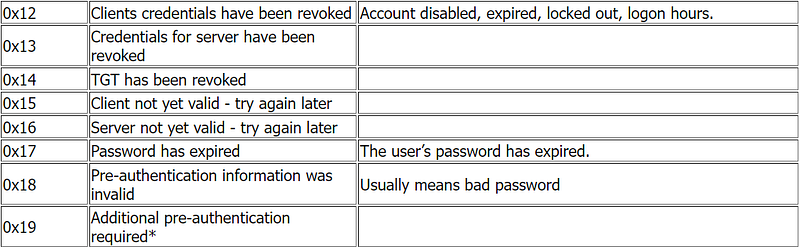
There are more codes check this link
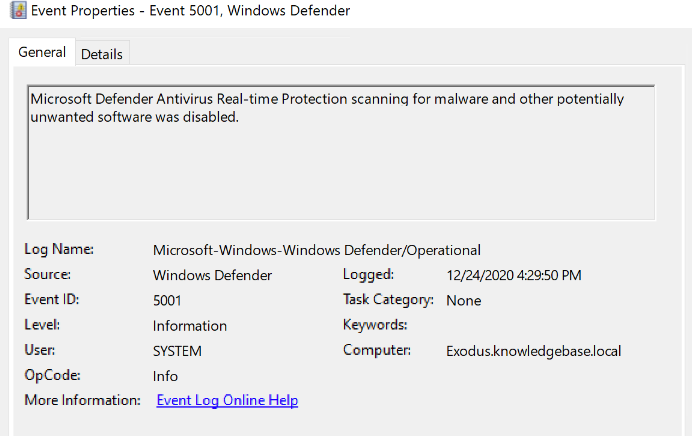
11- Event ID 5001 — Antivirus real-time protection configuration has changed
This event indicates that the real-time protection settings of Defender have been modified. Unauthorized changes could indicate an attempt to disable or undermine the functionality of Defender.
12- Event ID 5140 — Network Share Access
Event ID 5140 records access to network shares. This is useful for detecting unauthorized file access or data breaches. By monitoring network share access, you can ensure that file sharing practices are secure.
A network share object was accessed.

Subject:
   Security ID:  ACME-FR\Administrator
   Account Name:  Administrator
   Account Domain:  ACME-FR
   Logon ID:  0x78a731

Network Information:
   Source Address:  10.42.52.156
   Source Port:  64077

Share Name:   \\*\Dharma Initiative Protocols
13- Event ID 5156 — Windows Filtering Platform (WFP) Allow Network Connection
This event captures network connections allowed by the Windows Filtering Platform. It helps you identify unusual or unauthorized network traffic, which is crucial for maintaining network security.
The Windows Filtering Platform has allowed a connection.

Application Information:
   Process ID:  1752
   Application Name: \device\harddiskvolume1\windows\system32\dns.exe

Network Information:
   Direction:  Inbound
   Source Address:  10.45.45.103
   Source Port:  53
   Destination Address: 10.45.45.103
   Destination Port:  50146
   Protocol:  17

Filter Information:
   Filter Run-Time ID: 5
   Layer Name:  Receive/Accept
   Layer Run-Time ID: 44
14- Event ID 5158 — The Windows Filtering Platform has permitted a bind to a local port
When the WFP blocks a network connection, Event ID 5158 is generated. This helps you understand which network traffic is being blocked and troubleshoot any potential security issues.
The Windows Filtering Platform has permitted a bind to a local port.

Application Information:
   Process ID:  4
   Application Name: System

Network Information:
   Source Address:  ::
   Source Port:  3389
   Protocol:  6

Filter Information:
   Filter Run-Time ID: 0
   Layer Name:  Resource Assignment
   Layer Run-Time ID: 38
15- Event ID 7045 — A service was installed in the system
A sudden appearance of unknown services might suggest malware installation, as many types of malware install themselves as services.
A service was installed in the system.
Subject:
   Security ID: SYSTEM
   Account Name: WIN-GG82ULGC9GOS
   Account Domain: CONTOSO
   Logon ID: 0x3E7
Service Information:
   Service Name: W3SVC
   Service File Name: %windir%\system32\svchost.exe -k iissvcs
   Service Type: 0x20
   Service Start Type: 2
   Service Account: localSystem
These Event IDs provide critical insights into user activities, system changes, and potential security threats, helping analysts maintain a robust security posture.
Conclusion
Understanding Windows Event IDs is key to staying ahead in cybersecurity. By keeping track of these essential logs, you can spot suspicious activity, track user actions, and respond quickly to potential threats. Mastering these Event IDs not only helps you react to incidents but also strengthens your overall security strategy. Stay vigilant and use these insights to keep your systems secure and your organization protected.