
Windows Defender Memory Scan Feature Analysis

Defender is the anti-virus software that comes with Windows, built directly into the Windows system from Vista onwards, is on by default, and is the foundation of its system security for most ordinary users, so it is also an important research target for security researchers.
0x00 About Memory Scan
Memory scanning, also known as run-time analysis, is similar to traditional static scanning of files and generally relies on a set of known feature codes to identify malicious code. Because of the reliance on feature codes, memory scanning generally cannot detect unknown malicious code, but the false alarm rate is close to zero and can identify malicious code families. Compared to static scans, memory scans are more challenging for attackers because it is more difficult to obfuscate code in memory. Attackers can avoid static scans (including file-based machine learning detection) or modify file characteristics through various Fileless Attack, code obfuscation, shelling, and other techniques, but runtime memory characteristics generally remain the same. For example, various Loader-free schemes generally modify the file characteristics of malicious code by using a combination of different programming languages and encoding or encryption algorithms, but the original image is always decrypted in memory for execution after execution.
0x01 Analysis objectives and ideas A simple analysis of Defender’s memory scan function will be performed based on a combination of static analysis and dynamic debugging, with the following main objectives. 1. To determine which specific module the memory scanning function is implemented by and how it is implemented. 2. To locate which specific segment of memory data in memory is the malicious code feature code. 3. How the memory scan is triggered and what the process is like.
Analysis ideas. 1. Static look at the module description first and make guesses about the functionality based on the module description. 2. to the module function for verification, Microsoft software generally have pdb, static decompile to look at the function name, to find whether there is a memory scan-related functions. 3. dynamic analysis, the relevant function under the breakpoint, according to the function call stack analysis, analysis of the specific process and implementation.
0x02 Analysis process
2.1 Module analysis
According to the information is known MsMpEng.exe is Defender anti-virus software main service process, analysis of the version 4.18.2209.7–0, view the process loaded modules as follows.
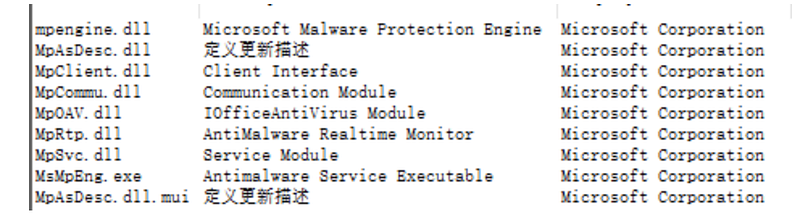
Based on the available information and module description, I guess the module function. MpRtp.dll: Runtime monitoring, generally through communication with the driver to obtain monitoring information and trigger other scans, how the memory scan is triggered should be related to this module. MpClient.dll/MpSvc.dll: less information, should be an interface for other components, may have memory scan related interfaces and implementations. mpengine.dll: Defender anti-virus core engine, feature library matching, malicious code determination related, previous research is basically for the analysis of this module, also contains local shelling, local sandbox simulation and other functions, memory scan feature code matching should be in this.
Then began to static decompile analysis of these modules, inconsistent with the expected, these modules Microsoft does not provide pdb (later Microsoft uploaded mpengine.dll pdb), temporarily using the previous pdb version of the file for analysis, through the memory scan related keywords and module import table roughly listed in these modules key functions and functional guesses, to facilitate the follow-up through Dynamic analysis to verify.
- MpRtp.dll
//Communicate with WdFilter.sys through the microfile port to get driver callback monitoring information, possibly related to triggering a memory scan
RealtimeProtection::CThreadPoolIoFilterRequest::DoOverlappedOperation
RealtimeProtection::CFilterCommunicatorBase::CommunicatorMainFunction
RealtimeProtection::CFilterCommunicatorBase::ParkFilterRequestToFilter
FilterGetMessage
The static analysis of MpRtp.dll is mainly carried out through the API related to microfile port communication, which is a way to achieve bi-directional real-time communication between the driver layer and the application layer. The subsequent dynamic debugging focuses on what behavior triggers the memory scan and the specific trigger process.
- MpClient.dll
// Some memory scan related functions can be found by the memory scan keyword
MpFastMemoryScanOpen MpClient::CMpMemoryScan::HandleScanEvents
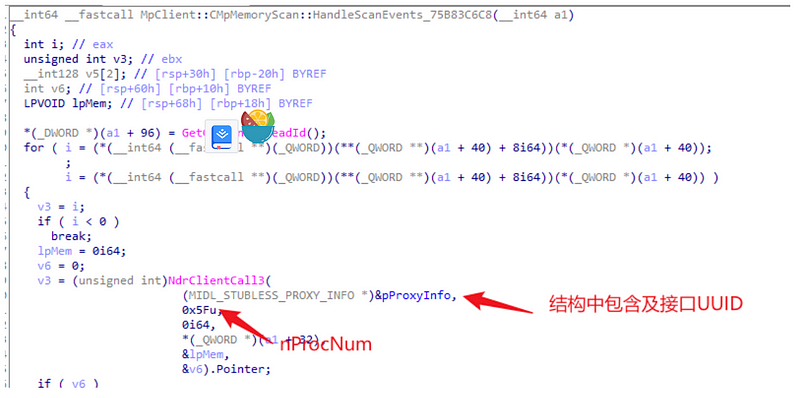
MpClient.dll there are some memory scan-related functions, but from the function logic did not find the implementation code, but only some calls to the interface and export functions, MpClient::CMpMemoryScan::HandleScanEvents from the function name is to deal with memory scan events, the function and through the NdrClientCall3 function through RPC calls to other modules, you can get the RPC interface through static analysis of the UUID c503f532–443a-4c69–8300-ccd1fbdb3839, the call ProcNum 0x5f.
- MpSvc.dll
OnDemandStartScan
MpService::NewScanContext
MpService::CMpSvcScanWorkItem::OnAction(void)
MpService::CMpSvcScanWorkItem::Run(void)
MpService::CGlobalEventsJob::OnAction
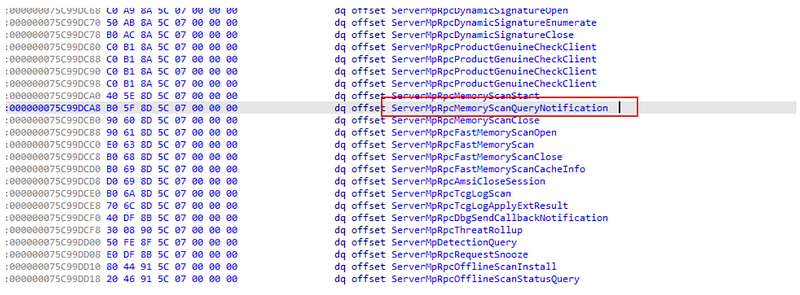
Static analysis of MpSvc.dll found many function names related to memory scanning, also found in the import table ReadProcessMemory function, ReadProcessMemory function for reading memory data of other processes, the function may be related to memory scanning. In addition to this, MpSvc.dll implements c503f532–443a-4c69–8300-ccd1fbdb3839 server-side interface, and the function with ProcNum 0x5f is found to be ServerMpRpcMemoryScanQueryNotification, and the function table also contains other functions that may be related to dynamic scan-related functions.
- mpengine.dll
CResmgrems::Scan
CEMSContext::EmsScan
CSMSProcess::ScanCompleted
ProcessMemoryScanCache::ProcessMemoryScanCach
eSMSMaps::ShouldSendMemoryScanReport
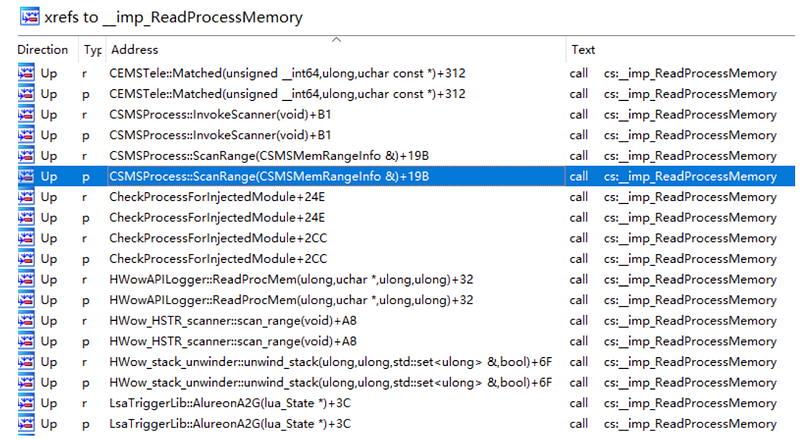
There are many functions related to memory scanning in mpengine.dll, and ReadProcessMemory is also imported. There are many functions that call ReadProcessMemory, and from the naming, many of them are also related to memory scanning.
2.2 Dynamic analysis environment preparation Before dynamic analysis, we need to remove Defender’s self-protection, details are as follows.
ObProcess(PreCall): Process object protection callback, the principle is to filter the OpenProcess API by registering the process object callback to get process handle behavior, which is implemented in WdFilter.sys driver. You can use Windows-Kernel-Explorer to remove the protection of ObProcess (PreCall) callback registered in WdFilter.sys. PPL (Protected Process Light): Under the protection of PPL without legal signature program can not have arbitrary access to the PPL protected process, only very restricted permissions, you can use PPLKiller or mimikatz to remove the PPL protection of MsMpEng.exe process.
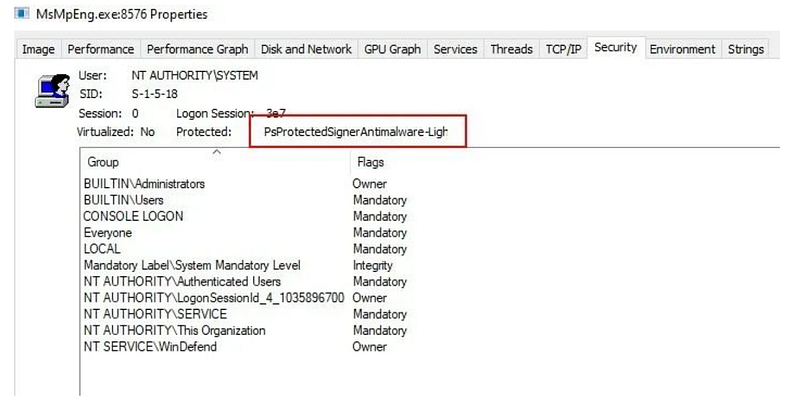
After removing Defender’s self-protection, you can add debugging normally, but stand-alone debugging sometimes the whole system will be stuck, guessing that the breakpoint is just when the driver and application layer communication, resulting in System threads hang, the system is stuck, you can use Windbg dual debugging to solve this problem, set up a good dual debugging environment after using Windbg additional debugging MsMpeng.exe process.
0: kd> !process 0 0 MsMpEng.exe
PROCESS ffff8009e37ca080
    SessionId: 0  Cid: 107c    Peb: e79fb62000  ParentCid: 029c
    DirBase: 12dc55000  ObjectTable: ffffcc06b8867700  HandleCount: 749.
    Image: MsMpEng.exe
0: kd> .process /i /p ffff8009e37ca080
You need to continue execution (press 'g' <enter>) for the context
to be switched. When the debugger breaks in again, you will be in
the new process context.
0: kd> g
Break instruction exception - code 80000003 (first chance)
nt!DbgBreakPointWithStatus:
fffff805`05400fc0 cc              int     3
0: kd> .reload /f /user
Loading User Symbols
........
Because of the need to analyze Defender memory scan logic, you also need a sample to trigger the memory scan, here using a static free CobaltStrike beacon as a sample, the sample file name is payload.exe, static free in the Defender environment, but after the start will be intercepted by Defender, showing Behavior:Win32/CobaltStrike.E!sms.
2.3. memory scan to achieve module positioning and memory scan function implementation analysis
By repeatedly analyzing the breakpoints of the functions listed in the static analysis, we found that the breakpoints of the ReadProcessMemory function can obtain a stack trace back to the time of the memory scan, and by checking the first parameter of ReadProcessMemory, we confirmed that the stack trace back is the process of memory scan for payload.exe.
1: kd> bu KernelBase!ReadProcessMemory
1: kd> k
 # Child-SP          RetAddr               Call Site
00 000000e7`a017d988 00007fff`64e7da0f     KERNELBASE!ReadProcessMemory
01 000000e7`a017d990 00007fff`64e7d613     mpengine!CSMSProcess::InvokeScanner+0xb7
02 000000e7`a017da00 00007fff`64e7d384     mpengine!CSMSProcess::ScanRange+0xa7
03 000000e7`a017daa0 00007fff`64e7cb9a     mpengine!CSMSProcess::Scan1Worker+0x244
04 000000e7`a017db40 00007fff`64cecca7     mpengine!CSMSProcess::Scan+0x45e
05 000000e7`a017dc30 00007fff`654f19c0     mpengine!CEMSContext::EmsScan+0x34b
06 000000e7`a017dd00 00007fff`654f0130     mpengine!EmsEnumProcesses+0x140
07 000000e7`a017ddd0 00007fff`654f0725     mpengine!RunEMS+0x2dc
08 000000e7`a017df10 00007fff`654f01c5     mpengine!CResmgrems::ScanImpl+0x21d
...
16 000000e7`a017f9b0 00007fff`7dcd2260     mpclient!MpGetASRPerRuleExclusions+0x5f043
17 000000e7`a017fa00 00007fff`7dcc31aa     ntdll!TppWorkpExecuteCallback+0x130
18 000000e7`a017fa50 00007fff`7da67034     ntdll!TppWorkerThread+0x68a
19 000000e7`a017fd50 00007fff`7dcc26a1     KERNEL32!BaseThreadInitThunk+0x14
1a 000000e7`a017fd80 00000000`00000000     ntdll!RtlUserThreadStart+0x21
1: kd> !handle @rcx
PROCESS ffff8009e37ca080
    SessionId: 0  Cid: 107c    Peb: e79fb62000  ParentCid: 029c
    DirBase: 12dc55000  ObjectTable: ffffcc06b8867700  HandleCount: 967.
    Image: MsMpEng.exe
Handle table at ffffcc06b8867700 with 967 entries in use
0a14: Object: ffff8009e6914340  GrantedAccess: 00001410 (Protected) Entry: ffffcc06aeaf8850
Object: ffff8009e6914340  Type: (ffff8009dcccaf00) Process
    ObjectHeader: ffff8009e6914310 (new version)
        HandleCount: 10  PointerCount: 294928
1: kd> !process ffff8009e6914340 0
PROCESS ffff8009e6914340
    SessionId: 1  Cid: 10ec    Peb: f18504000  ParentCid: 1aa8
    DirBase: 45344000  ObjectTable: ffffcc06b1110880  HandleCount: 331.
    Image: payload.exe
CSMSProcess::InvokeScanner, after calling ReadProcessMemory to read memory data, it will enter the hstr_internal_search_worker function, which is the feature code matching function after analysis. hstr_ internal_search_worker will call BMMatchEx2 to match the memory data read with the feature code of the virus library. BMMatchEx2 should match the feature code of the virus library by implementing the BM string matching algorithm according to the function name and function logic analysis.
# Child-SP          RetAddr               Call Site
00 000000e7`a017d548 00007fff`64b4ed9b     mpengine!BMMatchEx2
01 000000e7`a017d550 00007fff`64b4e022     mpengine!hstr_internal_search_worker+0x35b
02 000000e7`a017d880 00007fff`64eaf6e1     mpengine!hstr_internal_search+0x7e
03 000000e7`a017d910 00007fff`64eaf64e     mpengine!CSMSScanner::ScanWorker+0x59
04 000000e7`a017d960 00007fff`64e7dae1     mpengine!CSMSScanner::Scan+0x3e
05 000000e7`a017d990 00007fff`64e7d613     mpengine!CSMSProcess::InvokeScanner+0x189
06 000000e7`a017da00 00007fff`64e7d384     mpengine!CSMSProcess::ScanRange+0xa7
07 000000e7`a017daa0 00007fff`64e7cb9a     mpengine!CSMSProcess::Scan1Worker+0x244
08 000000e7`a017db40 00007fff`64cecca7     mpengine!CSMSProcess::Scan+0x45e
09 000000e7`a017dc30 00007fff`654f19c0     mpengine!CEMSContext::EmsScan+0x34b
...
2.4 Side channel locating memory scan feature code In the previous step, we have already located the specific memory scan logic, and in theory, we can analyze the logic of the hstr_internal_search_worker function to analyze the specific logic of the memory scan match, and then analyze which memory feature code was successfully matched. The logic of the hstr_internal_search_worker function is a bit more complicated. I guess that the size of the memory read by ReadProcessMemory should be different between the successful and failed Defender memory scan matches, so we can determine whether the match is successful and extract the feature code based on this phenomenon, similar to the success and failure of blasting passwords. As expected Defender memory matching really has this problem, in most cases ReadProcessMemory read memory size is 0x1000, once ReadProcessMemory read memory size is an uncommonly small number will pop up the intercept message, according to this phenomenon you can set Windbg conditional breakpoints. The stack traceback printed after the break is as follows.
00 000000e7`a00fed80 00007fff`65592d69     mpengine!CEMSTele::Matched+0x318
01 000000e7`a00fee50 00007fff`653cf858     mpengine!CSMSScanner::EnumHSTR+0x1f9
02 000000e7`a00feee0 00007fff`653cfbb4     mpengine!CSMSProcess::Report+0x178
03 000000e7`a00ff010 00007fff`64e7ccfc     mpengine!CSMSProcess::ScanCompleted+0xd0
04 000000e7`a00ff040 00007fff`65595667     mpengine!CSMSProcess::Scan+0x5c0
05 000000e7`a00ff130 00007fff`65594a58     mpengine!CSMSContext::ScanProcess+0xc3
...
From the analysis of CEMSTele::Matched function naming and stack backtracking logic, the stack backtracking at this time should be the process of memory scan completion and then reporting the detected feature codes. This way, you can get the information of the successful feature code by breaking the first instruction after ReadProcessMemory returns and printing the function parameters.
1: kd> bp mpengine!CEMSTele::Matched+0x318 ".printf \"Matched:\n\"; db rdi+1ch L@r15"
1: kd> g
Matched: 00000284`ea182166  4c 63 c2 4d 03 c0 42 0f-10 04 c0 48 8b c1 f3 0f  Lc.M..B....H....
00000284`ea182176  7f 01 c3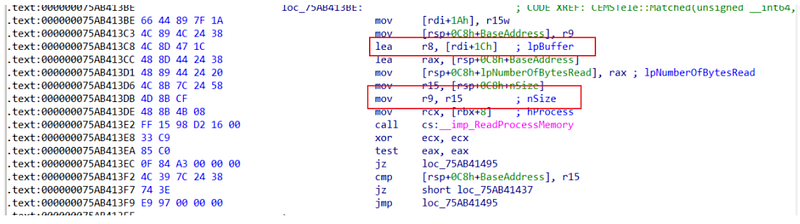
Where rdi+1ch is the address of the buffer read, and r15 is the size of the read, so that the memory scan can directly print the successful feature code.
2.5 convoluted analysis of memory scan trigger logic
The Defender thread pool consumer function is CommonUtil::CMpSimpleThreadPool::AsyncDequeue, corresponding to there is a producer function CommonUtil::CMpSimpleThreadPool::Submit, you can break this function to view the function call stack to analyze the memory trigger logic, need to pay attention to mpclient.dll and mpengine.dll both use this set of thread pool, you need to break the CommonUtil::CMpSimpleThreadPool::Submit function in these two modules at the same time.
//mpclient.dll No pdb symbol file, need to find the offset of CommonUtil::CMpSimpleThreadPool::Submit function in the current version by a tool like bindiff
0: kd> bp mpclient.dll+a7420 ".echo \"mpclient::CommonUtil::CMpSimpleThreadPool::Submit\";k;g"
0: kd> bp mpengine!CommonUtil::CMpSimpleThreadPool::Submit ".echo \"mpengine!CommonUtil::CMpSimpleThreadPool::Submit\";k;g"
By looking at the function call stack printed by Windbg during the memory scan, the trigger process for the memory scan can be sorted out as follows.
2.5.1 The source of the trigger is that the WdFilter.sys driver captures the module load event and sends the information to mprtp.dll via the microfile port. mprtp.dll then submits a ModuleLoad event to the thread pool to be processed.
// Since there is no pdb, the function names in the call stack here are compared by bindiff
# Child-SP          RetAddr               Call Site
00 000000e7`9fcff718 00007fff`73db3ec8     mpclient!CommonUtil::CMpSimpleThreadPool::Submit                                          mpclient!MpGetASRPerRuleExclusions+0x5e9d0
01 000000e7`9fcff720 00007fff`73e1adb0     mprtp!RealtimeProtection::CMpPluginWorkItemBase::PrioritizedDispatchJob_75E833E40         mprtp!MpPluginDeviceControlValidateDataDuplicationRemoteLocationConfiguration+0x1d2b8
02 000000e7`9fcff750 00007fff`73e0cde2     mprtp!RealtimeProtection::CProcessAgent::HandleModuleLoad_75E89ACF0                       mprtp!MpPluginDeviceControlValidateDataDuplicationRemoteLocationConfiguration+0x841a0
03 000000e7`9fcff7c0 00007fff`73e2465e     mprtp!RealtimeProtection::CProcessWatcher::HandleAsynchronousRequest_75E88CCD0            mprtp!MpPluginDeviceControlValidateDataDuplicationRemoteLocationConfiguration+0x761d2
04 000000e7`9fcff810 00000000`00000000     mprtp!RealtimeProtection::CAsynchronousWatcherBase::HandleRequest_75E8A45B0bl             mprtp!MpPluginDeviceControlValidateDataDuplicationRemoteLocationConfiguration+0x8da4e
05 000000e7`a097f188 00007fff`73e08b3c     mprtp!RealtimeProtection::CFileSystemWatcher::HandleRequest_75E8886C0                     mprtp!MpPluginDeviceControlValidateDataDuplicationRemoteLocationConfiguration+0x71f2c
06 000000e7`a097f768 00007fff`73e52233     mprtp!RealtimeProtection::CFilterCommunicatorBase::CommunicatorMainFunction_75E8D1884     mprtp!MpPluginDeviceControlValidateDataDuplicationRemoteLocationConfiguration+0xbb623
2.5.2 Then a file check is performed on the loaded Module to check if the file is trusted, and untrustworthy modules are added to MOAC.
00 00000047`a287e338 00007ffa`1e8d2717     mpengine!MOACManager::AddUntrustedToMoac
01 00000047`a287e340 00007ffa`1e3a49d9     mpengine!CacheMgr::AddUntrustedToMoac+0x37
02 00000047`a287e370 00007ffa`1e95041d     mpengine!IsFriendlyFile+0x3fd
03 00000047`a287e4a0 00007ffa`1e6dd5bc     mpengine!VerifyIsFriendlyFile+0xe1
04 00000047`a287e580 00007ffa`1e724a81     mpengine!ProcessContext::IsFriendlyImageFile+0x13c
05 00000047`a287e640 00007ffa`1e71dec1     mpengine!SignatureHandler::ReportDetection+0x5f1
06 00000047`a287ec50 00007ffa`1e725a37     mpengine!SignatureHandler::HandleDetection+0x421
07 00000047`a287ee30 00007ffa`1e725c43     mpengine!SignatureHandler::TestForDetection+0x2a3
08 00000047`a287f2a0 00007ffa`1e7261f8     mpengine!SignatureHandler::TestForDetectionWithTokenizedPath+0x1db
09 00000047`a287f380 00007ffa`1e721185     mpengine!SignatureHandler::TestForModuleLoad+0x7c
0a 00000047`a287f3f0 00007ffa`1e70dede     mpengine!SignatureHandler::HandleNotification+0xa95
...
10 00000047`a287f9d0 00007ffa`1e82b982     mpengine!NotificationItem::OnAction+0x42
11 00000047`a287fa20 00007ffa`3c132260     mpengine!CommonUtil::CMpSimpleThreadPool::AsyncDequeue+0xde
12 00000047`a287fa60 00007ffa`3c1231aa     ntdll!TppWorkpExecuteCallback+0x130
13 00000047`a287fab0 00007ffa`3a277034     ntdll!TppWorkerThread+0x68a
14 00000047`a287fdb0 00007ffa`3c1226a1     KERNEL32!BaseThreadInitThunk+0x14
15 00000047`a287fde0 00000000`00000000     ntdll!RtlUserThreadStart+0x21
2.5.3 Because the Module is not trusted, it is also submitted to an event queue QueueDetection.
00 00000047`a287e468 00007ffa`1e72c191     mpengine!CommonUtil::CMpSimpleThreadPool::Submit
01 00000047`a287e470 00007ffa`1e6ea00d     mpengine!DetectionQueue::QueueDetection+0x369
02 00000047`a287e5c0 00007ffa`1e731116     mpengine!DetectionController::QueueDetection+0x4d
03 00000047`a287e5f0 00007ffa`1e72529d     mpengine!ScanHandlerBase::ReportDetection+0xda
04 00000047`a287e640 00007ffa`1e71dec1     mpengine!SignatureHandler::ReportDetection+0xe0d
05 00000047`a287ec50 00007ffa`1e725a37     mpengine!SignatureHandler::HandleDetection+0x421
06 00000047`a287ee30 00007ffa`1e725c43     mpengine!SignatureHandler::TestForDetection+0x2a3
07 00000047`a287f2a0 00007ffa`1e7261f8     mpengine!SignatureHandler::TestForDetectionWithTokenizedPath+0x1db
08 00000047`a287f380 00007ffa`1e721185     mpengine!SignatureHandler::TestForModuleLoad+0x7c
...
2.5.4 DetectionQueue::OnAction consumes the events in the detection queue, and then TriggerEmsScan submits a memory scan task to the thread pool.
00 00000047`a287f118 00007ffa`1e70a05e     mpengine!CommonUtil::CMpSimpleThreadPool::Submit
01 00000047`a287f120 00007ffa`1e709b8f     mpengine!TriggerScan+0x6a
02 00000047`a287f170 00007ffa`1e6c6b09     mpengine!TriggerEmsScan+0x23b
03 00000047`a287f2a0 00007ffa`1e6cb266     mpengine!DoTriggeredActions+0x2e9
04 00000047`a287f350 00007ffa`1e6cd156     mpengine!PerformDetectionActions+0x2d6
05 00000047`a287f4d0 00007ffa`1e6cb643     mpengine!DetectionItem::UpdateCharacteristics+0x8c6
06 00000047`a287f6b0 00007ffa`1e72ba54     mpengine!DetectionItem::Send+0xf7
07 00000047`a287f820 00007ffa`1e72bd53     mpengine!DetectionQueue::DispatchDetections+0x3f4
08 00000047`a287f9a0 00007ffa`1e82b982     mpengine!DetectionQueue::OnAction+0xa3
09 00000047`a287fa20 00007ffa`3c132260     mpengine!CommonUtil::CMpSimpleThreadPool::AsyncDequeue+0xde
0a 00000047`a287fa60 00007ffa`3c1231aa     ntdll!TppWorkpExecuteCallback+0x130
0b 00000047`a287fab0 00007ffa`3a277034     ntdll!TppWorkerThread+0x68a
0c 00000047`a287fdb0 00007ffa`3c1226a1     KERNEL32!BaseThreadInitThunk+0x14
0d 00000047`a287fde0 00000000`00000000     ntdll!RtlUserThreadStart+0x21
2.5.5 The thread pool performs the task of performing a memory scan of the stack traceback.
//bp mpengine!CEMSContext::EmsScan+0x34 ".printf \"CEMSContext::EmsScan:%mu\", rax;g"
CEMSContext::EmsScan:\Device\HarddiskVolume3\payload.exe
# Child-SP          RetAddr               Call Site
00 00000047`a337d6b0 00007ffa`1ebc19c0     mpengine!CEMSContext::EmsScan+0x34
01 00000047`a337d780 00007ffa`1ebc0130     mpengine!EmsEnumProcesses+0x140
02 00000047`a337d850 00007ffa`1ebc0725     mpengine!RunEMS+0x2dc
03 00000047`a337d990 00007ffa`1ebc01c5     mpengine!CResmgrems::ScanImpl+0x21d
04 00000047`a337da50 00007ffa`1e366a1f     mpengine!CResmgrems::Scan+0x15
05 00000047`a337db80 00007ffa`1e791082     mpengine!ResmgrProcessResource+0x1c7
06 00000047`a337ddb0 00007ffa`1e77656d     mpengine!ResScan+0xa36
07 00000047`a337e1f0 00007ffa`1e7797d8     mpengine!ScanOpenWithContext+0x1911
08 00000047`a337eaf0 00007ffa`1e759248     mpengine!UberScanOpen+0xa64
09 00000047`a337ec10 00007ffa`1e519c13     mpengine!ksignal+0x6a8
0a 00000047`a337ed90 00007ffa`1e518fcb     mpengine!DispatchSignalHelper+0x6f
0b 00000047`a337edf0 00007ffa`2a8070f3     mpengine!DispatchSignalOnHandle+0x9b
0c 00000047`a337f260 00000000`00000000     mpsvc!ServiceCrtMain+0x1f6e3
Because the execution of the memory scan process is too long and are asynchronous tasks, so the intermediate process is not specifically analyzed, only the analysis of this scan is triggered by the WdFilter.sys driver monitoring to module loading, then how to verify whether the analysis results are correct? Here we can use the exclusion method to verify whether the result is correct or not, the process is as follows. - Use Windows-Kernel-Explorer to remove WdFilter.sys monitoring callbacks (process/thread/registry) other than the module load callback and check if the final memory scan is triggered. Here the test result is that the memory scan is triggered - Remove only the WdFilter.sys module load callback and check if the final memory scan is triggered. The test result here is that it does not.
Using the exclusion method, we verified that the results of this analysis are correct and that the module load event triggers the memory scan. SignatureHandler::HandleNotification function contains overloaded implementations of different events, and the different events are as follows.
- ArNotification
- BootChangeNotification
- DesktopNotification
- EtwNotification
- FileNotification
- InternalNotification
- NetworkNotification2
- ProcessNotification
- RegistryNotification
- RemoteThreadCreateNotification
- VolumeMountNotification
Other events are not analyzed here due to time and space constraints, and it cannot be ruled out that the other events above may also cause the memory scan logic to be triggered.
0x03 Summary This article has provided a brief analysis of Defender’s memory scan functionality and concludes with a summary answering the three questions posed in the analysis objectives.
- Determine which module specifically implements the memory scan function and how it is implemented The memory scan function is implemented in mpengine.dll, which reads the target process memory data by ReadProcessMemory and then matches the target memory data with the feature code data by BM string matching algorithm, similar to file static detection, but with different data sources.
- Locating which specific memory data in memory is the malicious code feature code CEMSTele::Matched+0x318 breakpoint can be used to directly print the malicious memory feature code detected at that time.
- How the memory scan is triggered and what is the flow The sample analyzed here is a memory scan triggered by a module load event, and it is not excluded that other events may also trigger a memory scan. The process is complex, and will go through different asynchronous detection processes before finally reaching the memory scan logic.


