
Why Use Docker for Machine Learning Training?
Docker Tips & Tricks Series

Docker containers have become an essential tool in the machine learning development workflow. In this article, I will share with you why Docker is a useful tool especially if you are doing any machine learning development, and then share with you some of the best practices that I learned while using docker.
Before going any further, let’s first define what is exactly Docker.

So, What is Docker?
Docker is a containerization platform that allows developers to package an application and its dependencies into a single container. This container can then be easily shared and deployed on any machine, ensuring that the application will always run the same, regardless of the environment.
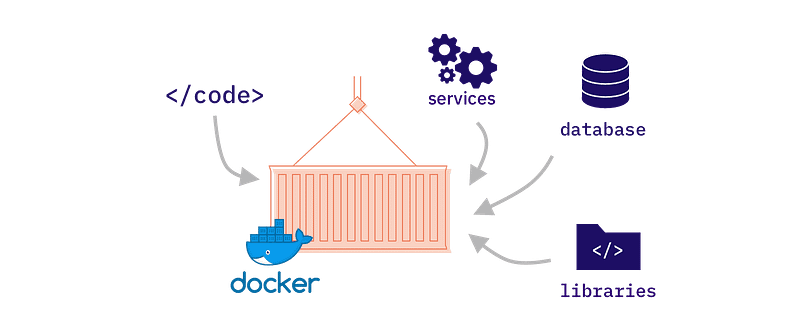
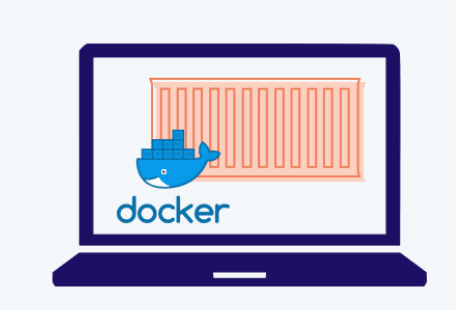
To make it in more simple term, you can visualize Docker container as a tiny machine with its own OS that runs on your regular OS and that has access to all the hardware on the machine.
Advantages of Using Docker
There are several advantages to using Docker for machine learning development, among which:
1- Reproducibility: One of the biggest challenges in machine learning is reproducing results. By using Docker, you can ensure that your code will always run in the same environment, making it easier to reproduce your results, which can help avoid errors and improve reproducibility.
2- Isolation: Docker containers allow you to isolate your machine learning code from the rest of the system, which can be particularly useful when working with multiple projects or different versions of libraries.
3- Collaboration: Docker containers can be easily shared with other developers, making it easier to collaborate on machine learning projects.
4- Ease of use: Docker provides a simple and easy-to-use interface for managing containers, making it a convenient tool for machine learning development.
5- Resource Efficiency: Docker allows you to run multiple machine learning environments on the same system without consuming additional resources, which can be helpful for running experiments in parallel or training large models.

How to Use Docker?
To use Docker for machine learning or another type of project that you might have, you will need to follow these steps:
1. Install Docker: First, install Docker on your system. You can download Docker from the official website ([https://www.docker.com/](https://www.docker.com/)) or use a package manager such as apt or yum on a Linux system.
$ sudo apt bupdate sudo apt install docker.io
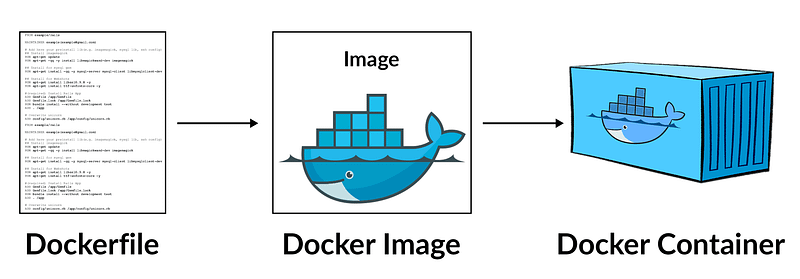
2. Choose a base image: Next, choose a base Docker image that includes the necessary libraries and tools for your machine learning project. You can use a pre-built image from Docker Hub ([https://hub.docker.com/](https://hub.docker.com/)) or create your own custom image (blueprint of the machine that you want to build) using a Dockerfile.
For example, to use a base image that includes TensorFlow and scikit-learn, you can use the following command:
$ docker pull tensorflow/tensorflow:2.4.0-jupyter
3. Build the Docker image: If you choose to build your own custom Docker image using a Dockerfile. Which is a text file that specifies the steps to build a Docker image, including installing packages and setting up the environment. e.g.,
FROM tensorflow/tensorflow:2.4.0-jupyter
# install additional packages
RUN pip install pandas matplotlib seaborn
# create a user and set the working directory
RUN useradd -m user && \
mkdir /home/user/notebooks && \
chown -R user:user /home/user
USER user WORKDIR /home/user
# set the port for the Jupyter notebook server
EXPOSE 8888
# start the Jupyter notebook server
CMD ["jupyter-notebook", " - port=8888", " - no-browser", " - ip=0.0.0.0", " - allow-root"]
This Dockerfile starts from the “tensorflow/tensorflow:2.4.0-jupyter” image and installs additional Python packages using “pip”. It then creates a user, sets the working directory, and exposes port 8888. Finally, it starts the Jupyter notebook server. To build a Docker image from this Dockerfile, you can run the “docker build” command and specify the path to the Dockerfile. For example:
docker build -t my-tensorflow-image .
This will create a Docker image with the name “my-tensorflow-image”. 4. Run the Docker container: Once you have built the Docker image, you can run the Docker container by using the command “docker run”. This will create a container that includes all of the necessary libraries and tools for your machine learning project. For example, to run the “my-machine-learning-image” Docker image and expose port 8888, you can use the following command:
docker run -p 8888:8888 my-machine-learning-image
This will create a Docker container and start a Jupyter notebook server on port 8888. You can then access the Jupyter notebook by opening a web browser and navigating to `http://localhost:8888`.
5. Train your model: Once your Docker container is up and running, you can use it to train your model. The following code used to train a machine learning model on the Iris dataset that contains data about iris flowers.
# import packages
import tensorflow as tf
from sklearn.datasets import load_iris
from sklearn.model_selection import train_test_split
# load the iris dataset
iris = load_iris()
X = iris['data']
y = iris['target']
# split the data into training and test sets
X_train, X_test, y_train, y_test = train_test_split(X, y, test_size=0.2, random_state=42)
# build the model
model = tf.keras.Sequential([ tf.keras.layers.Dense(16, input_shape=(4,), activation='relu'), tf.keras.layers.Dense(3, activation='softmax') ])
# compile the model
model.compile(optimizer='adam', loss='sparse_categorical_crossentropy', metrics=['accuracy'])
# train the model
model.fit(X_train, y_train, epochs=20, validation_data=(X_test, y_test))
6. Save the trained model: Once your model is trained, you can save the trained model to a file or a database for future use.
# save the model
model.save('iris_model.h5')
7. Share the Docker image: If you want to share your machine learning environment with others, you can either do it by sharing the Dockerfile (blueprint of the container you used to build the image locally) or use a registry such as the Docker Hub, but first you have to push your local docker image using the command “docker push”. Once you have made a new container on another machine, you can use the previous trained model, load it first using the “load_model” function provided by TensorFlow.
# import packages
import tensorflow as tf
# load the model
loaded_model = tf.keras.models.load_model('iris_model.h5')
You can then use the loaded model to make predictions on new data. For example:
import tensorflow as tf
from sklearn.metrics import accuracy_score, precision_score
# load the trained model
model = tf.keras.models.load_model('iris_model.h5')
# load the test dataset
X_test = …
# load the test features
y_test = …
# load the test labels
# make predictions on the test dataset
predictions = model.predict(X_test)
# calculate the accuracy and precision scores
accuracy = accuracy_score(y_test, predictions)
precision = precision_score(y_test, predictions, average='micro')
# print the results
print("Accuracy:", accuracy)
print("Precision:", precision)
Best Practices for Using Docker
After more than 1 year of using Docker, here are some best practices for using Docker in machine learning development, that I have learned during my short journey:
- Use official images: When building your own Docker images, it is best to base them on official images provided by the language or framework you are using. This ensures that you are using a stable and well-maintained base image.
- Keep your Dockerfile simple: Your Dockerfile should contain only the necessary steps to build your image. Avoid installing unnecessary packages or adding unnecessary complexity to your Dockerfile.
- Use .dockerignore: Use a .dockerignore file to exclude files and directories that do not need to be included in your Docker image. This will keep your image small and reduce the build time.
- Use multi-stage builds: Use multi-stage builds to reduce the size of your final image. This allows you to build your application in one stage and then copy the necessary files to a smaller base image in the final stage.
Conclusion
In conclusion, I think Docker is becoming (or is already) an essential tool for machine learning development (or software), providing benefits such as reproducibility, isolation, and collaboration.
And remember to ensure that you are using Docker effectively in your projects remember to use official images, keep it simple, use .dockerignore and the multi-stage build feature.
That is it for Docker and Why/How to use it, why not in one of your future machine learning project. And as usual to finish the article here is a quote from John Smith about Docker.
“Docker has changed the way I think about building and deploying software. It allows me to focus on the code and not worry about the underlying infrastructure, making development faster and more efficient.” — John Smith, Senior Software Developer
Cheers
Merwansky