Why Quizlet chose Apache Airflow for executing data workflows
Part Two of a Four-part Series
In Part I of this series on Quizlet’s Hunt for the Best Workflow Management System Around, we described and motivated the need for workflow management systems (WMS) as a natural step beyond task scheduling frameworks like CRON. However, we mostly pointed out the shortcomings of CRON for handling complex workflows and provided few guidelines for identifying what a great WMS would look like. It turns out that the landscape of available workflow managers is vast. As we evaluated candidates, we came up with the following wish list of features that a dream workflow manager would include (ordered roughly by importance):
1. Smart Scheduling. Scheduling task execution is obviously a minimal criterion for a WMS. However, we also wanted task execution to be more “data-aware.” Because some tasks can take longer to finish than their execution schedule (imagine a hourly-schedule job where each task takes 3 hours to execute), we want to ensure that any framework we use can take these incongruent time periods into account when scheduling dependent tasks.
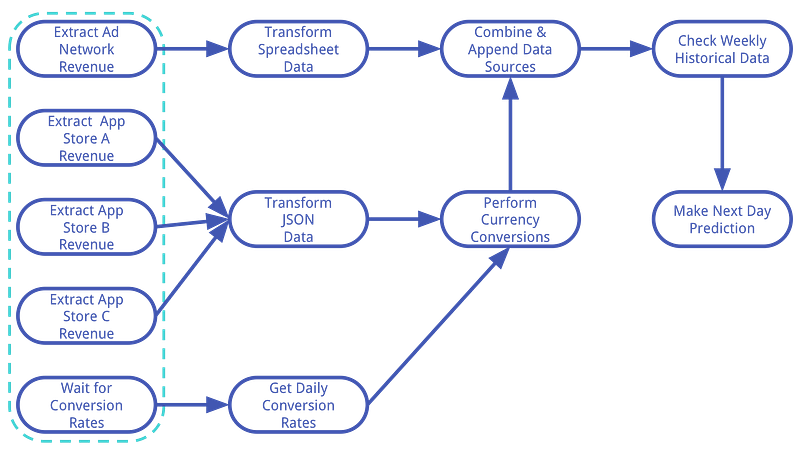
2. Dependency Management. This is where we fully diverge from CRON. We wanted a simple, concise interface for defining dependencies amongst tasks. Dependency management should handle not only the dependency of task execution, but also failures and retries. We also wanted a system that could take advantage of any lack of dependencies amongst tasks to increase workflow efficiency. For example, in our workflow example introduced in Part I of the series, the five leftmost tasks in Figure 2.1 (outlined by dotted line) are all independent of one another and can be executed in parallel. Additionally, there can be a single task on which many other child tasks depend on its completion. In this case, we’d prefer that the parent task be executed as early as possible. We also wanted a system that could consider the priority of individual tasks.
3. Resilience. As mentioned above, workflows will always act unexpectedly and tasks will fail. We wanted a framework that would be able to retry failed tasks and offer a concise interface for configuring retry behavior. In addition, we wanted the ability to gracefully handle timeouts and alert the team when failures occur or when tasks are taking longer-than-normal to execute (i.e. when service level agreement — or, SLA — conditions have been violated).
4. Scaleability. As Quizlet expands its usership and continues to develop more data-driven product features, the number and complexity of workflows will grow. Generally, this type of scaling necessitates more complex resource management, where particular types of tasks are executed on specially allocated resources. We wanted a framework that would not only address our current data processing needs, but would also scale with our future growth without requiring substantial engineering time and infrastructure changes.
5. Flexibility. Our dream framework would be able to execute a diverse (ok, limitless!) range of tasks. Furthermore, we wanted the system to be “hackable”, allowing us to implement different types of tasks as they are needed. We also wanted to avoid pegging our workflows to a particular type of file system (e.g. Oozie or Azkaban) or pre-defined set of operations (e.g. only map-reduce-type operations).
6. Monitoring & Interaction. Once we got our WMS up and running, we wanted it to offer centralized access to information regarding task statuses, landing times, execution durations, logs, etc. Not only should this diagnostic information be observable, it should potentially be actionable: from the same interface, we wanted the possibility to make decisions that affect the state and execution of the pipeline (e.g. ordering retries of specific tasks, manually setting task statuses, etc.). We also wanted configurable access to diagnostic information and workflow interactivity to be available to all data stakeholders.
7. Programmatic Pipeline Definition. A large number of workflow managers use static configuration files (e.g. XML, YAML) to define workflow orchestration (e.g. Jenkins, Dart, and Fireworks). In general, this approach is not a problem, as the structure of most workflows are fairly static. However, the sources and targets (.e.g. file names, database records) of many workflows are often dynamic. Thus being able to programmatically generate workflows on the fly given the current state of our data warehouse would be an advantage over static configuration-based approaches.
8. Organization & Documentation. For obvious reasons, we gave preference to projects that had a solid future road map, adequate documentation and examples.
9. Open Source / Python. The data science team at Quizlet takes a large part in the ownership and execution of data processing and workflows. We also take great pride in sharing and contributing to open projects that everyone can use and learn from (ourselves included!). It would be huge plus if we were able to a framework that was also rooted in the Python / open source community.
10. Batteries Included. Quizlet needs its data yesterday! Today’s business world is fast-moving, and business intelligence is better served sooner than later. These insights cannot be delivered if the data science team is busy implementing basic workflow functionality. We wanted to adopt a framework that is fairly plug-and-play, with a majority of the above features already baked in.
Why We Chose Airflow
Using the above wish list as a guide when evaluating WMS projects, we were able to select three main candidates from the pack: Pinterest’s Pinball, Spotify’s Luigi, and Apache Airflow.
All three projects are open source and implemented in Python, so far so good! However, after looking into Pinball, we were unconvinced by the focus of their road map and the momentum behind their community. At the time of writing this post, the Pinball Github project had 713 Stars, but only 107 total commits, 12 contributors, and just a handful of commits in the past year. In contrast, the breakdown of Github stats for the Luigi/Airflow projects, respectively is as follows: Stars: 6,735/4,901; Commits: 3,410/3,867; Contributors: 289/258. Thus, both Luigi and Airflow have the active developers and vibrant open-source community that we were looking for. Our primary decision then became to choose between either Luigi or Airflow.
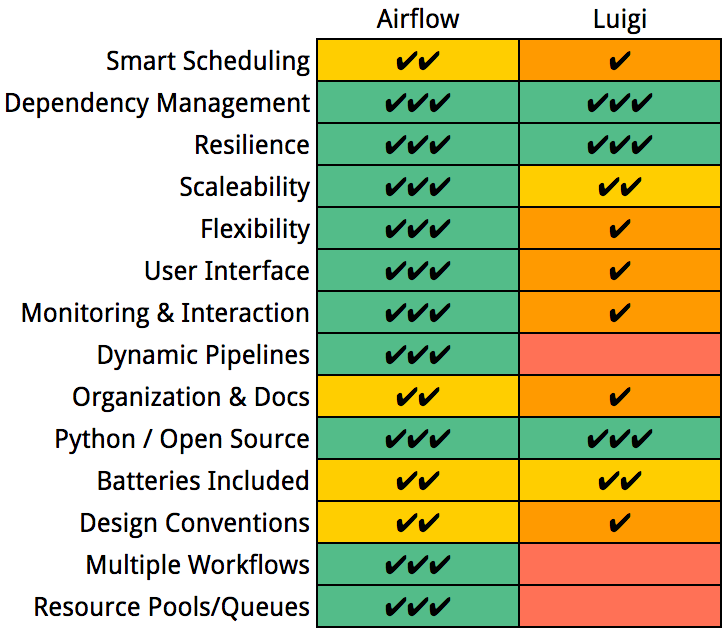
Luigi and Airflow are similar in a lot of ways, both checking a number of the boxes off our wish list (Figure 2.1). Both projects allow the developer to define complex dependencies amongst tasks and configure execution priorities. Both allow for parallelism of task execution, retrying failed tasks, and both support historical backfills. Both projects support an array of data stores and interfaces including S3, RDBs, Hadoop, and Hive. Both can be installed easily using pip and are, in general, fairly feature-rich. That said, there are a number of distinct differences between the two that motivated us to go with Airflow over Luigi.
First, Airflow’s future road map appears to be more focused and the momentum of the development community currently appears to be stronger than Luigi’s. Though originally developed by AirBNB, the Airflow project has become an Apache incubator project, which increases its probability of future success and maintenance.
We also preferred a lot of design conventions chosen by Airflow over Luigi. For example we preferred Airflow’s schedule-based task execution strategy, which is a little more “set-it-and-forget-it”, as compared to Luigi’s source/target-based approach, which can require heavier user interaction with workflow execution. We also felt that extending Airflow was more straight forward through the definition of new Operators (we’ll get to Operators shortly), rather than having to inherit from a particular set of base classes as is done in Luigi.
Airflow also offered a number of features missing from Luigi. In particular Airflow’s UI provides a wide range of functionality, allowing one to monitor multiple sources of metadata including execution logs, task states, landing times, task durations, just to name a few. A huge plus was that the same UI can also be used to manage the states of live workflows (e.g. manually forcing retries, success states, etc.). This is quite a powerful paradigm, as it not only makes diagnostic data easily available, but also allows the user to directly take action based on insights from the data. In contrast, Luigi offers a simple UI as well, but it’s not nearly as feature rich as Airflow’s, and offers no interaction capabilities with live processes.
Some other features offered by Airflow but missing from Luigi include the ability to define multiple, specialized workflows, the ability to share information between workflows, dynamic programmatic workflow definition, resource pools (referred to as “queues” in Airflow), and SLA emails. Thus, Luigi was able to check boxes 1–5 and 9–10 off of our wish list, but Airflow was able to check the remaining boxes as well. So we decided to go full-steam-ahead with Airflow!
The rest of the series of blog posts details what we learned getting Airflow up and running here at Quizlet. In particular, Part III demonstrates some of Airflow’s key concepts and components by implementing the workflow example introduced in Part I of the series. Part IV documents some of the practicalities associated with Quizlet’s deployment of Airflow.