
Why I use both Devonthink and Obsidian to manage my content

Last month, I wrote an article about my Data Capture Workflow — a walkthrough of how I capture (and store) information from websites, podcasts, social media feeds etc that I feel will be useful in the future.
I also list the apps that I use in that process. Since publishing the article, I’ve had a few questions about why I use both Devonthink and Obsidian so I thought it would be worthwhile to do a bit of a deep dive into why I value them both and how I see them fulfilling two very different roles in my workflow.
So, let’s start at the beginning.
What is DevonThink?
DevonThink (www.devontechologies.com)is a Document Management solution. Using its software, the user can set up a Database (or series of databases) to store any file that they want. That could range from PDFs to images and from eBooks to website bookmarks. All files are indexed and a powerful in-built AI can provide a range of useful documents based on any search that a user runs.
The whole system is backed up by a mobile app, meaning that anything I store within a DevonThink database can be accessible while on the move.
I’m in the process of trying to be 100% paperless, so I use DevonThink to store any essential document that I receive. That includes information like Bank Statements and Bills but also includes key documents for my family (such as passports and birth certificates) as well as boring stuff like the instruction manual for the dishwasher downstairs.
You can find out more information about DevonThink here.
What is Obsidian?
At its core, Obsidian is a note-taking app that allows users to build their own Wiki (or “Second Brain”) by linking thoughts and ideas together. The app itself sits on top of a series of Markdown files that the user creates and adds value in several different ways by providing a graphical representation of how all the notes fit together and making suggestions of “unlinked notes” which may have a connection.
You can find more information about Obsidian here.
The similarities between the two
The questions that I received about the two products largely centred around the fact that DevonThink allows you to create and store Markdown files, just as Obsidian does.
The thinking was that, not only could I link files together in DevonThink as I do in Obsidian, but I could also take advantage of DevonThink’s AI (which Obsidian doesn’t have) to find additional content relevant to my writing.
On the flip side of the coin, I had messages from people reminding me that I can store images, PDFs and entire web pages in Obsidian, so why would I want another tool to essentially do the same thing?
Here’s what it boils down to:
DevonThink is a best-in-class file management tool. Not only can it store any file that I throw at it, but it provides automation tools that make it incredibly easy to store that file in the right place. I can just dump a file in its central Inbox and rely on a series of rules I’ve written to ensure that DevonThink moves it to the right place — I don’t even have to think about it anymore.
Just as important is the way that DevonThink analyses the files that I put there. When I’m searching for something important, DevonThink doesn’t just rely on a file name to provide results, it’s able to dig into the contents of those files to provide me with relevant results.
Equally, when DevonThink uses that AI to give me information on documents that may be relevant to what I’m looking at, those results are based on the entire contents of a file — not just the name of it.
I’m a massive fan of DevonThink and would recommend it to anyone looking to store and archive information, but I wouldn’t recommend it to anyone as a writing tool because, in my opinion, it sucks at that.
Maybe I’m being too harsh there. It’s perfectly easy to create a Markdown file in DevonThink, but there are just better tools out there for doing it. It’s not what DevonThink does best. Writing in DevonThink just isn’t a pleasurable experience.
On the other hand, Obsidian’s main role is that of a note-taking app. While I can store images, PDFs, and web pages in there I don’t because I know they’ll be so much harder to find compared to files stored in DevonThink. Obsidian lacks DevonThink’s ability to scan and ‘read’ the files that I put in there making it much less powerful when it comes to finding information that is stored in those documents.
So while there is an overlap in functionality between the two tools — I use both for what they’re best at: DevonThink is my file management solution and Obsidian is my note-taking app.
So how do the two tools compliment each other?
When it comes to using the two tools together, I make a very clear (and important!) distinction:
DevonThink is for storing thoughts, ideas and content created by other people. Obsidian is purely for my own thoughts, content and ideas.
Nothing I write is stored within DevonThink and nothing anyone else writes is stored within my Obsidian vault.
That may sound like there is a huge divide between the two tools — far from it. A lot of what I write in Obsidian comes off the back of documents and web pages that I’ve stored within DevonThink.
When that happens, I make a conscious effort to link the two tools together and that’s because both platforms provide callback links to specific files or notes, which can be used in other apps.
Therefore, if I’m using documents stored in DevonThink as a reference to a note in Obsidian, I’ll copy the DevonThink Item link and post it at the bottom of my note.

Equally, I’ve added a custom Meta field within DevonThink where I can attach the URL of a relevant Obsidian note to any document that I store.
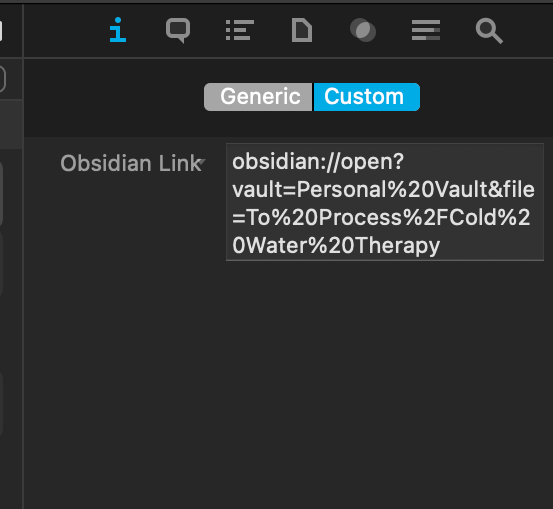
With these links in place, I can instantly switch between relevant content in either platform just by clicking on a link.
Some examples of DevonThink and Obsidian working together:
Here are a few ways that I use call back links to tie documents in DevonThink to notes in Obsidian (and vice versa!)
- Car Insurance: I have a note in Obsidian which summarises the details of what our car insurance covers. The note has a link to the official document we received from our insurer — which is stored in DevonThink.
- Health Documents: I have a note in Obsidian which outlines the dates and times of any medical procedures (e.g. vaccinations) that our family has had. The note contains links to the scans of the official medical documents within Obsidian
- Reference note: When I find articles that contain useful information that can be inserted into a note, I store the article in DevonThink and place a “Reference” link back to it from my Obsidian note so that I know where the information has come from.
One more thing …
If you found this article useful, you might want to think about signing up to Medium to read a ton more like it. It costs less than a coffee a month and by signing up here, you can support my writing at no additional cost to yourself.
Failing that, any thoughts/feedback generally would be appreciated as I look to build a writing habit!
Thanks very much


